
Introduction
This manual provides detailed instructions for the setup, operation, and maintenance of your LEKATO MS-2 Wireless In-Ear Monitor System. Please read this manual thoroughly before using the product to ensure proper function and longevity.
Safety Information
To ensure safe operation and prevent damage, please observe the following precautions:
- Battery Handling: Do not expose batteries to extreme heat or direct sunlight. Do not disassemble, puncture, or short-circuit batteries. Dispose of used batteries according to local regulations.
- Water Exposure: Avoid exposing the device to water or excessive moisture. This product is not waterproof.
- Temperature: Operate and store the device within recommended temperature ranges. Avoid extreme cold or heat.
- Interference: This wireless system operates on the 2.4GHz frequency band and may experience interference with other 2.4GHz wireless devices. Maintain a reasonable distance from other wireless equipment to minimize interference.
- Cleaning: Use a soft, dry cloth for cleaning. Do not use liquid cleaners or aerosols.
Package Contents
Verify that all items are present in your package:
- 1 x Wireless Transmitter
- 1 x Wireless Receiver
- 1 x User Manual
- 1 x Dual Type-C Charging Cable
- 2 x 3.5mm TRS Audio Cables
- 1 x 3.5mm to 6.5mm Adapter

Image: Contents of the LEKATO MS-2 Wireless In-Ear Monitor System package, including transmitter, receiver, cables, adapter, and manual.
Product Overview
The LEKATO MS-2 system consists of a transmitter and a receiver, designed for wireless audio monitoring. Below are the key components and their functions.
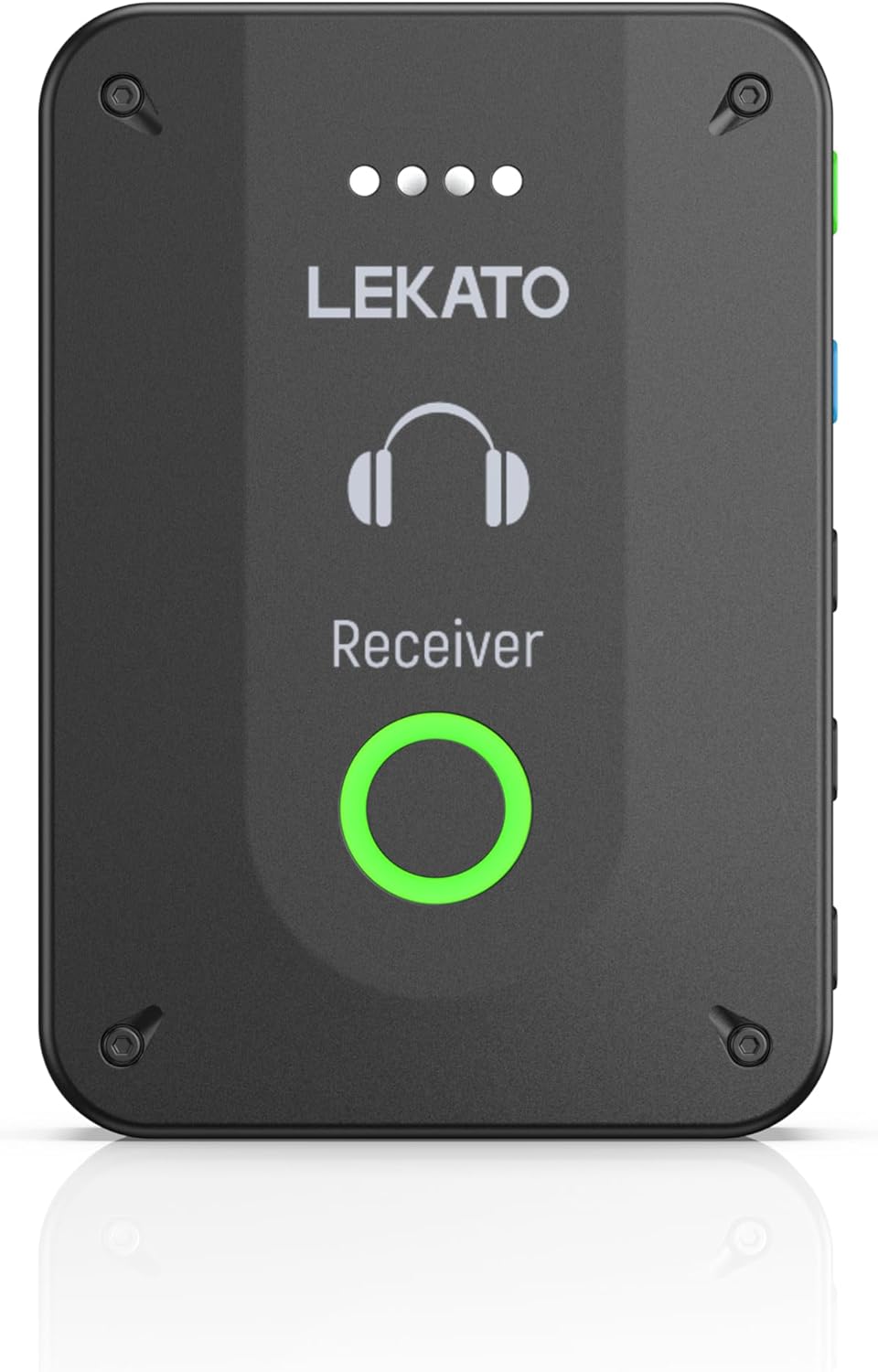
Image: Front view of the LEKATO MS-2 Receiver unit, showing the LEKATO logo, headphone icon, and a large circular button with a green LED ring.

Image: Detailed view of the LEKATO MS-2 Receiver, highlighting its side controls: STEREO (Power On/Off), MONO (Power On/Off), PAIR button, Volume + button, and Volume - button. It also shows the 3.5mm audio output and a belt clip.
Transmitter: Sends audio signals wirelessly. Features include:
- Power/Mode Switch: Green button for Stereo mode, Blue button for Mono mode.
- Pair Button: Initiates pairing with receivers.
- Mute Button: Quickly mutes the audio output.
- Input Jack: Connects to your audio source (e.g., mixer, instrument).
Receiver: Receives audio signals from the transmitter and outputs to headphones/IEMs. Features include:
- Power/Mode Switch: Green button for Stereo mode, Blue button for Mono mode.
- Pair Button: Initiates pairing with the transmitter.
- Volume Buttons: Adjusts the output volume (+/-).
- Output Jack: Connects to your in-ear monitors or headphones.
- Belt Clip: For convenient attachment to clothing.
Setup Instructions
1. Charging the Devices
Before first use, fully charge both the transmitter and receiver using the provided Dual Type-C charging cable and a standard USB power adapter (not included).
- Connect the Type-C ends of the cable to the charging ports on the transmitter and receiver.
- Connect the USB-A end to a power source.
- The LED indicators will show charging status. A full charge provides approximately 6-8 hours of continuous operation.

Image: Illustration showing the LEKATO MS-2 transmitter and receiver being charged simultaneously with a dual USB-C cable. Battery level indicators (four dots) are shown, along with a "6H WORKING TIME" label.
2. Power On/Off
To power on or off either the transmitter or receiver, long press the respective Stereo (green) or Mono (blue) button until the indicator light illuminates or extinguishes.
3. Pairing the Devices (One Transmitter to Multiple Receivers)
The MS-2 system supports one transmitter connecting to multiple receivers (up to 4 pairs). Follow these steps to pair:
- Power on the transmitter.
- Power on the first receiver.
- On both the transmitter and the first receiver, press and hold down the PAIR buttons simultaneously until their indicator lights begin to blink.
- Wait for the lights on both devices to become solid, indicating successful pairing.
- Repeat steps 2-4 for any additional receivers you wish to pair with the same transmitter.

Image: Diagram illustrating the "One to More" connection capability of the LEKATO MS-2 system. A single transmitter is shown connected to a mixer or laptop, broadcasting to multiple receivers used by musicians.
4. Mono/Stereo Switch
The system supports both Mono and Stereo input modes. Ensure both the transmitter and receiver are set to the same channel for proper operation.
- Long press the Stereo (green) or Mono (blue) button on both the transmitter and receiver to switch between modes.
- Mono Mode: Provides identical audio to both earpieces for precise tonal feedback. Offers ultra-low latency (<4.5ms).
- Stereo Mode: Delivers separate audio to left and right channels for enhanced spatial awareness. Has a slightly higher latency (<10.8ms).

Image: Close-up view of the LEKATO MS-2 transmitter and receiver, showing the green "Stereo" and blue "Mono" buttons. Text indicates "Long press to switch stereo or mono" and highlights the different latency values for each mode.
5. Volume Adjustment (Receiver)
The receiver features 5 levels of volume adjustment.
- Press the Volume + button to increase the volume.
- Press the Volume - button to decrease the volume.
6. One-Key Mute (Transmitter)
The transmitter includes a mute function for quick audio management.
- Press the Mute button on the transmitter to mute the audio output to all connected receivers.
- Press it again to unmute.

Image: A hand pressing the mute button on the LEKATO MS-2 transmitter, with a mute icon displayed. The text "ONE KEY MUTE" and "Seamless and quick audio management" are shown.
Operating Instructions
1. Connecting to an Audio Source
Use the provided 3.5mm TRS audio cable (and 3.5mm to 6.5mm adapter if needed) to connect the transmitter's input jack to your audio source. This could be a mixer, instrument, or other audio output device.
2. Connecting Headphones/IEMs
Plug your in-ear monitors or headphones into the 3.5mm output jack on the receiver.
3. Usage Scenarios
The LEKATO MS-2 system is suitable for various applications:
- Live Performance: Ideal for musicians, singers, and stage performers requiring personal monitoring.
- Band Rehearsals: Provides clear audio feedback for all band members without excessive stage volume.
- Recording Studio: Enables silent monitoring for artists and engineers during recording sessions.
- Church Services: Offers discreet and effective monitoring for worship teams.

Image: Collage showing various usage scenarios for the LEKATO MS-2 system, including musicians performing on stage, a band rehearsing, individuals composing music, a concert setting, and a recording studio.
Video: An overview of the LEKATO Wireless In-Ear Monitor System, demonstrating its features and ease of use in various musical settings.
Maintenance
Proper maintenance ensures the longevity and optimal performance of your LEKATO MS-2 system.
- Cleaning: Wipe the devices with a soft, dry cloth. Do not use harsh chemicals or abrasive materials.
- Storage: Store the system in a cool, dry place away from direct sunlight and extreme temperatures when not in use.
- Battery Care: For extended storage, charge the batteries to about 50% every few months to prevent deep discharge.
- Cable Management: Avoid sharp bends or kinks in the cables to prevent internal damage.
Troubleshooting
If you encounter issues with your LEKATO MS-2 system, refer to the following common problems and solutions:
| Problem | Possible Cause | Solution |
|---|---|---|
| No sound from receiver. |
|
|
| Intermittent signal or static. |
|
|
| Latency issues. |
|
|
| Transmitter not muting. |
|
|
Specifications
Technical specifications for the LEKATO MS-2 Wireless In-Ear Monitor System:
| Feature | Detail |
|---|---|
| Model Number | MS-2 |
| Connectivity Technology | 2.4GHz Wireless |
| Frequency Range | 20-20KHz |
| Sampling Rate | 24bit/48KHz |
| Mono Mode Latency | <4.5ms |
| Stereo Mode Latency | <10.8ms |
| Effective Wireless Distance | 100 feet (open area) |
| Battery Life | 6-8 hours (continuous operation) |
| Power Source | Battery Powered (USB-C charging) |
| Item Weight | 2.46 ounces (0.07 Kilograms) |
| Package Dimensions | 7.09 x 2.6 x 1.81 inches |

Image: Diagram showing the dimensions of the LEKATO MS-2 units (11.60 cm length, 7.40 cm width, 3.70 cm thickness) and a table summarizing key specifications: Frequency Range (20-20KHz), Battery Life (6H), Effective Distance (100FT), Sampling Rate (48KHz/24bit), Mono Delay (<4.5MS), and Stereo Delay (<10.8MS).
Warranty and Support
LEKATO products are designed for reliability and performance. For warranty information, technical support, or service inquiries, please refer to the official LEKATO website or contact their customer service directly. Keep your purchase receipt as proof of purchase for warranty claims.
For further assistance, you may visit the LEKATO Store on Amazon.