
1. Introduction
This manual provides essential instructions for the safe and efficient use of your EchoByte IDW25 Smartwatch. Please read this manual thoroughly before operating the device and retain it for future reference. The EchoByte IDW25 is a feature-rich smartwatch designed to enhance your daily life with health monitoring, communication, and smart assistant capabilities.
2. Package Contents
Verify that all items listed below are present in your package:
- EchoByte IDW25 Smartwatch (with strap)
- Magnetic Charging Cable
- User Manual
3. Product Overview
Familiarize yourself with the components of your EchoByte IDW25 Smartwatch.
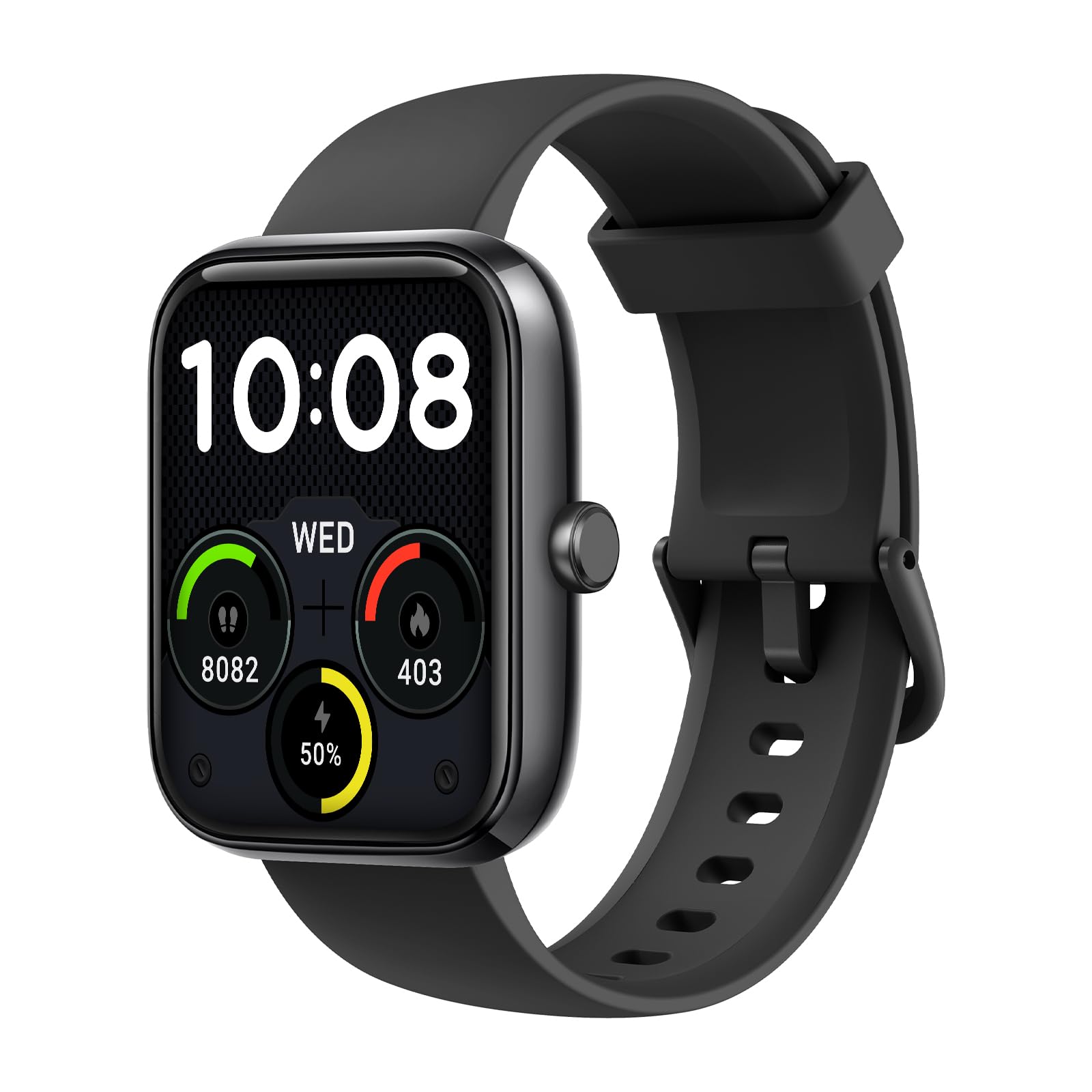
Figure 3.1: Front view of the EchoByte IDW25 Smartwatch. This image displays the large 1.83-inch rectangular screen and a physical button located on the right side of the watch casing.
- 1.83-inch Display: Touch-sensitive screen for navigation and information display.
- Side Button: Used for power on/off, returning to the home screen, and accessing the menu.
- Sensors (underside): For heart rate, blood oxygen, and other health monitoring functions.
- Charging Contacts (underside): For connecting the magnetic charging cable.
- Microphone/Speaker: For Bluetooth call functionality and Alexa voice commands.
4. Setup
4.1. Charging the Smartwatch
Before first use, fully charge your smartwatch. Connect the magnetic charging cable to the charging contacts on the back of the watch. Ensure the pins align correctly. Connect the USB end of the cable to a standard USB power adapter (5V/1A recommended) or a computer's USB port. The watch display will indicate charging status. A full charge typically takes approximately 2 hours.
4.2. App Installation and Pairing
To unlock the full functionality of your EchoByte IDW25, you need to install the companion application on your smartphone.
- Download the App: Scan the QR code provided in the quick start guide or search for the designated app name (usually mentioned in the packaging or quick start guide) in the Apple App Store (for iPhone) or Google Play Store (for Android).
- Create Account: Open the app and follow the on-screen instructions to create an account or log in.
- Enable Bluetooth: Ensure Bluetooth is enabled on your smartphone.
- Pair Device: In the app, navigate to the 'Device' or 'Add Device' section. The app will search for available devices. Select 'IDW25' from the list. Confirm the pairing request on both your phone and the smartwatch if prompted.
- Grant Permissions: Grant necessary permissions (e.g., notifications, location, contacts) to the app for optimal performance.
4.3. Initial Configuration
After successful pairing, the app will guide you through initial settings such as personal profile (age, height, weight), preferred units (metric/imperial), and time format.
5. Operating Instructions
5.1. Basic Navigation
- Wake Screen: Raise your wrist or press the side button.
- Swipe Up/Down: Scroll through menus or notifications.
- Swipe Left/Right: Access quick functions or different data screens.
- Tap: Select an item or confirm an action.
- Press Side Button: Return to the watch face or open the main menu.
5.2. Bluetooth Call Function
Ensure the watch is connected to your phone via Bluetooth and the call function is enabled in the app.
- Making Calls: Access the 'Dialer' or 'Contacts' feature on the watch to initiate a call.
- Receiving Calls: When a call comes in, the watch will display the caller ID. Tap the green icon to answer or the red icon to reject.
5.3. Sports Modes
The IDW25 supports over 100 sports modes. To start a workout:
- From the main menu, select 'Workout' or 'Sports'.
- Choose your desired activity (e.g., running, cycling, swimming).
- Tap to start. The watch will begin tracking your activity data.
- Swipe right or press the side button to pause or end the workout.
5.4. Health Monitoring
- Pedometer: The watch automatically tracks your steps, distance, and calories burned throughout the day. View this data on the watch or in the app.
- Sleep Management: Wear the watch to bed for automatic sleep tracking. The app provides detailed analysis of your sleep patterns.
- Heart Rate/Blood Oxygen: Access these functions from the watch menu to take on-demand measurements. Continuous monitoring can be enabled via the app.
5.5. Alexa Integration
To use Alexa, ensure your watch is connected to your phone and the Alexa feature is enabled and configured in the companion app.
- Activate Alexa: Swipe right from the watch face or use the designated shortcut (if configured).
- Give Commands: Speak your command clearly into the watch's microphone. Alexa can provide weather updates, set alarms, control smart home devices, and more.
5.6. Notifications
Enable app notifications in your phone's settings and the companion app to receive alerts on your watch.
- View Notifications: Swipe down from the watch face to view recent notifications.
- Clear Notifications: Swipe left on a notification to dismiss it.
6. Maintenance
6.1. Cleaning
Regularly clean your smartwatch and strap to prevent skin irritation and maintain device performance.
- Wipe the screen and casing with a soft, lint-free cloth.
- For stubborn dirt, slightly dampen the cloth with water. Avoid using harsh chemicals or abrasive materials.
- Ensure the watch is dry before charging.
6.2. Water Resistance (IP68)
The EchoByte IDW25 is rated IP68, meaning it is resistant to dust and can withstand immersion in water up to 1.5 meters for 30 minutes. This makes it suitable for daily use, hand washing, and light rain.
- Do NOT use the watch in hot water, saunas, or steam rooms.
- Do NOT press buttons underwater.
- Water resistance is not a permanent condition and may decrease over time with normal wear and tear.
7. Troubleshooting
- Watch not turning on: Ensure the watch is fully charged. Connect it to the charger for at least 30 minutes.
- Cannot pair with phone:
- Ensure Bluetooth is enabled on your phone.
- Make sure the watch is within range of your phone.
- Restart both the watch and your phone.
- Check if the app has all necessary permissions.
- Notifications not received:
- Verify that app notifications are enabled in your phone's settings.
- Ensure notification permissions are granted to the companion app.
- Check if 'Do Not Disturb' mode is active on either the watch or phone.
- Inaccurate health data: Ensure the watch is worn snugly on your wrist, about one finger's width above the wrist bone. Avoid excessive movement during measurements.
8. Specifications
| Feature | Specification |
|---|---|
| Model Name | IDW25 |
| Brand | EchoByte |
| Display Size | 1.83 inches |
| Connectivity Technology | Bluetooth 5.3 |
| Water Resistance Rating | IP68 |
| Compatible Devices | iPhone, Android |
| Battery Type | Lithium Polymer |
| Manufacturer | Shenzhen DO intelligent Technology Co., Ltd |
| Package Dimensions | 14 x 9 x 2 cm |
9. Warranty and Support
Your EchoByte IDW25 Smartwatch is covered by a standard manufacturer's warranty. Please refer to the warranty card included in your package for specific terms and conditions, including the warranty period and coverage details. For technical support, troubleshooting assistance, or warranty claims, please contact the retailer or manufacturer directly using the contact information provided with your purchase or on the official EchoByte website.