
1. Introduction
This manual provides detailed instructions for the installation, operation, and maintenance of your MSI GeForce RTX 5090 Ventus 3X OC Graphics Card. Please read this manual thoroughly before proceeding with installation to ensure proper setup and optimal performance.
1.1. Product Overview
The MSI GeForce RTX 5090 Ventus 3X OC is a high-performance graphics card designed for demanding gaming, 3D rendering, and AI acceleration tasks. It features 32GB of GDDR7 memory, 21,760 CUDA cores, and advanced cooling solutions to deliver exceptional visual fidelity and processing power.

Figure 1.1: MSI GeForce RTX 5090 Ventus 3X OC Graphics Card.
1.2. What's in the Box
- MSI GeForce RTX 5090 Ventus 3X OC Graphics Card
2. Setup and Installation
Proper installation is crucial for the stability and performance of your graphics card. Follow these steps carefully.
2.1. Pre-Installation Checklist
- Ensure your power supply unit (PSU) meets the recommended wattage for the RTX 5090.
- Verify your computer case has sufficient clearance for the card's dimensions (12.8 x 5.5 x 2.6 inches).
- Turn off your computer and disconnect all power cables.
- Ground yourself to prevent electrostatic discharge (ESD) damage.
2.2. Hardware Installation
- Open your computer case.
- Locate an available PCI Express 5.0 x16 slot on your motherboard.
- Remove any expansion slot covers that obstruct the installation.
- Carefully align the graphics card with the PCIe slot and press down firmly until it is securely seated.
- Secure the graphics card to the case with screws.
- Connect the necessary PCIe power cables from your PSU to the graphics card. The RTX 5090 typically requires multiple 8-pin or 12VHPWR connectors. Refer to your PSU and graphics card documentation for exact requirements.
- Close your computer case.

Figure 2.1: Side view of the MSI GeForce RTX 5090 Ventus 3X OC Graphics Card, highlighting the DisplayPort and HDMI outputs.
2.3. Driver Installation
- Connect your display cable (HDMI or DisplayPort) from the graphics card to your monitor.
- Power on your computer.
- Once the operating system loads, download the latest NVIDIA drivers for the GeForce RTX 5090 from the official NVIDIA website (www.nvidia.com/drivers).
- Follow the on-screen instructions to complete the driver installation. A system restart may be required.
3. Operating the Graphics Card
After successful installation, your graphics card is ready for use. This section covers basic operation and software considerations.
3.1. Display Connections
The MSI GeForce RTX 5090 Ventus 3X OC supports multiple display outputs:
- 3x DisplayPort 2.1b
- 1x HDMI 2.1b
Connect your monitor(s) to these ports. For optimal performance, especially with high-refresh-rate or high-resolution displays, use DisplayPort connections where available.
3.2. Software Utilities
MSI provides various software utilities to enhance your graphics card experience, such as MSI Afterburner for overclocking and monitoring, and MSI Center for system management. These tools can be downloaded from the official MSI website.
Video 3.1: Short video showcasing the performance and features of the MSI GeForce RTX 5090 Ventus 3X OC Graphics Card, highlighting its capabilities for new game releases.
4. Maintenance
Regular maintenance helps ensure the longevity and consistent performance of your graphics card.
4.1. Dust Cleaning
Dust accumulation can impede cooling performance. Periodically, with the computer powered off and unplugged, use compressed air to gently clean dust from the fans and heatsink fins of the graphics card.
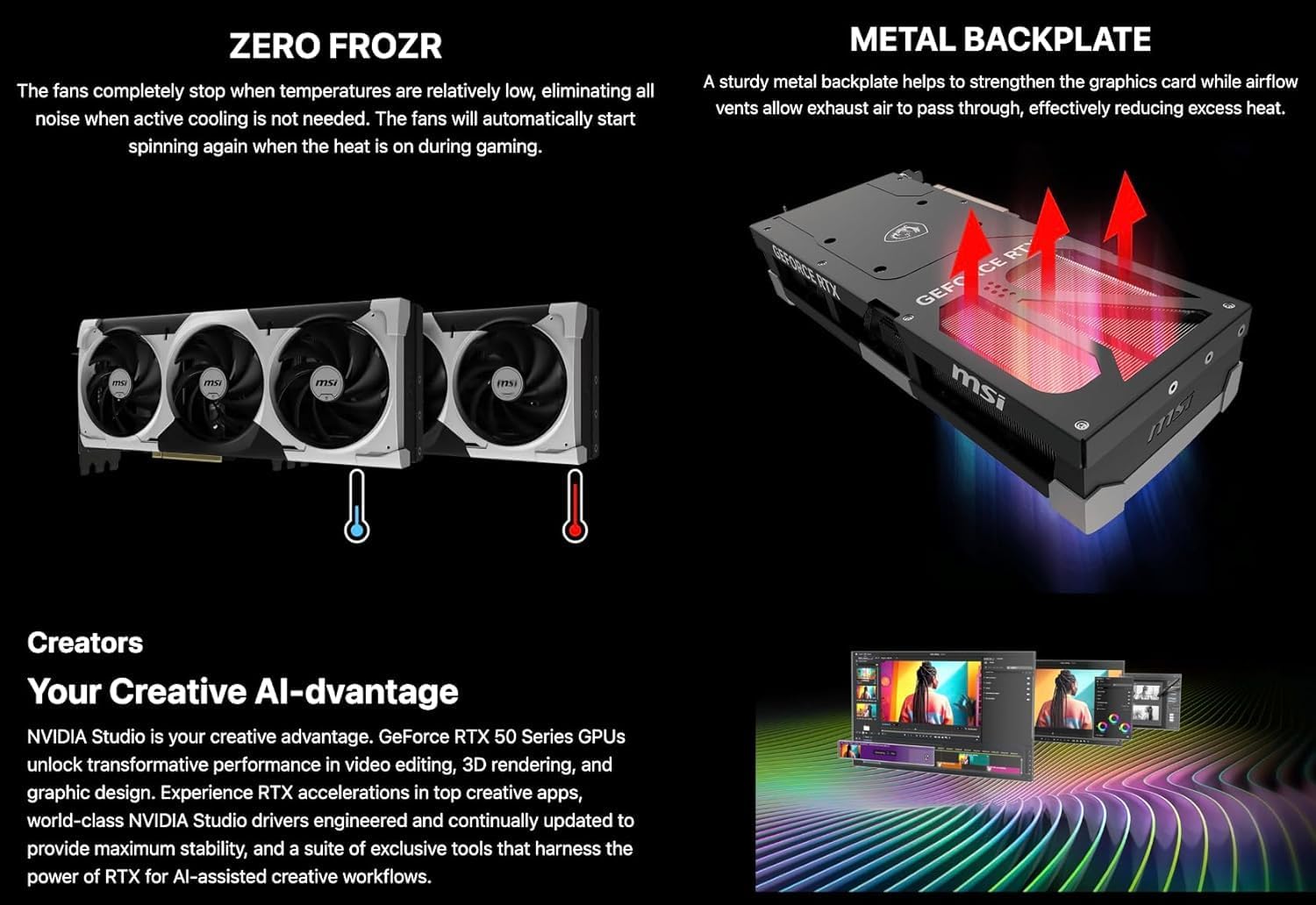
Figure 4.1: Illustration of the Zero Frozr technology, where the graphics card fans stop when temperatures are low for silent operation.
4.2. Airflow Management
Ensure your computer case has adequate airflow. Proper case fan configuration helps dissipate heat generated by the graphics card and other components, preventing thermal throttling.

Figure 4.2: Diagram illustrating the metal backplate and airflow vents on the MSI GeForce RTX 5090 Ventus 3X OC Graphics Card for enhanced cooling.

Figure 4.3: Close-up view of the Core Pipes cooling system, designed for efficient heat transfer from the GPU.
5. Troubleshooting
This section addresses common issues you might encounter with your graphics card.
5.1. No Display Output
- Check Cables: Ensure all display cables (HDMI/DisplayPort) are securely connected to both the graphics card and the monitor.
- Power Connections: Verify that all PCIe power connectors are properly seated in the graphics card.
- Monitor Input: Confirm your monitor is set to the correct input source.
- Reseat Card: Power off your PC, unplug it, and reseat the graphics card in its PCIe slot.
5.2. Driver Issues or Crashes
- Update Drivers: Ensure you have the latest NVIDIA drivers installed.
- Clean Installation: If issues persist, perform a clean installation of the drivers using NVIDIA's DDU (Display Driver Uninstaller) tool in Safe Mode.
- Check Software Conflicts: Temporarily disable any overclocking software or monitoring tools to rule out conflicts.
5.3. Overheating
- Monitor Temperatures: Use software like MSI Afterburner to monitor GPU temperatures during load.
- Improve Airflow: Ensure good airflow within your PC case. Clean any dust from the graphics card fans and heatsink.
- Case Fans: Verify all case fans are functioning correctly and are configured to provide adequate cooling.
6. Specifications
Detailed technical specifications for the MSI GeForce RTX 5090 Ventus 3X OC Graphics Card.
6.1. Key Features
- Architecture: Ada-Next
- CUDA Cores: 21,760
- Tensor Cores: 680 (5th-gen)
- Memory: 32GB GDDR7
- Memory Speed: 28 Gb/s
- Memory Interface: 512-Bit
- Boost Clock: 2452 MHz
- Interface: PCIe 5.0 x16
- Display Outputs: 3x DisplayPort 2.1b, 1x HDMI 2.1b
- Cooling: Triple-fan system with vapor chamber and smart fans (TORX FAN 5.0, Zero Frozr, Core Pipes)
- Features: Real-time ray tracing, DLSS 3.5, AI Acceleration, NVIDIA Reflex 2, Metal Backplate
6.2. General Specifications
| Attribute | Value |
|---|---|
| Product Dimensions | 12.8 x 5.5 x 0.1 inches |
| Item Weight | 5 pounds |
| Manufacturer | MSI |
| ASIN | B0F9M47665 |
| Date First Available | May 22, 2025 |
| Graphics Coprocessor | NVIDIA GeForce RTX 5090 |
| Brand | msi |
| Graphics RAM Size | 32 GB |
| Video Output Interface | DisplayPort |
| Graphics Processor Manufacturer | MSI |
7. Warranty and Support
MSI products are designed for reliability and performance. For warranty information, please refer to the warranty card included with your product or visit the official MSI website.
7.1. Technical Support
If you encounter any issues not covered in this manual, or require further assistance, please contact MSI technical support through their official website:


