
Introduction
This manual provides instructions for the E-YOOSO M10 (Z686-1) Wired Mechanical Keyboard. Please read this manual carefully before using the product to ensure proper operation and to maximize its lifespan. This keyboard features a 65% compact layout, mechanical blue switches, and customizable RGB backlighting, designed for office work and multimedia use.
Setup
Connecting the Keyboard
- Locate the detachable USB cable provided with your keyboard.
- Connect the USB-C end of the cable to the port on the back of the E-YOOSO M10 keyboard.
- Plug the USB-A end of the cable into an available USB 2.0 port on your computer.
- The keyboard is plug-and-play; no additional drivers or software are required for basic functionality.

Image: The E-YOOSO M10 keyboard connected via its detachable USB cable to a computer, illustrating the wired connection setup.
Compatibility
The E-YOOSO M10 keyboard is compatible with various operating systems, including:
- Windows (2000, XP, ME, Vista, 7, 8)
- Linux
- Mac OS
Operating Instructions
Key Layout and Functions
The E-YOOSO M10 features a 65% compact layout with 68 keys, including dedicated arrow keys and access to F1-F12 functions via the Fn key. This design optimizes desktop space while retaining essential keys for productivity.
RGB Backlight Customization
The keyboard supports 18 customizable RGB backlight modes. Use the following key combinations to adjust the lighting effects:
- Fn + Ins: Switch between 18 different backlight modes.
- Fn + ← / →: Adjust the backlight speed.
- Fn + ↑ / ↓: Adjust the backlight brightness.

Image: The E-YOOSO M10 keyboard showcasing its RGB backlighting and illustrating the function key combinations for adjusting light effects, speed, and brightness.
Anti-Ghosting Feature
The keyboard is equipped with full N-Key Rollover, meaning all 68 keys are anti-ghosting. This ensures that every key press is registered accurately, even when multiple keys are pressed simultaneously, which is beneficial for fast typing and gaming.

Image: The E-YOOSO M10 keyboard in use on a desk, visually representing the N-Key Rollover capability by highlighting several simultaneously pressed keys.
Ergonomic Design
The keyboard features an ergonomic design with double kickstands, allowing for adjustable typing angles. The keycaps are designed with an ergonomic suspension profile and double-color injection for comfortable and durable use.

Image: A side profile view of the E-YOOSO M10 keyboard, demonstrating its ergonomic design with varying keycap heights and the overall contoured shape for comfortable typing.
Maintenance
Cleaning the Keyboard
To maintain the appearance and functionality of your E-YOOSO M10 keyboard, follow these cleaning guidelines:
- Use a soft, dry cloth to wipe down the keycaps and chassis regularly.
- For deeper cleaning, you may use a slightly damp cloth with a mild cleaning solution, ensuring no liquid enters the keyboard.
- The PBT injection keycaps are designed to be anti-sweat and fade-resistant, requiring minimal special care.
- Use compressed air to remove dust and debris from between the keycaps.

Image: A detailed view of the E-YOOSO M10 keyboard's PBT injection keycaps, emphasizing their construction for clear backlighting, anti-sweat properties, and resistance to fading.
Troubleshooting
Keyboard Not Responding
- Ensure the USB cable is securely connected to both the keyboard and the computer.
- Try plugging the USB cable into a different USB port on your computer.
- Restart your computer.
- If using a USB hub, try connecting the keyboard directly to the computer.
Backlight Not Working or Incorrect
- Check if the backlight is turned off. Use Fn + ↑ to increase brightness.
- Cycle through backlight modes using Fn + Ins to see if it resolves the issue.
- Ensure the keyboard is receiving sufficient power from the USB port.
Keys Not Registering or Double Typing
- Ensure the keyboard is clean and free of debris under the keycaps.
- Test the keyboard on another computer to rule out a software or driver issue on your primary system.
Specifications
| Brand | E-YOOSO |
| Model Number | Z686-1 |
| Connectivity | Wired (USB 2.0) |
| Switch Type | Mechanical Blue Switch |
| Number of Keys | 68 Keys |
| Layout | 65% Compact, QWERTY |
| Backlight | RGB (18 modes) |
| Anti-Ghosting | Full N-Key Rollover |
| Keycaps | PBT Injection, Double-shot |
| Material | Acrylonitrile Butadiene Styrene (ABS), Aluminum Plate |
| Cable Length | 4.9 ft (1.5 m) Detachable USB Cable |
| Compatibility | Windows, Linux, Mac OS |
| Special Features | Hot-swappable PCBA, North-facing LEDs, Pre-lubed Plate Mounted Stabilizer, Ergonomic Design |
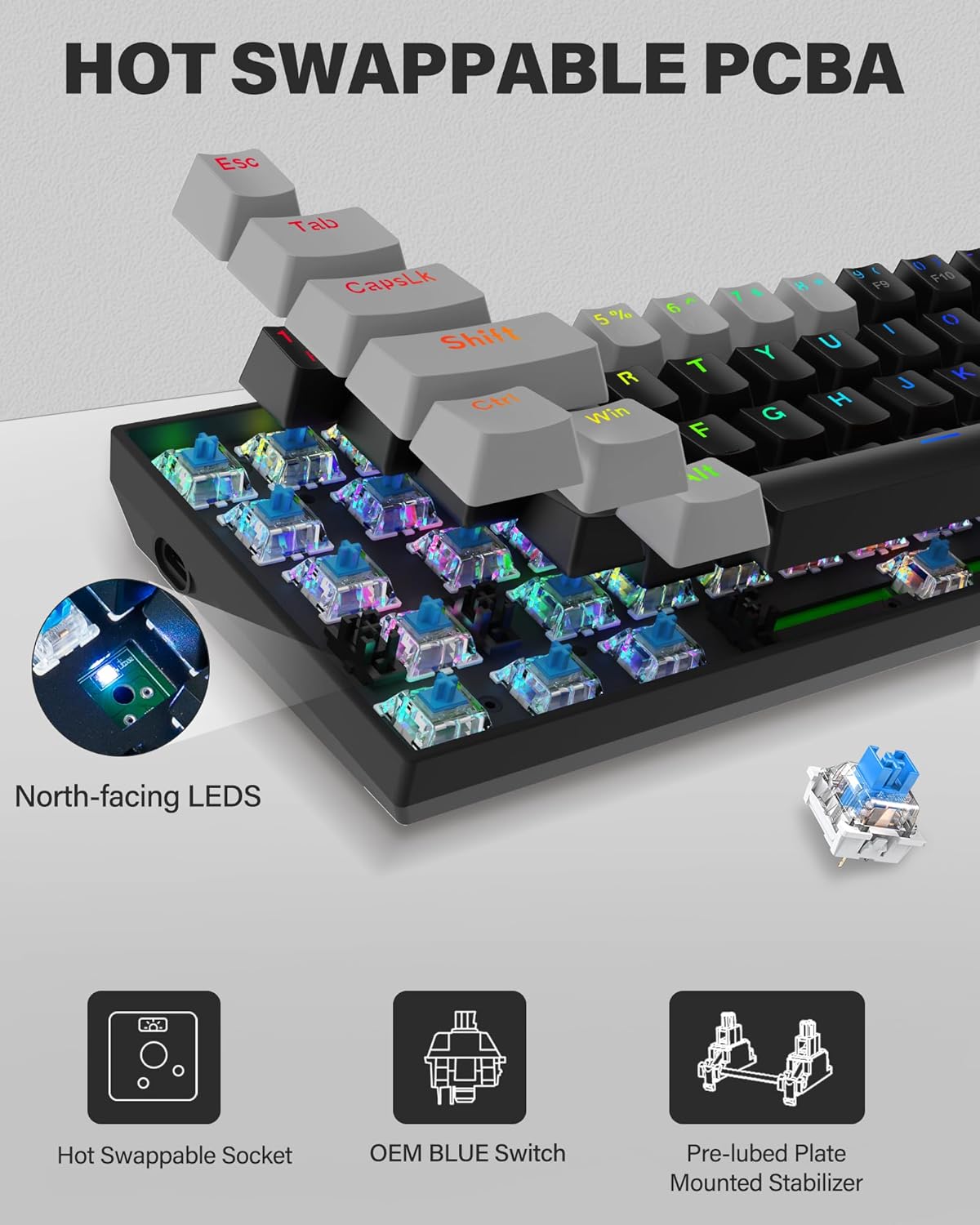
Image: A close-up of the E-YOOSO M10 keyboard's internal components, highlighting the hot-swappable PCBA, OEM Blue Switches, and pre-lubed plate-mounted stabilizers.

Image: An exploded diagram illustrating the layers of the E-YOOSO M10 keyboard, including PBT keycaps, Blue Switches, Positioning Plate, PCB Board, and Bottom Case.
Warranty
The E-YOOSO M10 (Z686-1) Wired Mechanical Keyboard comes with a 1-year warranty from the date of purchase. This warranty covers manufacturing defects and issues arising from normal use. Please retain your proof of purchase for warranty claims.
Support
For further assistance, technical support, or warranty inquiries, please refer to the contact information provided on the E-YOOSO official website or your retailer's support channels. When contacting support, please have your product model (Z686-1) and proof of purchase available.


