
1. Important Safety Information
Please read all instructions carefully before operating the AMADVI LC36ATS Commercial Ice Maker Machine. Retain this manual for future reference. Failure to follow these instructions may result in property damage, personal injury, or death.
- Electrical Safety: Ensure the appliance is connected to a properly grounded power outlet. Do not use extension cords.
- Water Connection: Connect the water supply according to local plumbing codes. Ensure all connections are secure to prevent leaks.
- Ventilation: Maintain adequate clearance around the machine for proper ventilation to prevent overheating.
- Placement: Place the ice maker on a stable, level surface. Allow the unit to stand upright for at least 24 hours before initial operation to allow refrigerants to settle.
- Cleaning: Always unplug the unit before cleaning or performing maintenance.
- Children: Keep children away from the appliance.
2. Product Overview
2.1 Key Features
- High Capacity: Produces up to 100 lbs of ice per day with a 20 lbs storage capacity.
- Fast Ice Production: Generates 36 crystal clear ice cubes per cycle in approximately 10-15 minutes.
- Powerful Compressor: Equipped with an efficient compressor for fast and quiet operation, reducing power consumption.
- Dual Water Inlet Options: Supports both direct tap water connection and bottled water supply. Includes a tap water filter for clean ice production.
- Intelligent Control Panel: Features an LED digital display and mechanical buttons for easy operation, including ice thickness adjustment, 24-hour reservation timing, and self-cleaning.
- Versatile Placement: Designed for both undercounter and freestanding installation.
2.2 Construction Details
The AMADVI LC36ATS ice maker features a robust construction designed for durability and efficiency.
- Exterior: Heavy-duty stainless steel for commercial environments.
- Insulation: An overall thickened foam layer provides excellent heat retention, helping to prevent ice from melting quickly and reducing noise.
- Interior: Food-grade PP inner liner ensures a clean and hygienic ice-making environment.

Image: A diagram illustrating the internal construction of the ice maker, highlighting the outer durable metal layer, the middle thickened foam insulation, and the inner food-grade PP liner for heat retention and hygiene.
2.3 Components Included
The package includes:
- 1 x AMADVI LC36ATS Ice Maker Machine
- 1 x Ice Scooper
- 1 x Drain Hose
- 1 x Water Filter
- Several accessories for installation
2.4 Product Dimensions
Dimensions (D x W x H): 13.5 inches x 13.2 inches x 26.4 inches.
Weight: 34.61 Pounds.

Image: Overview of the AMADVI LC36ATS Commercial Ice Maker Machine, illustrating its high capacity (100 lbs/day, 20 lbs storage), 36 ice cubes per cycle, and overall design.
3. Setup and Installation
3.1 Initial Placement
Upon receiving the ice maker, place it in its desired location. It is crucial to allow the machine to stand upright for at least 24 hours before plugging it in or operating it. This allows the refrigerant to settle, ensuring optimal performance and preventing damage to the compressor.
3.2 Water Inlet Connection
The ice maker supports two water inlet methods: direct tap water connection or bottled water supply.
- Tap Water Connection: Connect the provided water filter and hose to a tap water source. Ensure the blue water inlet switch inside the machine is set to the horizontal position for tap water.
- Bottled Water Supply: Place a standard bottled water jug on the top inlet. Ensure the blue water inlet switch inside the machine is set to the vertical position for bottled water.
Caution: Do not connect an external water source when the internal valve is open, as this may cause an overflow.

Image: Illustration of the dual water inlet options, showing connections for tap water with a filter and a top-mounted bottled water dispenser.
Video: A tutorial demonstrating the setup and initial operation of the commercial ice maker, including water connection and control panel usage.
4. Operating Instructions
4.1 Starting Ice Production
- Ensure the machine is properly set up and connected to a water source and power.
- Press the ON/OFF button on the control panel to start the ice-making process. The "ice making" indicator light will illuminate.
- The machine will automatically begin producing ice.
4.2 Adjusting Ice Thickness
After pressing the ON/OFF button, use the '+' and '-' buttons on the control panel to adjust the ice thickness. A higher number typically corresponds to thicker ice, requiring a longer freezing time.
- Thin Ice: Approximately 7-10 minutes per cycle. Ideal for seafood preservation.
- Medium Ice: Approximately 10-15 minutes per cycle. Suitable for general beverages.
- Thick Ice: Approximately 15-20 minutes per cycle. Best for slow-melting drinks like beer.
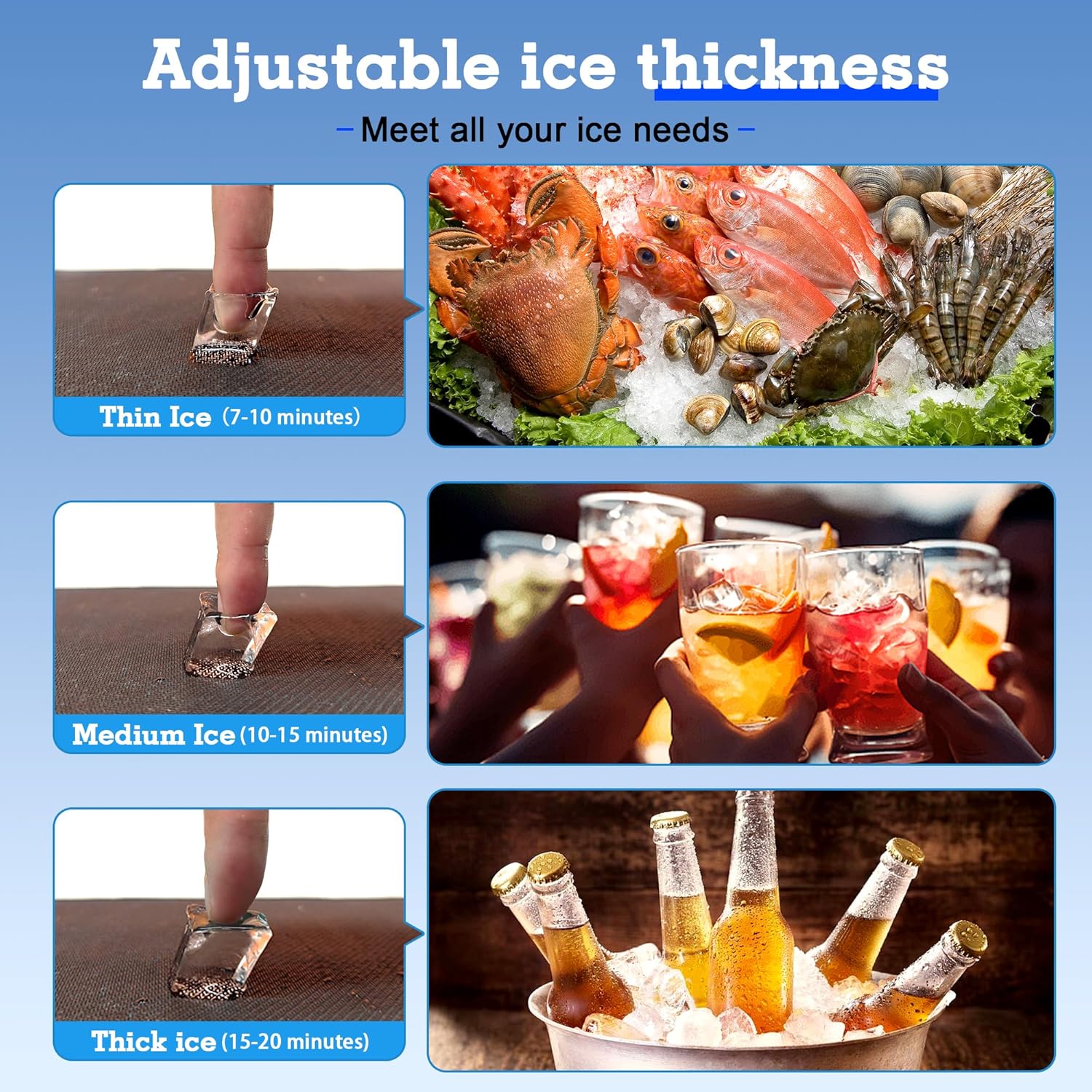
Image: The control panel displaying options for adjusting ice thickness, with examples of thin, medium, and thick ice and their typical uses.
4.3 Reservation Timing
The machine features a reservation function to schedule power-on or power-off times.
- To Reserve Power-On Time: While in standby mode, press the 'Reservation/Clean' button. Use the '+' and '-' buttons to set the desired power-on time in hours.
- To Reserve Power-Off Time: During the ice-making process, press the 'Reservation/Clean' button. Use the '+' and '-' buttons to set the desired shutdown time in hours.
4.4 Indicator Lights
The control panel includes various indicator lights:
- Ice Making: Illuminates when the machine is actively producing ice.
- Reservation: Indicates a reservation time has been set.
- Add Water: Flashes when the water level is low and requires refilling (for bottled water mode) or indicates a water supply issue (for tap water mode).
- Ice Full: Illuminates when the ice storage bin is full, and ice production will temporarily stop.
- Melting: Indicates the machine is in a defrost cycle.
- Stoppage: Indicates an error or abnormal operation.
- Clean: Illuminates during the self-cleaning cycle.

Image: Close-up of the intelligent control panel, showing the LED display, ON/OFF button, ice thickness adjustment, and various indicator lights for operational status.
5. Maintenance and Cleaning
Regular cleaning and maintenance are essential to ensure the longevity and hygienic operation of your ice maker.
5.1 Self-Cleaning Function
The machine is equipped with an automatic self-cleaning function:
- Ensure the machine is in standby mode.
- Long press the 'Reservation/Clean' button to initiate the self-cleaning cycle. The "clean" indicator light will illuminate.
- The machine will perform an internal cleaning process. Once complete, drain any remaining water.
5.2 Manual Cleaning
Periodically clean the internal walls of the water box and ice mold with a mild detergent. Rinse thoroughly with clean water. Replace the water filter element regularly as needed to maintain ice quality.
- Always unplug the ice maker before manual cleaning.
- Use a soft cloth or sponge. Avoid abrasive cleaners or harsh chemicals.
- Ensure all detergent residue is completely rinsed away.
6. Troubleshooting
If you encounter issues with your AMADVI LC36ATS ice maker, refer to the following common problems and solutions:
| Problem | Possible Cause | Solution |
|---|---|---|
| Machine does not turn on. | No power supply. | Check power cord connection and wall outlet. Ensure the unit has been upright for 24 hours. |
| "Add Water" indicator is on. | Low water level or water supply issue. | Refill bottled water or check tap water connection and filter. Ensure the water inlet switch is in the correct position. |
| Ice production is slow or ice is too thin. | Incorrect ice thickness setting; ambient temperature too high; poor ventilation. | Adjust ice thickness setting using '+' button. Ensure adequate ventilation around the machine. Operate in a cooler environment. |
| Ice cubes are stuck together or form a "brick". | Ice thickness too high; ice not harvested properly. | Reduce ice thickness setting. Ensure the ice bin is not overfilled. Break up ice with the provided scooper. |
| "Ice Full" indicator is on, but bin is not full. | Ice sensor obstruction or malfunction. | Check for any ice blocking the sensor. Clean the sensor area. |
If the problem persists after attempting these solutions, please contact customer support.
7. Specifications
| Specification | Value |
|---|---|
| Brand | AMADVI |
| Model Name | LC36ATS |
| Product Dimensions (D x W x H) | 13.5" x 13.2" x 26.4" |
| Ice Storage Capacity | 20 Pounds |
| Daily Ice Production | Up to 100 Pounds |
| Ice Cubes per Cycle | 36 Pieces |
| Wattage | 235 watts |
| Item Weight | 34.61 Pounds |
| Refrigerant | R290a |
8. Warranty and Support
For warranty information or technical support, please refer to the warranty card included with your product or contact AMADVI customer service directly. Ensure you have your model number (LC36ATS) and purchase details available when contacting support.
Contact information can typically be found on the manufacturer's website or your purchase documentation.


