

Introduction
This manual provides detailed instructions for the installation, operation, and maintenance of your anyfree ML01 Wireless Video Doorbell Camera. Please read this manual thoroughly before use to ensure proper functionality and to maximize your product experience. Keep this manual for future reference.
Package Contents
Verify that all items listed below are included in your package:
- 1x anyfree ML01 Video Doorbell Camera
- 1x Signal Station (Chime)
- 1x USB Charging Cable
- 2x Mounting Brackets
- 1x Double-sided Adhesive Tape
- 1x Security Screw
- 2x Anchors
- 2x KA3*30 Screws
- 2x KA3*10 Screws
- 1x Instruction Manual (this document)
Product Overview
The anyfree ML01 is a wireless video doorbell camera designed for outdoor use, featuring solar-assisted battery power, AI motion detection, HDR ultra-clear video, and dual-band Wi-Fi connectivity. It includes a unique wind chime design and a separate signal station.

Image: Front view of the anyfree ML01 Video Doorbell Camera, showcasing its silver finish and unique design.

Image: The white signal station (chime) with two antennas, designed to be plugged into an indoor power outlet.
Setup
- Download the App:
Download the "Hello Doorbell" application from your smartphone's app store (Google Play Store for Android or Apple App Store for iOS). The app is compatible with both phones and tablets.

Image: Illustration showing the "Hello Doorbell" app interface on a smartphone and a tablet.
- Power On the Doorbell:
Locate the ON/OFF switch on the back of the video doorbell and slide it to the "ON" position.

Image: A close-up of the back of the doorbell showing the ON/OFF switch and charging ports.
- Activate the Signal Station:
Plug the signal station (chime) into an indoor power outlet. Press and hold the button on the signal station until the red light turns green, indicating successful activation.
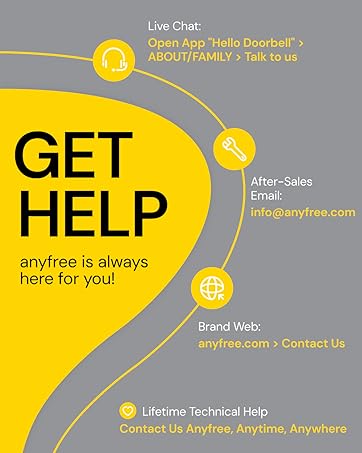
Image: A hand plugging the signal station into a wall outlet, with an indicator light visible.
- Connect Devices via App:
Open the "Hello Doorbell" app. Follow the in-app instructions to connect the signal station and the video doorbell via Wi-Fi (supports 2.4GHz and 5GHz) and Bluetooth. This process establishes the communication between your devices and the app.
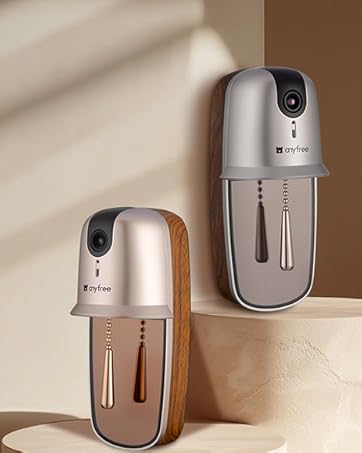
Image: A hand holding the doorbell, with Wi-Fi signals radiating, indicating connectivity setup.
- Mount the Doorbell:
Choose your preferred mounting method:
- Screw-in Installation: Use the provided mounting brackets, screws (KA3*30, KA3*10), and anchors to securely attach the doorbell to your wall.
- Self-Adhesive Installation: Use the included 3M double-sided adhesive tape to stick the doorbell onto a clean, flat surface.

Image: A person installing the doorbell on a wall next to a door.
Operating Instructions
Two-Way Audio and Live View
Through the "Hello Doorbell" app, you can communicate with visitors at your door in real-time using the two-way audio feature. You can also access a live video feed of your doorstep at any time, from anywhere.

Image: A delivery person at the door and a user interacting via the app's two-way audio feature.
AI Motion Detection and Notifications
The doorbell features precise AI recognition to identify family members, couriers, and other visitors. It sends personalized notifications to your phone, categorizing content based on visitor type and event nature. The system records clips up to 15 seconds each upon detection.

Image: A smartphone screen displaying various AI-generated notifications, such as "The courier rang" or "Someone passed by."
HDR Night Vision
The doorbell offers clear HDR night vision, providing enhanced clarity both day and night. This ensures you can clearly see visitors and packages, even in low-light conditions.

Image: A split image showing a clear daytime view and an equally clear night vision view of people at a doorstep.
Storage Options
The doorbell supports both local and cloud storage:
- Local Storage: Supports SD cards up to 128GB (SD card not included). Installing an SD card allows for motion detection recording without monthly fees.
- Cloud Storage: Enjoy a 90-day free trial of unlimited cloud storage. After the trial, a subscription may be required.

Image: Visual representation of an SD card slot for local storage and a cloud icon for cloud storage, highlighting the 90-day free trial.
Customizable Ringtones
You can customize the ringing sound of your doorbell through the app. The signal station also offers 3 choices of ringtones.
Image: A smartphone screen showing ringtone customization options and the signal station emitting musical notes.
Family Sharing
The doorbell access can be shared with up to 4 family members, allowing multiple users to receive notifications and view footage.

Image: Multiple family members interacting with the doorbell app on their phones, indicating shared access.
Destruction Alarm
For enhanced security, the doorbell is equipped with a destruction alarm. If someone attempts to disassemble the doorbell, it will trigger an alarm, send a phone notification, and initiate a specific action.
Maintenance
Battery Charging
The doorbell features a solar-assisted built-in battery designed for extended battery life. The solar panel helps alleviate daily power loss but does not fully replace USB charging. When the doorbell's power is low, it must be recharged via the USB cable.

Image: An illustration showing the solar panel on the doorbell and its contribution to battery life, with a note about USB charging.
Battery life is tied to daily activity. Frequent triggering (e.g., 30 activations/day) may result in approximately 60 days of battery life, while normal triggering (e.g., 10 activations/day) can extend it to about 120 days.

Image: An internal view of the doorbell highlighting the battery, with text explaining battery life duration based on usage frequency.
Cleaning
To maintain optimal performance, periodically wipe the doorbell camera lens and body with a soft, dry cloth. Avoid using harsh chemicals or abrasive cleaners.
Troubleshooting
- No Power/Doorbell Not Turning On: Ensure the ON/OFF switch on the back of the doorbell is in the "ON" position. If the battery is depleted, connect it to a USB power source for charging.
- Poor Wi-Fi Connection: Ensure your Wi-Fi router is within range and that the doorbell is connected to either a 2.4GHz or 5GHz network. The device supports dual-band Wi-Fi for stable connections.
- Notifications Not Received: Check your phone's app settings to ensure notifications for the "Hello Doorbell" app are enabled. Verify that the doorbell is connected to Wi-Fi and the app.
- Solar Charging Ineffective: The solar panel assists in maintaining battery charge but does not fully recharge a depleted battery. Ensure the doorbell is placed in an area with sufficient direct sunlight. Regular USB charging is still required.
- Two-Way Audio Issues: Check your internet connection speed. Ensure your phone's microphone and speaker permissions are granted to the "Hello Doorbell" app.
- SD Card Not Detected: Ensure the SD card is correctly inserted and formatted. The doorbell supports up to 128GB SD cards.
Specifications
| Feature | Detail |
|---|---|
| Model Number | ML01 |
| Brand | anyfree |
| Indoor/Outdoor Usage | Outdoor |
| Power Source | Solar Assist Battery Powered |
| Connectivity Technology | Wi-Fi (2.4G / 5G), Wireless |
| Controller Type | APP Control |
| Video Capture Resolution | HDR Ultra-Clear |
| Special Features | 2-Way Audio, HDR Camera, Local Recording, Motion Sensor, Night Vision, Solar Assist Battery |
| Local Storage | Supports up to 128GB SD card (not included) |
| Item Dimensions (L x W x H) | 11.6 x 9.5 x 5.5 inches |
| Item Weight | 2.38 pounds (1.08 Kilograms) |
| Water Resistance Level | Waterproof (IPX5) |
| Battery Type | Lithium Ion (1 required, not included) |
Warranty and Support
anyfree is committed to providing excellent customer service and technical assistance.
- Lifetime Technical Help: Contact anyfree anytime, anywhere for technical support.
- After-Sales Email: For support inquiries, please email info@anyfree.com.
- Live Chat: Open the "Hello Doorbell" app, navigate to ABOUT/FAMILY, and select "Talk to us" for live chat support.
- Brand Website: Visit anyfree.com and navigate to "Contact Us" for additional support resources.

Image: A graphic detailing various support channels including live chat, email, and website, emphasizing lifetime technical help.


