
Introduction
Thank you for choosing the SKYBASIC Digital Microscope P-375. This device is designed to introduce children to the microscopic world, offering a 2.0-inch IPS screen, up to 1000x magnification, and integrated LED lighting. This manual provides essential information for safe operation, setup, maintenance, and troubleshooting to ensure an optimal user experience.
Product Overview
Components and Controls
Familiarize yourself with the microscope's components and controls as illustrated below:
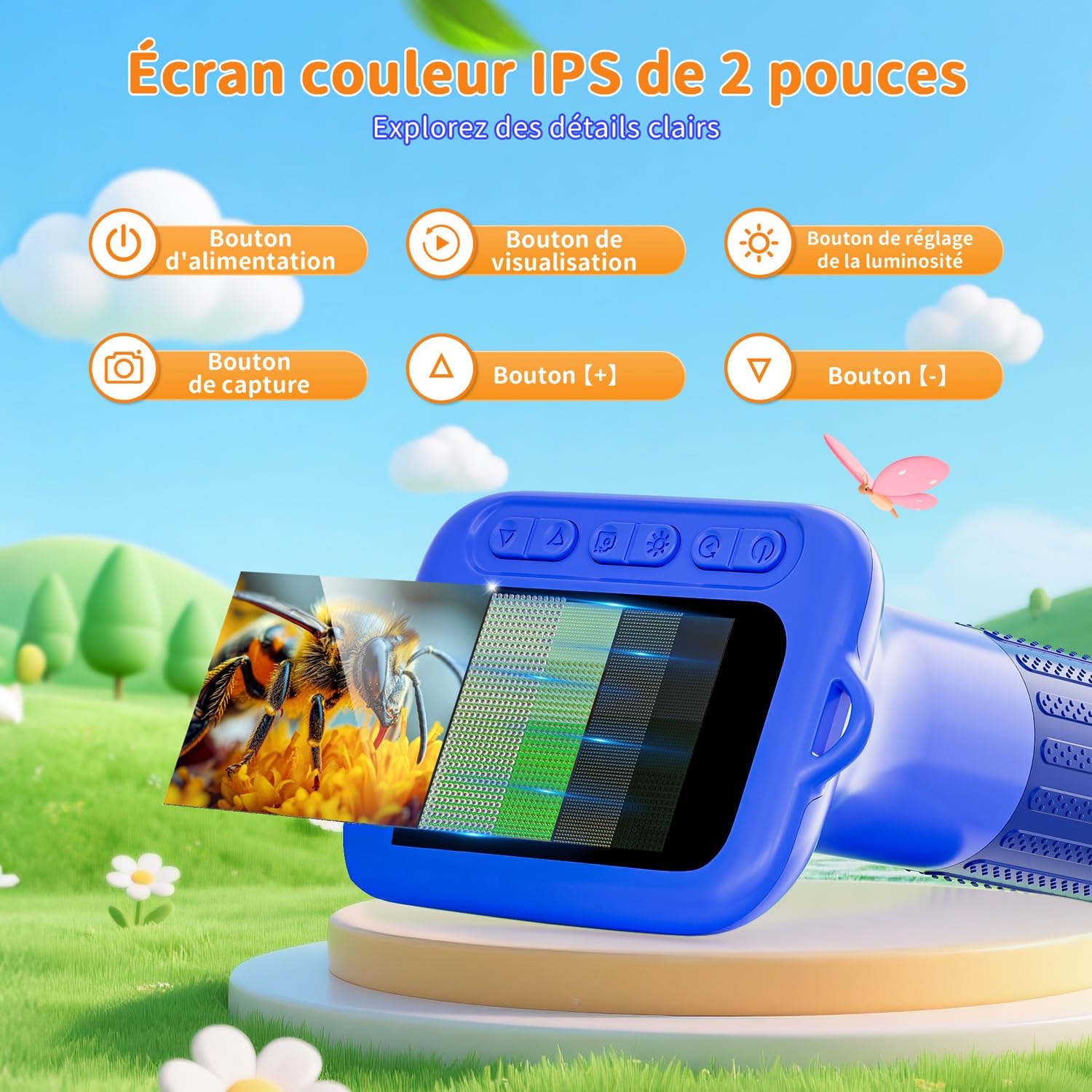
Image: Overview of the SKYBASIC Digital Microscope showing the 2-inch IPS screen and clearly labeled control buttons for power, viewing mode, brightness adjustment, capture, and zoom in/out.
- Power Button: Press and hold to turn the device on or off.
- View Button: Switches between different viewing modes.
- Brightness Adjustment Button: Controls the intensity of the LED lights.
- Capture Button: Takes photos or starts/stops video recording.
- Plus (+) Button: Increases magnification or navigates menus.
- Minus (-) Button: Decreases magnification or navigates menus.
Key Features
- 2-inch IPS Screen: Provides a clear, colorful, and detailed real-time view of microscopic subjects.
- 1000x Magnification: Ideal for exploring textures of insects, plants, and other small objects.
- HD Lens and 8 Adjustable LEDs: Ensures optimal illumination and clear observation under various lighting conditions.
- One-Touch HD Recording: Easily capture photos and videos to save and share discoveries.
- Expandable Storage: Features built-in memory for up to 200 photos. A TF memory card (not included) is required for video recording.
- Portable Design: Lightweight (approximately 117 grams) with a detachable lanyard, suitable for outdoor activities.
- Computer Connectivity: Connects via USB cable to Windows (7/8/10/11+) or Mac (macOS 11.0+) for viewing on a larger screen.
Setup
Charging the Device
- Locate the USB charging port on the microscope.
- Connect the provided USB cable to the microscope and to a compatible USB power adapter (not included) or a computer USB port.
- The charging indicator light will illuminate. Allow the device to charge fully before first use.
Inserting a TF Memory Card (Optional)
A TF memory card is required for video recording. Ensure the microscope is powered off before inserting or removing the card.
- Locate the TF card slot on the side of the microscope.
- Gently insert the TF card into the slot until it clicks into place.
- To remove, push the card inward until it springs out.
Operating Instructions
Basic Operation
- Power On: Press and hold the Power button until the screen illuminates.
- Focusing: Bring the microscope lens close to the object you wish to observe. Slowly rotate the focus wheel to adjust the focus until the details appear clear on the HD screen.
- Adjusting Brightness: Use the Brightness Adjustment button to cycle through different LED light intensities for optimal viewing.

Image: A child's hand demonstrating how to hold and use the SKYBASIC Digital Microscope to observe a small object, highlighting its ergonomic design for young users.
Capturing Photos and Videos
- Taking a Photo: While observing, press the Capture button once to take a still image. The image will be saved to the internal memory or TF card.
- Recording a Video: Press and hold the Capture button to start video recording. Press again to stop. Videos require a TF memory card.
Viewing on a Computer
Connect the microscope to a computer to view specimens on a larger screen and manage captured media.
- Ensure the microscope is powered on.
- Connect the microscope to your Windows PC (Win 7/8/10/11+) or Mac (macOS 11.0+) using the provided USB cable.
- The computer should recognize the microscope as an external device or webcam. Follow on-screen prompts or use appropriate software to view the live feed or access stored files.

Image: The SKYBASIC Digital Microscope connected to a computer, demonstrating how to view magnified images and videos on a larger display for detailed exploration.
Outdoor Exploration
The portable design makes this microscope suitable for outdoor use.

Image: A child using the SKYBASIC Digital Microscope outdoors, highlighting its portability and suitability for exploring nature in various environments.
Maintenance
- Cleaning: Use a soft, dry cloth to clean the microscope body. For the lens, use a specialized lens cleaning cloth and solution. Avoid abrasive cleaners or solvents.
- Storage: Store the microscope in a cool, dry place away from direct sunlight and extreme temperatures.
- Battery Care: To prolong battery life, avoid fully discharging the battery frequently. Charge the device regularly, even if not in use for extended periods.
- Handling: Handle the microscope with care to prevent drops or impacts, which can damage internal components.
Troubleshooting
- Device does not power on: Ensure the battery is charged. Connect to a power source and try again. If the issue persists, contact support.
- Image is blurry: Adjust the focus wheel slowly until the image becomes clear. Ensure the lens is clean and free of dust or smudges.
- Cannot record video: Verify that a TF memory card is properly inserted. Ensure the card has sufficient free space.
- Cannot connect to computer: Ensure the USB cable is securely connected to both the microscope and the computer. Try a different USB port or cable. Check your computer's device manager for recognition.
- LED lights are not working: Check the brightness adjustment settings. If the issue persists, the device may require servicing.
Specifications
| Brand | SKYBASIC |
| Model Number | P-375 (Rose) |
| ASIN | B0F9L76D1H |
| Screen | 2.0-inch IPS Display |
| Maximum Magnification | 1000x |
| Illumination | 8 Adjustable LED Lights |
| Battery | 1 Lithium-ion (included) |
| Package Dimensions | 17.6 x 10.1 x 6.7 cm |
| Weight | 220 grams |
| Box Contents | USB Cable |
Warranty and Support
For warranty information and technical support, please refer to the official SKYBASIC website or contact your retailer. Keep your purchase receipt as proof of purchase for any warranty claims.
Online Support: Visit the official SKYBASIC support page for FAQs and contact options.
Email Support: [Insert Manufacturer's Support Email Here, if available]
Phone Support: [Insert Manufacturer's Support Phone Number Here, if available]


