
1. Introduction
This manual provides instructions for the assembly, operation, maintenance, and troubleshooting of your SKKTKT 360° Swivel RGB Lighted Jewelry Cabinet with Full-Length Mirror. Please read this manual thoroughly before use and retain it for future reference.
Safety Information:
- Ensure all components are securely fastened during assembly.
- Do not overload shelves or drawers to prevent tipping.
- Keep keys out of reach of children.
- Avoid direct contact of water with electrical components (lights).
2. Package Contents
Verify that all the following components are present in your package:
- Pre-assembled Mirror Cabinet Unit
- Base Legs (2)
- Storage Shelves (4)
- Swivel Base
- Hardware Pack (screws, tools)
- Power Adapter for Lights
- Keys (2)
- Instruction Manual
3. Assembly Instructions
The main mirror cabinet unit comes pre-assembled. Only the base legs and storage shelves require attachment.
- Attach Base Legs: Carefully lay the main cabinet unit on a soft, flat surface to prevent scratches. Attach the two base legs to the bottom of the cabinet using the provided screws from the hardware pack. Ensure they are firmly secured.
- Install Swivel Base: Connect the assembled cabinet with legs to the swivel base, aligning the pre-drilled holes and securing with the appropriate hardware.
- Attach Storage Shelves: Insert the four storage shelves into the designated slots on the rear of the cabinet. Ensure they are level and stable.
- Position the Cabinet: Carefully stand the assembled jewelry cabinet upright in your desired location. Ensure it is on a stable, level surface.
- Connect Power: Plug the power adapter into the cabinet's power input and then into a standard electrical outlet to power the RGB lights.

Image: Product dimensions for assembly reference. The cabinet measures approximately 14.6 inches deep, 21.6 inches wide, and 63.4 inches high.
4. Key Features
- 360° Swivel Design: Allows for easy access to both the full-length mirror and the rear storage shelves.
- Dynamic RGB Lighting: Features 7 static light colors (white, blue, pink, red, yellow, light blue, green) and 7 dynamic RGB lighting modes. Adjustable speed and brightness with memory function.
- Ample Jewelry Storage: Includes 108 earring slots, 36 stud holes, 1 PVC bag, 24 necklace hooks, 104 ring slots, 3 bracelet rods, 4 shelves, and 2 drawers.
- Integrated Lighted Vanity Mirror: A smaller, built-in mirror with soft interior lighting for makeup application and jewelry selection.
- Secure Lock: Lockable design with two keys to protect valuable items.
- Durable Construction: Made with a sturdy wooden frame and soft velvet lining to protect jewelry.
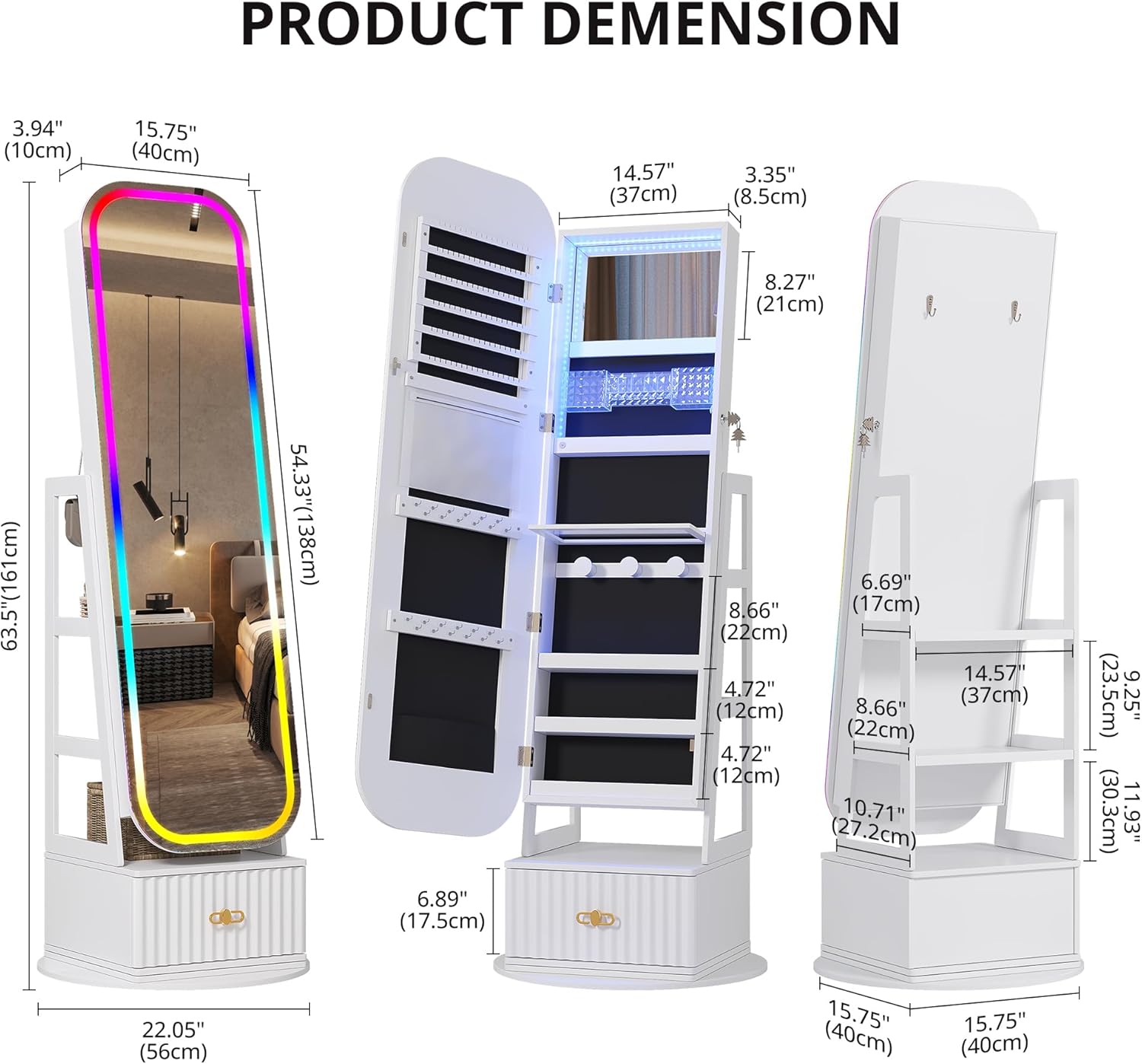
Image: Interior view of the cabinet displaying earring slots, necklace hooks, ring slots, and shelves for various jewelry and cosmetic items.

Image: Demonstrates the 360-degree rotation feature, the spacious bottom drawer, the included keys for locking, and the multi-layer storage shelves on the back of the unit.

Image: A detailed breakdown of the cabinet's storage capabilities, including specific counts for earring slots, stud holes, necklace hooks, ring slots, bracelet rods, and shelves, along with a large drawer.
Video: An overview of the SKKTKT 360 Swivel Jewelry Cabinet with Lights, showcasing its features and functionality.
5. Operating Instructions
5.1. 360° Swivel Function
Gently rotate the entire cabinet unit on its base to access the full-length mirror, internal storage, or rear storage shelves. Ensure the area around the cabinet is clear before rotating.
5.2. RGB Lighting Control
The RGB lights are controlled via touch-sensitive buttons located on the mirror frame. Ensure the power adapter is connected.
- Power On/Off: Tap the power button icon to turn the lights on or off.
- Change Static Color: Tap the color cycle button to cycle through the 7 static colors (white, blue, pink, red, yellow, light blue, green).
- Activate Dynamic Modes: Tap the mode button to switch between the 7 dynamic RGB lighting modes.
- Adjust Brightness: Press and hold the brightness adjustment button to increase or decrease the light intensity (from 10% to 100%). The system remembers your last brightness setting.
- Adjust Dynamic Mode Speed: For dynamic modes, long press the mode button to control the color-changing speed from fast to slow.

Image: The full-length mirror showcasing its vibrant RGB lighting capabilities, displaying a spectrum of colors.
5.3. Using the Internal Vanity Mirror
Open the main mirror door to reveal the internal storage and the built-in lighted vanity mirror. The soft interior lighting will illuminate automatically when the door is opened, providing optimal light for makeup application or jewelry selection.

Image: A close-up of the integrated lighted vanity mirror, ideal for applying makeup and selecting accessories.
5.4. Locking Mechanism
To secure your valuables, use the provided keys to lock the main mirror door. Insert the key into the lock on the side of the cabinet and turn to engage the locking mechanism. Ensure the door is fully closed before locking.
6. Maintenance
- Cleaning the Mirror: Use a soft, lint-free cloth and a glass cleaner to clean the mirror surfaces. Avoid abrasive cleaners.
- Cleaning the Cabinet: Wipe the exterior and interior surfaces with a soft, damp cloth. For velvet-lined areas, use a soft brush or lint roller to remove dust.
- Dusting: Regularly dust all surfaces to prevent buildup.
- Avoid Moisture: Keep the cabinet away from excessive moisture or humidity to prevent damage to the wood and electrical components.
- Check Connections: Periodically check all screws and fasteners to ensure they remain tight.
7. Troubleshooting
| Problem | Possible Cause | Solution |
|---|---|---|
| RGB lights not turning on. | Power adapter not connected or faulty. | Ensure the power adapter is securely plugged into both the cabinet and a working electrical outlet. Check the power outlet with another device. |
| Lights not changing color/mode. | Incorrect button press or temporary malfunction. | Refer to section 5.2 for correct button usage. Try unplugging and re-plugging the power adapter to reset the system. |
| Cabinet does not swivel smoothly. | Obstruction on the base or uneven surface. | Check for any objects obstructing the swivel base. Ensure the cabinet is placed on a flat, level surface. |
| Door does not close or lock properly. | Misalignment or obstruction. | Check for any items blocking the door. Ensure the cabinet is on a level surface. Inspect hinges for damage. |
8. Specifications
| Feature | Detail |
|---|---|
| Model Number | 67052 |
| Brand | SKKTKT |
| Color | White 052 |
| Material | Engineered Wood (exterior), Velvet (interior) |
| Product Dimensions (D x W x H) | 14.6" x 21.6" x 63.4" |
| Item Weight | 60.4 Pounds |
| Lighting Type | RGB LED (7 static colors, 7 dynamic modes) |
| Special Features | 360° Swivel, Full-Length Mirror, Internal Lighted Vanity Mirror, Lockable, Rear Storage Shelves |
| Number of Drawers | 2 |
| Included Components | Installation tool |
9. Warranty and Support
For warranty information, technical support, or assistance with parts, please contact SKKTKT customer service. Refer to the product packaging or the official SKKTKT website for contact details.