Introduction
Thank you for choosing the Peascat Spotlight Rechargeable Flashlight. This high-lumen, multi-functional device is designed for various outdoor and emergency situations, offering powerful illumination, versatile lighting modes, and convenient charging options. This manual provides essential information for the safe and effective use, maintenance, and troubleshooting of your new flashlight.
Please read this manual thoroughly before operating the device and retain it for future reference.
Product Overview
The Peascat Spotlight is a robust and versatile lighting tool featuring a 350° rotatable head, multiple light modes, and dual charging capabilities. Its durable construction ensures reliable performance in various conditions.
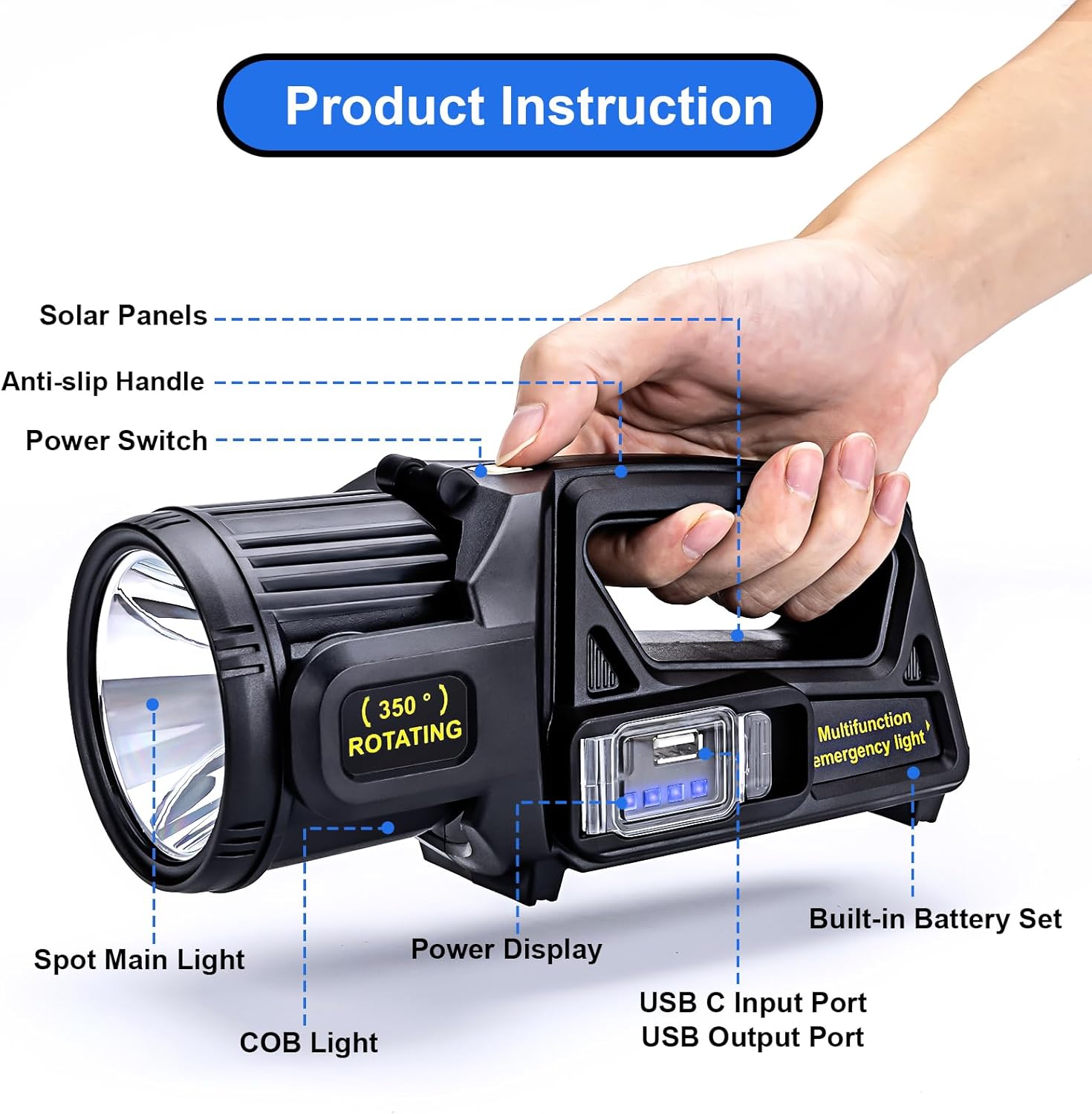
Figure 1: Product Components and Features
- Spot Main Light: Primary high-lumen light source.
- COB Light: Secondary light source for broader illumination.
- Solar Panels: Integrated panel for solar charging.
- Anti-slip Handle: Ergonomically designed for secure grip.
- Power Switch: Controls power and light modes.
- Power Display: Indicates remaining battery life (25%/50%/75%/100%).
- USB C Input Port: For fast charging the device.
- USB Output Port: Functions as a power bank to charge external devices.
- Built-in Battery Set: Provides long-lasting power.
The flashlight is designed with a 350° rotatable head, allowing for flexible adjustment of the light angle to suit various needs. It also features an IPX6 waterproof rating, making it suitable for use in rain, snow, and dusty environments.
Setup
Before first use, ensure the flashlight is fully charged. The device offers two primary charging methods:
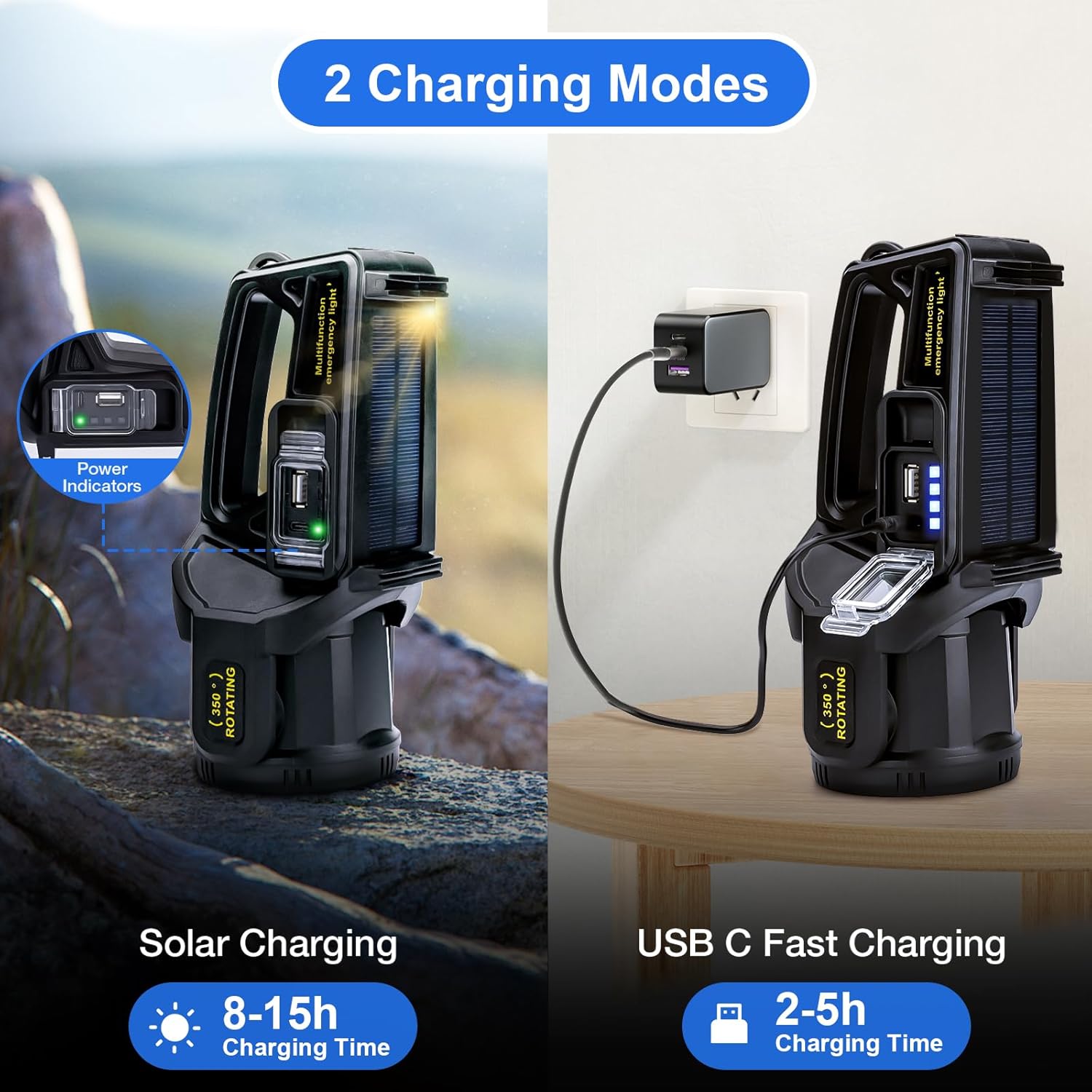
Figure 2: Charging Methods
- USB C Fast Charging:
- Connect the provided USB C charging cable to the USB C Input Port on the flashlight.
- Plug the other end of the cable into a compatible USB power adapter (not included) or a computer USB port.
- Charging time typically ranges from 2 to 5 hours for a full charge.
- Solar Charging:
- Place the flashlight with the solar panel facing direct sunlight.
- Ensure the solar panel is clean and unobstructed for optimal charging efficiency.
- Solar charging time can range from 8 to 15 hours depending on sunlight intensity.
The Power Display will indicate the charging progress and remaining battery life (25%/50%/75%/100%).
Operating Instructions
The Peascat Spotlight features 9 distinct lighting modes, accessible via the power switch and the 350° rotatable head.
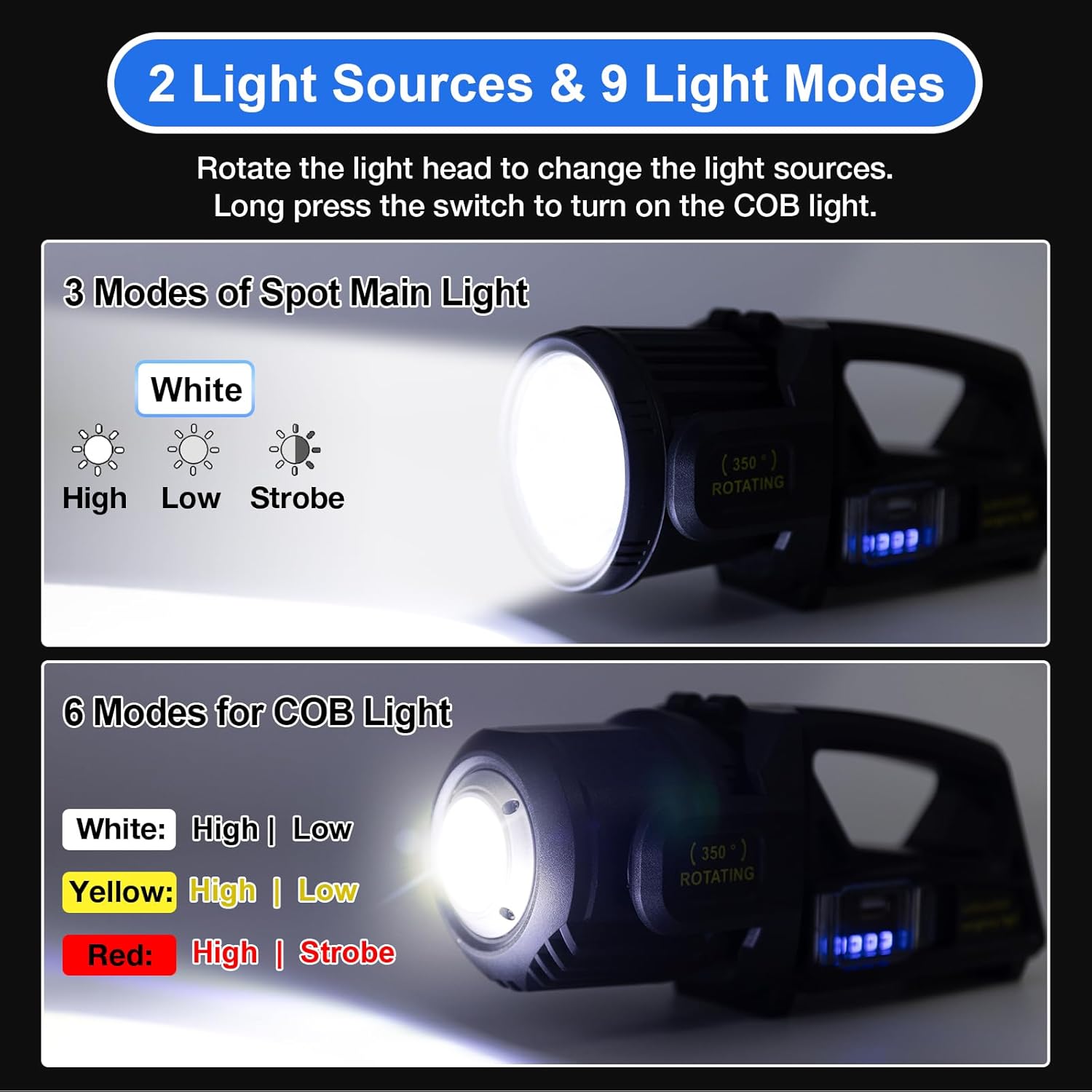
Figure 3: Light Modes and Rotation
Switching Light Sources:
To switch between the main spot light and the COB light, rotate the head of the flashlight 350°. The main spot light is active when the head is in the forward position, and the COB light is active when the head is rotated to expose the side panel.
Operating the Main Spot Light (3 Modes):
- Press the Power Switch once for High mode.
- Press again for Low mode.
- Press a third time for Strobe mode.
- Press a fourth time to turn off the main spot light.
Operating the COB Light (6 Modes):
- Ensure the flashlight head is rotated to expose the COB light panel.
- Long press the Power Switch to activate the COB light.
- Subsequent short presses will cycle through the following modes:
- White High
- White Low
- Yellow High
- Yellow Low
- Red High
- Red Strobe (Emergency Signal)
- Long press the Power Switch again to turn off the COB light.
Using as a Power Bank:
The flashlight is equipped with a USB Output Port, allowing it to function as an emergency power bank for your mobile phone or other small electronic devices.

Figure 4: USB Power Output Function
- Connect your device's charging cable to the USB Output Port on the flashlight.
- The flashlight will begin charging your device.
- Note that using the flashlight as a power bank will consume its internal battery.
Maintenance
Proper maintenance ensures the longevity and optimal performance of your Peascat Spotlight.
Cleaning:

Figure 5: IPX6 Waterproof Feature
- Wipe the flashlight with a soft, damp cloth to remove dirt and debris.
- Do not use abrasive cleaners or solvents, as they may damage the surface.
- Ensure the USB ports are dry before charging or using the power bank function.
- While the flashlight is IPX6 waterproof (protected against powerful water jets), it is not designed for underwater use. Avoid submerging the device.
Storage:
- Store the flashlight in a cool, dry place away from direct sunlight and extreme temperatures.
- For long-term storage, charge the battery to approximately 50% every 3-6 months to preserve battery health.
Battery Care:
- Avoid completely draining the battery frequently, as this can reduce its lifespan.
- Use only the provided charging cable or a compatible USB C cable.
Troubleshooting
If you encounter issues with your Peascat Spotlight, refer to the following common problems and solutions:
| Problem | Possible Cause | Solution |
|---|---|---|
| Flashlight does not turn on. | Low battery. | Charge the flashlight using USB C or solar power. Check the power display. |
| Light output is dim. | Low battery; Lens is dirty. | Recharge the flashlight. Clean the lens with a soft cloth. |
| Cannot switch between main light and COB light. | Head not fully rotated; Incorrect button press. | Ensure the head is fully rotated to the desired position. For COB light, a long press of the power switch is required. |
| Phone not charging from USB Output. | Flashlight battery is too low; Cable issue; Device incompatibility. | Ensure flashlight has sufficient charge. Try a different USB cable. Verify your device is compatible with 5V USB charging. |
| Solar charging is slow or not working. | Insufficient sunlight; Solar panel is dirty or obstructed. | Place the flashlight in direct, strong sunlight. Clean the solar panel. Note that solar charging is slower than USB C charging. |
If the problem persists after trying these solutions, please contact customer service for further assistance.
Specifications
| Feature | Detail |
|---|---|
| Model Number | P1 |
| Lumen Output | Up to 2,000,000L (equivalent to 1100 Lumen brightness) |
| Beam Distance | Up to 1300 meters |
| Light Modes | 9 Modes (Spot: High/Low/Strobe; COB: White High/Low, Yellow High/Low, Red High/Strobe) |
| Head Rotation | 350° Rotatable |
| Charging Methods | USB C (2-5 hours), Solar (8-15 hours) |
| Battery Life (Low Mode) | Up to 12 hours |
| Power Output | USB (for charging external devices) |
| Water Resistance | IPX6 Waterproof (Snowproof, Dustproof) |
| Material | High-density ABS Plastic |
| Dimensions | 3"D x 1"W x 3"H |
| Weight | 1.37 pounds |
| Included Components | Built-in battery spotlight, Charging Cable |
Warranty and Support
Peascat offers comprehensive customer support for your product.
- Warranty: We provide 2 years of free replacement service from the date of purchase.
- Customer Service: Our customer service team is available 7 days a week, 24 hours a day.
- Contacting Support: If you have any questions or encounter problems with your flashlight, please click "Get Help With Order" under your order ID on Amazon. We aim to resolve your issues within 24 hours.
For more information, visit the official Peascat Store on Amazon: Peascat Store


