
1. Introduction
Thank you for choosing the Lienuis 110 Pints Commercial Dehumidifier, Model OX-60PA. This manual provides essential information for the safe and efficient operation, maintenance, and troubleshooting of your dehumidifier. Please read it thoroughly before installation and use, and retain it for future reference.
This powerful unit is designed for effective moisture control in various environments, including basements, crawl spaces, garages, storage rooms, warehouses, and job sites, covering areas up to 1300 sq.ft. It features a 110 PPD (Pints Per Day) saturation removal rate and is equipped with advanced functionalities like automatic defrost, remote control, and flexible drainage options to ensure a dry and comfortable environment.

Image: The Lienuis 110 Pints Commercial Dehumidifier, showcasing its compact design and digital display.
2. Safety Information
Always follow basic safety precautions when using this appliance to reduce the risk of fire, electric shock, or injury.
- Ensure the unit is properly grounded.
- Do not operate the unit with a damaged power cord or plug.
- Do not block air intake or exhaust vents.
- Keep the unit away from water sources and flammable materials.
- Always unplug the unit before cleaning or performing any maintenance.
- Do not use the unit in areas where it may be exposed to splashing water.
- This appliance is not intended for use by persons (including children) with reduced physical, sensory or mental capabilities, or lack of experience and knowledge, unless they have been given supervision or instruction concerning use of the appliance by a person responsible for their safety.
3. Package Contents
Verify that all items are present in the package:
- Lienuis Commercial Dehumidifier (Model OX-60PA)
- Adjustable Feet
- Control Panel External Connection Cable (32.8 ft)
- Drain Hose (9.86 ft)
- Duct Adapter
- User Manual
4. Product Features
- High Capacity: 110 PPD (Pints Per Day) moisture removal at saturation, covering up to 1300 sq.ft.
- Smart Humidity Control: Adjustable humidity range from 20% to 90%.
- Multiple Operation Modes: Auto Mode, Continuous Dry Mode, and Sleep Mode for versatile use.
- Automatic Defrost: Prevents coils from freezing in low temperatures (down to 41°F) for continuous operation.
- Remote Control: External control panel with a 32.8 ft extension cable for convenient remote adjustments.
- Flexible Drainage: Supports gravity drainage with the included 9.86 ft hose or optional external pump drainage (pump not included).
- Washable Filter: Reusable filter for easy maintenance and improved air quality.
- Memory Restart: Automatically resumes previous settings after a power outage.
- Compact Design: Dimensions of 20.5"D x 14"W x 14"H, with portable handles and leveling feet.
- Duct-able Air Outlet: Allows for flexible air distribution.
5. Setup
5.1 Placement
Place the dehumidifier on a level, stable surface. Ensure there is at least 12 inches of space around the unit for proper airflow. The unit can be used for floor installation or hanging installation (hanging kits not included).

Image: The Lienuis dehumidifier showcasing its portable handles and adjustable leveling feet, highlighting its compact and easy-to-use design.
5.2 Drainage Options
Your dehumidifier offers two drainage methods:
- Gravity Drainage: Connect the included 9.86 ft drain hose to the drainage port on the unit. Ensure the hose is sloped downwards to allow water to flow out by gravity into a suitable drain.
- Pump Drainage (Optional): For situations requiring water to be drained upwards or over longer distances, an external condensate pump can be connected. The pump is not included and must be purchased separately.

Image: Illustration of the dehumidifier's flexible drainage options, including gravity drainage with the provided hose and the setup for optional pump drainage.
5.3 Remote Control Setup
The external control panel can be connected to the dehumidifier using the 32.8 ft extension cable. This allows you to monitor and adjust settings from a convenient location, such as a bedroom or another room, without needing to access the unit directly.
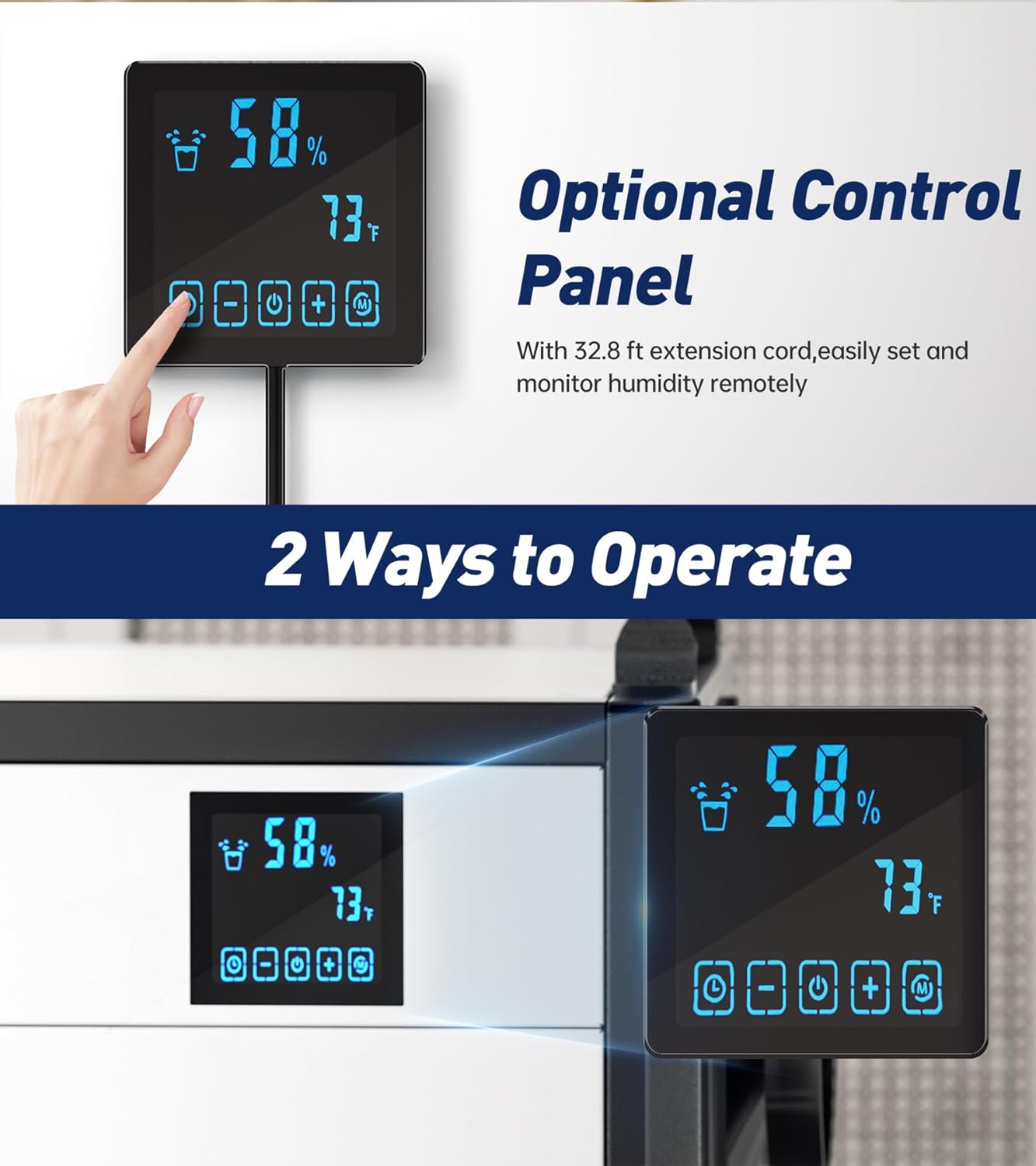
Image: The dehumidifier's optional remote control panel, showing its display and buttons for remote operation and monitoring of humidity and temperature.
6. Operating Instructions
6.1 Control Panel Overview
The control panel (either on the unit or the remote) allows you to manage all functions of the dehumidifier. It displays current humidity and temperature, and provides buttons for mode selection, humidity adjustment, and timer settings.
6.2 Power On/Off
Press the Power button to turn the unit on or off.
6.3 Setting Desired Humidity
In Auto Mode, use the Up/Down arrows on the control panel to set your desired humidity level between 20% and 90% Relative Humidity (RH). The unit will operate until the set humidity is reached, then cycle on/off to maintain it.
6.4 Operation Modes
- Auto Mode: The unit operates based on your set humidity level.
- Continuous Dry Mode: Ideal for very high humidity areas, the unit will run continuously regardless of the ambient humidity level.
- Sleep Mode: Operates at a lower fan speed for quieter performance, suitable for nighttime use.
6.5 Timer Function
Use the Timer button to set a delayed start or stop time for the dehumidifier, up to 24 hours. This allows for automated operation according to your schedule.
7. Maintenance
7.1 Filter Cleaning
The dehumidifier is equipped with a washable, reusable filter. Regularly check and clean the filter to ensure optimal performance and air quality. To clean, remove the filter, rinse it under running water, and allow it to dry completely before reinserting.

Image: A visual representation of the dehumidifier's washable and reusable filter being cleaned, emphasizing ease of maintenance.
7.2 Automatic Defrost
The unit features an automatic defrost function. If frost builds up on the coils in low-temperature environments (below 41°F), the unit will automatically initiate a defrost cycle to melt the ice, ensuring continuous and efficient operation. No manual intervention is required for this process.

Image: An illustration demonstrating the automatic defrost function, showing how it prevents ice buildup on the coils for uninterrupted performance.
8. Troubleshooting
| Problem | Possible Cause | Solution |
|---|---|---|
| Dehumidifier does not turn on. | No power, power cord not plugged in, or power outage. | Check power connection, ensure outlet is functional. |
| Unit is running but not removing moisture. | Filter is dirty, humidity setting is too high, or ambient temperature is too low. | Clean the air filter. Lower the desired humidity setting. Ensure ambient temperature is above 41°F. |
| Water is not draining. | Drain hose is kinked, clogged, or not properly connected. Gravity drainage hose is not sloped downwards. | Check drain hose for kinks or blockages. Ensure proper connection and downward slope for gravity drainage. |
| Unit is making unusual noise. | Unit is not level, fan obstruction, or internal component issue. | Ensure the unit is on a level surface. Check for any obstructions in the fan. If noise persists, contact customer support. |
9. Specifications
| Feature | Detail |
|---|---|
| Brand | Lienuis |
| Model Name | OX-60PA |
| Capacity | 110 Pints (at saturation) / 60 Pints per Day (AHAM) |
| Floor Area Coverage | Up to 1300 Square Feet |
| Humidity Control Range | 20% - 90% RH |
| Operating Temperature Range | 41°F - 113°F |
| Air Flow Capacity | 125 Cubic Feet Per Minute (CFM) |
| Wattage | 567 watts |
| Item Weight | 64 Pounds |
| Product Dimensions | 14"D x 20"W x 14"H |
| Material | Metal |
| Special Features | Adjustable Humidity Control, Automatic Defrost, Automatic Moisture Removal, Optional Remote Control, Gravity Drainage, Pump Drainage (optional pump), Timer, Washable Filter |
| Included Components | Adjustable Feet, Control Panel External Connection Cable, Drain Hose, Duct Adapter |
10. Warranty and Support
For warranty information and customer support, please refer to the documentation included with your product or visit the official Lienuis website. Ensure you register your product for warranty purposes if required.
For any questions or assistance, please contact Lienuis customer service.


