
FYC Q23L
FYC Walking Treadmill User Manual
Model: Q23L
Introduction
Welcome to the user manual for your new FYC Walking Treadmill. This treadmill is designed with user comfort and safety in mind, featuring extended handrails and a composite shock-absorbing deck, making it ideal for seniors and suitable for the entire family. It offers optional APP control for an enhanced exercise experience and boasts a robust 300 LBS capacity.

Figure 1: FYC Walking Treadmill in use.
Important Safety Instructions
Before operating your treadmill, please read and understand all safety instructions. Keep this manual for future reference.
- Consult a physician before beginning any exercise program.
- Ensure the treadmill is placed on a flat, stable surface with adequate clearance around it.
- Always wear appropriate athletic footwear.
- Attach the safety key lanyard to your clothing before starting the treadmill.
- Do not allow children or pets near the treadmill while it is in operation.
- Hold onto the extended handrails for balance, especially when starting or stopping.
- If you feel faint, dizzy, or experience pain, stop exercising immediately.

Figure 2: Emphasizing the safety key and long handrails for user security.
Setup and Assembly
The FYC Walking Treadmill is designed for quick and easy assembly, typically taking less than 30 minutes with assistance.
- Carefully remove all components from the packaging.
- Attach the main support frame to the base unit using the provided hardware.
- Secure the extended handrails to the main support frame. Ensure all bolts are tightened securely.
- Connect the console cables as instructed in the quick start guide.
- Plug the treadmill into a grounded electrical outlet.
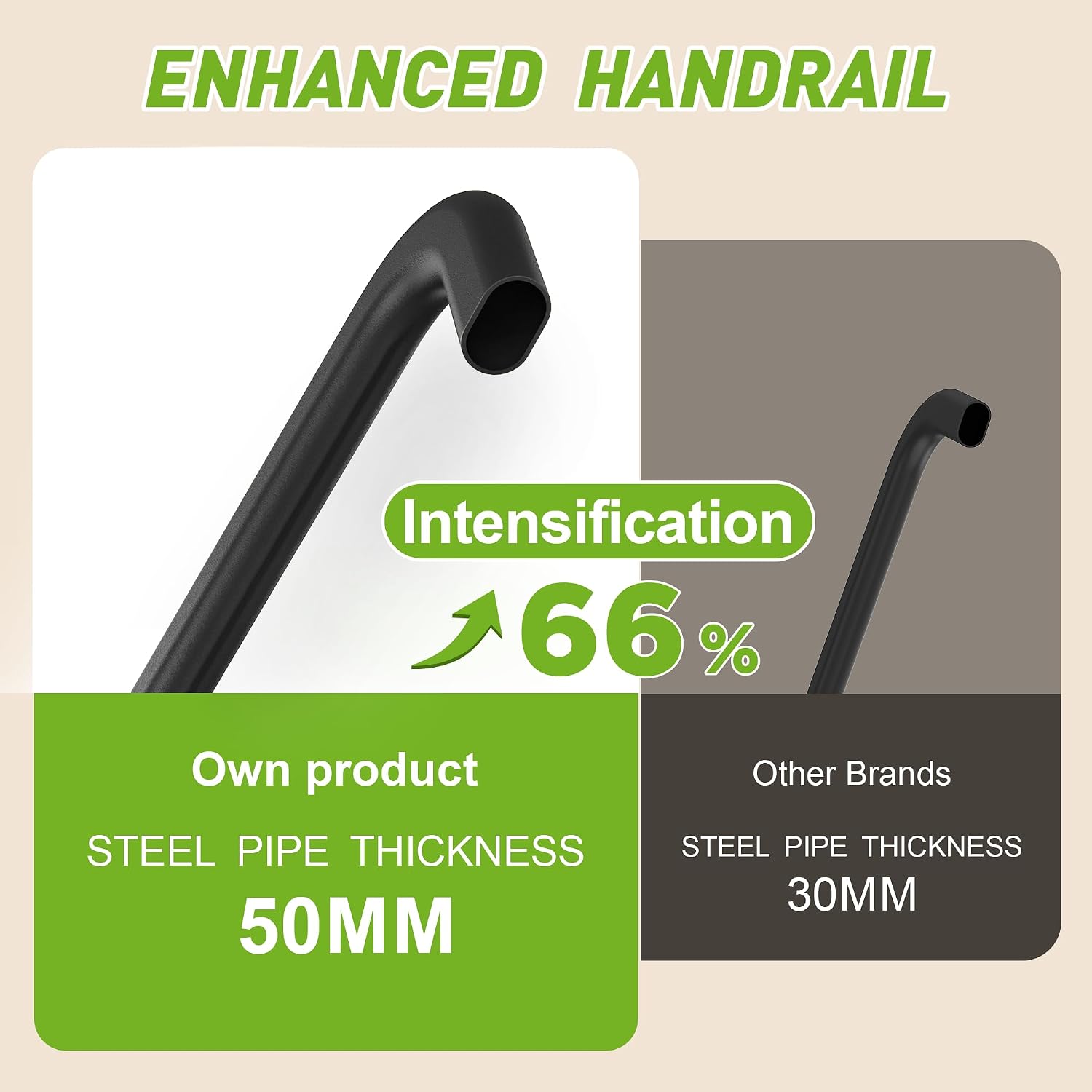
Figure 3: Illustration of the enhanced handrail thickness for stability.
Operating Your Treadmill
Control Panel Overview
The treadmill features a large, backlit LED display with clear, legible fonts, showing key exercise data such as speed, distance, time, and calories burned. The control panel includes intuitive buttons for easy operation.
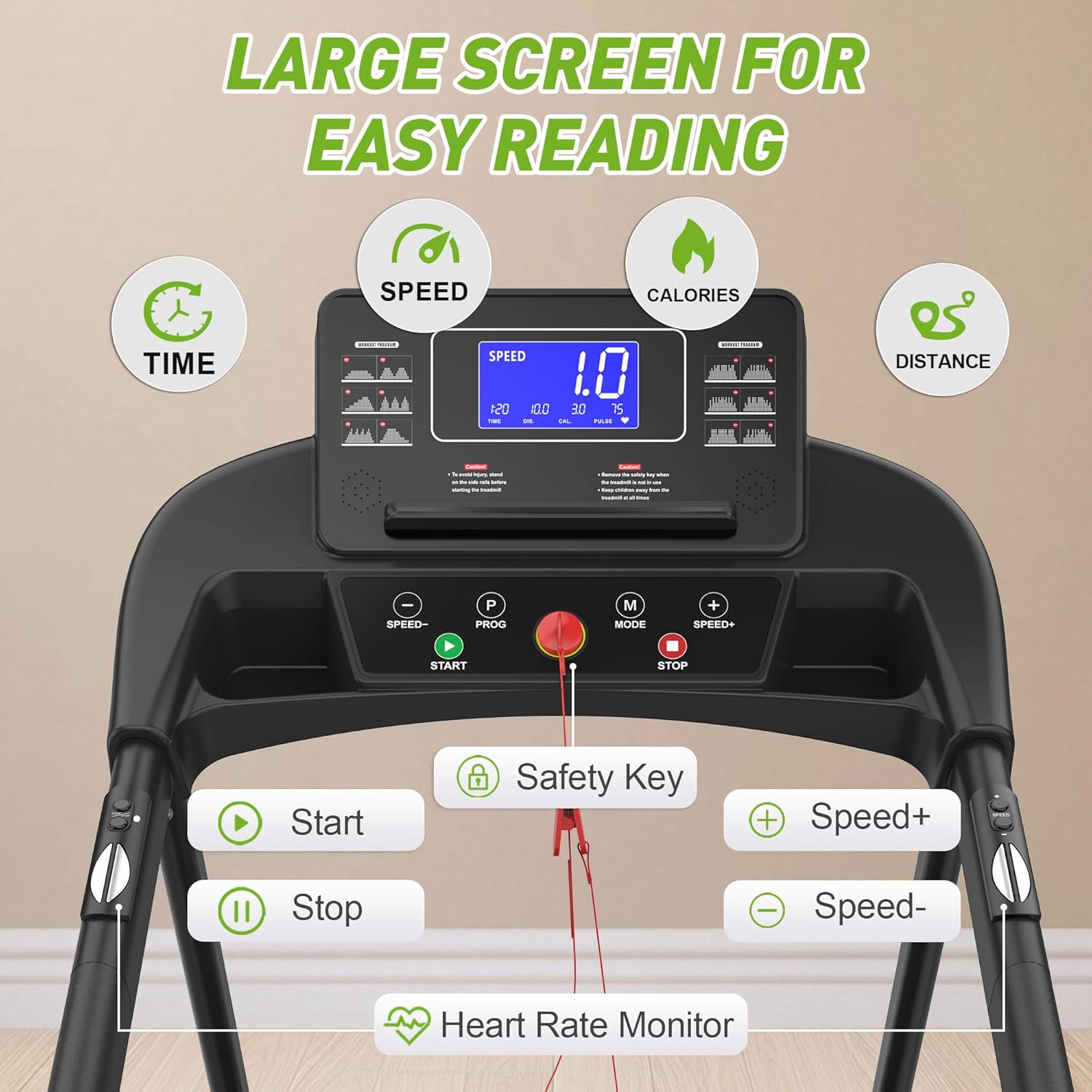
Figure 4: Detailed view of the user-friendly control panel.
Speed Adjustment
The treadmill offers a speed range from 0.5 to 7.5 Miles per Hour (MPH). You can adjust the speed in 0.1 MPH increments using the 'Speed+' and 'Speed-' buttons on the main console or the convenient buttons located on the handrails.
Heart Rate Monitoring
Integrated heart rate sensors are located on the handrails. Simply grip these sensors during your workout to display your current heart rate on the console.

Figure 5: Location of the heart rate sensors on the handrails.
Pre-set Programs and Modes
The treadmill comes with 12 pre-set workout modes designed to cater to various fitness levels and goals, from gentle walks to high-intensity training. Use the 'PROG' button to cycle through these programs and 'MODE' to select different display modes.
App Connectivity
Enhance your workout experience by connecting to the Fit Show app. The app allows you to enjoy various simulated scenarios, such as forest running and beach walking, and provides virtual running tracks. It also records and generates reports for your exercise data, including steps, heart rate, calorie consumption, and duration.
Safety Key
The red safety key is a crucial safety feature. Attach the lanyard to your clothing. If you accidentally fall or move too far from the console, the safety key will detach, immediately cutting off power to the treadmill and bringing the belt to a stop.
Key Features and Benefits
- Dedicated Knee Care: Features a six-layer thickened running belt and 8 spring double shock-absorbing running boards to significantly reduce knee impact.
- All-round Safety: Equipped with a low-profile running platform and full-size extended handrails for enhanced balance and support. The red safety key provides immediate power cut-off in case of accidental falls.
- Simple Operation: Designed for convenience with a backlit display, large legible fonts, and intuitive buttons for easy control of speed and workout settings.
- Fun-filled Exercise: Compatible with the Fit Show app, offering virtual scenarios and tracking comprehensive exercise data for better fitness management.
- Sleek Design for Easy Placement & Mobility: Streamlined profile with mobile rollers allows for smooth repositioning and a compact footprint, ideal for any home.
- Family-friendly: Suitable for daily exercise for seniors and offers 12 preset modes for various workout intensities, accommodating the whole family.

Figure 6: The treadmill's protection design with advanced shock absorption.

Figure 7: The spacious running area provides comfort and safety.

Figure 8: The treadmill's robust 300 LBS maximum load capacity.
Maintenance Guidelines
Regular maintenance ensures the longevity and optimal performance of your treadmill.
- Cleaning: Wipe down the treadmill with a damp cloth after each use to remove sweat and dust. Avoid abrasive cleaners.
- Belt Lubrication: The running belt requires lubrication every 3-4 months, or after approximately 50 hours of use, to ensure smooth operation and prevent wear. Refer to the included user manual for specific lubrication instructions.
- Belt Tension: Periodically check the tension of the running belt. If it slips or feels loose, adjust it according to the instructions in the full user manual.
Troubleshooting Common Issues
If you encounter any issues with your treadmill, please refer to the following common troubleshooting steps:
- Treadmill not starting: Ensure the power cord is securely plugged into a grounded outlet and the safety key is correctly inserted into the console.
- Belt slipping: The running belt may need tensioning or lubrication. Refer to the Maintenance section or the full user manual.
- Unusual noises: Check for any loose parts or foreign objects under the belt. If the noise persists, contact customer support.
For more detailed troubleshooting or issues not listed here, please contact our customer service team.
Product Specifications
| Specification | Detail |
|---|---|
| Brand | FYC |
| Model Name | Q23L |
| Color | black |
| Product Dimensions | 50.5"D x 26"W x 7.6"H |
| Item Weight | 66 Pounds |
| Material | Carbon Steel |
| Maximum Speed | 7.5 Miles per Hour |
| Maximum Horsepower | 3 Horsepower |
| Maximum Weight Recommendation | 300 Pounds |
| Number of Programs | 12 |
| Connectivity Technology | Bluetooth |
Warranty and Customer Support
FYC values customer satisfaction and provides comprehensive support for your treadmill.
- Quality Guarantee: Your FYC Walking Treadmill comes with a two-year quality guarantee.
- Customer Service: Our dedicated 6*24-hour customer service team is ready to assist with any issues or questions you may have.
For support, please contact the seller, Homill, through your purchase platform or refer to the contact information provided in the full user manual.
Related documentsQ23L


Ask a question about this manual
Ask about setup, troubleshooting, compatibility, parts, safety, or missing instructions. Manuals+ will review the question and use this page’s manual context to help answer it.