
1. Introduction
Thank you for choosing the KUNFINE 22-inch Car Overhead Monitor, Model MP5-22IN. This manual provides essential information for the safe installation, operation, and maintenance of your new car entertainment system. Please read this manual thoroughly before installation and use, and retain it for future reference.
2. Safety Information
- Professional Installation Recommended: Due to the complexity of vehicle electrical systems and mounting requirements, professional installation is strongly recommended to ensure proper function and safety.
- Power Supply: Ensure the monitor is connected to a stable 12V DC power supply. Incorrect voltage can damage the device.
- Wiring: All wiring should be securely connected and insulated to prevent short circuits and electrical hazards. Avoid routing cables where they can be pinched or damaged.
- Ventilation: Do not block the ventilation openings on the unit. Ensure adequate airflow to prevent overheating.
- Operating While Driving: Do not operate the monitor or allow passengers to operate it in a manner that distracts the driver. Driver distraction can lead to accidents.
- Cleaning: Use a soft, dry cloth for cleaning. Do not use abrasive cleaners or solvents.
- Moisture: Keep the unit away from water and excessive moisture.
3. Product Overview
The KUNFINE MP5-22IN is a 22-inch LED overhead monitor designed for vehicle installation. It features a flip-down design, HDMI input, and supports various media formats for playback via USB or SD card. The unit includes built-in stereo speakers and Bluetooth audio transmission capabilities.
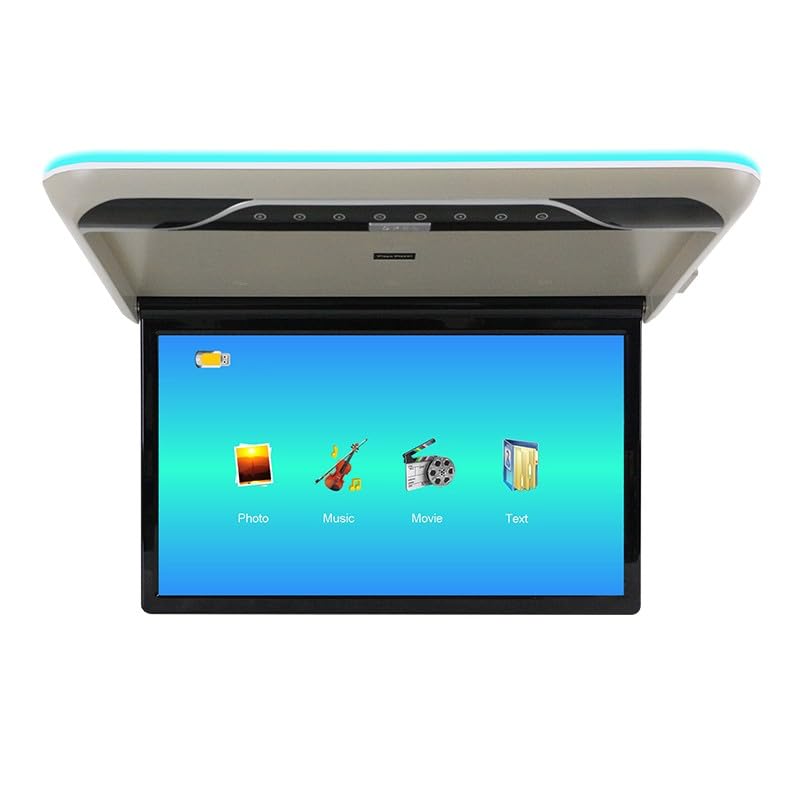
Figure 3.1: KUNFINE 22-inch Car Overhead Monitor (MP5-22IN) with screen deployed.
Key Features:
- 22-inch Full HD (1920x1080) LED IPS Screen with HDR10+ Technology
- Flip-down roof mount design
- HDMI input for external devices
- USB and SD card media playback (RMVB, AVI, MP4, MPG, RM, MPEG formats supported)
- Built-in Stereo Speakers
- Bluetooth Audio Transmission
4. Installation
Proper installation is crucial for the performance and safety of your overhead monitor. It is highly recommended to have this unit installed by a qualified professional.
4.1 Pre-Installation Considerations
- Space Requirement: Before purchase and installation, ensure there is sufficient space in your vehicle's roof for the 22-inch monitor when folded up and deployed. Consider the dimensions of the unit and the available ceiling clearance.
- Vehicle Compatibility: This monitor is suitable for large vehicles such as buses, coaches, and motor homes. Verify compatibility with your vehicle's electrical system and roof structure.
- Power Source: Identify a stable 12V DC power source within your vehicle.
4.2 Mounting the Unit
- Carefully select the mounting location on the vehicle's roof, ensuring it does not obstruct the driver's view or interfere with vehicle safety features.
- Mark the mounting points and carefully cut any necessary openings in the headliner for wiring and mounting brackets.
- Securely attach the mounting bracket to the vehicle's roof structure using appropriate fasteners.
- Mount the monitor unit to the installed bracket, ensuring it is firmly secured and level.
4.3 Wiring Connections
- Power Connection: Connect the monitor's power cable to the vehicle's 12V DC power supply (typically an ignition-switched power source) and ground. Use appropriate fuses.
- HDMI Input: If connecting an external HDMI source (e.g., a game console, media player), connect an HDMI cable from the source to the monitor's HDMI input port.
- Audio Output (Optional): If using external speakers or an amplifier, connect the audio output from the monitor to your vehicle's audio system.
- USB/SD Card: These ports are for media playback and do not require external wiring for basic function.
5. Operation
This section details the basic operation of your KUNFINE overhead monitor.
5.1 Powering On/Off
- To power on the monitor, ensure the vehicle's ignition is on (if wired to an ignition-switched source) and press the power button on the unit or remote control.
- To power off, press the power button again.
5.2 Media Playback (USB/SD Card)
- Insert a USB drive or SD card containing compatible media files (RMVB, AVI, MP4, MPG, RM, MPEG) into the respective port.
- The monitor should automatically detect the media and display a menu for Photo, Music, or Movie.
- Navigate through the menu using the control panel buttons or remote control to select your desired media type and file.
- Press the Play/Enter button to start playback.
5.3 HDMI Input
- Connect an external device (e.g., smartphone, tablet, game console) to the monitor's HDMI input port using an HDMI cable.
- Select the HDMI input source from the monitor's input menu. The monitor will display content from the connected HDMI device.
5.4 Audio Output
- Built-in Speakers: The monitor features integrated stereo speakers for direct audio output. Adjust volume using the unit's controls or remote.
- Bluetooth Audio Transmission: The monitor can transmit audio wirelessly via Bluetooth. Refer to your vehicle's audio system manual for pairing instructions to connect the monitor's Bluetooth audio to your car's speakers.
6. Maintenance
Regular maintenance ensures the longevity and optimal performance of your KUNFINE overhead monitor.
- Cleaning the Screen: Use a soft, lint-free cloth specifically designed for electronics screens. Gently wipe the screen to remove dust and fingerprints. For stubborn marks, slightly dampen the cloth with water or a screen-cleaning solution (do not spray directly onto the screen).
- Cleaning the Unit: Wipe the exterior of the monitor with a soft, dry cloth. Avoid using harsh chemicals, solvents, or abrasive materials, as these can damage the finish.
- Ventilation: Periodically check that the ventilation openings are free from dust and debris to ensure proper heat dissipation.
- Storage: If the vehicle is to be stored for an extended period, ensure the monitor is powered off and the screen is folded up to protect it.
7. Troubleshooting
If you encounter issues with your KUNFINE overhead monitor, refer to the following troubleshooting guide:
| Problem | Possible Cause | Solution |
|---|---|---|
| Monitor does not power on. | No power supply; Blown fuse; Loose wiring. | Check vehicle's ignition; Inspect power cable connections; Check and replace fuse if necessary. |
| No video signal. | Incorrect input source selected; Faulty HDMI cable; No media in USB/SD. | Select correct input source (HDMI, USB, SD); Replace HDMI cable; Ensure USB/SD card contains compatible media. |
| No audio. | Volume too low; Mute activated; Incorrect audio output selected; Bluetooth not paired. | Increase volume; Deactivate mute; Check audio settings; Pair Bluetooth with vehicle's audio system. |
| Remote control not working. | Dead batteries; Obstruction between remote and unit. | Replace remote control batteries; Ensure clear line of sight to the monitor's IR receiver. |
If the problem persists after attempting these solutions, please contact KUNFINE customer support.
8. Specifications
| Model Number | MP5-22IN (KF-A1905) |
| Screen Size | 22 inches |
| Display Type | LED IPS |
| Display Resolution | 1920x1080 (Full HD) |
| Connectivity Technology | HDMI, USB, SD Card, Bluetooth |
| Compatible Devices | Television (via HDMI), USB/SD media devices |
| Supported Media Formats | RMVB, AVI, MP4, MPG, RM, MPEG |
| Power Supply | 12V DC |
| Dimensions (Parcel) | 64 x 48 x 10 cm |
| Weight (Parcel) | 7.5 kg |
9. Warranty and Support
The KUNFINE 22-inch Car Overhead Monitor (MP5-22IN) comes with a 1-year warranty from the date of purchase. This warranty covers manufacturing defects and ensures your rights and interests.
For technical support, warranty claims, or any questions regarding your product, please contact KUNFINE customer support directly through the Amazon messaging system. Our team will respond as soon as possible to assist you.