
Introduction
This manual provides instructions for the ZWP Replacement Remote Control, designed for various under-desk elliptical machines. This remote control is a direct replacement and requires no programming. Simply install batteries to begin operation.
Product Overview
The ZWP Replacement Remote Control is constructed from high-quality, wear-resistant ABS material, offering a comfortable hand feeling and durable performance. It features soft silicone buttons for reliable operation.
Key Features:
- Made of high-quality ABS material for durability.
- Comfortable hand feeling.
- No programming required; ready to use after battery installation.
- Compatible with a range of under-desk elliptical machines.

Image: The remote control's construction, emphasizing its ABS material and soft silicone buttons for user comfort and durability.

Image: A general view of two ZWP replacement remote controls, illustrating their design and form factor.
Setup
Battery Installation:
- Locate the battery compartment on the back of the remote control.
- Slide the battery compartment cover downwards to open it.
- Insert two (2) 1.5V AAA batteries, ensuring correct polarity (+ and -) as indicated inside the compartment. (Batteries are not included with the remote control.)
- Slide the battery compartment cover back into place until it clicks securely.
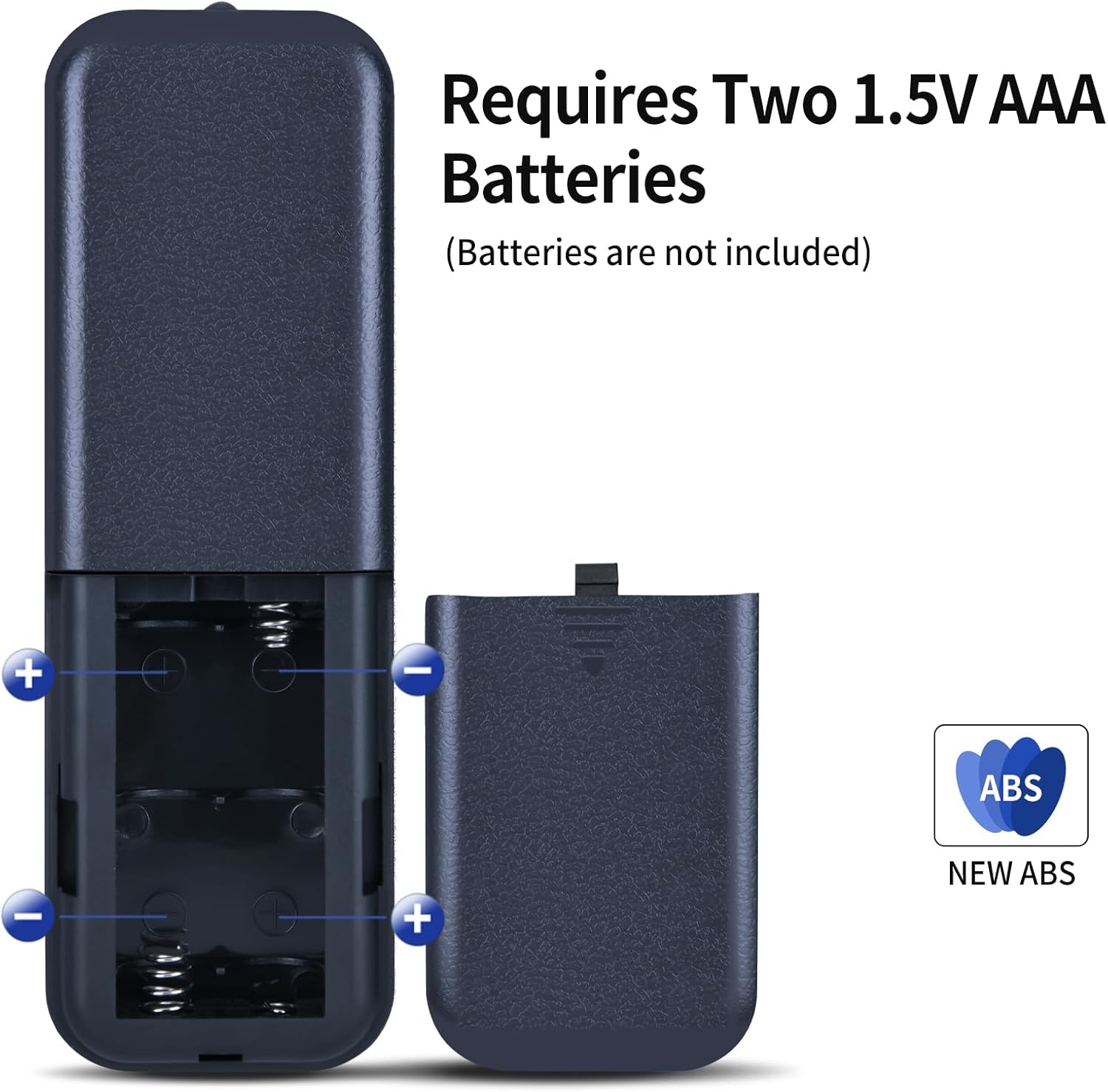
Image: Illustration of the remote control's battery compartment, demonstrating the correct insertion of two 1.5V AAA batteries.
Operating Instructions
After installing the batteries, the remote control is ready for immediate use with compatible under-desk elliptical machines. No additional programming is required.
Button Functions:

Image: A detailed view of the remote control, highlighting each button and its corresponding function for easy identification.
- POWER: Turns the elliptical machine on or off.
- START/STOP: Initiates or pauses the exercise program.
- MODE: Cycles through different exercise modes or display options.
- DIRECTION: Changes the direction of pedal rotation (forward/reverse).
- SPEED ▲ (Up): Increases the speed or intensity level.
- SPEED ▼ (Down): Decreases the speed or intensity level.
- FUNCTION: Activates specific functions or settings on the elliptical machine.
Important Compatibility Note: Before purchasing or using this replacement remote, ensure that the button layout and functions on your original remote control match those shown on this replacement. Discrepancies in button layout may result in incompatibility.

Image: A visual comparison between the ZWP replacement remote and an original remote, illustrating the importance of verifying identical button configurations for proper functionality.

Image: Two remote controls displayed side-by-side, visually confirming the functional equivalence of the replacement remote with the original.
Maintenance
To ensure the longevity and optimal performance of your remote control, follow these maintenance guidelines:
- Cleaning: Wipe the remote control regularly with a soft, dry cloth. For stubborn dirt, slightly dampen the cloth with water; avoid harsh chemicals or abrasive cleaners.
- Storage: Store the remote control in a cool, dry place away from direct sunlight and extreme temperatures.
- Battery Care: If the remote control will not be used for an extended period, remove the batteries to prevent leakage and potential damage.
- Avoid Drops: Protect the remote from physical impact, as drops can damage internal components.
Troubleshooting
If you experience issues with your remote control, refer to the following common troubleshooting steps:
- Remote Not Responding:
- Check if the batteries are inserted correctly with the correct polarity.
- Replace old batteries with new 1.5V AAA batteries.
- Ensure there are no obstructions between the remote control and the elliptical machine's receiver.
- Verify that the remote control's button layout matches your original remote for compatibility.
- Intermittent Functionality:
- Ensure the battery contacts are clean and free of corrosion.
- Try operating the remote closer to the elliptical machine.
Specifications
| Feature | Detail |
|---|---|
| Brand | ZWP |
| Compatible Devices | Putnen MF-H-01, HJDFGSS D802, CURSOR Fitness C5, GEONEO S200, Medilax P70324, Morelax M858, DOMNIU, Yagud ZF0801, Roylvan TD05-EB-010 Under Desk Elliptical Machines |
| Power Source | 2 x 1.5V AAA Batteries (Not Included) |
| Material | High-quality ABS |
| Color | Black |
| Item Weight | 2.08 ounces |
| Package Dimensions | 7.5 x 2.6 x 1 inches |
| Special Feature | Ergonomic design |
Support
For any questions or assistance regarding your ZWP Replacement Remote Control, please do not hesitate to contact us. We are committed to helping you resolve any issues you may encounter.
Please refer to your purchase documentation or the seller's contact information for specific support channels.