
SweetLF SWS7105
SweetLF Electric Razor SWS7105 User Manual
Model: SWS7105 | Brand: SweetLF
Introduction
This manual provides detailed instructions for the safe and effective use, maintenance, and troubleshooting of your SweetLF Electric Razor SWS7105. Please read this manual thoroughly before first use and retain it for future reference.
Key Features:
- 360° Floating Head: Adapts to facial contours for a close shave.
- Long-Lasting Battery & Fast Charging: Up to 120 minutes of runtime on a 60-minute Type-C charge.
- IPX7 Waterproof: Suitable for wet or dry shaving and easy cleaning under running water.
- Pop-Up Trimmer: For precise detailing of sideburns and necklines.
- Quiet Operation: Low-noise motor for a comfortable shaving experience.
What's in the Box
Verify that all items are present upon unboxing:
- 1x SweetLF Electric Razor
- 1x Cleaning Brush
- 1x USB Charging Cable
- 1x Instruction Manual (this document)
- 1x Protective Cap

Image: SweetLF Electric Razor SWS7105 with its included accessories.
Safety Information
Please observe the following safety precautions:
- Always unplug the razor and allow it to cool before cleaning.
- Do not use the razor while charging or near water if it is not explicitly designed for wet use while charging.
- Exercise caution when using the pop-up trimmer to prevent injury.
- Clean the razor after each use and ensure it dries completely to prevent bacterial growth.
Setup
Initial Charging
- Connect the provided USB Type-C charging cable to the razor's charging port.
- Plug the other end of the USB cable into a compatible USB power adapter (not included) or a computer USB port.
- The battery indicator lights on the razor will illuminate to show charging progress.
- A full charge takes approximately 60 minutes and provides up to 120 minutes of shaving time.

Image: The SweetLF Electric Razor SWS7105 being charged via its USB-C port, displaying battery level.
Operating Instructions
Basic Shaving
The SweetLF Electric Razor SWS7105 supports both wet and dry shaving.
- Dry Shaving: For a quick shave, ensure your face is clean and dry.
- Wet Shaving: For a more comfortable shave, apply shaving gel or foam to your face. The IPX7 waterproof design allows for safe use in the shower.
- Press the power button to turn on the razor.
- Gently move the razor in small, circular motions over your skin. The 360° floating head will adapt to your facial contours.
- For best results, stretch your skin taut with your free hand.
- After shaving, press the power button to turn off the razor.
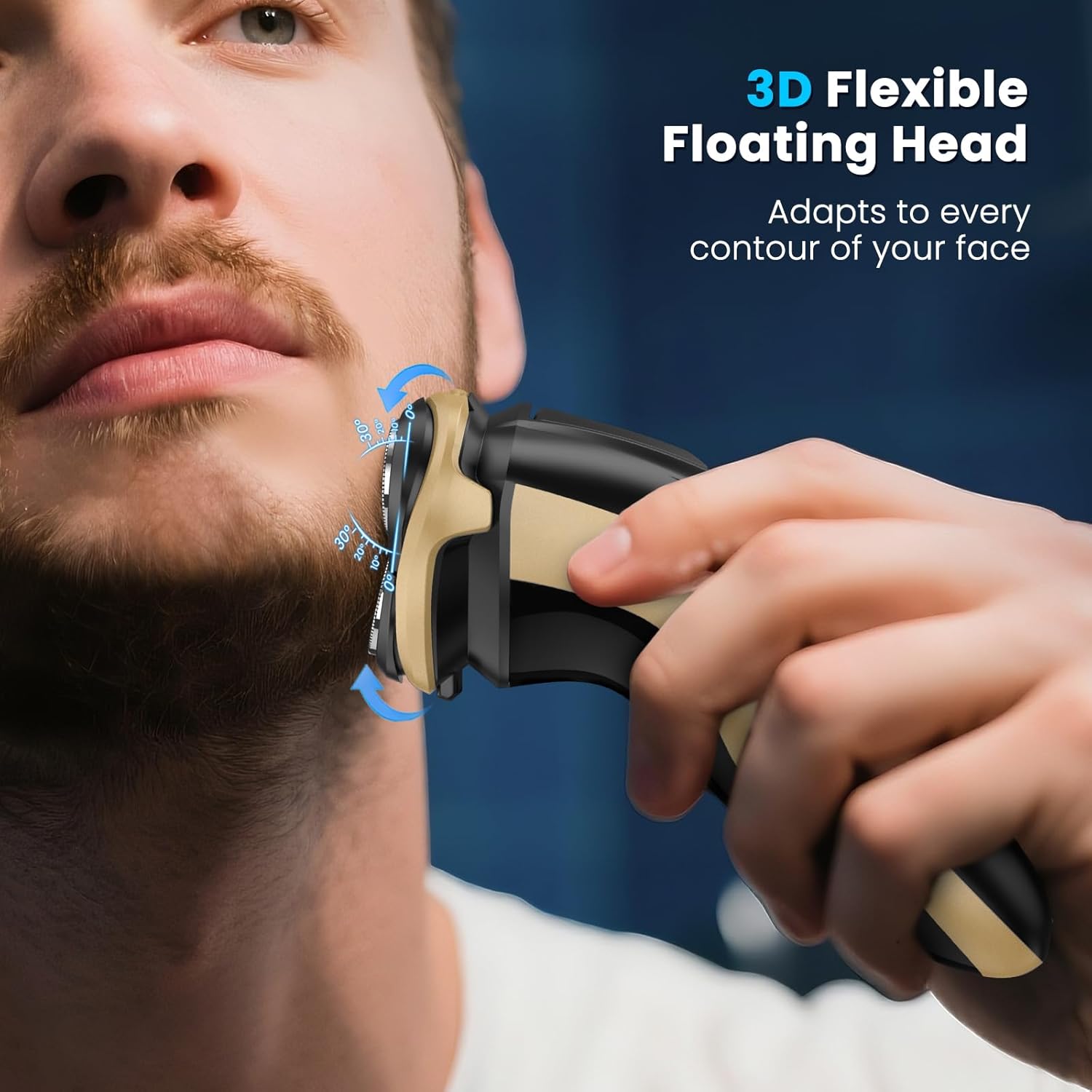
Image: The 3D flexible floating head of the SweetLF Electric Razor SWS7105 conforms to facial curves for an efficient shave.
Using the Pop-Up Trimmer
The integrated pop-up trimmer is ideal for precise edging and detailing.
- Locate the trimmer switch on the back of the razor.
- Slide the switch upwards to activate the pop-up trimmer.
- Use the trimmer to shape sideburns, mustaches, or define necklines.
- Once finished, slide the switch downwards to retract the trimmer.
Maintenance
Cleaning the Razor
Regular cleaning ensures optimal performance and hygiene.
- Turn off the razor and unplug it from any charging source.
- Open the shaver head by pressing the release button (if applicable) or gently pulling it open.
- Rinse the shaver head and the internal components under running water. The IPX7 rating allows for full washability.
- Use the provided cleaning brush to remove any stubborn hair clippings from the blades and internal chamber.
- Allow all parts to air dry completely before reassembling the shaver head and attaching the protective cap.

Image: The SweetLF Electric Razor SWS7105 is fully washable and can be rinsed under water for easy cleaning.
Replacing Shaver Heads
For continued optimal shaving performance, it is recommended to replace the shaver heads periodically.
Video: Instructions on how to install the razor head for the SweetLF Electric Razor.
Video: Further guidance on installing the razor head for the SweetLF Electric Razor.
Video: Demonstration on how to replace the black plastic component of the shaver head.
Troubleshooting
If you encounter issues with your SweetLF Electric Razor SWS7105, please refer to the following common solutions:
- Razor not turning on: Ensure the battery is charged. Connect the charger and check the indicator lights.
- Poor shaving performance: Clean the shaver heads thoroughly. If performance does not improve, consider replacing the shaver heads.
- Razor making unusual noise: Clean the shaver head to remove any trapped debris. If the noise persists, contact customer support.
- Battery not charging: Verify that the USB cable is securely connected to both the razor and the power source. Try a different USB port or adapter.
For issues not covered here, please contact SweetLF customer support.
Specifications
| Feature | Detail |
|---|---|
| Model Number | SWS7105 |
| Brand Name | SweetLF |
| Manufacturer | SweetLF |
| Package Dimensions | 7.05 x 3.31 x 2.83 inches |
| Item Weight | 9.91 ounces |
| Waterproof Rating | IPX7 |
| Battery Type | Rechargeable Lithium-Ion (Integrated) |
| Charging Time | Approx. 60 minutes |
| Runtime | Up to 120 minutes |
| Head Type | Pivoting (360° Floating) |
| Blade Material | Stainless Steel |
| Color | Coffee |
Warranty and Support
SweetLF is committed to providing quality products and customer satisfaction.
- 2-Year Protection Plan: Your SweetLF Electric Razor SWS7105 is covered by a 2-year protection plan.
- Lifetime Technical Help: Access to technical assistance for the lifespan of your product.
- Customer Support: For any inquiries or assistance, please visit the SweetLF Store on Amazon or contact their customer service directly.

Image: The SweetLF Electric Razor SWS7105 offers a 2-year protection plan for customer assurance.
Related documentsSWS7105


Ask a question about this manual
Ask about setup, troubleshooting, compatibility, parts, safety, or missing instructions. Manuals+ will review the question and use this page’s manual context to help answer it.