
Introduction
This manual provides detailed instructions for the setup, operation, and maintenance of your IQUNIX EZ80 Magnetic Switch Hall Effect Gaming Keyboard. Designed for high-performance gaming and efficient daily use, the EZ80 features advanced magnetic switches and a durable aluminum construction. Please read this manual thoroughly to ensure proper usage and to maximize your keyboard's potential.
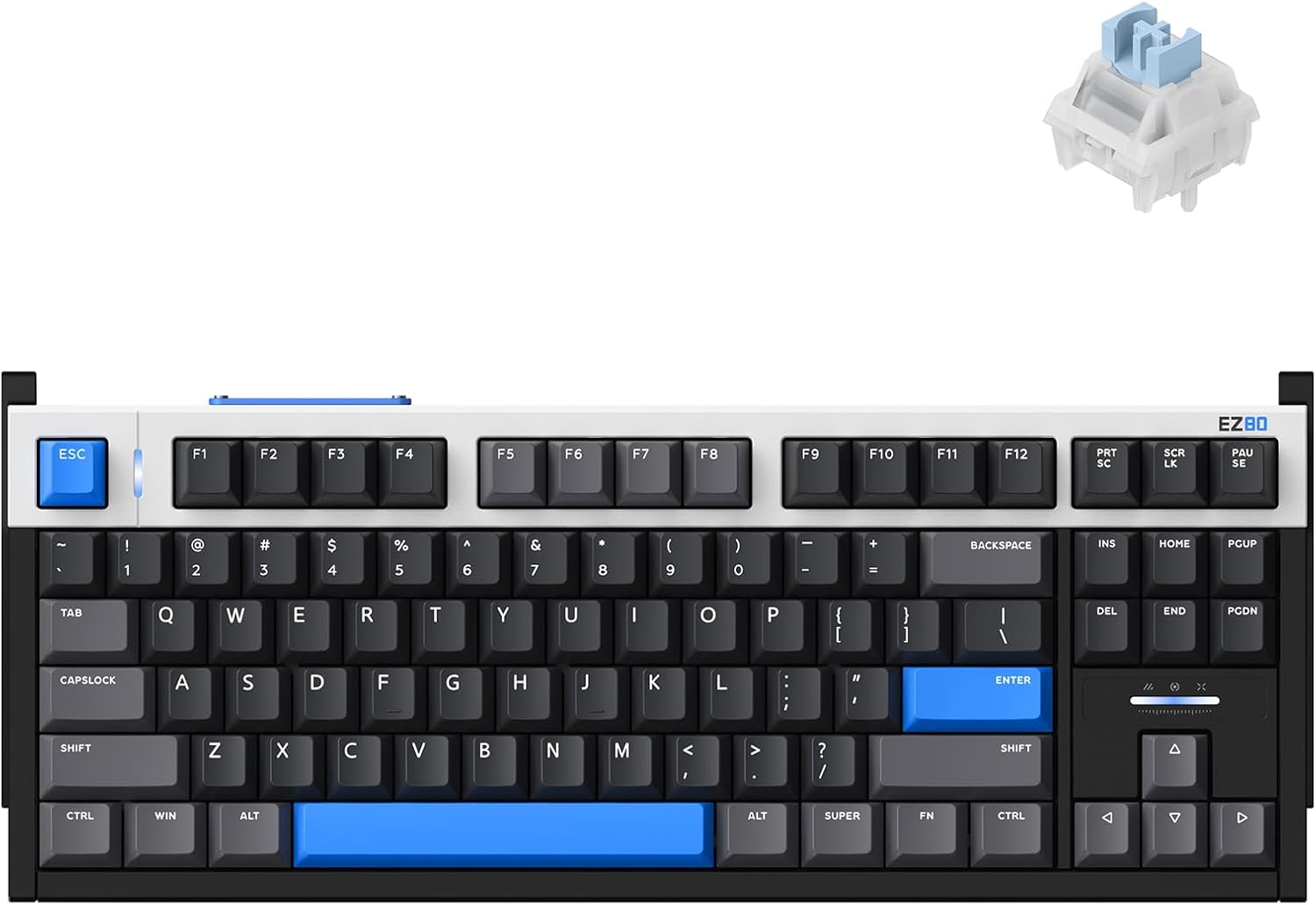
Image: The IQUNIX EZ80 keyboard showcasing its design and a detailed view of its magnetic switch.
Package Contents
Verify that all items are present in your product package:
- IQUNIX EZ80 Hall Effect Magnetic Keyboard
- USB Cable
- Keycap Puller
- EZCarry Case
Setup
- Connect the Keyboard: Insert the USB cable into the USB-C port on the keyboard and connect the other end to an available USB port on your computer. The keyboard is designed for wired connectivity.
- Initial Power-On: The keyboard will power on automatically once connected. The RGB backlighting will illuminate.
- Software Installation: For full customization of features such as Rapid Trigger, actuation points, lighting, and macros, download the official IQUNIX software from the IQUNIX website. Follow the on-screen instructions for installation.
Operating Instructions
Basic Functions
The IQUNIX EZ80 functions as a standard TKL (Tenkeyless) keyboard. All standard alphanumeric keys, function keys (F1-F12), navigation keys, and modifier keys operate as expected. The 80% layout provides a balance between compactness and full functionality.

Image: The 80% TKL layout of the IQUNIX EZ80 keyboard.
Advanced Features
- Rapid Trigger: The EZ80 features ultra-low latency and 0.005mm Rapid Trigger sensitivity in infinite mode. This allows keys to register and reset with minimal movement, providing a competitive edge in fast-paced applications. This feature is configurable via the IQUNIX software.

Image: Performance specifications including polling rate, scanning rate, latency, and rapid trigger sensitivity.
- Upgraded M.A.T. Algorithm 2.0: This algorithm automatically calibrates voltage stability to eliminate artificial dead zones, ensuring precise keystroke registration.
- Magnetic X Ultra Switch: Exclusively designed for the EZ80, these switches feature a larger magnet and an upgraded electromagnetic induction system for a wider voltage range, stable precision, and consistent input.
Magnetic X Ultra Switch Specifications Parameter Value Initial Force 36 ± 10gf End Force 48 ± 10gf Travel Distance 3.5 ± 0.2mm Initial Magnetic Flux 140 ± 15Gs End Magnetic Flux 780 ± 80Gs Lifespan 100 million+ 
Image: Diagram illustrating the components and specifications of the X Magnetic Switch.
- Custom EZ Dual Circuit System: This system, featuring 11 tantalum capacitors, dual Hall-effect power supply, and a grid-style wiring layout, ensures ultra-stable Hall voltage for flawless keystrokes, preventing key chatter, double-clicks, and accidental presses.
- 3rd-Gen Linear Hall Effect Sensor: An industry-first single-sided rail-to-rail sensor provides ultra-stable and precise keystrokes for rapid and consistent input.
- RGB Backlighting: The keyboard features customizable RGB backlighting. Lighting effects and colors can be adjusted through the IQUNIX software.
- Programmable Keys and Macros: Utilize the IQUNIX software to remap keys, create custom macros, and set up different profiles for various applications or games.
- Esports Gasket Structure: The EZ80 incorporates a rigid gasket mount with an aluminum plate to ensure precise and stable keypresses, minimizing wobble.
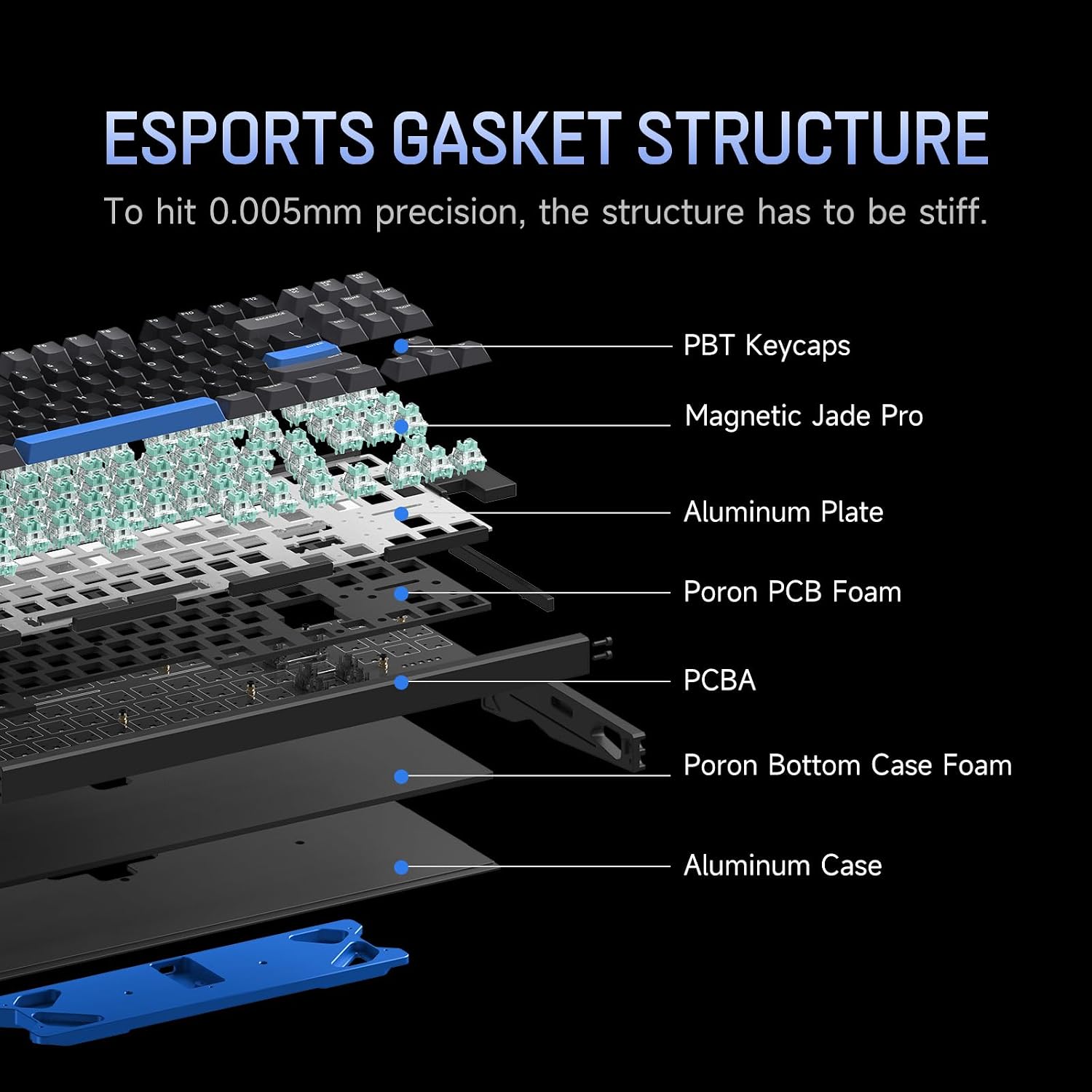
Image: Exploded view of the keyboard's internal structure, detailing the gasket mount and various layers.
- Double Shot PBT Keycaps: The keyboard is equipped with durable double-shot PBT keycaps, designed for longevity and a consistent typing feel.

Image: Close-up of the double-shot PBT keycaps.
Maintenance
- Cleaning the Case: The aircraft-grade CNC aluminum case can be cleaned with a soft, damp cloth. Avoid abrasive cleaners or solvents that may damage the anodized finish.

Image: Detail of the keyboard's CNC aluminum construction.
- Cleaning Keycaps: Use the provided keycap puller to carefully remove keycaps. They can be cleaned with mild soap and water, then thoroughly dried before reattaching.
- Dust Removal: Use compressed air to remove dust and debris from between the keycaps and switches.
- Storage: When not in use, store the keyboard in its EZCarry case to protect it from dust and potential damage.
Troubleshooting
| Issue | Possible Solution |
|---|---|
| Keyboard not responding |
|
| Keys not registering or double-typing |
|
| Backlighting not working or incorrect |
|
| Software not detecting keyboard |
|
Specifications
| Feature | Detail |
|---|---|
| Model Number | EZ80 |
| Switch Type | Magnetic X Ultra Switch (Hall Effect) |
| Layout | 80% TKL |
| Connectivity | Wired (USB-C) |
| Case Material | Aircraft-Grade CNC Aluminum |
| Keycaps | Double Shot PBT |
| Backlighting | RGB |
| Rapid Trigger Sensitivity | 0.005mm (Infinite Mode) |
| Tested Latency | 0.18ms |
| Polling Rate | 8000Hz |
| Scanning Rate | 16000Hz |
| Item Weight | 6.32 pounds (approx. 2.87 kg) |
| Package Dimensions | 17.09 x 8.31 x 3.82 inches |
| Compatible Devices | Gaming Console, Laptop, PC, Tablet |
Warranty Information
IQUNIX products are manufactured to high-quality standards. For detailed warranty terms and conditions, please refer to the official IQUNIX website or contact customer support. Keep your proof of purchase for warranty claims.
Support
For further assistance, technical support, or to download the latest software and firmware updates, please visit the official IQUNIX website. You can also find FAQs and community forums there.
Manufacturer: IQUNIX