1. Introduction
This manual provides essential instructions for the safe and efficient operation of your EcoVolt OSCAL PowerMax 3600 Solar Generator. Please read this manual thoroughly before using the product and retain it for future reference.
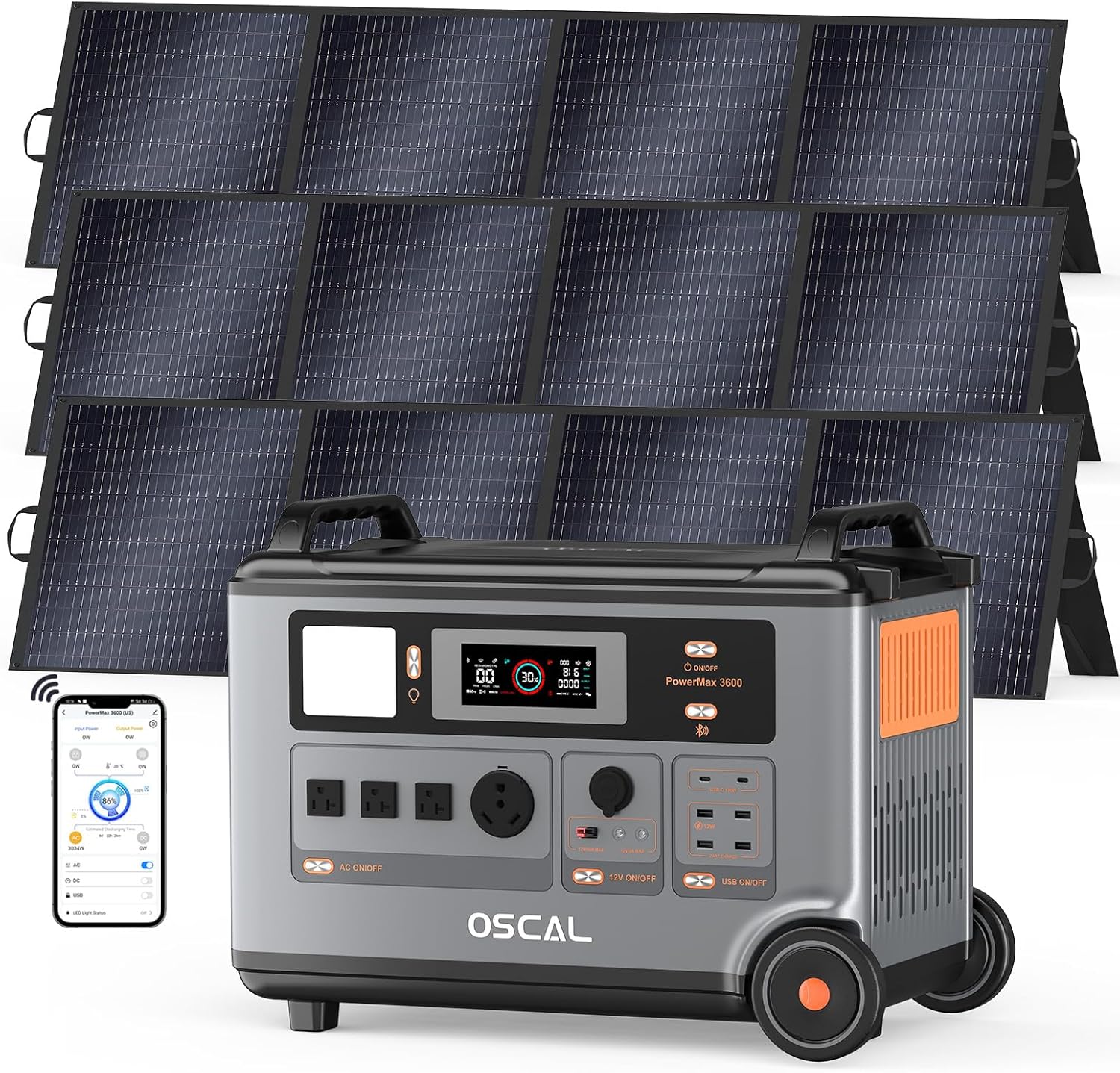
Image 1.1: The EcoVolt OSCAL PowerMax 3600 Solar Generator with three accompanying solar panels.
The PowerMax 3600 is a high-capacity portable power station designed to provide reliable electricity for various applications, including home backup, outdoor camping, and remote work. It features a 3600Wh capacity and 3600W output (6000W peak), capable of powering a wide range of appliances.
2. What's in the Box
Upon unpacking, please verify that all the following items are included:
- PowerMax 3600 Power Station
- 3 x 200W Solar Panels (as per product variant)
- AC Charging Cable
- Car Charging Cable
- Solar Charging Cable
- User Manual (this document)
- Warranty Card

Image 2.1: Contents of the PowerMax 3600 package and available outlets.
3. Product Features and Components
3.1. Overview of Ports and Controls
The PowerMax 3600 is equipped with a variety of input and output ports to accommodate diverse charging and powering needs.

Image 3.1: Detailed view of the PowerMax 3600's versatile output ports.
- AC Outlets (x4): Pure sine wave, 3x 20A, 1x 30A TT-30, 100-120Vac (50Hz/60Hz). Total 3600W (6000W Peak).
- USB-A Output (x1): 12V Max.
- USB-A Fast Charging (x3): 18W Max per port, total 54W.
- USB-C Output (x2): 100W Max per port, total 200W.
- Car Charger Output: 12V, 10A, 120W Max.
- DC5521 Output (x2): 12V, 3A, 36W.
- Anderson Output: 12.6V, 30A, 378W Max.
- Display Screen: Provides real-time information on power usage, battery level, and charging status.
- Control Buttons: Individual buttons for AC, DC, and USB outputs, along with a main power button.
3.2. Portability and Design
The PowerMax 3600 is designed for ease of transport, featuring sturdy handles and integrated wheels.

Image 3.2: The PowerMax 3600 demonstrating its portability with a pull handle and wheels.
- Dimensions: 23.2"L x 13.8"W x 17.3"H
- Net Weight: Approximately 97lb (44.45kg)
3.3. Expandable Capacity
The PowerMax 3600's capacity can be expanded from 3600Wh up to 57600Wh by connecting additional BP3600 batteries (sold separately).

Image 3.3: Expandable capacity of the PowerMax 3600 with BP3600 batteries.
4. Setup
Before initial use, ensure the PowerMax 3600 is fully charged.
- Unpacking: Carefully remove all components from the packaging. Inspect for any damage.
- Placement: Place the power station on a flat, stable surface in a well-ventilated area, away from direct sunlight, heat sources, and moisture.
- Initial Charge: Connect the AC charging cable to the power station and a standard wall outlet. Allow the unit to charge completely until the display indicates 100%.
- Solar Panel Connection (Optional): If using solar panels, connect them to the solar input port on the PowerMax 3600 using the provided solar charging cable. Ensure panels are positioned for maximum sun exposure.
5. Operating Instructions
5.1. Powering On/Off
- To power on the unit, press and hold the main power button for a few seconds until the display illuminates.
- To power off, press and hold the main power button again until the display turns off.
5.2. Charging the PowerMax 3600
The PowerMax 3600 supports multiple charging methods:
- AC Charging: Connect the AC charging cable to a wall outlet. The unit can charge from 0-100% in approximately 1.2 hours with 1800W AC input.
- Solar Charging: Connect solar panels (up to 1600W max input) using the solar charging cable. Charging time depends on solar intensity and panel wattage.
- Car Charging: Use the car charging cable to charge from a vehicle's 12V outlet.

Image 5.1: Charging speed options for the PowerMax 3600.
5.3. Discharging (Powering Devices)
To power your devices:
- Ensure the PowerMax 3600 is powered on.
- Press the corresponding output button (AC, DC, or USB) for the port you wish to use. The button will illuminate to indicate it is active.
- Connect your device to the appropriate port.
- Monitor the display for real-time power output and remaining battery life.

Image 5.2: The PowerMax 3600 powering multiple devices simultaneously.
5.4. Emergency Power Supply (EPS) Mode
The PowerMax 3600 features an EPS function. When connected to an AC power source and also powering devices, it can automatically switch to battery power within 5-8 milliseconds in the event of a power outage. This ensures uninterrupted power for critical equipment.

Image 5.3: PowerMax 3600 operating in EPS mode, providing uninterrupted power.
5.5. APP Control
Download the OSCAL application on your smartphone to manage and monitor the PowerMax 3600 remotely via Bluetooth or Wi-Fi.
- Download: Search for "OSCAL" in your smartphone's app store.
- Pairing: Follow the in-app instructions to pair your device with the PowerMax 3600.
- Functions: The app allows you to monitor power usage, check battery status, control output ports, and adjust settings.

Image 5.4: OSCAL smartphone application for remote control and monitoring.
6. Maintenance
Proper maintenance ensures the longevity and optimal performance of your PowerMax 3600.
- Cleaning: Use a dry, soft cloth to clean the exterior of the unit. Do not use abrasive cleaners or immerse the unit in water.
- Storage: If storing for extended periods, charge the unit to 50-80% every 3-6 months to preserve battery health. Store in a cool, dry place away from direct sunlight.
- Battery Life: The LiFePO4 battery is designed for 3,500+ charge cycles, providing a long service life.
- Ventilation: Ensure ventilation openings are clear and unobstructed during operation to prevent overheating.
7. Troubleshooting
If you encounter issues with your PowerMax 3600, refer to the following common problems and solutions:
| Problem | Possible Cause | Solution |
|---|---|---|
| Unit does not power on. | Battery is depleted; power button not pressed correctly. | Charge the unit; press and hold the power button firmly for several seconds. |
| Devices not charging/powering. | Output port not activated; device exceeds output limit; cable issue. | Ensure the specific output button (AC/DC/USB) is pressed; check device wattage; try a different cable. |
| Slow charging via solar. | Insufficient sunlight; panels not optimally angled; dirty panels. | Adjust panel angle for direct sun; clean panel surfaces; check connections. |
| Overload warning on display. | Connected device(s) exceed the unit's output capacity. | Disconnect high-power devices until the load is within limits. |
| APP connection issues. | Bluetooth/Wi-Fi off; app not updated; unit not discoverable. | Ensure Bluetooth/Wi-Fi is active on phone and unit; restart app and unit; re-pair device. |
If the problem persists, please contact customer support.
8. Specifications
| Feature | Detail |
|---|---|
| Model Name | PowerMax 3600 |
| Brand | EcoVolt |
| Capacity | 3600Wh |
| AC Output | 3600W (6000W Peak), 4 AC Outlets (3x 20A, 1x 30A TT-30) |
| Battery Type | LiFePO4 (Lithium Iron Phosphate) |
| Cycle Life | 3,500+ cycles to 80% capacity |
| AC Input | 1800W Fast Charging (100-120Vac, 15A) |
| Solar Input | 11-150V, 15A Max, 1600W Max |
| Car Charger Input | 12V (default 10A) |
| USB-A Output | 1x 12V Max, 3x 18W Max (Fast Charging) |
| USB-C Output | 2x 100W Max (PD) |
| DC5521 Output | 2x 12V, 3A, 36W |
| Anderson Output | 12.6V, 30A, 378W Max |
| EPS Switchover Time | 5-8 ms |
| Dimensions (LxWxH) | 23.2" x 13.8" x 17.3" (59x35x44cm) |
| Weight | Approx. 97lb (44.45kg) |
9. Warranty and Support
The EcoVolt PowerMax 3600 Solar Generator comes with a 2-year warranty. Please refer to the included warranty card for detailed terms and conditions.
For technical support, troubleshooting assistance, or warranty claims, please contact EcoVolt customer service. Contact information can typically be found on the warranty card or the official EcoVolt website.
Manufacturer: Shenzhen Doke Communication Co.,Ltd