
Redragon M815, K734
Redragon Wireless Gaming Mouse M815 & Mechanical Keyboard K734 User Manual
Model: M815 (Mouse), K734 (Keyboard)
1. Introduction
This manual provides comprehensive instructions for the Redragon Wireless Gaming Mouse M815 and the Redragon Wireless Mechanical Keyboard K734. Please read this manual thoroughly before using the products to ensure proper setup, operation, and maintenance. Retain this manual for future reference.

Image: The Redragon Wireless Gaming Mouse M815 and Wireless Mechanical Keyboard K734, showcasing their sleek black design and RGB lighting capabilities.
2. Product Overview
2.1 Redragon Wireless Gaming Mouse M815
The Redragon M815 is a high-performance wireless gaming mouse designed for precision and versatility. It features multiple connectivity options and advanced sensor technology.
- Tri-Mode Connectivity: Supports Bluetooth, 2.4GHz wireless, and wired (USB-C) connections for maximum flexibility.
- Advanced Optical Sensor: Equipped with a Pixart Advanced 26K DPI Optical Sensor (PAW 3395) for high precision positioning.
- Ultra-Lightweight Design: Weighs only 54g, providing agile and comfortable control during extended gaming sessions.
- Adjustable DPI: Offers a high DPI level up to 26000, allowing users to customize sensitivity to meet different gaming and working needs.
- Adjustable Report Rate: Supports report rates from 125Hz to 1000Hz for responsive tracking.

Image: The Redragon M815 mouse highlighting its Tri-Mode connectivity options: USB-C, Bluetooth, and 2.4GHz wireless.

Image: A close-up of the Redragon M815 mouse's Pixart Advanced 26K DPI Optical Sensor (PAW 3395), emphasizing its high precision capabilities.

Image: The Redragon M815 mouse with a visual representation of its 54g ultra-lightweight design, featuring feathers to symbolize its lightness.

Image: A diagram illustrating the Redragon M815 mouse's adjustable DPI levels (up to 26000) and report rates (125Hz-1000Hz), with corresponding LED light indicators for DPI.
2.2 Redragon Wireless Mechanical Keyboard K734
The Redragon K734 is a custom mechanical keyboard designed for durability, comfort, and customizable performance.
- 75% TKL Layout: Compact Tenkeyless layout, optimizing desk space while retaining essential keys.
- 3 Modes Connectivity: Supports multiple connection modes for versatile use.
- Gasket Structure: Provides a softer, more cushioned typing experience and reduces fatigue.
- Full RGB Lighting: Customizable per-key RGB backlighting for aesthetic personalization.
- 4000mAh Battery: High-capacity battery for extended wireless usage.
- Hot-Swappable Switches: Allows for easy replacement of switches without soldering, enabling customization of typing feel.
- Side-Engraved PBT Keycaps: Durable PBT keycaps with side-engraved legends for a clean top surface and enhanced aesthetics.
- Pre-Lubed Linear Switches: Ensures smooth and consistent key presses right out of the box.
- Custom Cream Switches: Features switches with specific force-travel characteristics (Total Travel: 3.6mm, Conduction Stroke: 2.0±0.6mm, Operating Force: 40±10gf).
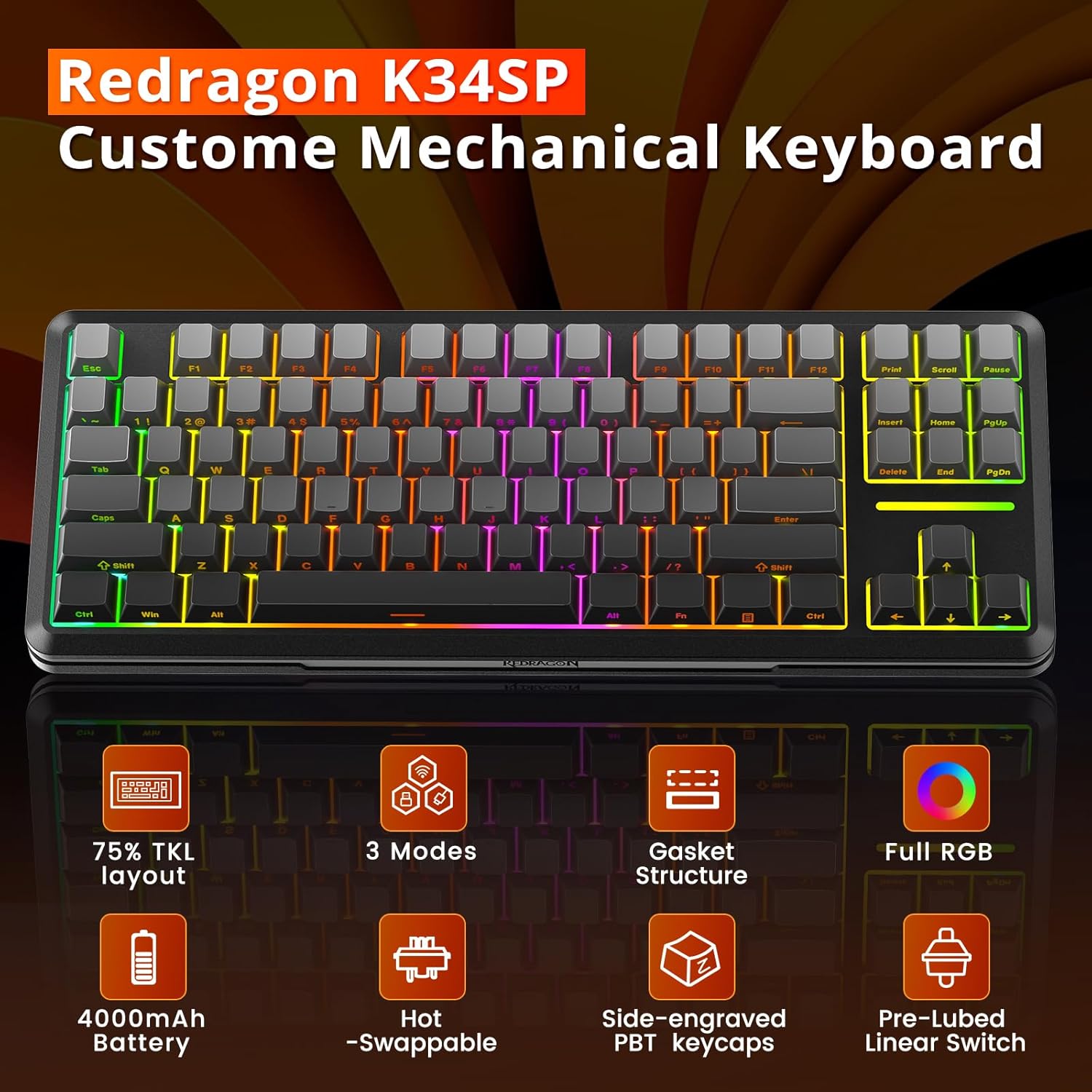
Image: An overview of the Redragon K34SP (K734) Custom Mechanical Keyboard, highlighting its key features such as 75% TKL layout, 3 modes, gasket structure, full RGB, 4000mAh battery, hot-swappable switches, side-engraved PBT keycaps, and pre-lubed linear switches.

Image: A detailed view of the Redragon K734's Custom Cream Switch, including a force-travel diagram showing total travel (3.6mm), conduction stroke (2.0±0.6mm), and operating force (40±10gf).

Image: A close-up of the Redragon K734 keyboard's side-printed PBT keycaps, illustrating the translucent, side-engraved gradient design.

Image: An exploded view diagram of the Redragon K734 keyboard's gasket structure, showing its various layers including PBT keycaps, pre-lubed linear switch, upper cover, slotted PC positioning plate, PORON cotton, spacer under axle, PET voice acting pad, silencing shaft seat cotton, silicone bottom pad, interlayer, and bottom case.
3. Setup Instructions
3.1 Mouse M815 Setup
- Charging: Connect the mouse to a USB power source using the provided USB-C cable. The LED indicator will show charging status.
- 2.4GHz Wireless Connection:
- Insert the 2.4GHz USB receiver into an available USB port on your computer.
- Turn on the mouse. It should automatically connect to the receiver.
- Bluetooth Connection:
- Switch the mouse to Bluetooth mode.
- On your computer, go to Bluetooth settings and search for new devices.
- Select "Redragon M815" from the list to pair.
- Wired Connection:
- Connect the mouse directly to your computer using the USB-C cable. The mouse will function in wired mode and charge simultaneously.
3.2 Keyboard K734 Setup
- Charging: Connect the keyboard to a USB power source using a USB-C cable. The battery indicator will show charging status.
- 2.4GHz Wireless Connection:
- Insert the 2.4GHz USB receiver (often shared with the mouse or a separate one) into an available USB port on your computer.
- Switch the keyboard to 2.4GHz mode. It should automatically connect.
- Bluetooth Connection:
- Switch the keyboard to Bluetooth mode.
- On your computer, go to Bluetooth settings and search for new devices.
- Select "Redragon K734" from the list to pair.
- Wired Connection:
- Connect the keyboard directly to your computer using the USB-C cable. The keyboard will function in wired mode and charge simultaneously.
4. Operating Instructions
4.1 Mouse M815 Operation
- DPI Adjustment: Use the dedicated DPI button (usually located near the scroll wheel) to cycle through different DPI settings. The LED indicator will change color to indicate the current DPI level.
- Report Rate Adjustment: Refer to the Redragon software (downloadable from the official website) to adjust the polling rate (report rate) between 125Hz, 250Hz, 500Hz, and 1000Hz.
- Programmable Buttons: Utilize the Redragon software to customize the functions of the mouse's programmable buttons, assign macros, and adjust lighting effects.
4.2 Keyboard K734 Operation
- RGB Lighting Control:
- Use Fn + specific keys (e.g., Fn + \| for mode, Fn + arrow keys for brightness/speed) to cycle through lighting effects, adjust brightness, and change speed.
- For advanced customization, download the Redragon software to create custom lighting profiles.
- Hot-Swapping Switches:
- Power off the keyboard and disconnect it.
- Use the provided switch puller tool to gently remove the existing switch.
- Align the pins of the new switch with the holes on the PCB and press firmly until it clicks into place.
- Key Remapping & Macros: Use the Redragon software to remap keys, create complex macros, and save multiple profiles for different applications or games.
- Function Keys (Fn Combinations): The K734 features a 75% layout, requiring the use of the Fn key in combination with other keys to access certain functions (e.g., F1-F12, Home, End, PgUp, PgDn). Refer to the keycap legends for specific combinations.
5. Maintenance
- Cleaning:
- Mouse: Use a soft, dry cloth to wipe the surface. For optical sensor, use a cotton swab lightly dampened with isopropyl alcohol.
- Keyboard: Use compressed air to remove dust and debris from between keycaps. Keycaps can be removed for deeper cleaning using a keycap puller. Wipe surfaces with a slightly damp cloth. Ensure the keyboard is powered off and disconnected before cleaning.
- Battery Care: To prolong battery life, avoid fully discharging the devices frequently. Store in a cool, dry place when not in use for extended periods.
- Storage: Store the mouse and keyboard in a clean, dry environment away from extreme temperatures and direct sunlight.
6. Troubleshooting
6.1 General Issues
- Device Not Responding:
- Ensure the device is charged.
- Check the connection mode (2.4GHz, Bluetooth, Wired) and ensure it matches your computer's settings.
- Try connecting via a different USB port or cable.
- Restart your computer.
- Connectivity Issues (Wireless):
- Ensure the USB receiver is securely plugged in and close to the device.
- Avoid interference from other wireless devices (e.g., Wi-Fi routers, other 2.4GHz devices).
- For Bluetooth, ensure your computer's Bluetooth is enabled and try re-pairing the device.
6.2 Mouse M815 Specific Issues
- Inaccurate Tracking: Clean the optical sensor. Ensure you are using the mouse on a suitable surface (preferably a mouse pad).
- DPI/LED Not Changing: Ensure the mouse is powered on and try pressing the DPI button firmly. If using software, ensure it's running and updated.
6.3 Keyboard K734 Specific Issues
- Keys Not Registering: Check if the switch is properly seated. If hot-swapping, ensure the pins are not bent. Try replacing the switch.
- RGB Lighting Malfunction: Ensure the keyboard is fully charged. Try cycling through lighting modes using Fn combinations. If issues persist, reinstall the Redragon software.
7. Specifications
7.1 Redragon Wireless Gaming Mouse M815
- Model: M815
- Sensor: Pixart PAW 3395 Optical Sensor
- DPI: Up to 26000 DPI (Adjustable)
- Report Rate: 125Hz / 250Hz / 500Hz / 1000Hz
- Weight: Approx. 54g
- Connectivity: 2.4GHz Wireless, Bluetooth, USB-C Wired
7.2 Redragon Wireless Mechanical Keyboard K734
- Model: K734
- Layout: 75% TKL
- Switch Type: Custom Cream Switches (Pre-Lubed Linear, Hot-Swappable)
- Operating Force: 40±10gf
- Total Travel: 3.6mm
- Conduction Stroke: 2.0±0.6mm
- Battery Capacity: 4000mAh
- Connectivity: 2.4GHz Wireless, Bluetooth, USB-C Wired
- Lighting: Full RGB Backlighting
- Keycaps: Side-Engraved PBT
8. Warranty and Support
Redragon products typically come with a limited warranty. Please refer to the warranty card included with your product or visit the official Redragon website for detailed warranty terms and conditions. For technical support, product inquiries, or warranty claims, please contact Redragon customer service through their official channels.
Official Redragon Website: www.redragonzone.com
Related Documents - M815, K734
 |
Redragon K683WBO-RGB-M FIDD Keyboard User Manual - Features, Setup, Warranty Comprehensive user manual for the Redragon K683WBO-RGB-M FIDD mechanical keyboard. Details product features, installation, safety, shortcut keys, maintenance, and warranty information. |
 |
Redragon Nova K709 Wired 60% RGB Hot-Swappable Mechanical Keyboard User Manual Official user manual for the Redragon Nova K709 wired 60% RGB hot-swappable mechanical keyboard. Learn how to connect, use product features like backlighting and key combinations, and find troubleshooting tips. |
 |
Redragon EISA PRO Mechanical Keyboard User Manual and Features Comprehensive guide to the Redragon EISA PRO 3-Modes 98 Key Gasket Hot-Swappable RGB Mechanical Keyboard, covering setup, features, troubleshooting, and safety guidelines. |
 |
Redragon ANTONIUM K743 PRO LCD PRO User Guide User guide for the Redragon ANTONIUM K743 PRO LCD PRO mechanical keyboard, detailing specifications, battery safety instructions, and regulatory compliance statements. |
 |
Redragon Ryze 68 Key Wired Mechanical Gaming Keyboard - Operating Instructions Get detailed operating instructions for the Redragon Ryze 68 Key Wired Mechanical Gaming Keyboard. Learn about key functions, backlight settings, plug-in, and troubleshooting. |
 |
Redragon M709 Tiger Gaming Mouse User Manual and Specifications Official user manual and operating instructions for the Redragon M709 Tiger gaming mouse. Learn about its ergonomic design, DPI adjustment, RGB lighting, software customization, and find warranty information. |