
DEWALT DXMA1909935BA
DEWALT Heavy Duty Neckband Bluetooth Earbuds User Manual
Model: DXMA1909935BA
1. Introduction
Thank you for purchasing the DEWALT Heavy Duty Neckband Bluetooth Earbuds. These earbuds are designed for durability and performance in demanding environments, featuring IP56 dust and water resistance, Bluetooth 5.2 connectivity, and extended battery life. This manual provides essential information for the proper use and maintenance of your earbuds.
Package Contents
- DEWALT Heavy Duty Neckband Bluetooth Earbuds
- Interchangeable Ear Cushions (S, M, L sizes)
- Memory Foam Ear Tips
- Noise Isolation Ear Tips
- Ear Fins (for secure fit, if needed)
- Shirt Clip
- Quick Start Guide
- USB Charging Cable

Image: All included accessories for the DEWALT Heavy Duty Neckband Bluetooth Earbuds, including various ear tips, ear fins, a shirt clip, and the quick start guide.
2. Safety Information
Please read all safety warnings and instructions before using this product to ensure safe operation and prevent damage.
- Hearing Protection: Prolonged exposure to loud sounds can cause permanent hearing damage. Set the volume to a moderate level before putting on the earbuds.
- Environmental Awareness: Do not use earbuds in situations where the inability to hear ambient sounds could pose a danger (e.g., driving, cycling, walking in traffic, or operating heavy machinery).
- Water and Dust Resistance: These earbuds are rated IP56 for dust and water resistance. This means they are protected against dust ingress and powerful water jets. Do not submerge the earbuds in water. Ensure the charging port cover is securely closed when not charging to maintain water resistance.
- Cleaning: Clean the earbuds with a soft, dry cloth. Do not use harsh chemicals or abrasive materials.
- Battery Safety: The earbuds contain a non-replaceable battery. Do not attempt to open or disassemble the earbuds. Do not expose to extreme temperatures or dispose of in fire.
- Choking Hazard: Keep small parts, such as ear tips, away from children and pets.

Image: A close-up of a person wearing the DEWALT earbuds, illustrating their IP56 sweat and water resistance in a work environment.
3. Setup
3.1 Charging the Earbuds
Before first use, fully charge your DEWALT earbuds. A full charge provides over 20 hours of playtime.
- Locate the charging port on the inline control module.
- Open the protective cover of the charging port.
- Connect the supplied USB charging cable to the charging port and the other end to a USB power source (e.g., computer USB port, wall adapter).
- The LED indicator on the control module will illuminate to show charging status. It will change color or turn off when fully charged.
- Once charging is complete, disconnect the cable and securely close the protective cover to maintain water resistance.

Image: The DEWALT earbuds resting on a wooden surface, highlighting their 20+ hour run time capability.
3.2 Fitting the Earbuds
Proper fit is crucial for sound quality, noise isolation, and comfort. Experiment with the different ear tips and ear fins provided to find the best fit for your ears.
- Ear Tips: Choose from the S, M, or L silicone ear cushions, or the memory foam/noise isolation tips. Gently twist and push the ear tip onto the earbud nozzle until it is securely attached.
- Ear Fins: If a more secure fit is desired, attach the ear fins. These are designed to tuck into the concha of your ear to prevent the earbuds from falling out during activity.
- Placement: Insert the earbud into your ear canal and gently twist until it feels snug and comfortable. The neckband should rest comfortably behind your neck.
4. Operating Instructions
4.1 Power On/Off
- Power On: Press and hold the Multi-function Button (usually the center button on the inline control) for approximately 3 seconds until the LED indicator flashes and you hear a power-on prompt.
- Power Off: Press and hold the Multi-function Button for approximately 5 seconds until the LED indicator turns off and you hear a power-off prompt.
4.2 Bluetooth Pairing
The earbuds use Bluetooth 5.2 for wide compatibility with laptops, smartphones, and tablets.
- Ensure the earbuds are powered off.
- Press and hold the Multi-function Button for approximately 5-7 seconds until the LED indicator flashes red and blue alternately, indicating pairing mode.
- On your device (smartphone, tablet, laptop), enable Bluetooth and search for available devices.
- Select "DEWALT Earbuds" (or similar name) from the list of found devices.
- Once paired, the LED indicator will flash blue slowly, and you will hear a confirmation prompt.
- The earbuds will automatically attempt to reconnect to the last paired device when powered on.

Image: An illustration showing various devices such as tablets, smartphones, and a Nintendo Switch, demonstrating the wide compatibility of the DEWALT Bluetooth 5.2 earbuds.
4.3 Call Management
The integrated microphone allows for clear hands-free calls.
- Answer/End Call: Press the Multi-function Button once.
- Reject Call: Press and hold the Multi-function Button for 2 seconds.
- Redial Last Number: Double-press the Multi-function Button.

Image: A man wearing the DEWALT earbuds with a hard hat, illustrating the functionality of the HD microphone and noise isolation for clear communication.
4.4 Music Playback
- Play/Pause: Press the Multi-function Button once.
- Next Track: Press and hold the Volume Up (+) button for 2 seconds.
- Previous Track: Press and hold the Volume Down (-) button for 2 seconds.
4.5 Volume Control
- Volume Up: Press the Volume Up (+) button.
- Volume Down: Press the Volume Down (-) button.

Image: A detailed view of the inline control module on the DEWALT neckband earbuds, showing the buttons for volume and playback control.
5. Maintenance
5.1 Cleaning
- Regularly clean the ear tips and the earbud nozzles to prevent wax buildup, which can affect sound quality.
- Remove the ear tips and wipe them with a soft, damp cloth. Allow them to dry completely before reattaching.
- Use a dry cotton swab or a small, soft brush to gently clean any debris from the earbud nozzles. Do not use liquids directly on the nozzles.
- Wipe the neckband and control module with a soft, dry cloth.
5.2 Storage
- When not in use, store the earbuds in a clean, dry place, away from extreme temperatures and direct sunlight.
- Avoid tangling the cables by coiling them neatly.
6. Troubleshooting
| Problem | Possible Cause | Solution |
|---|---|---|
| Earbuds won't power on. | Low battery. | Charge the earbuds fully. |
| Cannot pair with device. | Earbuds not in pairing mode; device Bluetooth off; too far from device. | Ensure earbuds are in pairing mode (flashing red/blue). Turn device Bluetooth off/on. Move earbuds closer to device (within 10 meters). |
| No sound or low volume. | Volume too low on earbuds or device; earbuds not connected; ear tips blocked. | Increase volume on both earbuds and device. Re-pair earbuds. Clean ear tips and nozzles. |
| Sound cuts in and out. | Interference; too far from device; low battery. | Move closer to device. Avoid areas with strong Wi-Fi or other Bluetooth signals. Charge earbuds. |
| Microphone not working. | Earbuds not selected as audio input on device; microphone blocked. | Check device audio settings to ensure earbuds are selected for calls. Ensure microphone is not covered. |
7. Specifications
| Feature | Detail |
|---|---|
| Model Name | DXMA1909935BA |
| Connectivity Technology | Wireless (Bluetooth 5.2) |
| Ear Placement | In Ear |
| Form Factor | In Ear |
| Noise Control | Sound Isolation |
| Water Resistance Level | IP56 (Dust and Water Resistant) |
| Playtime | 20+ Hours |
| Color | Black |
| Item Weight | 0.704 ounces (0.02 Kilograms) |
| Impedance | 200 Ohm |
| UPC | 826341056625 |
| Manufacturer | E-filliate Inc. |
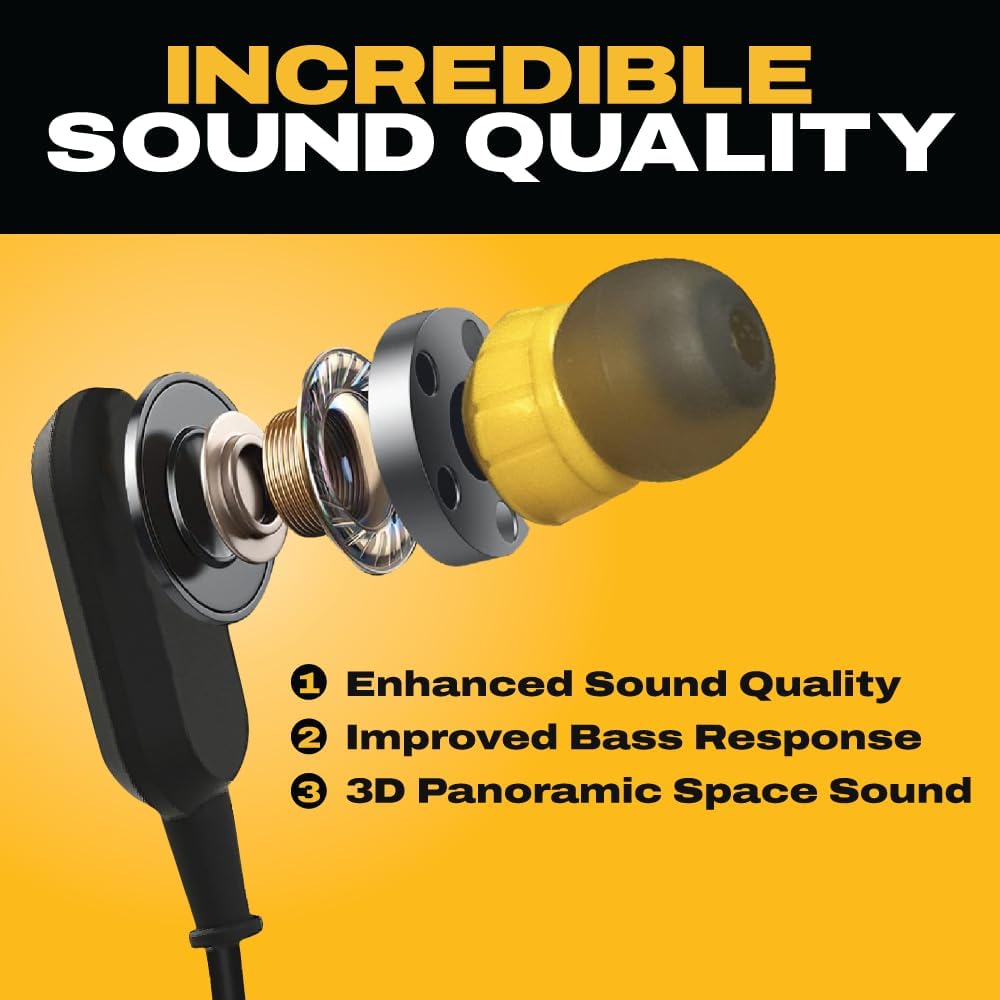
Image: An exploded diagram illustrating the internal components of the DEWALT earbud, highlighting its design for enhanced sound quality and deep bass response.
8. Warranty and Support
DEWALT stands behind the quality of its products. These earbuds come with a Limited Lifetime Warranty.
8.1 Limited Lifetime Warranty
The DEWALT Heavy Duty Neckband Bluetooth Earbuds are covered by a Limited Lifetime Warranty. This warranty covers defects in materials and workmanship under normal use. For full details regarding warranty coverage, terms, and conditions, please refer to the warranty card included in your product packaging or visit the official DEWALT website.

Image: The official DEWALT Limited Lifetime Warranty logo, indicating the product's warranty coverage.
8.2 Customer Support
For technical assistance, warranty claims, or general inquiries, please contact DEWALT customer support through their official website or the contact information provided in your product documentation. Please have your model number (DXMA1909935BA) and UPC (826341056625) ready when contacting support.
You can visit the official DEWALT store on Amazon for more information: DEWALT Store
Related documentsDXMA1909935BA


Ask a question about this manual
Ask about setup, troubleshooting, compatibility, parts, safety, or missing instructions. Manuals+ will review the question and use this page’s manual context to help answer it.