
Introduction
This manual provides detailed instructions for the setup, operation, and maintenance of your GARDENCUBE Hydroponics Growing System Kit HP-GC001. This indoor gardening system is designed to facilitate plant growth using a water-based nutrient solution and an integrated LED grow light, allowing for year-round cultivation of herbs, vegetables, and fruits.
What's Included
Your GARDENCUBE Hydroponics Growing System Kit includes the following components:
- Hydroponics Growing System Unit (8-pod capacity)
- LED Grow Light Panel with adjustable height and angle
- Water Pump (quiet operation)
- Planting Baskets (8x)
- Grow Sponges (8x)
- Covers for planting pods (8x)
- Plant Tags (8x)
- Grow Domes (8x)
- Nutrient Solutions (A & B)
- Nutrient Refill Packs
- Power Adapter
- Support Rods for plant growth (8x)

Figure 1: All components included in the GARDENCUBE Hydroponics Growing System Kit.
Setup Instructions
Follow these steps to set up your hydroponics growing system:
- Prepare Seeds and Sponges: Soak your chosen seeds and grow sponges in pure water for 5-12 hours. This helps with germination.
- Insert Seeds into Sponges: Place your prepared seeds into the soaked grow sponges. Then, insert each sponge into a planting basket. Cover each basket with a grow dome to create a humid environment for germination.
- Fill Water Tank and Add Nutrients: Fill the 3-liter water tank with water up to the maximum fill line. Add 15ml of Nutrient A and 15ml of Nutrient B to the water tank. Ensure the nutrients are well mixed.
- Power On and Select Grow Mode: Connect the power adapter to the unit and a power outlet. Turn on the system using the power button on the control panel. Select the appropriate grow mode (Vegetables or Flowers & Fruits) based on your plants.

Figure 2: Step-by-step visual guide for initial setup.
Operating Instructions
LED Grow Light
The system features a 24-watt LED grow light that simulates natural sunlight, promoting photosynthesis. The light operates on an automatic 24-hour cycle (16 hours on, 8 hours off) once activated. The LED panel can be adjusted up to 180° and has a maximum height adjustment of 21 inches to accommodate plant growth.
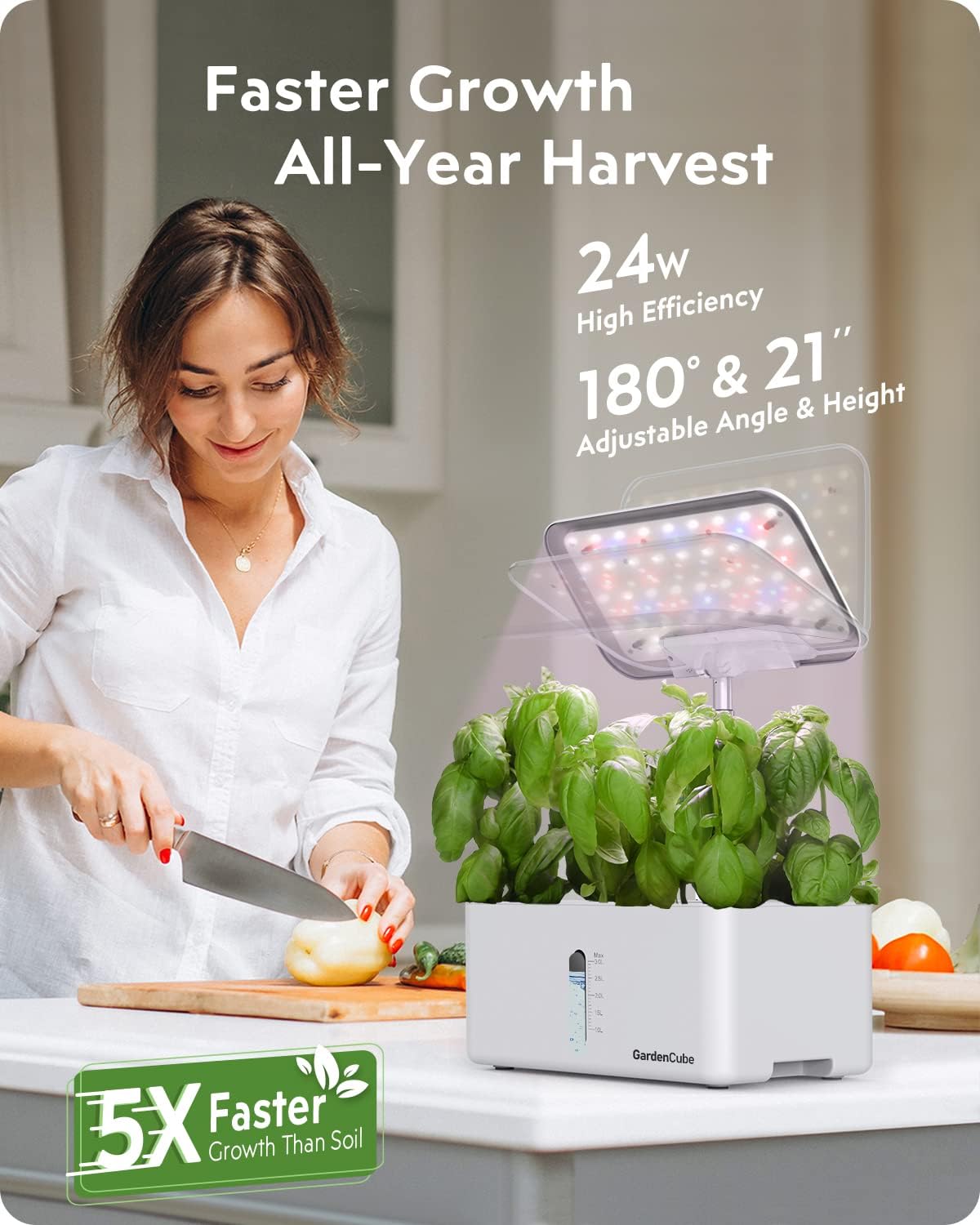
Figure 3: Adjustable LED grow light in operation.
Smart Watering System
The hydroponic system includes a quiet smart water pump (less than 20 dB) that runs every 30 minutes. This ensures efficient water circulation and provides oxygen for optimal root development. A water shortage indicator light will alert you when the water level is low, preventing plants from drying out.

Figure 4: Smart quiet watering system features.
Control Panel and Grow Modes
The control panel allows you to select between two primary grow modes:
- Vegetables Mode: Utilizes Red, Blue, White, and IR LED lights for optimal growth of leafy greens and vegetables.
- Flowers & Fruits Mode: Utilizes Red, White, and IR LED lights, suitable for flowering plants and fruit-bearing varieties.
Simply press the corresponding button on the control panel to switch between modes. The system automatically manages the light cycle (16 hours on, 8 hours off) for continuous plant observation and growth.

Figure 5: Smart control panel with selectable growth modes.
Maintenance
Water and Nutrient Management
The 3-liter water tank can sustain plants for 1-2 weeks. Monitor the water level through the transparent window and refill as needed. Add nutrient solutions according to the plant's growth stage and manufacturer's recommendations. Typically, nutrients are added during water refills.
Cleaning
The indoor herb garden features a detachable design for easy cleaning. The grow light pole can be detached to prevent short circuits during cleaning. Regularly clean the water tank and components to prevent algae growth and maintain a healthy environment for your plants.

Figure 6: Detachable design for easy cleaning and water level visibility.
Troubleshooting
If you encounter issues with your GARDENCUBE Hydroponics Growing System, consider the following common solutions:
- Plants Not Growing: Ensure the grow light is on for the correct duration (16 hours on, 8 hours off). Check water levels and nutrient concentration. Verify seeds are viable and properly placed in sponges.
- Pump Not Working: Check if the power adapter is securely connected. Ensure the water tank has sufficient water. Clean the pump if it appears clogged.
- Algae Growth: Algae can form if the system is exposed to too much light or if water is not changed regularly. Ensure grow domes are in place to block light from the water surface. Clean the tank and replace water and nutrients.
- Water Shortage Indicator On: Refill the water tank immediately.
For persistent issues, please refer to the Warranty and Support section for contact information.
Specifications
| Feature | Detail |
|---|---|
| Model Number | HP-GC001 |
| Planting Pods | 8 |
| LED Grow Light Power | 24 Watts |
| LED Light Adjustment | 180° angle, up to 21 inches height |
| Water Pump Noise Level | Less than 20 dB |
| Water Pump Cycle | 30 minutes on/off |
| Water Tank Capacity | 3 Liters |
| Light Cycle | 16 hours on, 8 hours off (automatic) |
| Product Dimensions | 12.05 x 8.62 x 7.64 inches |
| Item Weight | 3.76 pounds |
| Manufacturer | GARDENCUBE |
Warranty and Support
GARDENCUBE offers a 2-year service warranty for all its products. For any questions, technical assistance, or warranty claims, please contact GARDENCUBE customer support. Contact details can typically be found on the product packaging or the official GARDENCUBE website.

Figure 7: 2-Year Service Warranty.
