
VIGX AI-Powered Adjustable Exoskeleton
VIGX AI-Powered Adjustable Exoskeleton User Manual
Model: AI-Powered Adjustable Exoskeleton
1. Product Overview
The VIGX AI-Powered Adjustable Exoskeleton is a lightweight, wearable lower limb support device designed to assist users during various physical activities such as hiking, fitness, rehabilitation, and general outdoor mobility. It features AI-driven assistance, app control, and a modular, foldable design for portability.
Key Features:
- Lightweight Design: Weighs approximately 1.8kg, making it highly portable.
- Adjustable Fit: Flexible waist belt and adjustable thigh straps accommodate various body types.
- AI Intention Recognition: Automatically adjusts support based on user activity (walking, running, climbing) and terrain.
- Mobile App Control: Bluetooth 5.1 connectivity for iOS/Android app to track data and customize modes.
- Long Endurance Battery: Provides support for up to 10,000 steps on a single charge, with a 1.5-hour recharge time.
- Modular Construction: Legs can be easily attached and detached for compact storage.

Image 1.1: Front view of the VIGX AI-Powered Adjustable Exoskeleton, showcasing its compact design and vibrant accents.

Image 1.2: Illustration highlighting the lightweight nature (1.8kg) and flexible waist belt of the VIGX Exoskeleton, designed for comfort and adaptability.
2. Setup Instructions
2.1 Package Contents
Before proceeding, ensure all components are present:
- VIGX Exoskeleton Main Unit (waist belt with integrated electronics)
- Left and Right Leg Modules
- Charging Cable
- User Manual (this document)
2.2 Assembly
The VIGX Exoskeleton features a modular design for easy assembly.
- Align each leg module with the corresponding attachment points on the main waist unit.
- Gently push until you hear a click, indicating the module is securely locked in place.
- Ensure both leg modules are firmly attached before use.

Image 2.1: Depiction of the exoskeleton's modular construction, showing how the leg poles can be folded and detached for compact storage (36x14x12cm).
2.3 Charging the Battery
The exoskeleton is equipped with a rechargeable lithium battery.
- Locate the charging port on the main unit.
- Connect the provided charging cable to the port and a suitable power source.
- The charging indicator light will illuminate. A full charge typically takes 1.5 hours.
- Disconnect the charger once fully charged.
2.4 Sizing and Adjustment
Proper fit is essential for comfort and performance.
- Waist Measurement: Measure your waist circumference one finger below the navel.
- Thigh Measurement: Measure the circumference of your thigh.
- Select Size: Refer to the sizing chart below to choose the appropriate exoskeleton size.
| Size | Waist Circumference | Thigh Circumference |
|---|---|---|
| S | 70-85 cm | 32-42 cm |
| M | 83-100 cm | 40-58 cm |
| L | 98-125 cm | 40-58 cm |
- Wearing the Exoskeleton: Secure the waist belt snugly around your waist. Adjust the thigh straps to ensure the leg modules are positioned correctly and comfortably on your thighs.
2.5 App Installation and Pairing
The VIGX app is available for iOS and Android devices.
- Download the VIGX app from your device's app store.
- Ensure Bluetooth is enabled on your mobile device.
- Power on the VIGX Exoskeleton.
- Open the VIGX app and follow the on-screen instructions to pair with your device via Bluetooth 5.1.
3. Operating Instructions
3.1 Powering On/Off
- Power On: Press and hold the power button on the main unit until the indicator lights illuminate.
- Power Off: Press and hold the power button until the indicator lights turn off.
3.2 Operating Modes
The exoskeleton offers different modes to suit various activities:
- Standard Mode: Provides general assistance for daily activities and walking.
- Fitness Mode: Designed for more intense activities, potentially targeting specific muscle groups or providing higher torque assistance.
Modes can be switched via the mobile application.

Image 3.1: A user performing fitness exercises, demonstrating the exoskeleton's application in a fitness setting, potentially utilizing Fitness Mode for enhanced efficiency.
3.3 AI Intention Recognition
The VIGX Exoskeleton utilizes AI to detect your movement intentions and adapt its support accordingly.
- Assistance Adaptive: The system adjusts power output based on your effort.
- Speed Adaptive: Support levels change with your walking, running, or climbing speed (up to 10 km/h).
- Terrain Adaptive: The AI recognizes changes in terrain, such as inclines or stairs, and optimizes assistance. For example, it can reduce energy consumption on stairs by 15% and fatigue on long walks by 30%.

Image 3.2: Diagram illustrating the AI Intention Recognition feature, showing how the exoskeleton adapts to walking, climbing, and running based on assistance, speed, and terrain.
3.4 Using the Mobile Application
The VIGX app provides detailed control and monitoring features:
- Track Activity: Monitor steps, mileage, and calories burned.
- Adjust Parameters: Customize power levels and sports modes.
- View Motion Data: Access detailed reports on your movement.
- Mode Switching: Easily switch between Standard and Fitness modes.
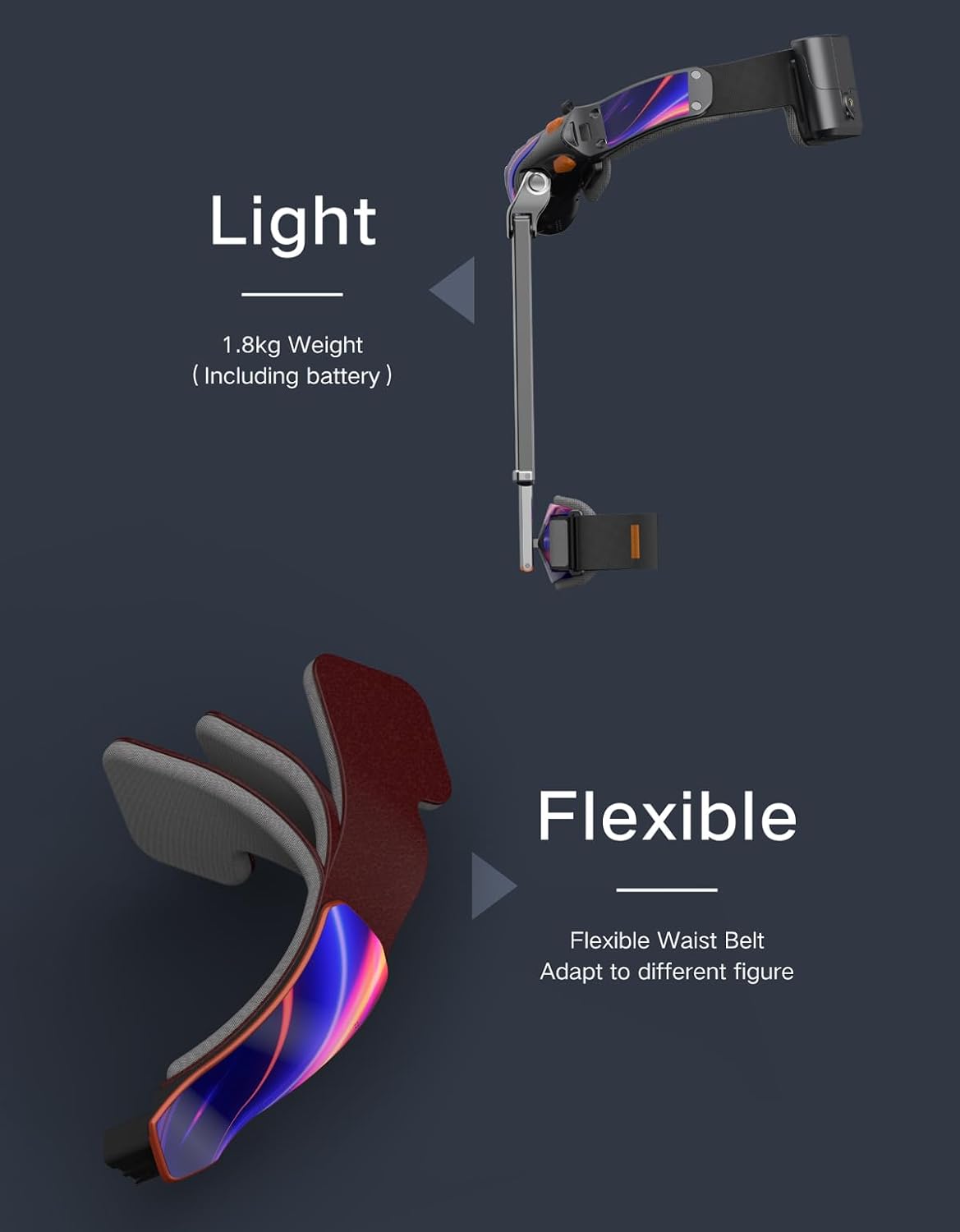
Image 3.3: Screenshot of the VIGX mobile application interface, displaying activity tracking (steps, runtime), power levels, and options for mode switching and parameter adjustment.
3.5 Application Scenarios
The VIGX Exoskeleton is suitable for a variety of uses:
- Hiking: Provides support on trails and inclines.
- Fitness: Enhances workouts and rehabilitation exercises.
- Walking: Reduces fatigue during long walks or daily errands.
- Climbing Stairs: Offers assistance for ascending and descending stairs.

Image 3.4: Collage depicting various application scenarios for the VIGX Exoskeleton, including fitness, running, walking, and climbing stairs.
4. Maintenance
4.1 Cleaning
- Wipe the exoskeleton's surfaces with a damp cloth.
- Do not use harsh chemicals or abrasive cleaners.
- Ensure the device is completely dry before storage or next use.
4.2 Storage
- Store the exoskeleton in a cool, dry place away from direct sunlight.
- For compact storage, detach the leg modules and fold the main frame.
4.3 Battery Care
- Charge the battery regularly, even if not in frequent use, to maintain battery health.
- Avoid fully discharging the battery for extended periods.
- Do not expose the battery to extreme temperatures.
5. Troubleshooting
5.1 Common Issues
| Problem | Possible Cause | Solution |
|---|---|---|
| Device does not power on | Low battery; Power button not pressed correctly | Charge the battery; Press and hold the power button firmly |
| Cannot connect to app | Bluetooth off; Device not in pairing mode; App issue | Ensure Bluetooth is on; Restart exoskeleton and app; Reinstall app |
| Insufficient assistance | Incorrect mode; Low battery; Improper fit | Switch to appropriate mode (e.g., Fitness); Charge battery; Adjust straps for snug fit |
| Uncomfortable fit | Incorrect size; Straps too tight/loose | Verify size with chart; Adjust waist belt and thigh straps for comfort |
6. Technical Specifications
| Feature | Specification |
|---|---|
| Model | AI-Powered Adjustable Exoskeleton |
| Weight | 1.8 kg (including battery) |
| Folded Dimensions | 36 x 14 x 12 cm |
| Battery Type | Lithium Ion (1 required, included) |
| Charging Time | Approx. 1.5 hours |
| Endurance | Up to 10,000 steps |
| Max Speed Assistance | Up to 10 km/h |
| Torque Output | 10 Nm |
| Connectivity | Bluetooth 5.1 (iOS/Android App) |
| Manufacturer | VIGX |
| Country of Origin | China |
| ASIN | B0F9FYFMGW |
| GTIN | 00850070755412 |
7. Safety Information
- Read all instructions before using the VIGX Exoskeleton.
- Ensure the device is properly fitted and secured before each use.
- Do not use the exoskeleton if any part is damaged or malfunctioning.
- Consult a medical professional before use if you have any pre-existing medical conditions or are undergoing rehabilitation.
- Keep out of reach of children.
- Do not attempt to modify or disassemble the device beyond the modular components.
- Avoid exposing the device to water or extreme environmental conditions.
Legal Disclaimer: Actual product packaging and materials may contain more and different information than what is shown on our website. We recommend that you do not rely solely on the information presented and that you always read labels, warnings, and directions before using or consuming a product.
8. Warranty and Support
For product support, technical assistance, or warranty inquiries, please contact VIGX customer service through the official website or the contact information provided with your purchase documentation.
Ask a question about this manual
Ask about setup, troubleshooting, compatibility, parts, safety, or missing instructions. Manuals+ will review the question and use this page’s manual context to help answer it.