
1. Introduction
This manual provides essential instructions for the installation, operation, and maintenance of your RXCWWZQQ Universal TV Motherboard. This product is designed to replace damaged motherboards in compatible 17-27 inch LCD and LED televisions, restoring normal functionality and extending the lifespan of your display equipment. It supports various resolutions, including 1280x768, 1920x1080, 1366x768, 1920x1200, 1440x900, and 1650x1080.
Please read this manual thoroughly before installation to ensure correct usage and to prevent potential damage.
2. Safety Information
- Always disconnect the television from the power outlet before attempting any installation or repair.
- Discharge any static electricity from your body before handling the motherboard by touching a grounded metal object.
- Handle the motherboard by its edges to avoid touching sensitive components.
- Ensure all connections are secure and correctly oriented before applying power.
- If you are unsure about any step, consult a qualified technician.
3. Package Contents
Please verify that all items are present in your package:
- 1x RXCWWZQQ Universal TV Motherboard (Model TP.V56.PA671 or compatible variant)
- (Additional cables or accessories may vary by specific product variant and are not universally included.)
4. Product Overview
The RXCWWZQQ Universal TV Motherboard is a versatile component designed for repairing and upgrading various LCD and LED television models. It integrates essential functions for display control, audio processing, and video input management.
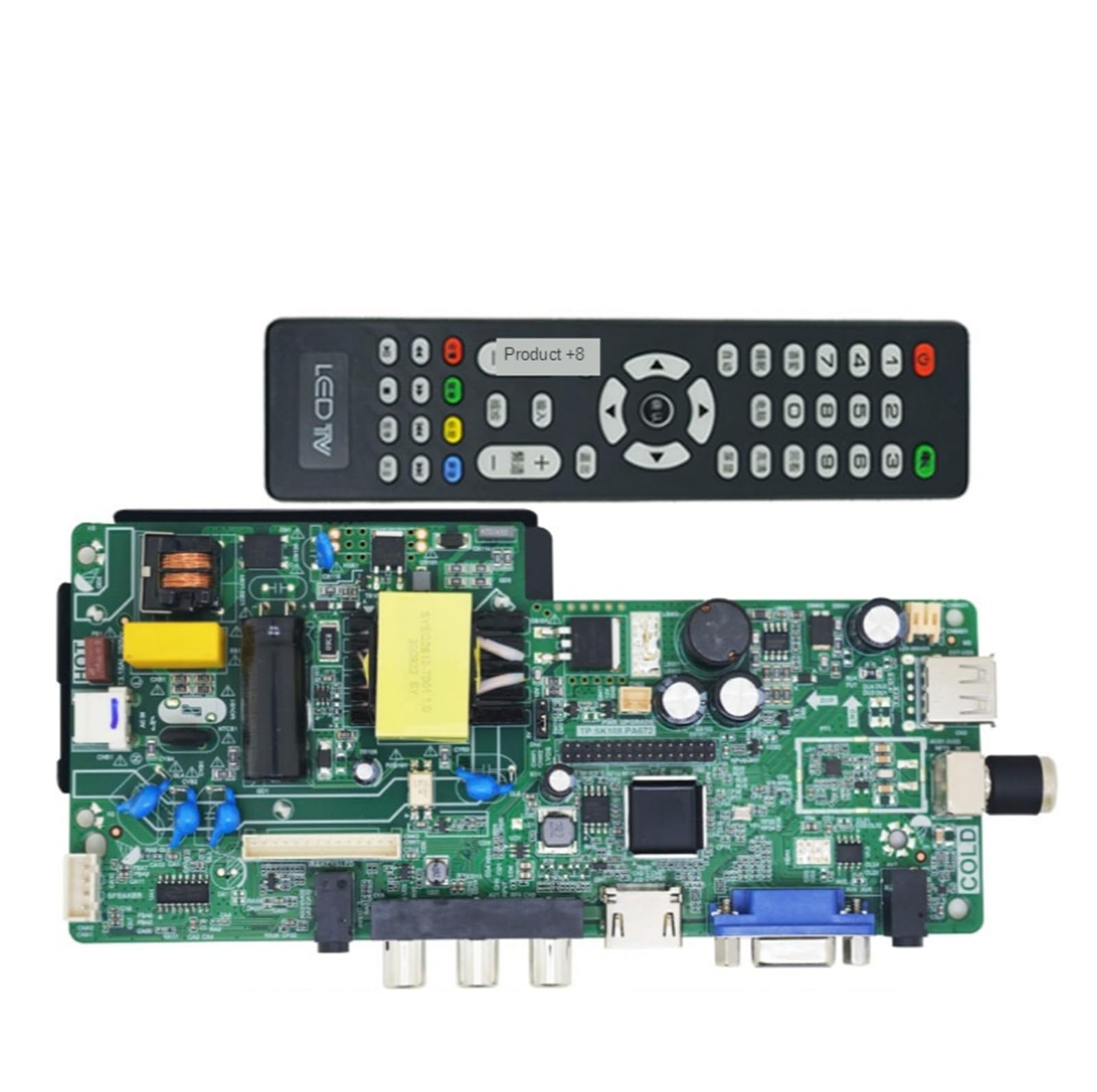
Figure 4.1: RXCWWZQQ Universal TV Motherboard. This image displays the main circuit board with various connectors for power, video inputs (HDMI, VGA), and other peripheral connections. Key components are visible on the board's surface.
5. Setup and Installation
- Preparation:
- Ensure the television is completely powered off and unplugged from the wall outlet.
- Place the TV face down on a soft, clean surface to protect the screen.
- Remove the back cover of the television to access the existing motherboard.
- Discharge any residual power by pressing and holding the power button for a few seconds.
- Remove Old Motherboard:
- Carefully disconnect all cables connected to the old motherboard (power, display panel, speakers, input ports, etc.). Note their positions for re-connection.
- Unscrew the mounting screws holding the old motherboard in place and gently remove it.
- Install New Motherboard:
- Align the new RXCWWZQQ Universal TV Motherboard with the mounting holes in the TV chassis.
- Secure the new motherboard with the appropriate screws. Do not overtighten.
- Carefully re-connect all cables to their corresponding ports on the new motherboard. Ensure all connections are firm and correctly seated. Pay special attention to the display panel cable (LVDS or similar) and power connections.
- Initial Power-On:
- Before replacing the back cover, plug the TV into a power outlet.
- Power on the TV and check if the display functions correctly. Verify that the resolution is appropriate for your panel.
- If the display is incorrect or distorted, power off the TV immediately and re-check all connections, especially the display panel cable.
- If the TV powers on and displays correctly, power it off, unplug it, and re-attach the back cover.
6. Operating Instructions
As a replacement component, the RXCWWZQQ Universal TV Motherboard integrates seamlessly with your television's existing controls. Operation of the TV, including power on/off, input selection, volume control, and menu navigation, will continue to be managed through your television's remote control or integrated buttons.
- Power On/Off: Use your TV's standard power button or remote control.
- Input Selection: Use the "Input" or "Source" button on your remote to switch between HDMI, VGA, and other available inputs.
- Menu Navigation: Access the TV's on-screen display (OSD) menu using your remote to adjust picture settings, sound, and other TV functions.
7. Maintenance
The RXCWWZQQ Universal TV Motherboard requires minimal maintenance once installed. To ensure optimal performance and longevity:
- Dust Removal: Periodically, and with the TV unplugged, you may carefully remove the TV's back cover and use compressed air to gently clear any dust accumulation from the motherboard and surrounding components. Avoid using liquids.
- Environmental Conditions: Ensure the television is operated in a well-ventilated area, away from excessive heat, humidity, and direct sunlight.
8. Troubleshooting
If you encounter issues after installing the motherboard, refer to the following common problems and solutions:
| Problem | Possible Cause | Solution |
|---|---|---|
| No Power / TV does not turn on | Loose power connection, faulty power supply, incorrect installation. |
|
| No Signal / Blank Screen | Incorrect input selected, loose video cable, incompatible resolution. |
|
| Distorted or Incorrect Display | Incorrect resolution setting, faulty display panel cable, panel type mismatch. |
|
| No Audio | Loose speaker connection, audio settings, source device issue. |
|
9. Specifications
| Brand | RXCWWZQQ |
| Model Numbers | TP.V56.PA671, TP.VST59.PA671, TP.VST59.P67 (Current delivery model: TP.SK108.PA672) |
| Compatible Screen Sizes | 17-27 inch LCD TV LED |
| Supported Resolutions | 1920x1080, 1366x768, 1920x1200, 1440x900, 1650x1080 (and 1280x768 for this variant) |
| Item Weight | 1.76 ounces |
| Package Dimensions | 0.39 x 0.39 x 0.39 inches |
| Type | Digital-to-Analog Converter (DAC), Professional Audio Equipment, Display Equipment |
10. Warranty and Support
For any questions, technical assistance, or warranty inquiries regarding your RXCWWZQQ Universal TV Motherboard, please contact the seller or manufacturer directly. Refer to your purchase documentation for specific warranty terms and contact information.
Note: This product is intended for repair and replacement by individuals with appropriate technical knowledge. Improper installation may void warranty or cause damage.