
1. Important Safety Information
Please read and understand all safety instructions before assembling, operating, or maintaining your Marsail Electric Standing Desk. Failure to follow these instructions may result in injury or damage to the product.
- Weight Limit: Do not exceed the maximum weight capacity of 176 lbs (80 kg) on the desktop.
- Children and Pets: Keep children and pets away from the desk when it is in motion to prevent injury.
- Stability: Ensure the desk is placed on a level surface and is properly assembled to maintain stability.
- Power Cord: Keep the power cord away from heat sources, water, and sharp edges. Do not operate the desk with a damaged power cord or plug.
- Power Outage: In case of a power outage, lower the desk to its lowest position before unplugging it.
- Maintenance: Do not attempt to disassemble or repair the motor or control system yourself. Contact customer support for assistance.
2. Package Contents
Verify that all components are present before beginning assembly:
- Desktop (55x24")
- Desk Legs and Frame Components
- Control Panel with Memory Presets
- Motor and Power Adapter
- Side Storage Pocket
- Headphone Hook
- Assembly Hardware and Tools (Hex key, screws)
- User Manual
Video: Step-by-step guide for assembling the Marsail Electric Standing Desk.
3. Setup Instructions
Follow these steps to assemble your Marsail Electric Standing Desk:
- Assemble the Frame: Attach the crossbar to the lifting columns using the provided screws. Ensure all connections are secure.
- Attach the Feet: Secure the desk feet to the bottom of the lifting columns.
- Assemble the Desktop: The desktop may come in two pieces. Align the pieces and secure them together using the provided dowels and connectors.
- Attach Desktop to Frame: Carefully place the assembled desktop onto the frame. Align the pre-drilled holes and secure the desktop to the frame using the provided screws.
- Install Control Panel: Mount the control panel to the underside of the desktop in the designated area.
- Connect Cables: Connect the motor cable and power cable to the control panel. Plug the power adapter into a wall outlet.
- Attach Accessories: Install the side storage pocket and headphone hook as desired.
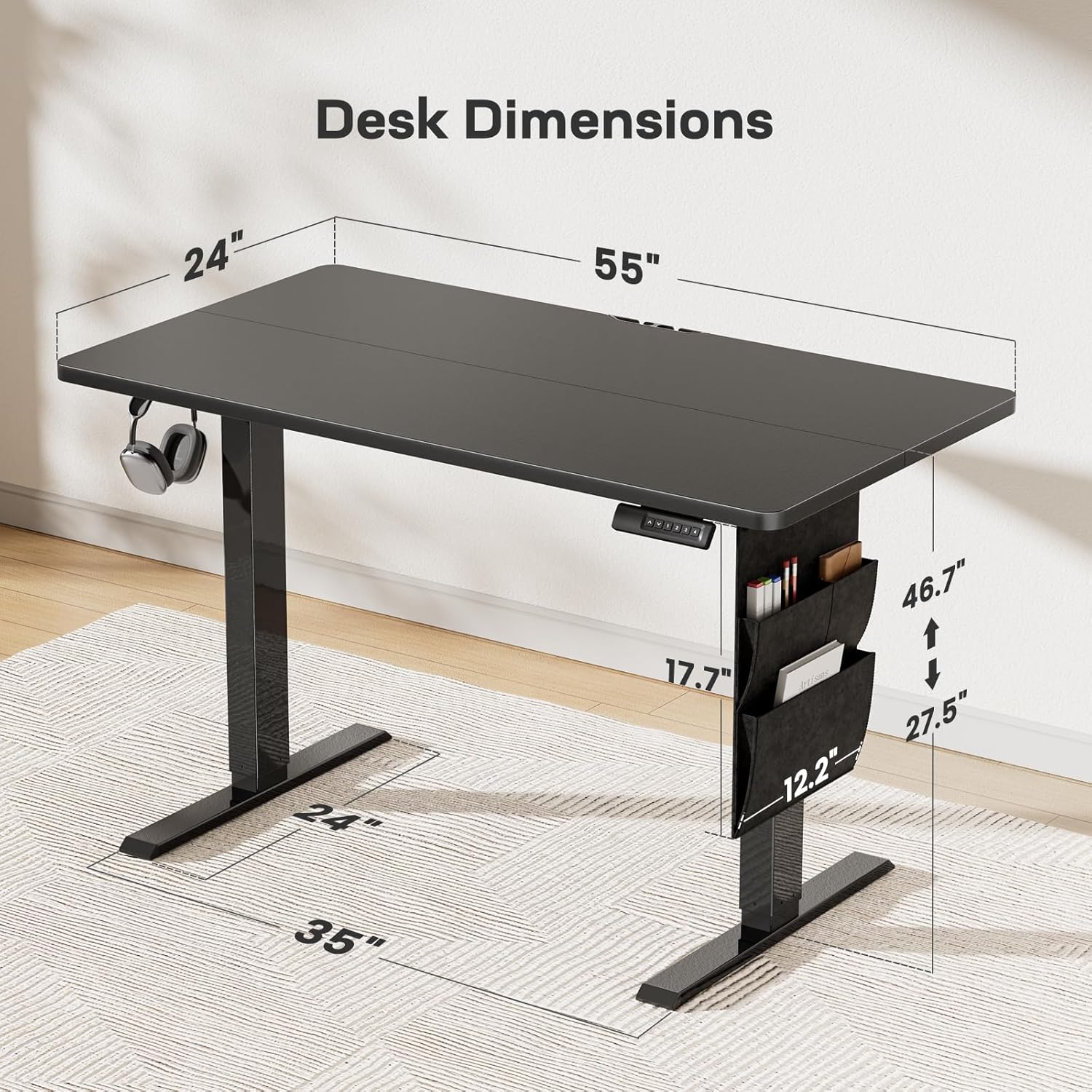
Image: Detailed dimensions of the Marsail 55x24 Electric Standing Desk, showing height range from 27.5" to 46.7".
4. Operating Instructions
Your Marsail Electric Standing Desk features intuitive controls for seamless height adjustment.
4.1. Height Adjustment
- Raise Desk: Press and hold the Up Arrow (^) button to raise the desk.
- Lower Desk: Press and hold the Down Arrow (v) button to lower the desk.
- The desk adjusts smoothly and quietly (below 50dB) at approximately 1 inch per second.
4.2. Memory Presets
The control panel allows you to save up to four custom height settings:
- Adjust the desk to your desired height using the Up/Down arrows.
- Press the 'S' button (Set).
- Immediately press one of the numbered buttons (1, 2, 3, or 4) to save the current height to that preset. The display will flash to confirm.
- To recall a saved height, simply press the corresponding numbered button. The desk will automatically move to the saved position.

Image: Close-up of the desk's control panel, highlighting the Up/Down arrows and four custom height setting buttons.
Video: Demonstrates the electric standing desk's height adjustment and memory preset functions, showcasing its smooth and quiet operation.
5. Maintenance
Regular maintenance ensures the longevity and optimal performance of your Marsail Electric Standing Desk.
- Cleaning: Wipe the desktop and frame with a soft, damp cloth. Avoid harsh chemicals or abrasive cleaners.
- Cable Management: Periodically check all cables for wear or damage. Ensure cables are neatly organized to prevent entanglement during height adjustments.
- Fasteners: Occasionally check all screws and bolts to ensure they are tight. Retighten if necessary.
- Environmental Conditions: Avoid exposing the desk to extreme temperatures or high humidity.
6. Troubleshooting
If you encounter any issues with your desk, refer to the following common troubleshooting steps:
- Desk Not Moving: Check if the power cord is securely plugged into both the desk and the wall outlet. Ensure there are no obstructions preventing movement.
- Uneven Movement: If the desk moves unevenly, ensure it is on a level surface and that all frame connections are tight.
- Error Codes: If the control panel displays an error code, refer to the specific error code section in the full manual (if available) or contact customer support.
- Noise: A slight humming sound during operation is normal. Excessive or unusual noise may indicate an issue; ensure no components are loose.
7. Specifications
| Feature | Specification |
|---|---|
| Brand | Marsail |
| Model Number | TZESD8B-N1-US |
| Product Dimensions | 24"D x 55"W x 46.7"H |
| Color | Black |
| Minimum Height | 27.5 Inches |
| Maximum Height | 46.7 Inches |
| Weight Capacity | 176 lbs (80 kg) |
| Lifting Mechanism | Electric |
| Noise Level | <50dB |
| Desktop Material | Engineered Wood (CARB-certified, low-VOC, formaldehyde-free, scratch-resistant) |
| Frame Material | Carbon Steel |
| Special Features | Adjustable Height, Anti-Collision System, Electric, Ergonomic, One-Touch Lifting, Side Storage Pocket, Headphone Hook |

Image: Illustration demonstrating ergonomic comfort with the Marsail Electric Standing Desk at both sitting (27.5") and standing (46.7") heights.
8. Warranty and Support
Marsail provides a limited warranty for this product. For detailed warranty information, please refer to the documentation included with your purchase or visit the official Marsail website.
For technical support, troubleshooting assistance, or parts replacement, please contact Marsail customer service through their official channels.


