
1. Introduction
This manual provides detailed instructions for the Souroyea AI Translation Earbuds, Model TE-101. Please read this guide thoroughly before using your device to ensure proper operation and to maximize its features. Keep this manual for future reference.
2. What's in the Box
The package includes:
- Souroyea AI Translation Earbuds
- Charging Case
- User Manual
3. Product Overview
The Souroyea TE-101 AI Translation Earbuds are designed for seamless communication across language barriers, offering real-time translation, music playback, and phone call capabilities. Their open-ear design ensures comfort for extended wear.

The image displays the Souroyea TE-101 AI Translation Earbuds nestled within their sleek black charging case. The earbuds feature an open-ear design, and the case is compact for portability.
4. Setup
4.1 Charging the Earbuds and Case
Before first use, fully charge the earbuds and the charging case. Place the earbuds into the charging case. Connect the charging case to a power source using a compatible USB cable. The indicator lights on the case will show the charging status. A full charge provides approximately 10 hours of earbud use and up to 30 hours total with the charging case.
4.2 Downloading the Companion App
The Souroyea AI Translation Earbuds require a dedicated application for full translation functionality. Download the 'VTrans.AI' app from the Google Play Store or Apple App Store.

This image shows a smartphone displaying the VTrans.AI application interface. The app features options for 'Simultaneous interpretation mode', 'Speaker Mode', 'Offline translation', 'Touch Mode', 'Video call', and 'Photo translation mode', indicating various translation functionalities.
4.3 Pairing with Your Device
- Ensure the earbuds are charged and removed from the charging case. They will automatically enter pairing mode.
- On your smartphone, enable Bluetooth and search for available devices.
- Select 'Souroyea TE-101' from the list of discovered devices to connect.
- Open the VTrans.AI app and follow the on-screen instructions to complete the setup.
5. Operating Instructions
5.1 Wearing the Earbuds
The Souroyea TE-101 earbuds feature an open-ear design for comfort during prolonged use. Gently place each earbud over your ear, ensuring a secure and comfortable fit without blocking your ear canal.

A person is shown wearing the Souroyea open-ear earbuds while reading a book outdoors, illustrating the comfortable and lightweight design suitable for extended wear.
5.2 Basic Functions
The earbuds offer versatile functionality beyond translation, including music playback and handling phone calls.

This image highlights the 'Three-in-One' capabilities of the earbuds with icons for 'Translate', 'Music Playing', and 'Phone Calls', indicating their multi-functional design.
5.3 Translation Modes
The VTrans.AI app provides several translation modes to suit different communication needs:
- Free Talk Mode: For natural, continuous conversation.
- Offline Mode: Supports translation in 8 major languages without an internet connection (Chinese, English, Japanese, Korean, Russian, German, French, Spanish).
- Audio Transcription: Converts spoken language into text.
- Photo Translation: Translates text from images.

The image shows two smartphone screens side-by-side, demonstrating the real-time translation feature of the VTrans.AI app. Text is translated between English and another language, with audio wave indicators.

This image illustrates various scenarios where the earbuds can be used, including face-to-face conversations, foreign language listening, and filming/interpreting for learning, showcasing their versatility.
5.4 Environmental Noise Cancelling (ENC)
Equipped with dual microphones, the earbuds feature Environmental Noise Cancelling (ENC) technology. This enhances voice clarity during calls and improves the accuracy of voice capture for translation by reducing ambient noise.
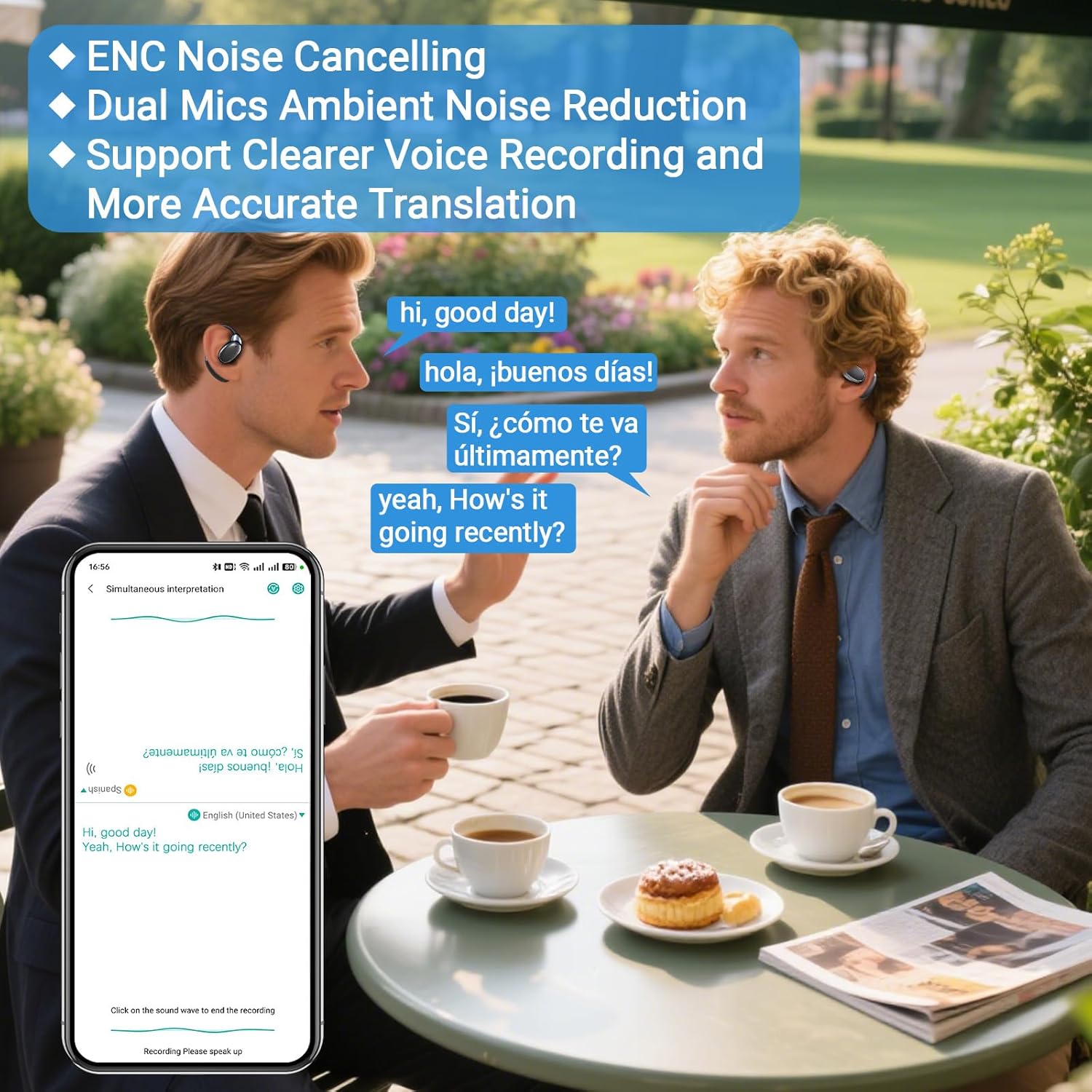
Two men are shown conversing in a cafe setting, with speech bubbles indicating translation. One man is wearing the earbuds, highlighting the ENC feature for clearer communication in noisy environments.
5.5 Touch Controls
The earbuds feature intuitive touch controls for managing calls, music playback, and translation functions. Refer to the VTrans.AI app or the quick start guide for specific touch gestures.

A person is depicted outdoors, listening to audio with the earbuds, emphasizing the 'Touch to Enjoy Crystal-Clear Sound' feature, suggesting easy control and high-quality audio.
6. Maintenance
6.1 Cleaning
The earbuds are waterproof and made of silicone. To clean, gently wipe the earbuds and charging case with a soft, damp cloth. Do not use harsh chemicals or abrasive materials. Ensure the charging ports are dry before charging.
6.2 Storage
When not in use, store the earbuds in their charging case to protect them and maintain battery life. Avoid extreme temperatures and direct sunlight.
7. Troubleshooting
7.1 Earbuds not pairing
Ensure Bluetooth is enabled on your device and the earbuds are charged. Try restarting your device and the earbuds. If issues persist, unpair and re-pair the earbuds.
7.2 Translation inaccuracy
Check your internet connection for online translation. Ensure clear speech and minimal background noise. Verify language settings in the VTrans.AI app.
7.3 No sound or poor audio quality
Check volume levels on both your device and the earbuds. Ensure earbuds are properly seated in your ears. Clean any debris from the earbud speakers.
7.4 Battery not charging
Verify the charging cable and adapter are working correctly. Ensure the earbuds are properly placed in the charging case and the case is connected to a power source.
8. Specifications
Detailed technical specifications for the Souroyea TE-101 AI Translation Earbuds:
| Feature | Detail |
|---|---|
| Brand | Souroyea |
| Model Number | TE-101 |
| Color | Black |
| Ear Placement | Open Ear |
| Form Factor | True Wireless |
| Impedance | 16 Ohms |
| Connectivity Technology | Wireless (Bluetooth 5.0) |
| Noise Control | Environmental Noise Cancellation |
| Battery Average Life | 10 Hours (Earbuds), 30 Hours (with Charging Case) |
| Control Method | App, Touch |
| Water Resistance Level | Waterproof |
| Compatible Devices | Smartphones (iPhone, Android) |
| Enclosure Material | Silicone |
| Frequency Range | 20 Hz - 20,000 Hz |
9. Warranty Information
The Souroyea TE-101 AI Translation Earbuds come with a 1-year warranty from the date of purchase. This warranty covers manufacturing defects. For warranty claims, please retain your proof of purchase.
10. Customer Support
For further assistance, technical support, or inquiries regarding your Souroyea TE-101 AI Translation Earbuds, please refer to the contact information provided with your product packaging or visit the official Souroyea website.