
1. Product Overview
The XTRONS Android 14 Car Stereo is a 9-inch touch screen head unit designed for select Volkswagen, Skoda, and SEAT models. It features a high-definition IPS display, an Octa-Core CPU, 4GB RAM, and 64GB ROM for a fast and smooth user experience. This unit integrates advanced features such as built-in DSP, wireless CarPlay, wireless/wired Android Auto, and dual-band WiFi connectivity.

Image 1.1: Front view of the XTRONS Android 14 Car Stereo highlighting its core specifications and features.
2. Vehicle Compatibility
This car stereo is compatible with a range of Volkswagen, Skoda, and SEAT models. It is designed for plug-and-play installation, retaining original vehicle features such as steering wheel controls, AC information, door status, and mileage display.
2.1 Compatible Volkswagen Models:
- Amarok (2010-2015)
- Beetle (2011-2015)
- Bora (Jetta) (2005-2015)
- Caddy (2004-2015)
- EOS (2006-2015)
- Golf MK5 / V5 / A5 / 1K (Variant / GTI / Estate) (2003-2009)
- Golf MK6 / VI6 / A6 / 5K (GTI / Wagon / R / Variant / Estate / Cabriolet) (2008-2013)
- Golf Plus (2004-2013)
- Jetta V / A5 / 1K (2005-2009)
- Jetta VI / A6 / 1B (2010-2015)
- Passat B6 / 3C (Estate / Sedan / Wagon) (2005-2010)
- Passat B7 / 3C (Estate / Sedan / Wagon / Alltrack) (2010-2014)
- Passat CC (2008-2011)
- Polo MK5 / 6R (GTI / Sedan) (2009-2014)
- Scirocco Mk3 (2008-2011)
- Magotan (2007-2013)
- Sharan (2010-2014)
- Touran (2003-2014)
- Tiguan (2007-2013)
- T5 Multivan (2010-2013)
- T5 Transporter (2010-2013)
- T5 Caravelle (2010-2015)
- Vento (2009-2015)
2.2 Compatible SKODA Models:
- Fabia (2007-2014)
- Fabia Combi (2008-2014)
- Roomster (2006-2015)
- Octavia (2007-2012)
- Yeti (2009-2015)
- Superb (2008-2015)
2.3 Compatible SEAT Models:
- Alhambra (2010-2015)
- Altea (2004-2015)
- Altea XL (2007-2015)
- Leon Mk2 (2005-2012)
- Toledo (2004-2015)

Image 2.1: Visual comparison of a car's center console before and after installation, demonstrating the integrated look.
2.4 Important Compatibility Notes:
- Please verify your VW T5 vehicle's center console shape. If it is not a square shape as shown in the product images, this unit may not fit.
- For SKODA vehicles, compare your center console with the provided images to ensure compatibility.
- This unit does not support vehicles equipped with Dynaudio or Fender sound systems.
3. Package Contents
The following items are included with your XTRONS Android 14 Car Stereo:
- 2 × ISO Wiring Harness
- 2 × USB Cable
- 1 × 4G Antenna
- 1 × GPS Antenna
- 1 × Original USB Cable Adapter
- 1 × User Manual
- 1 × CANbus Box
- 1 × Microphone
- 1 × CANbus Cable
- 1 × Camera Cable
- 1 × SIM Card Slot Cable
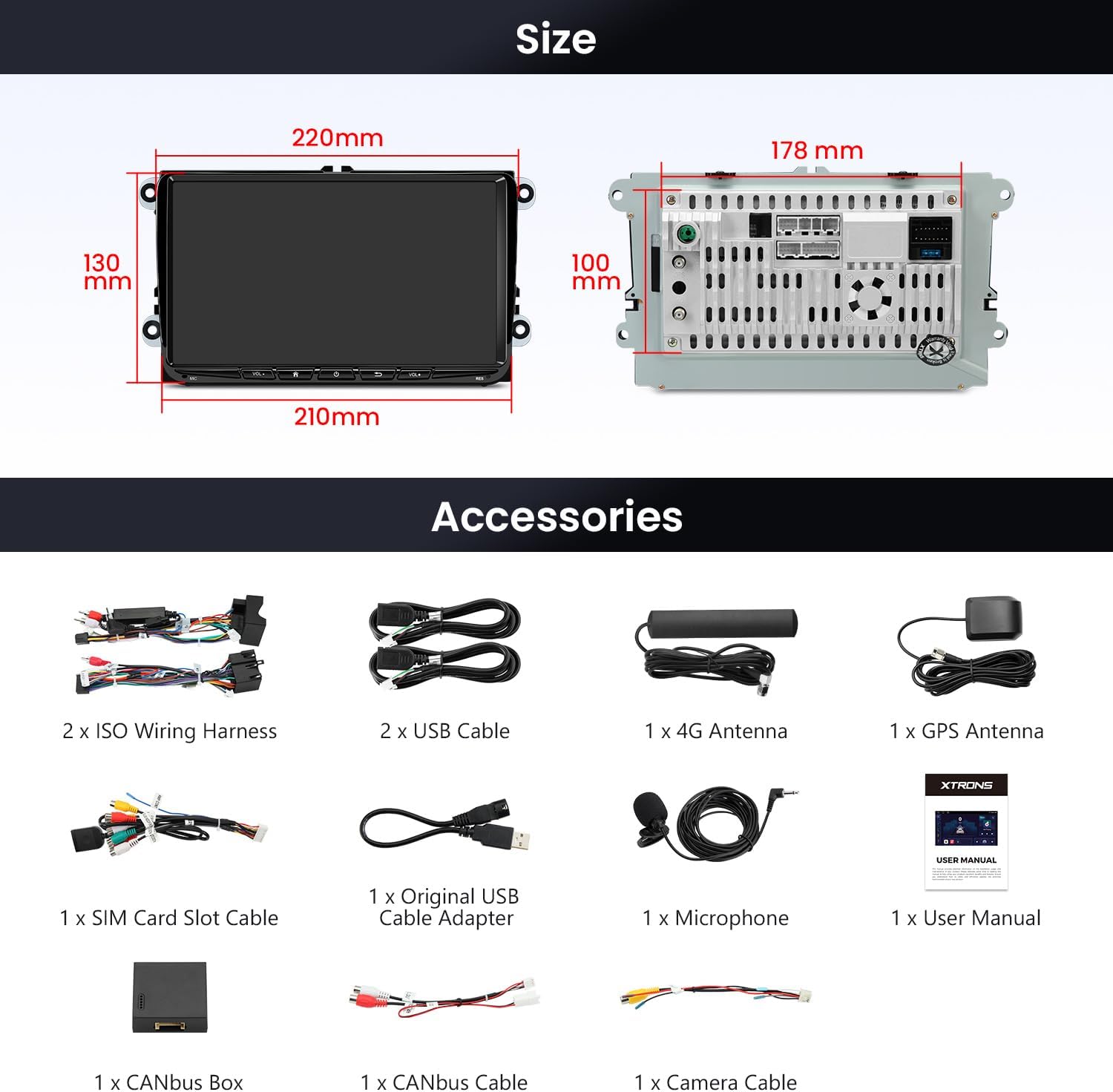
Image 3.1: A complete view of all included accessories and cables.
4. Setup and Installation
Installation should be performed by a qualified professional. Ensure the vehicle's power is disconnected before beginning installation.
4.1 Wiring Connections:
- ISO Wiring Harness: Connect the appropriate ISO wiring harness to your vehicle's existing wiring.
- USB Cables: Connect the provided USB cables for data transfer and charging.
- Antennas: Connect the 4G antenna and GPS antenna to their respective ports on the unit.
- CANbus Box and Cable: The CANbus box and cable are essential for integrating with your vehicle's original features like steering wheel controls and displaying vehicle information. Connect them as per the wiring diagram in the detailed user manual.
- Microphone: Connect the external microphone for improved call quality.
- Camera Cable: If installing a reverse camera, connect it using the provided camera cable.
- SIM Card Slot Cable: Insert a SIM card into the SIM card slot cable to enable 4G network connectivity.

Image 4.1: Wiring options for retaining the original reversing camera function.
For detailed wiring diagrams and specific installation steps, refer to the included User Manual.
5. Operating Instructions
5.1 Display and User Interface:
The unit features a 9-inch 1280x720 HD IPS display with 178° ultra-wide viewing angles. The Android 14 operating system provides a customizable user interface (UI). You can explore XTRONS built-in UI themes and download additional themes from the built-in App platform.

Image 5.1: The IPS panel offers wide viewing angles and consistent color accuracy.

Image 5.2: Examples of multiple customizable UI themes available for the unit.
Video 5.1: This video demonstrates how to refresh themes on XTRONS ID series units, showcasing the process of selecting and applying new interface designs.
5.2 Smartphone Connectivity:
The unit supports both wireless and wired CarPlay and Android Auto. Bluetooth 5.0 is included for hands-free calls and audio streaming. Screen mirroring functionality allows you to display your smartphone's content directly on the car stereo screen.

Image 5.3: Overview of smartphone connectivity features: CarAutoPlay, Android Auto, and Screen Mirroring.
Video 5.2: This video demonstrates the car radio stereo's wireless CarPlay and Android Auto features, GPS navigation, FM radio, and WiFi connectivity.
5.3 Audio Features:
A built-in Digital Signal Processor (DSP) enhances the audio experience, allowing for detailed sound customization.

Image 5.4: The built-in DSP offers advanced audio customization options.
5.4 Vehicle Integration:
The unit supports original vehicle functions and displays information such as parking sensor data, PDC (Park Distance Control), reversing radar, air conditioning information, door status, fuel consumption, mileage, car battery voltage, engine speed, radio frequency, Bluetooth status, GPS status, ACC control, reversing control, light control, and handbrake control.

Image 5.5: Display of integrated vehicle information and steering wheel control functionality.
6. Specifications
| Feature | Description |
|---|---|
| Display Size | 9 Inches |
| Screen Resolution | 1280 x 720 HD |
| Panel Type | IPS Panel, 178° Viewing Angle |
| Operating System | Android 14 |
| Processor | Octa Core CPU |
| RAM | 4GB |
| ROM | 64GB |
| Connectivity Technology | Bluetooth 5.0, Dual-band WiFi (2.4GHz & 5GHz) |
| Special Features | Touchscreen, Built-in DSP, Wireless CarPlay, Wireless/Wired Android Auto |
| Vehicle Service Type | Car |
7. Maintenance and Care
To ensure the longevity and optimal performance of your XTRONS car stereo, follow these maintenance guidelines:
- Cleaning: Use a soft, dry cloth to clean the screen and exterior. Avoid abrasive cleaners or solvents.
- Software Updates: Periodically check for and install software updates to ensure the system runs efficiently and has the latest features.
- Temperature: Avoid exposing the unit to extreme temperatures for extended periods.
- Power: Ensure stable power supply to prevent damage to the unit.
8. Troubleshooting
If you encounter any issues with your XTRONS car stereo, refer to the following basic troubleshooting steps:
- No Power: Check all power connections and ensure the vehicle's ignition is on. Verify fuses are intact.
- No Sound: Check speaker connections, volume settings, and ensure the audio source is correctly selected. Verify DSP settings are not muting output.
- Touchscreen Unresponsive: Try restarting the unit. If the issue persists, a factory reset may be necessary (refer to the detailed user manual for instructions).
- Bluetooth/CarPlay/Android Auto Connection Issues: Ensure Bluetooth is enabled on both the unit and your smartphone. For wired connections, try a different USB cable. For wireless, ensure WiFi is active and the device is discoverable.
- GPS Signal Loss: Ensure the GPS antenna is properly installed and has a clear line of sight to the sky.
For more complex issues, consult the comprehensive user manual or contact XTRONS customer support.
9. Warranty and Support
The XTRONS Android 14 Car Stereo comes with a 1-Year Manufacturer Warranty. For warranty claims, technical support, or service inquiries, please refer to the contact information provided in your product packaging or visit the official XTRONS website.


