
Important Safety Instructions
Please read and understand all safety instructions before using this product. Keep this manual for future reference.
- Ventilation: Ensure adequate ventilation. Do not block any ventilation openings.
- Water and Moisture: Do not expose this appliance to rain or moisture. Do not place objects filled with liquids, such as vases, on the apparatus.
- Heat Sources: Do not install near any heat sources such as radiators, heat registers, stoves, or other apparatus (including amplifiers) that produce heat.
- Power Sources: Use only power supplies specified by the manufacturer. Ensure the power cord is protected from being walked on or pinched.
- Cleaning: Clean only with a dry cloth.
- Servicing: Do not attempt to service this product yourself. Refer all servicing to qualified service personnel.
Package Contents
Verify that all items listed below are included in your package:
- Kuephom CD-X2A Boombox
- AC Power Cord
- User’s Manual (this document)
- Remote Control
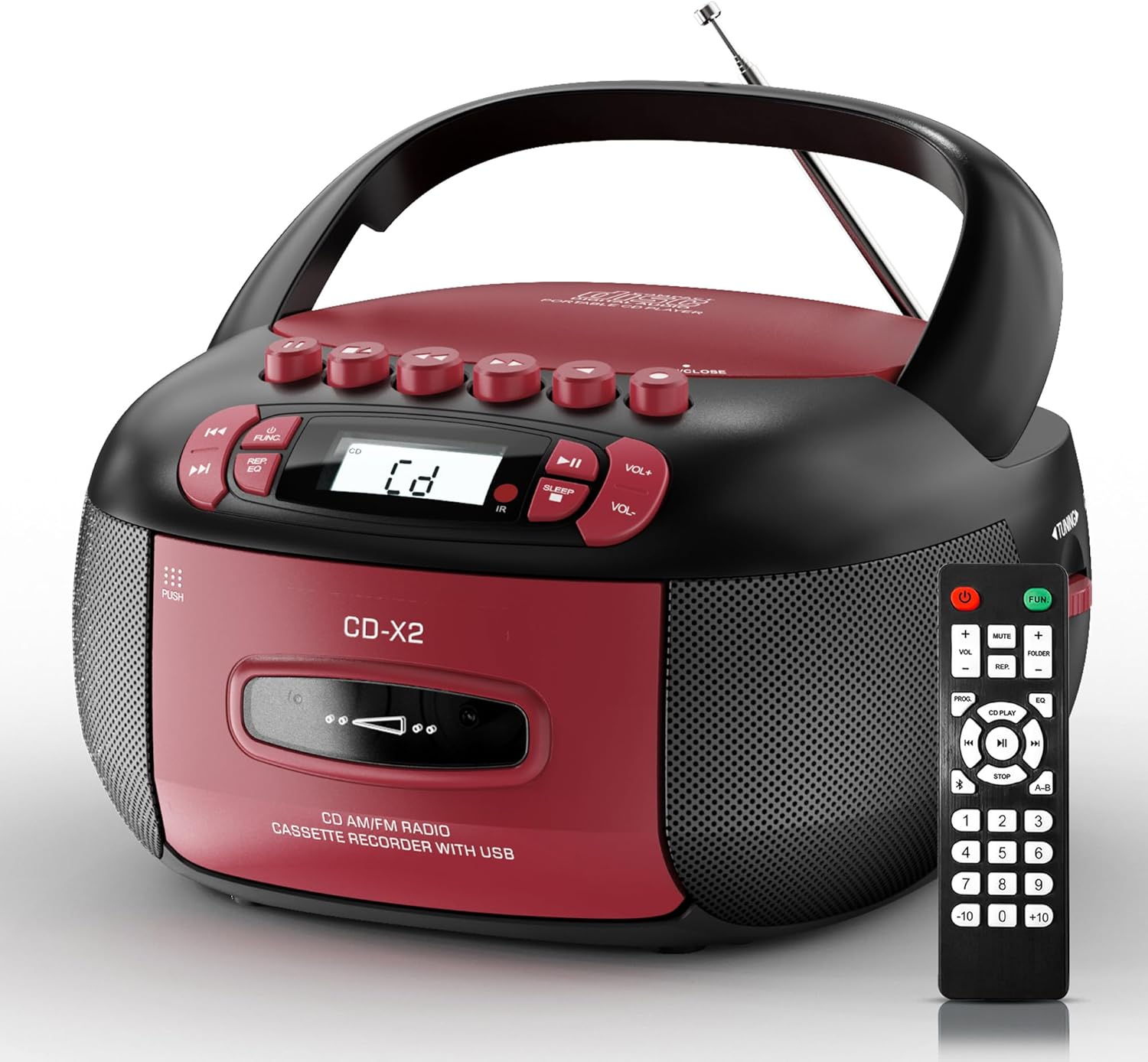
Image: The Kuephom CD-X2A Boombox with its included remote control, showcasing its compact design and red/black color scheme.
Product Overview
Familiarize yourself with the various components and controls of your Kuephom CD-X2A Boombox.
Front Panel Controls
- Power/Function Button: Press and hold to power on/off. Press to cycle through modes (CD, USB, Bluetooth, Radio, AUX, Tape).
- Volume +/- Buttons: Adjust the playback volume.
- Play/Pause Button: Start or pause playback for CD, USB, Bluetooth, or Tape.
- Stop Button: Stop playback.
- Skip/Search Buttons: Navigate between tracks on CD/USB or fast forward/rewind on tape.
- EQ Button: Select equalizer presets.
- Sleep Timer Button: Set the sleep timer.
Side Panel Controls
- Tuning Knob: Manually tune AM/FM radio stations.
- Headphone Jack: Connect headphones for private listening.
- AUX-in Port: Connect external audio devices.
- USB Port: Insert USB drives for MP3/WMA playback.
Top Panel Features
- CD Compartment: Top-loading compartment for CDs.
- Cassette Compartment: Front-loading compartment for cassette tapes.
- Telescopic Antenna: Extend for improved radio reception.

Image: The boombox highlighting its multiple functions including CD/MP3, Bluetooth, Type I/II tape, USB, FM/AM Radios, Sleep timer, Remote, Phone jack, AUX, and Tape recording.

Image: Close-up views of the boombox's phone jack, top-loading CD player, telescopic antenna, and tape play/record buttons.
Setup
Powering the Boombox
AC Power
- Connect the supplied AC power cord to the AC IN jack on the back of the boombox.
- Plug the other end of the power cord into a standard AC wall outlet (120V~60Hz).
Battery Power
- Open the battery compartment cover located on the bottom of the boombox.
- Insert 6 x 'C' size batteries (not included), ensuring correct polarity (+/-).
- Close the battery compartment cover securely.
- When operating on battery power, disconnect the AC power cord.

Image: The boombox demonstrating both AC power connection and the use of 6 C-size batteries for portable operation.
Remote Control
- Insert 2 x 'AAA' batteries (not included) into the remote control, observing polarity.
- Point the remote control towards the boombox's IR sensor for optimal operation.

Image: An individual comfortably operating the boombox using the remote control from a distance.
Operating Instructions
General Operation
- Power On/Off: Press and hold the Power/Function button to turn the unit on or off.
- Function Selection: Press the Power/Function button repeatedly to switch between CD, USB, Bluetooth, Radio (AM/FM), AUX, and Tape modes.
CD Playback
- Open the CD compartment cover.
- Place a CD (CD, CD-R, MP3, WMA compatible) onto the spindle with the label side facing up.
- Close the CD compartment cover.
- Press the Power/Function button to select 'CD' mode.
- Press the Play/Pause button to start playback.
- Use the Skip/Search buttons to navigate tracks.
- Press the Repeat button to repeat a single track, folder, or all tracks.
- Press the Program button to program a custom playback sequence.

Image: The boombox's display showing 'CD' mode, with icons indicating compatibility with CD, CD-R, CD-RW, WMA, and MP3 formats, along with single cycle, repeat folder, repeat all, random play, and play in order options.
Cassette Playback and Recording
- Press the 'OPEN/CLOSE' button on the cassette compartment to open it.
- Insert a cassette tape.
- Close the cassette compartment.
- Press the Power/Function button to select 'TAPE' mode.
- Press the Play button to start playback.
- Use the Fast Forward/Rewind buttons to navigate the tape.
- Recording: In TAPE mode, select the desired source (CD, Bluetooth, USB, or AM/FM radio). Press the Record button to begin recording onto the cassette. The unit features an auto-stop function when the tape reaches its end.

Image: A hand inserting a cassette tape into the boombox's front-loading compartment, with controls for tape operation visible.
AM/FM Radio
- Press the Power/Function button to select 'RADIO' mode. Press again to switch between AM and FM bands.
- Extend the telescopic antenna for better FM reception. For AM, rotate the unit for best reception.
- Use the Tuning knob on the side to manually tune to your desired station. The frequency will be displayed on the screen.

Image: A man relaxing on a couch with the boombox, which displays various FM/AM radio frequencies, indicating good reception.
Bluetooth Connectivity
- Press the Power/Function button to select 'BT' (Bluetooth) mode. The display will show 'BT' and flash, indicating it's in pairing mode.
- On your mobile device, enable Bluetooth and search for 'CD-X2A'.
- Select 'CD-X2A' to pair. Once paired, the 'BT' indicator will stop flashing.
- You can now stream audio wirelessly from your device to the boombox.

Image: A woman in a living room wirelessly streaming audio from her smartphone to the boombox via Bluetooth 5.1, indicating a stable connection.
USB Playback
- Insert a USB flash drive into the USB port on the side of the boombox.
- Press the Power/Function button to select 'USB' mode.
- The boombox will automatically detect and play compatible MP3/WMA files.
- Use the Play/Pause, Stop, and Skip/Search buttons to control playback.
AUX Input
- Connect an external audio device (e.g., smartphone, MP3 player) to the AUX-in port using a 3.5mm audio cable (not included).
- Press the Power/Function button to select 'AUX' mode.
- Control playback directly from your connected external device.
Sleep Timer
- While the unit is playing, press the Sleep Timer button.
- Repeatedly press the button to cycle through available sleep timer durations (e.g., 15, 30, 60, 90 minutes).
- The unit will automatically power off after the selected time.

Image: A man sleeping in bed with the boombox on his nightstand, illustrating the sleep timer feature which allows the device to turn off automatically.
Maintenance
- Cleaning: Use a soft, dry cloth to clean the exterior of the boombox. Do not use abrasive cleaners or solvents.
- CD Care: Handle CDs by their edges. Clean dirty CDs with a soft, lint-free cloth, wiping from the center outwards.
- Cassette Care: Keep cassette tapes away from direct sunlight and heat. Periodically clean the tape heads with a specialized cassette head cleaner.
- Storage: When not in use for extended periods, disconnect the power cord and remove batteries. Store the unit in a cool, dry place.
Troubleshooting
If you encounter issues, refer to the table below for common problems and solutions.
| Problem | Possible Cause | Solution |
|---|---|---|
| No power | AC cord not connected; Batteries depleted or incorrectly inserted. | Check AC connection; Replace or correctly insert batteries. |
| No sound | Volume too low; Incorrect function mode selected; Headphones connected. | Increase volume; Select correct mode; Disconnect headphones. |
| CD skips or doesn't play | CD dirty or scratched; CD inserted incorrectly; Incompatible CD format. | Clean or replace CD; Insert CD correctly; Ensure CD is compatible (CD, CD-R, MP3, WMA). |
| Radio static/poor reception | Antenna not extended/positioned; Weak signal. | Extend and adjust telescopic antenna; Try repositioning the unit. |
| Bluetooth not pairing | Boombox not in pairing mode; Device Bluetooth off; Device too far. | Ensure boombox is in 'BT' mode and flashing; Enable Bluetooth on device; Move device closer. |
| Cassette not playing/recording | Tape inserted incorrectly; Tape heads dirty; Auto-stop engaged. | Insert tape correctly; Clean tape heads; Check tape end. |
Specifications
| Feature | Detail |
|---|---|
| Model Number | CD-X2A |
| Product Dimensions (L x W x H) | 8.39 x 4.8 x 8.54 inches |
| Item Weight | 3.45 pounds |
| Power Source | AC 120V~60Hz or 6 x 'C' size batteries |
| Connectivity Technology | Auxiliary, Bluetooth, USB |
| Speaker Type | Stereo (2W+2W output) |
| Supported Disc Formats | CD, CD-R, MP3, WMA |
| Supported Tape Types | Type I/II Cassette |
| Radio Bands | AM/FM |
| Special Features | Tape Recording, Sleep Timer, Earphone Jack, Remote Control |
Warranty and Support
Kuephom products are designed for reliability and performance. This product comes with a standard manufacturer's warranty against defects in materials and workmanship under normal use.
For warranty claims, technical assistance, or any questions regarding your Kuephom CD-X2A Boombox, please contact Kuephom customer support. Refer to the contact information provided with your purchase documentation or visit the official Kuephom website for support details.
We are committed to providing lifetime service support and 7/24 customer assistance for our products.