
1. Introduction
The UGREEN Nexode Pro 300W Charging Station is an advanced 8-port power delivery device designed to efficiently charge multiple electronic devices simultaneously. Featuring a smart interactive display and app remote control capabilities, this charging station provides real-time charging insights and customizable settings. It incorporates GaN technology and Thermal Guard for stable, efficient, and safe charging.
2. Package Contents
Before proceeding with setup, please ensure all items are present in the package:
- UGREEN Nexode Pro 300W Charging Station
- Power Cord
- Angle Adjustment Base
- User Manual

Image: Contents of the UGREEN Nexode Pro 300W Charging Station package, including the desktop charger, power cord, angle adjustment base, and user manual.
3. Setup Instructions
- Placement: Place the charging station on a stable, flat surface with adequate ventilation. Ensure it is away from direct sunlight, heat sources, and liquids.
- Connect Power: Insert the provided power cord into the DC input port on the charging station, then plug the other end into a standard wall outlet.
- Attach Base (Optional): If desired, attach the angle adjustment base to the bottom of the charging station for optimal viewing angle.
- Initial Power On: The smart display will illuminate upon connecting to power.
4. Operating Instructions
4.1 On-Device Control
The charging station features three control buttons on the top surface for direct interaction with the smart display.
- Middle Button: Press to Enter / Confirm selections.
- Left/Right Buttons: Press to Select / Navigate options.
- Hold Left Button: Hold to Return to the previous screen or home screen.

Image: Diagram illustrating the function of the three control buttons on the UGREEN Nexode Pro charging station for navigation, selection, and returning to the home screen.
4.2 Smart Display Functionality
The intelligent display provides real-time information and customization options:
- Real-time Data: View current wattage, voltage, current, and active charging protocols for each port.
- Charging Modes: Access and switch between different charging modes.
- Settings: Adjust display brightness, screen timeout, and language.
- Customization: Personalize the screen with custom wallpapers.
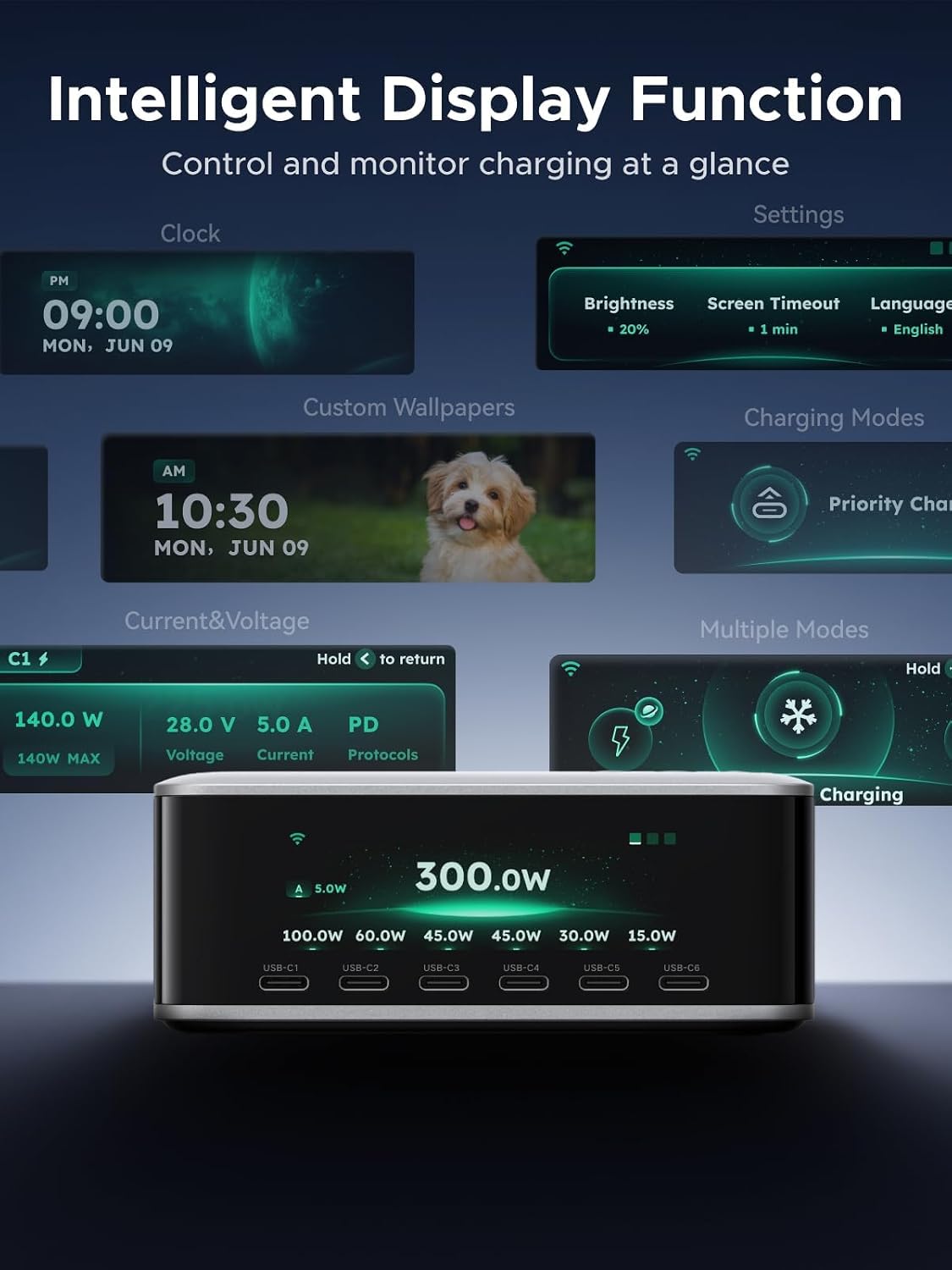
Image: The smart display of the UGREEN Nexode Pro charging station showing various interactive features including clock, custom wallpapers, charging modes, and detailed current/voltage information.
4.3 Charging Modes
The charging station offers five distinct charging modes to optimize power delivery:
- Adaptive Power: Automatically adjusts power output based on connected devices.
- Thermal-Safe Charging: Prioritizes temperature control for extended device lifespan.
- Priority Charging: Allows selection of specific ports for prioritized power delivery.
- DC Turbo Charging: Provides maximum power output for compatible DC devices.
- Custom Power: User-defined power distribution settings (requires app configuration).

Image: The UGREEN Nexode Pro charging station's display interface showcasing the five available charging modes, which can be selected by tapping the top control.
5. App Remote Control
The UGREEN Nexode Pro 300W Charging Station can be controlled and monitored remotely via the UgreenConnect app.
5.1 Easy Connection Guide
- Download App: Download the "UgreenConnect" app from your device's app store.
- Add Device: Open the app, go to "My Devices," and tap the "+" button to add a new device.
- Enable Bluetooth/Wi-Fi: Ensure Bluetooth or Wi-Fi is enabled on your phone and grant necessary permissions. When "Nexode Pro" appears, tap to select it.
- Pairing: Follow the on-screen prompts to complete pairing and enter your Wi-Fi name and password if required. After setup, you will be directed to the device home page within the app.

Image: A step-by-step guide on connecting the UGREEN Nexode Pro charging station to the UgreenConnect app, showing app interface screenshots.
5.2 App Features
- Remote Monitoring: View real-time charging status, wattage, voltage, and current from your phone.
- Mode Control: Switch between charging modes remotely.
- Personalization: Customize display settings, including wallpapers and display styles.
- Custom Power Configuration: Create and manage custom power distribution settings for specific ports.

Image: A user interacting with the UgreenConnect app on a smartphone to remotely control the charging station, depicted in both outdoor and home office environments.
5.3 Firmware Updates (OTA)
The app supports Over-The-Air (OTA) firmware updates to unlock new features, improve compatibility, and optimize performance over time. Ensure your device is connected to the app and follow the prompts for updates.

Image: The UGREEN Nexode Pro charging station alongside a smartphone displaying the firmware update interface within the UgreenConnect app, indicating compatibility and feature updates.
5.4 Video: Button Usage and App Instructions
Video: This video demonstrates the usage of the physical buttons on the UGREEN Nexode Pro 300W Charging Station and provides instructions for using the UgreenConnect mobile application.
6. Charging Performance and Compatibility
The UGREEN Nexode Pro 300W Charging Station delivers high-speed charging for a wide range of devices.
- Total Output: Up to 300W total power output across all 8 ports.
- Single Port Max: Up to 140W fast charging from USB-C1, C2, or C3.
- Efficient Charging: Charges two MacBook Pros to 50% in approximately 28 minutes.

Image: The UGREEN Nexode Pro 300W Charging Station highlighting its 300W maximum power output, ability to charge two MacBook Pros to 50% in 28 minutes, and the distribution of power across its 6 USB-C, 1 USB-A, and 1 DC port.

Image: The UGREEN Nexode Pro 300W Charging Station showcasing its capability for up to 140W single-port fast charging from USB-C1, C2, or C3, with examples of charging speeds for various devices.
6.1 Wide Compatibility
This charging station supports major fast-charging protocols and is compatible with a broad range of devices:
- Laptops: MacBook Air/Pro Series, HP Spectre & EliteBook Series, Dell XPS, ThinkPad, etc.
- Smartphones: iPhone 17/16 Series, Galaxy S26/S25 Series, Google Pixel 10/9 Series, etc.
- Tablets: iPad Pro/Air, Galaxy Tab S10/S9 Series, Surface Pro 11/10 Series, etc.
- Gaming Devices: Nintendo Switch, Steam Deck, ROG Ally, etc.
- Wearables: Apple Watch, Airpods, Buds 5/5 Pro, etc.

Image: An infographic detailing the wide compatibility of the UGREEN Nexode Pro 300W Charging Station with various categories of devices, including laptops, smartphones, tablets, gaming devices, and wearables.
7. Safety Features
The UGREEN Nexode Pro 300W Charging Station is engineered with advanced technologies and materials to ensure maximum safety and durability.
- GaN Technology: Utilizes GaN (Gallium Nitride) chips for stable and efficient power delivery with up to 93% energy conversion efficiency.
- Thermal Guard: Monitors internal temperature 200 times per second to prevent overheating and ensure stable charging.
- V-0 Flame-Retardant Material: The exterior casing is constructed from V-0 flame-retardant material, providing fire and heat insulation.
- 9-Layer Protection: Includes comprehensive protection against overcurrent, overvoltage, short-circuit, overtemperature, undervoltage, anti-interference, overpower, and electrostatic discharge.

Image: An exploded view of the UGREEN Nexode Pro 300W Charging Station, illustrating the internal components and the Thermal Guard technology, including graphene, copper heat sink, and thermal insulation pad for temperature monitoring.
8. Maintenance
To ensure the longevity and optimal performance of your UGREEN Nexode Pro 300W Charging Station, follow these maintenance guidelines:
- Cleaning: Disconnect the power cord before cleaning. Use a soft, dry cloth to wipe the exterior. Avoid using harsh chemicals, abrasive cleaners, or liquids.
- Storage: When not in use for extended periods, store the charging station in a cool, dry place away from direct sunlight and extreme temperatures.
- Cable Management: Avoid bending or crimping the power cord and charging cables excessively to prevent damage.
- Ventilation: Ensure the charging station has adequate airflow around it to prevent heat buildup, especially during heavy use.
9. Troubleshooting
If you encounter issues with your charging station, refer to the following common solutions:
| Problem | Possible Cause | Solution |
|---|---|---|
| Device not charging | Loose connection, incompatible cable, power outlet issue, device fault. | Ensure all cables are securely connected. Try a different cable or port. Verify the power outlet is functional. Test with another device. |
| Slow charging speed | Cable not supporting fast charging, device not supporting fast charging, multiple high-power devices connected, incorrect charging mode. | Use a high-quality cable compatible with fast charging. Ensure your device supports the charging protocol. Check the power distribution on the display or app. Select "Priority Charging" for critical devices. |
| Display not working | Power issue, screen timeout setting. | Check power connection. Adjust screen timeout settings via the device buttons or app. |
| App connection issues | Bluetooth/Wi-Fi disabled, incorrect password, app glitch. | Ensure Bluetooth and Wi-Fi are enabled on your phone. Re-enter Wi-Fi password. Restart the app or reinstall it. Ensure the charging station is within range. |
| Physical button unresponsive | Mechanical issue. | If a physical button is stuck or unresponsive, use the UgreenConnect app to adjust settings and control the device. |
10. Specifications
| Feature | Detail |
|---|---|
| Brand | UGREEN |
| Model Number | X783 |
| Color | Starlight Grey |
| Hardware Interface | USB, USB Type C |
| Number of Ports | 8 (7 USB, 1 DC) |
| Total USB Ports | 7 |
| Wattage | 300 watts (Total) |
| Input Voltage | 240 volts |
| Product Dimensions (L x W x H) | 4.41" x 3.41" x 1.8" |
| Item Weight | 3.2 pounds |
| Compatible Devices | Cellphone, Laptop, Tablets, Gaming Devices, Wearables |
11. Warranty and Support
UGREEN products are designed and manufactured to high-quality standards. For warranty information, technical support, or customer service inquiries, please refer to the official UGREEN website or contact UGREEN customer support directly. Keep your purchase receipt for warranty claims.


