
Product Overview
The HOOBRO TV Stand with Mount and Power Outlet (Model BB130UDDS01) is designed to accommodate televisions from 32 to 65 inches. It features a rotatable mount, integrated power outlets, LED lighting, and ample storage with both open shelves and fabric drawers. Constructed from particleboard, metal, and non-woven fabric, this unit provides a stable and functional solution for your entertainment needs.

Image: The HOOBRO TV Stand with Mount and Power Outlet, showcasing its black finish and overall design.
Setup and Assembly
This TV stand requires assembly. All necessary parts are numbered, and a detailed illustrated manual with tools is included to guide you through the process. It is recommended to follow the instructions carefully for proper and safe assembly.
Before You Begin:
- Verify all components are present according to the parts list in the manual.
- Ensure you have adequate space for assembly.
- Keep children and pets away from the assembly area.
Assembly Steps (General):
- Assemble the main frame structure using the provided hardware.
- Attach the particleboard panels to form the shelves and top surface.
- Install the TV mount column and bracket. Ensure the safety lock is properly secured to prevent wobbling.
- Insert the non-woven fabric drawers into their designated compartments.
- Connect the integrated power outlet unit and LED light strip according to the manual.
- Attach the anti-tip device to the wall for enhanced stability, especially with larger TVs or in households with children.
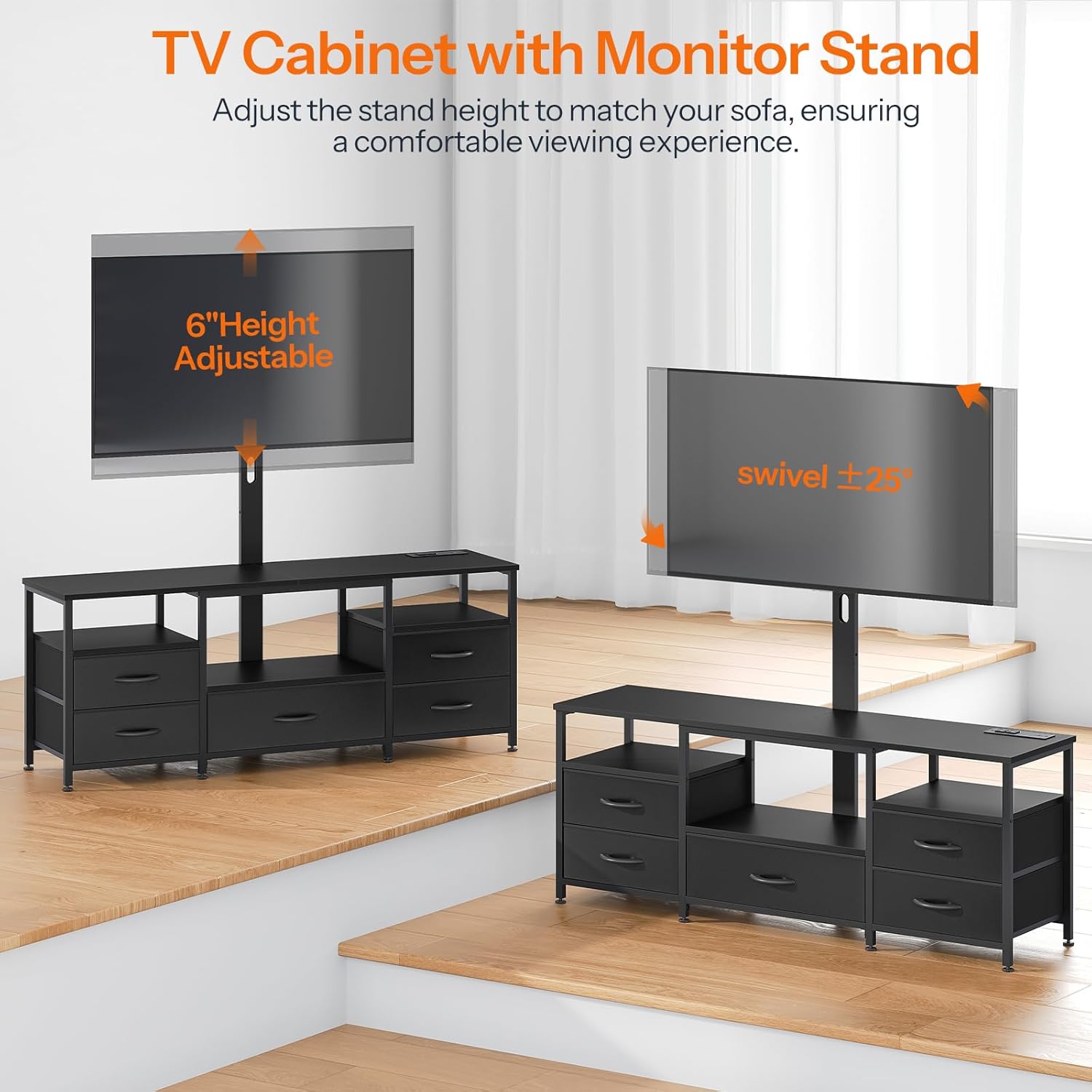
Image: Illustration of the adjustable height and swivel capabilities of the TV mount.

Image: Detailed view of the anti-tip device and its installation process.
Operating Instructions
TV Mount Adjustment:
- Height Adjustment: The TV mount allows for height adjustment to optimize viewing angles. Refer to your assembly manual for specific adjustment mechanisms.
- Swivel Function: The mount can swivel 25 degrees left or right. Gently rotate the TV to achieve your desired viewing position. Avoid forcing the swivel beyond its intended range.

Image: The TV stand with a television mounted, illustrating the 25-degree swivel capability for optimal viewing.
Integrated Power Outlet:
- The TV stand includes 2 AC outlets (120V/12A), 1 USB port (5V/2A), and 1 Type-C port (5V/2A).
- Use these ports to power and charge your media devices, such as game consoles, streaming devices, and mobile phones.
- Ensure the power cord is securely plugged into a wall outlet.

Image: A close-up view of the integrated power strip, featuring two AC outlets, one USB port, and one Type-C port.
LED Light Strip:
- The integrated LED light strip offers multiple colors, brightness levels, and lighting modes.
- Control the LED lights using the provided remote control or smart controller (if applicable).
- Refer to the LED light strip's specific instructions for detailed operation of modes and colors.

Image: The TV stand with its RGB LED light strip illuminated in blue, accompanied by the remote control for adjusting settings.
Storage:
- Utilize the open shelves for displaying media devices such as game consoles, speakers, and Wi-Fi routers.
- The five non-woven fabric drawers are suitable for storing smaller items like remotes, books, and game cards.

Image: The TV stand displaying its open shelves and five fabric drawers, highlighting its storage capabilities for various items.
Care and Maintenance
- Cleaning Surfaces: Wipe particleboard and metal surfaces with a soft, damp cloth. Avoid abrasive cleaners or harsh chemicals that may damage the finish.
- Fabric Drawers: For the non-woven fabric drawers, spot clean with a mild detergent and a damp cloth. Allow to air dry completely. Do not machine wash.
- Dusting: Regularly dust all surfaces to prevent buildup.
- Inspections: Periodically check all screws and connections to ensure they remain tight. Re-tighten if necessary to maintain stability.
- Power Outlet: Ensure the power cord and outlets are free from dust and debris. Do not overload the power strip.
Troubleshooting
| Problem | Possible Cause | Solution |
|---|---|---|
| TV appears wobbly or crooked on the mount. | Mounting screws are not sufficiently tightened; safety lock not engaged; TV weight exceeds capacity. | Ensure all mounting screws are securely tightened. Verify the safety lock mechanism is properly engaged. Confirm your TV's weight and size are within the specified limits (32-65 inches). |
| LED light strip not working or falling off. | Loose connection; power issue; adhesive failure. | Check all connections to the LED strip and power source. Ensure the power outlet is functional. If adhesive fails, re-secure the strip with stronger adhesive tape suitable for electronics. |
| Power outlets not providing power. | Main power cord unplugged; circuit breaker tripped; device not properly plugged in. | Verify the TV stand's main power cord is fully plugged into a working wall outlet. Check your home's circuit breaker. Ensure devices are correctly inserted into the outlets. |
| Fabric drawers are flimsy or not sliding smoothly. | Overloaded drawer; improper assembly; damaged drawer. | Reduce the weight in the drawers. Ensure the drawer supports are correctly installed. Inspect drawers for damage and replace if necessary. |
Product Specifications
- Model Number: BB130UDDS01
- Brand: HOOBRO
- Mounting Type: Floor Mount
- Movement Type: Swivel (25° left or right)
- Compatible TV Sizes: 32 to 65 Inches
- Material: Particleboard, Metal, Non-Woven Fabric
- Color: Black
- Power Outlet: 2 AC Outlets (120V/12A), 1 USB Port (5V/2A), 1 Type-C Port (5V/2A)
- Power Cord Length: 4.9 Feet (approx. 1.5 meters)
- LED Light Strip: Multi-mode, multi-color (21 colors, 8 brightness, 8 lighting modes)

Image: A technical diagram illustrating the full dimensions of the TV stand and its components.
Warranty Information
Specific warranty details for the HOOBRO TV Stand (Model BB130UDDS01) are typically provided with the product packaging or can be obtained directly from the manufacturer. Please refer to the documentation included in your product box for comprehensive warranty terms and conditions. Generally, products are covered against manufacturing defects for a specified period from the date of purchase.
Customer Support
For any questions, assistance with assembly, or to report missing/damaged parts, please contact HOOBRO customer support. Contact information can usually be found in the product manual or on the official HOOBRO website. When contacting support, please have your model number (BB130UDDS01) and purchase details readily available.
You can visit the HOOBRO Store on Amazon for more information: HOOBRO Store
