
Keyluv FKCLCGT
Keyluv Twin Car Bed Frame with LED Lights and Charging Station - User Manual
Model: FKCLCGT | Brand: Keyluv
Important Safety Information
Please read and understand all safety instructions before assembly and use. Keep this manual for future reference.
- Always use a mattress that fits the bed frame dimensions to prevent entrapment hazards.
- Do not jump or play on the bed frame to avoid injury and damage to the product.
- Supervise children when they are using the bed to ensure their safety.
- Ensure all bolts and fasteners are securely tightened before use and periodically check for tightness.
- Do not exceed the maximum weight capacity of 800 pounds.
- Keep electrical components (LED lights, charging station) away from liquids.
Product Overview
The Keyluv Twin Car Bed Frame is designed with a unique car-shaped aesthetic, featuring LED lights and a convenient charging station. It offers a comfortable and durable sleeping solution with a sturdy metal frame and upholstered headboard.
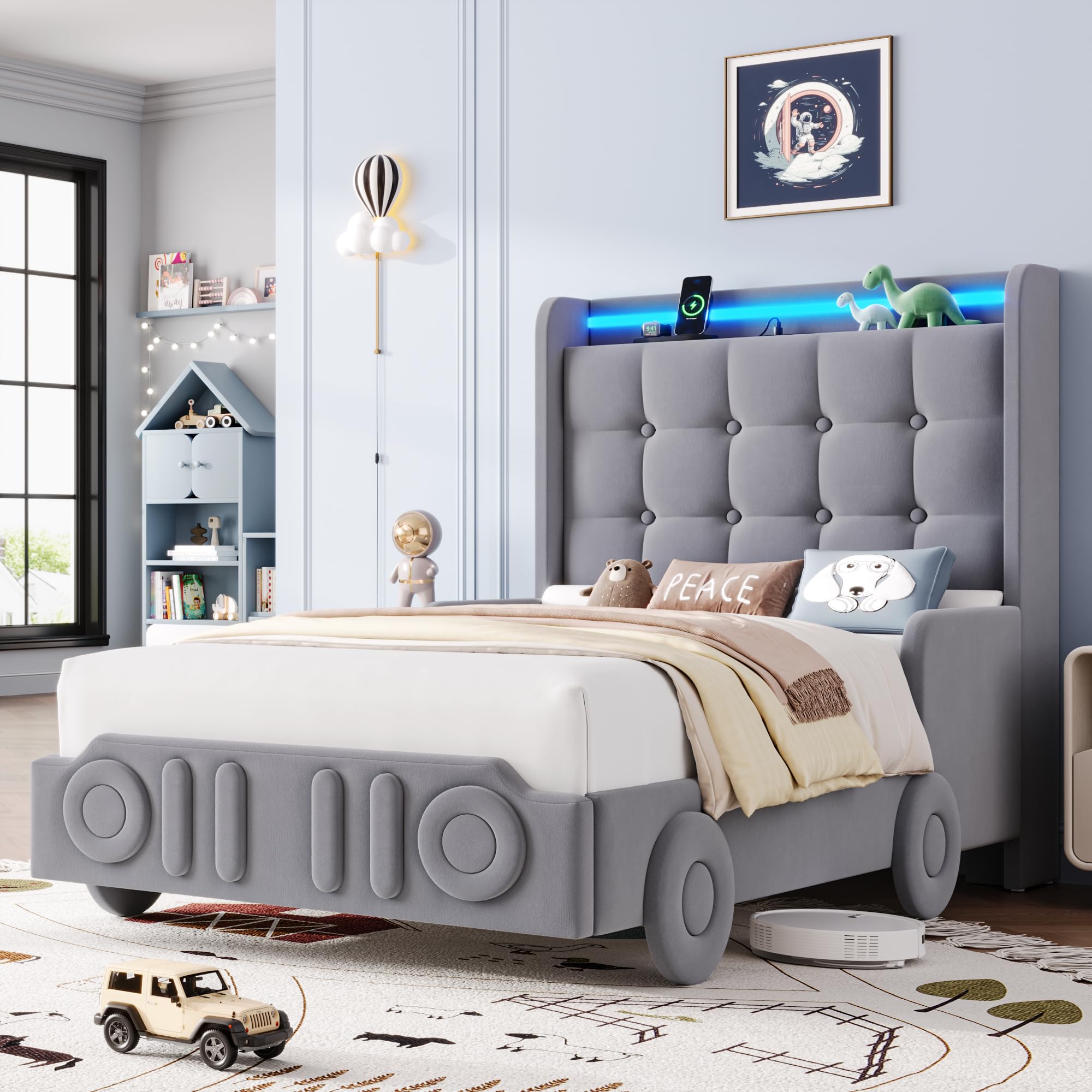
Image: Overall view of the Keyluv Twin Car Bed Frame in grey, showcasing its car-shaped design, upholstered headboard, and integrated LED lighting.

Image: A detailed view of the car-shaped footboard, highlighting the iconic four-slot grille, round headlamps, and wheel designs.
Video: An official product video demonstrating the features and design of the Keyluv Car Bed Frame, including its LED lights and charging station.
Package Contents
Before beginning assembly, ensure all parts are present and undamaged. Refer to the detailed parts list included in your physical assembly manual.
- Headboard with integrated LED lights and charging station
- Footboard with car design elements
- Side rails (left and right)
- Metal frame components
- Pre-connected wooden slats
- Support legs (9 total)
- Assembly hardware (bolts, washers, nuts)
- Assembly tools (e.g., Allen wrench)
- Instruction manual
- LED light remote control
Setup and Assembly
Assembly is designed to be straightforward, typically taking one person approximately 45 minutes. All necessary tools and labeled parts are included. It is recommended to assemble the bed frame in the room where it will be used.
General Assembly Steps:
- Unpack Components: Carefully remove all parts from the packaging and lay them out on a clean, soft surface to prevent scratches. Verify all parts against the included parts list.
- Attach Side Rails to Headboard: Secure the side rails to the headboard using the provided hardware. Ensure connections are firm but do not overtighten initially.
- Attach Footboard: Connect the footboard to the side rails using the appropriate hardware.
- Install Center Support Beam and Legs: Assemble the central metal support beam and attach the support legs as indicated in the manual.
- Place Slats: Unroll or place the pre-connected wooden slats onto the bed frame. Secure them to the side rails and center beam using the designated fasteners. Ensure silent strips are properly positioned to prevent noise.
- Final Tightening: Once all components are in place, systematically tighten all bolts and fasteners to ensure a stable and secure structure.
- Connect Power: Plug in the power cord for the LED lights and charging station to a suitable power outlet.

Image: An illustrative diagram showing the dimensions and key structural features of the twin bed frame, including the headboard, footboard, and slat system.

Image: A detailed view of the bed frame's internal structure, showing the heavy-duty metal frame, 12 closely spaced wooden slats, and 9 thickened support legs designed for stability and noise reduction.
Operating Instructions
LED Lights Operation:
The integrated RGB LED lights offer various modes and colors, controllable via the included remote or a compatible mobile application (if applicable, refer to the physical manual for app details).
- Power On/Off: Use the designated button on the remote control to turn the LED lights on or off.
- Color Selection: Choose from over 16 million static colors using the color wheel or preset color buttons on the remote.
- Dynamic Modes: Select from various flashing or static modes. The lights can also auto-flash with music rhythm.
- Brightness and Speed Adjustment: Adjust the brightness of static colors or the speed of dynamic modes using the remote control.

Image: The bed frame's headboard with the smart RGB LED lights illuminated, demonstrating different color options and dynamic lighting effects.
Charging Station Usage:
The headboard features a built-in charging station with multiple ports for convenience.
- Connect Devices: Use the 1 Type-C port (5V/3A) or the 3 USB ports (5V/2A each) to charge compatible electronic devices.
- Storage Shelf: The integrated shelf provides a convenient space to place devices while they charge.
- Power Source: Ensure the bed frame's power cord is securely plugged into a functional wall outlet for the charging station to operate.

Image: A close-up view of the headboard's integrated charging station, showing the Type-C and USB ports, along with the storage shelf holding electronic devices.
Maintenance
Regular maintenance helps prolong the life and appearance of your bed frame.
- Cleaning Upholstery: For the velvet upholstery, gently vacuum with a soft brush attachment to remove dust. For spills, blot immediately with a clean, dry cloth. Do not rub. For stubborn stains, consult a professional upholstery cleaner.
- Cleaning Frame: Wipe metal and wood components with a soft, damp cloth. Avoid harsh chemicals or abrasive cleaners.
- Hardware Check: Periodically check all bolts and fasteners to ensure they remain tight. Retighten as necessary to maintain stability and prevent squeaking.
- Electrical Components: Ensure the LED strip and charging ports are free from dust and debris. Do not attempt to repair electrical components yourself.
Troubleshooting
If you encounter issues with your Keyluv Twin Car Bed Frame, refer to the following common problems and solutions:
| Problem | Possible Cause | Solution |
|---|---|---|
| Bed frame is squeaking. | Loose hardware; uneven floor; slats not properly seated. | Check and tighten all bolts and fasteners. Ensure the bed is on a level surface. Verify slats are correctly positioned and silent strips are intact. |
| LED lights are not working. | Power cord disconnected; remote control battery low; LED strip damaged. | Ensure the power cord is securely plugged into a working outlet. Check the remote control battery and replace if necessary. If the issue persists, contact customer support. |
| Charging station is not providing power. | Bed frame power cord disconnected; device cable faulty; device incompatible. | Verify the bed frame's main power cord is plugged in. Try a different charging cable or device to rule out cable/device issues. Ensure your device is compatible with USB/Type-C charging. |
| Parts missing or damaged upon arrival. | Shipping damage; packaging error. | Do not proceed with assembly. Contact Keyluv customer support immediately with your purchase details and a description of the issue. |
Specifications
| Feature | Detail |
|---|---|
| Model Number | FKCLCGT |
| Brand | Keyluv |
| Size | Twin |
| Overall Dimensions (L x W x H) | 79.9" x 40.5" x 47.6" |
| Weight Capacity | 800 pounds |
| Materials | Velvet, Foam, Metal, Wood |
| Upholstery Fabric Type | Velvet |
| Frame Material | Metal |
| Headboard Material | Velvet, Foam |
| Recommended Mattress Height | 8" - 12" (Mattress not included) |
| Ground to Item Distance | 5.9 inches |
| Charging Ports | 1x Type-C (5V/3A), 3x USB (5V/2A) |
| LED Lights | RGB, 16 Million Colors, Static/Flashing Modes, Music Sync |
| UPC | 632125677272 |
Warranty and Support
The Keyluv Twin Car Bed Frame comes with a limited warranty. Please refer to the warranty card included in your package for specific terms and conditions, including coverage duration and what is covered.
For any questions, missing parts, or assistance with assembly or operation, please contact Keyluv customer support. Contact information can typically be found on the product packaging, the included instruction manual, or the Keyluv official website.
When contacting support, please have your model number (FKCLCGT) and proof of purchase readily available.
Ask a question about this manual
Ask about setup, troubleshooting, compatibility, parts, safety, or missing instructions. Manuals+ will review the question and use this page’s manual context to help answer it.