
1. Introduction
This manual provides essential information for the proper installation, operation, and maintenance of your Freewell Split ND Filters 4-Pack for the DJI Mavic 4 Pro. These filters are designed to enhance your aerial photography and videography by providing precise exposure control in various lighting conditions.

Figure 1: Freewell Split ND Filters for DJI Mavic 4 Pro, highlighting features like High Definition, Lightweight design, Water, Oil, and Dust Repellent Coating, Anti-Reflective (AR) Coating, Scratch-Resistant Coating, and Gimbal Safe fit.
2. Product Overview
The Freewell Split ND Filters 4-Pack is specifically engineered for the DJI Mavic 4 Pro's triple camera system. This kit includes four split neutral density filters:
- ND8/4
- ND16/8
- ND32/16
- ND64/32
These filters allow for flexible exposure management in diverse lighting scenarios, ensuring balanced exposure between bright skies and darker landscapes for smooth cinematic transitions.

Figure 2: Overview of the four Split ND filters included in the pack, illustrating their application in various lighting conditions to manage overexposure and enhance detail.
3. Setup and Installation
Installing the Freewell Split ND Filters on your DJI Mavic 4 Pro is a straightforward process:
- Remove the Stock Frame: Gently rotate the clear stock frame on the drone's camera counterclockwise to release and remove it.
- Select Your Filter: Choose the appropriate Split ND filter (ND8/4, ND16/8, ND32/16, or ND64/32) based on your lighting conditions.
- Install the Filter: Align the chosen Freewell filter with the drone's camera system. Gently press and turn clockwise until it securely locks into place. Ensure a snug fit to prevent gimbal strain.
For ND/PL and CPL filters (if applicable to other kits), align the white lines on the filter frame for optimal polarization effect.
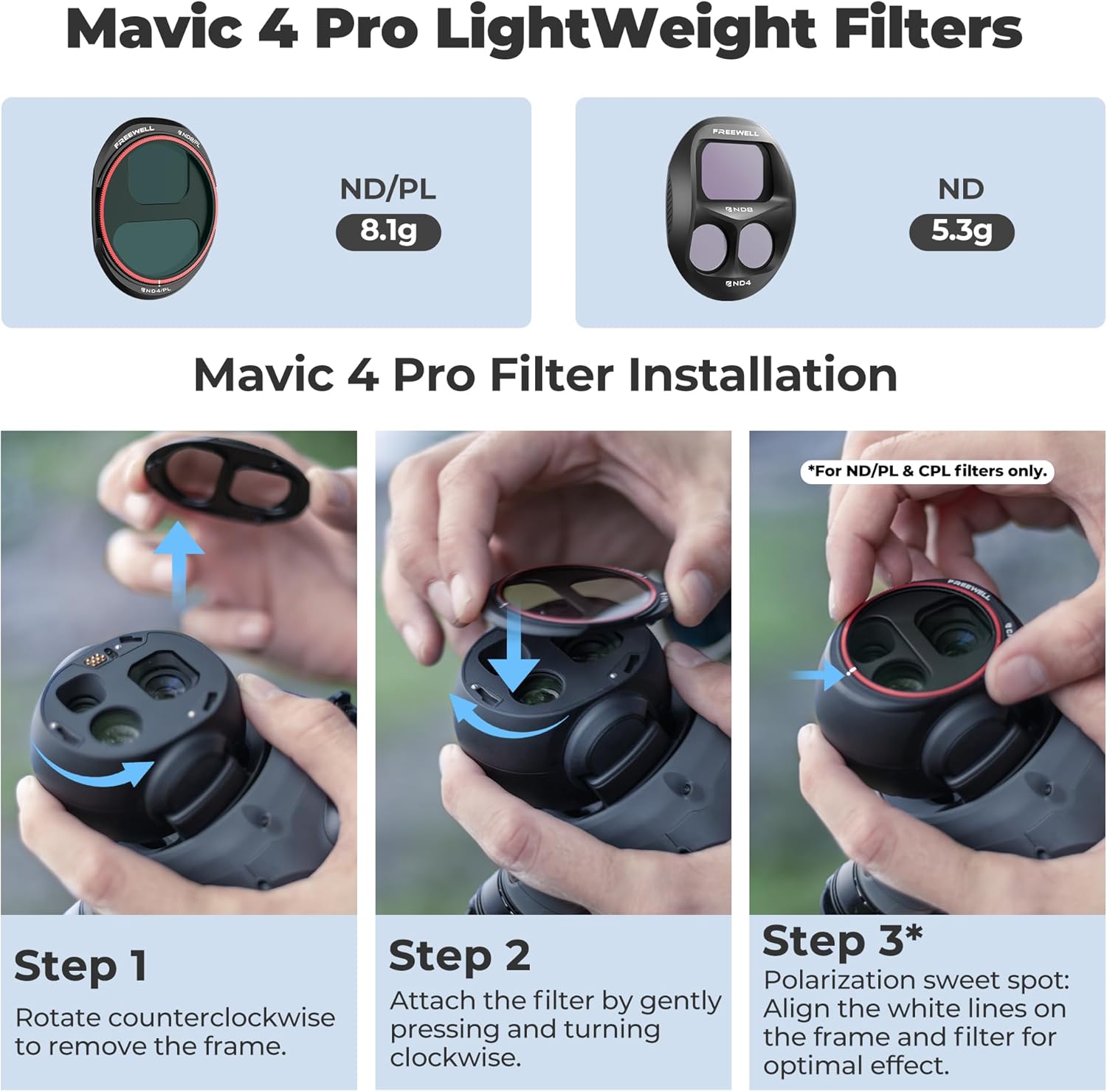
Figure 3: Step-by-step guide for installing Freewell filters on the DJI Mavic 4 Pro.
Video 1: Official introduction to Freewell Mavic 4 Pro filters, demonstrating installation and usage. This video is provided by Life Style Gear, a seller of the product.
4. Operating the Filters
Freewell Split ND filters are designed to manage light entering the drone's camera lenses, allowing you to achieve optimal exposure and cinematic effects. Each filter in the 4-pack offers different levels of light reduction:
- ND8/4: Reduces light by 3 stops for the main camera and 2 stops for the telephoto lenses. Ideal for cloudy to mildly bright conditions.
- ND16/8: Reduces light by 4 stops for the main camera and 3 stops for the telephoto lenses. Suitable for normal bright daylight.
- ND32/16: Reduces light by 5 stops for the main camera and 4 stops for the telephoto lenses. Recommended for very bright conditions.
- ND64/32: Reduces light by 6 stops for the main camera and 5 stops for the telephoto lenses. Best for extremely bright, sunny days.
By selecting the appropriate filter, you can maintain desired shutter speeds for video, reduce glare, and balance exposure across different focal lengths of the Mavic 4 Pro's camera system.

Figure 4: Illustration of the split ND filter design, optimizing exposure for the main and telephoto lenses of the DJI Mavic 4 Pro.
5. Maintenance
To ensure the longevity and optimal performance of your Freewell Split ND Filters, follow these maintenance guidelines:
- Cleaning: Use the provided microfiber cloth or a dedicated lens cleaning solution and cloth to gently wipe the filter surfaces. Avoid abrasive materials that could scratch the optical glass.
- Storage: Always store the filters in their protective case when not in use. This prevents dust accumulation and physical damage.
- Handling: Handle filters by their frames to avoid touching the glass surfaces, which can leave fingerprints and smudges.
6. Troubleshooting
If you encounter issues with your filters, consider the following:
- Unclear Images: Ensure filters are clean and free from smudges or dust. Verify that the filter is securely attached and properly aligned.
- Gimbal Errors: Confirm the filter is correctly installed and not causing any obstruction or imbalance to the gimbal. The gimbal-safe design minimizes this risk, but improper installation can still cause issues.
- Incorrect Exposure: Double-check that you have selected the appropriate ND strength for the current lighting conditions.
For further assistance, refer to the Freewell official support channels.
7. Specifications
| Attribute | Detail |
|---|---|
| Brand | FREEWELL |
| Model Name | FW-M4P-SPLITND |
| Material | Optical Glass |
| Coating Description | Multi Coating |
| Photo Filter Effect Type | Neutral Density |
| Water Resistance Level | Not Water Resistant |
| Photo Filter Factor | Up to 64x (ND64) |
| Set Name | Split ND 4-Pack |
| Number of Pieces | 4 |
| Compatible Devices | DJI Mavic 4 Pro |
8. Warranty and Support
No specific warranty information is provided in the product details. For any support inquiries or detailed warranty information, please contact Freewell customer service directly or visit their official website.