
1. Introduction
The XAUCY KW470 is a professional diagnostic scanner designed for comprehensive vehicle analysis. It combines full system diagnostics for specific vehicle makes with universal OBDII engine diagnostics and a robust battery testing function. This manual provides detailed instructions for setting up, operating, and maintaining your KW470 scanner to ensure accurate and efficient vehicle diagnostics.

Figure 1.1: The XAUCY KW470 OBD2 Scanner unit with its diagnostic cable and battery clamps.
2. Product Overview
2.1. Key Features
- Full System Diagnostics: Supports comprehensive system scanning for Ford, Lincoln, and Mercury vehicles (over 90 types).
- Universal OBDII Engine Diagnostics: Reads and clears engine fault codes for all OBDII compliant vehicles (post-1996).
- Advanced Battery Testing: Includes 12V battery health test, cranking system test, and charging system test.
- Special Reset Functions: Performs Oil Reset, Electronic Parking Brake (EPB) Replacement, Keyfob programming, and Battery Matching.
- Additional Functions: Supports ABS, SRS, SAS, TPMS, ECM, PTS, TCM, IC, and Lamp Adjust functions.
- Multi-language Support: Available in English, French, Spanish, German, Russian, Italian, and Polish.
2.2. Device Layout and Interface
The KW470 features a clear display and intuitive button layout for easy navigation and operation.

Figure 2.1: Main menu interface of the KW470, displaying options for Ford, Lincoln, Mercury, OBDII, Car BAT, and Oil Reset.
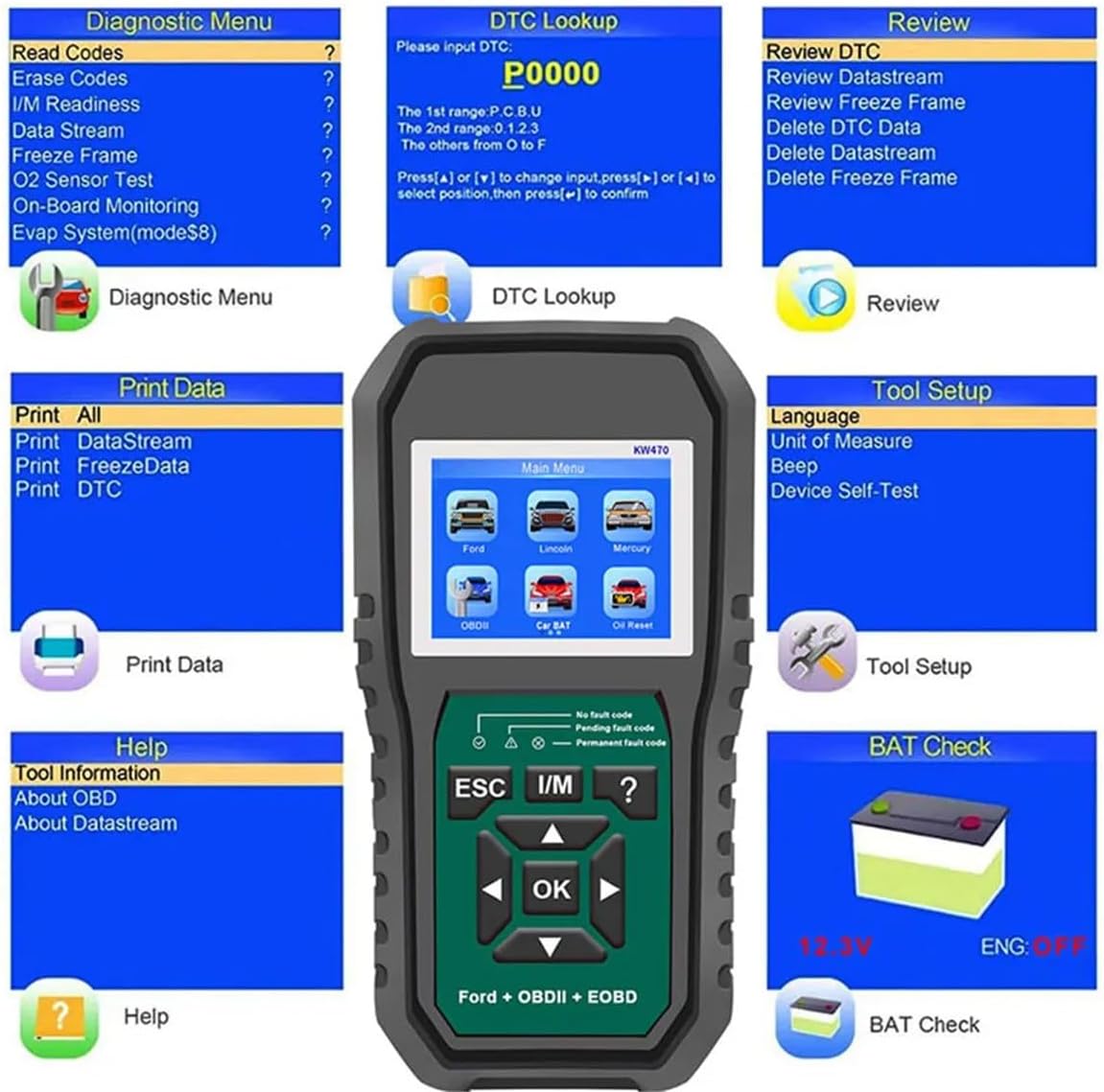
Figure 2.2: Overview of various diagnostic and utility menus available on the KW470 scanner.
3. Setup
3.1. Connecting to the Vehicle
- Locate the vehicle's Data Link Connector (DLC), typically found under the dashboard on the driver's side.
- Ensure the vehicle's ignition is in the "ON" position (engine can be off or running, depending on the test).
- Connect the KW470's OBDII cable to the vehicle's DLC. The device will power on automatically.
3.2. Initial Setup and Language Selection
Upon first use or after a reset, you may need to select your preferred language. Navigate to the "Tool Setup" menu and select "Language" to choose from the available options.
4. Operating Instructions
4.1. OBDII Engine Diagnostics
This function allows you to access engine-related diagnostic information for all OBDII compliant vehicles.
- From the main menu, select "OBDII".
- The scanner will establish communication with the vehicle's Engine Control Unit (ECU).
- Choose from the following options:
- Read Codes: Displays current, pending, and permanent Diagnostic Trouble Codes (DTCs).
- Erase Codes: Clears DTCs from the vehicle's memory. Ensure the underlying issue is resolved before clearing codes.
- I/M Readiness: Checks the status of emission-related monitors.
- Data Stream: Displays real-time data parameters from the vehicle's sensors.
- Freeze Frame: Shows a snapshot of vehicle conditions when a fault code was set.
- O2 Sensor Test: Retrieves O2 sensor monitoring test results.
- On-Board Monitoring: Accesses results of on-board diagnostic monitoring tests for specific components/systems.
- EVAP System Test: Initiates a test of the Evaporative Emission Control System.
- Vehicle Information: Displays vehicle identification number (VIN), calibration ID (CALID), and calibration verification number (CVN).

Figure 4.1: Illustrates common vehicle issues that can be diagnosed with the KW470, including engine and battery problems.
4.2. Battery Test
The KW470 can perform comprehensive tests on 12V vehicle batteries and their associated systems.
- From the main menu, select "Car BAT".
- Follow the on-screen prompts to connect the battery clamps to the vehicle battery terminals (red to positive, black to negative).
- Choose the desired test:
- 12V Battery Test: Assesses the overall health and charge level of the battery.
- Cranking Test: Evaluates the battery's ability to provide sufficient current to start the engine.
- Charging Test: Checks the vehicle's charging system (alternator) to ensure it is properly recharging the battery.
- Review the test results displayed on the screen.
4.3. Special Functions (Ford, Lincoln, Mercury)
The KW470 offers specialized reset and service functions for Ford, Lincoln, and Mercury vehicles.
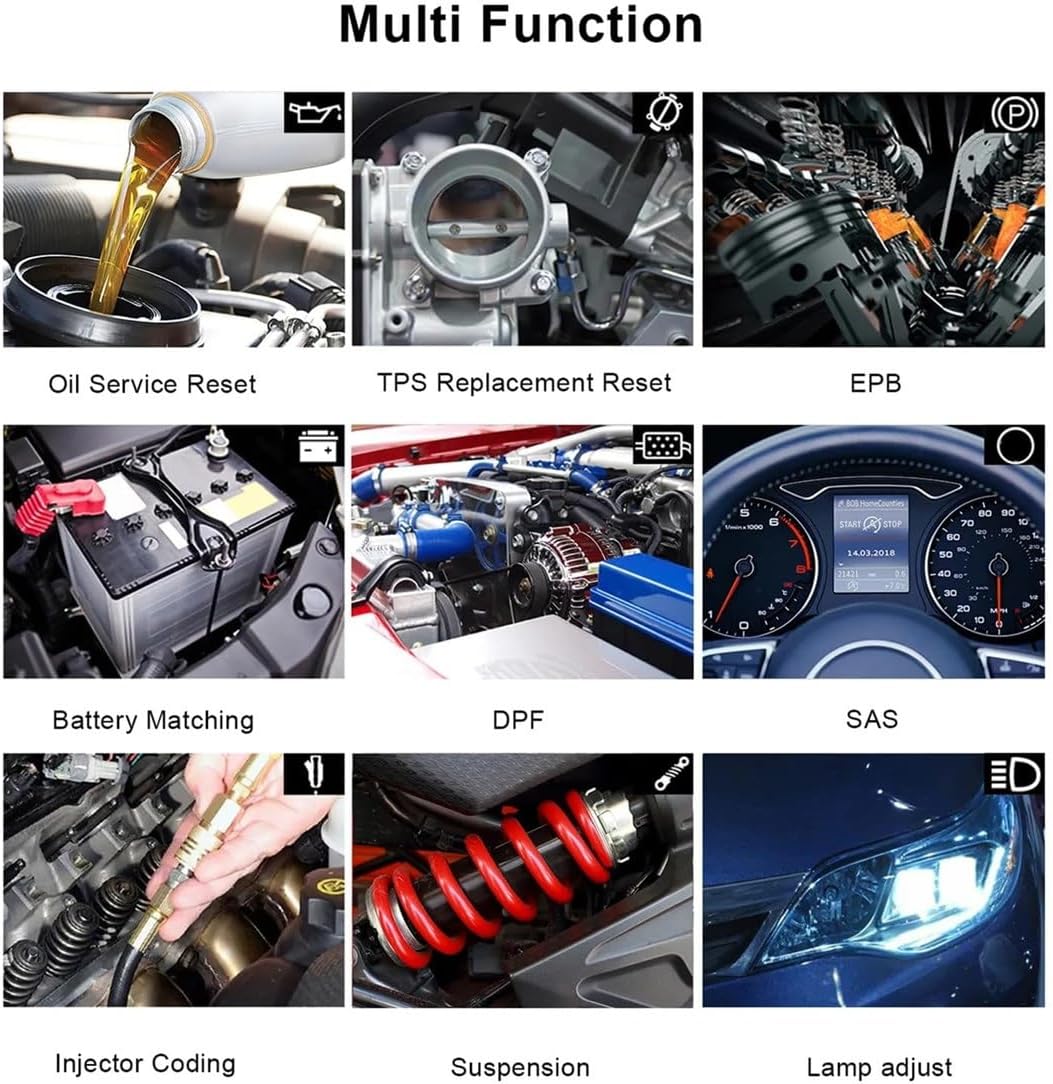
Figure 4.2: Visual representation of various special functions available on the KW470 scanner.
- Oil Reset: Resets the engine oil life system after an oil change, ensuring accurate maintenance reminders.
- EPB Replacement: Performs necessary procedures for replacing electronic parking brake pads, including releasing and re-engaging the brake calipers.
- Keyfob Programming: Assists in the programming or re-programming of vehicle key fobs for remote entry systems.
- Battery Match: Clears old battery fault information and performs battery matching after a new battery installation to optimize charging and monitoring.
- ABS (Anti-lock Braking System): Accesses and diagnoses ABS system faults.
- SRS (Supplemental Restraint System): Accesses and diagnoses airbag system faults.
- SAS (Steering Angle Sensor): Performs steering angle sensor calibration.
- TPMS (Tire Pressure Monitoring System): Diagnoses and resets TPMS related issues.
- Lamp Adjust: Adjusts vehicle lighting parameters.
To access these functions, select the specific vehicle brand (Ford, Lincoln, or Mercury) from the main menu, then navigate to the desired service function.

Figure 4.3: Highlights a selection of the extensive special features and reset functions available with the KW470.
5. Troubleshooting
- Device Not Powering On:
- Ensure the OBDII cable is securely connected to the vehicle's DLC.
- Verify the vehicle's ignition is in the "ON" position.
- Check the vehicle's fuse for the OBDII port.
- Communication Error:
- Confirm the vehicle is OBDII compliant (generally 1996 and newer for gasoline vehicles in the US).
- Ensure the ignition is on.
- Try connecting to a different OBDII compliant vehicle to rule out scanner malfunction.
- Check for loose connections.
- Incorrect Readings/Functionality:
- Ensure the correct vehicle make/model is selected if applicable for specific functions.
- Verify the software version is up to date (check manufacturer's website for updates).
6. Specifications
| Feature | Detail |
|---|---|
| Model | KW470 |
| Type | All System OBDII Scanner |
| Material | ABS |
| Item Weight | 2.2 pounds (approximately 1 kg) |
| Package Dimensions | 1 x 1 x 1 inches (approximate, for shipping) |
| Supported Languages | English, French, Spanish, German, Russian, Italian, Polish |
| Battery Test Voltage | 12V |
7. Maintenance
- Cleaning: Use a soft, dry cloth to clean the scanner's exterior. Avoid using abrasive cleaners or solvents.
- Storage: Store the device in a dry, cool environment, away from direct sunlight and extreme temperatures.
- Cable Care: Inspect the OBDII cable and battery clamps regularly for damage. Avoid bending or crimping the cable excessively.
- Software Updates: Periodically check the XAUCY official website for available software updates to ensure optimal performance and compatibility with newer vehicle models.
8. Warranty and Support
For warranty information, technical support, or service inquiries, please refer to the documentation included with your purchase or visit the official XAUCY website. Keep your purchase receipt as proof of purchase for warranty claims.
For further assistance, please contact XAUCY customer support directly.