
1. Introduction
Thank you for choosing the UGREEN Nexode Pro 100W 5-Port GaN Fast Charger. This advanced charging solution is designed to power your devices efficiently and safely, featuring GaN II technology, a smart display, and dynamic power distribution. Please read this manual carefully before use to ensure optimal performance and safety.
2. Key Features
- 100W Fast Charging: Delivers up to 100W from a single USB-C port (C1, C2, or C3) for rapid charging of compatible laptops and devices.
- 5-in-1 Simultaneous Power: Equipped with 4 USB-C ports and 1 USB-A port to charge up to five devices concurrently.
- Live Power Monitoring with Adjustable Screen: Real-time display of charging status, temperature, and port output data. The screen can be pivoted 90 degrees or smoothly adjusted by holding the button for flexible viewing. Auto-sleep mode activates after two minutes of inactivity to save energy.
- Intelligent Dynamic Power Distribution: Automatically detects connected devices and allocates the most suitable power across all ports.
- GaN Technology & Compact Design: Utilizes advanced GaN II technology for a compact form factor and enhanced efficiency.
- Wide Compatibility: Supports multiple fast-charging protocols including PD 3.0, PPS, QC 4.0, FCP, AFC, AVS, and SCP.
3. Package Contents
- UGREEN Nexode Pro 100W 5-Port GaN Fast Charger (Model X773)
- Power Cable
- User Manual
4. Product Overview
The UGREEN Nexode Pro 100W charger features multiple ports and a smart display for convenient and efficient charging.
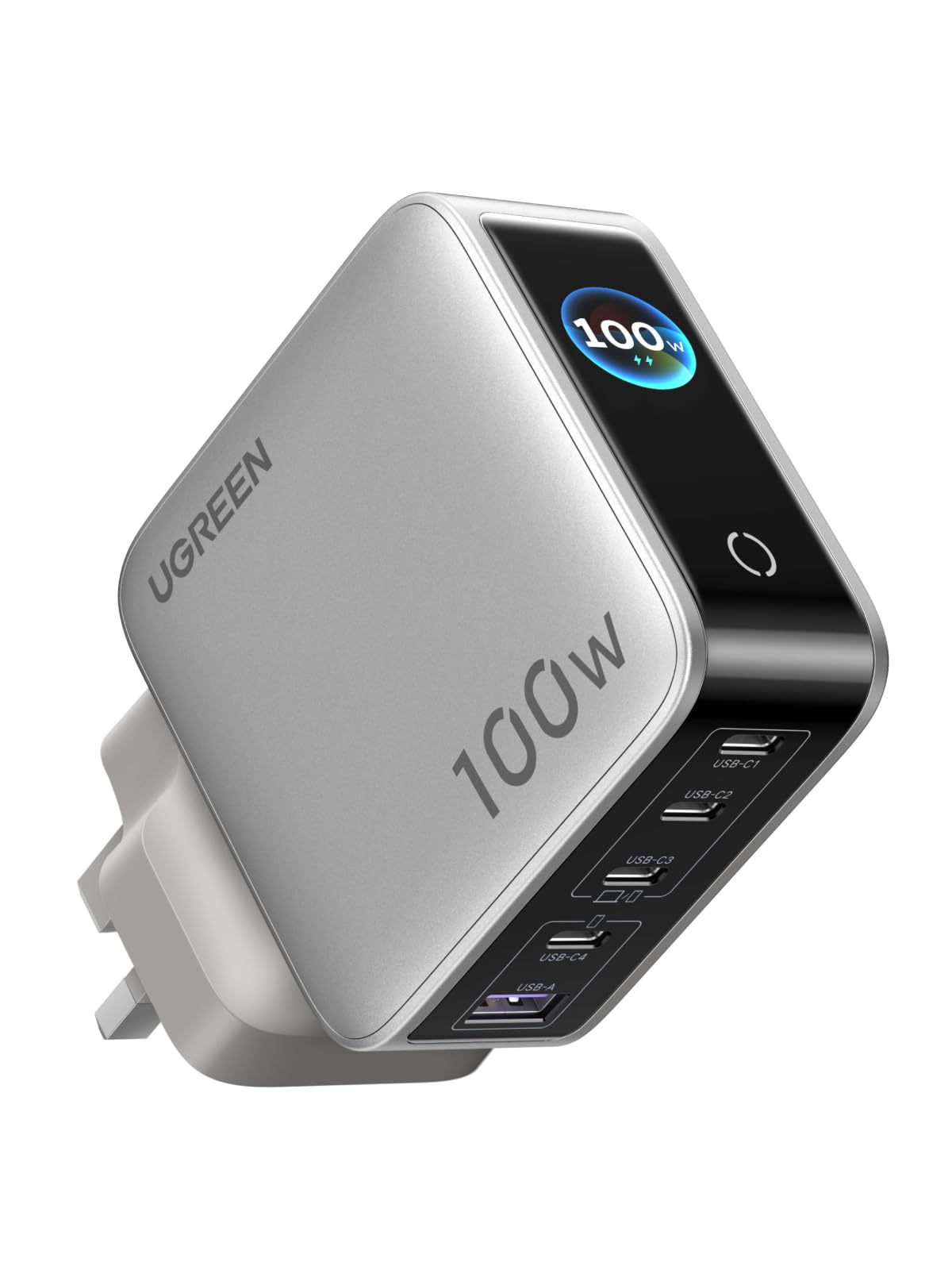
Image: UGREEN Nexode Pro 100W 5-Port GaN Fast Charger, showcasing its compact design and smart display.
Port Layout
- USB-C1, USB-C2, USB-C3: High-power USB-C ports, capable of delivering up to 100W individually.
- USB-C4: Standard USB-C port.
- USB-A: Standard USB-A port.

Image: Diagram illustrating the port configuration and individual power capabilities of the UGREEN Nexode Pro 100W charger.
5. Setup
- Unpack the UGREEN Nexode Pro 100W charger and its power cable.
- Connect the power cable to the charger.
- Plug the charger into a standard wall outlet.
- The smart display will illuminate, indicating the charger is ready for use.
6. Operating Instructions
6.1 Charging Your Devices
- Connect your device's charging cable to the appropriate port on the UGREEN Nexode Pro 100W charger. For optimal fast charging, use USB-C1, C2, or C3 for high-power devices like laptops.
- Connect the other end of the cable to your device.
- The smart display will show real-time charging information, including total power output, power per port, charging protocol, and temperature.

Image: The UGREEN Nexode Pro 100W charger connected and simultaneously charging a laptop, smartphone, and smartwatch.
6.2 Smart Display Functions
- Real-time Monitoring: The display provides instant feedback on charging parameters.
- Adjustable Screen: Press the button once to pivot the screen 90 degrees. Hold the button to smoothly adjust the screen angle for better viewing.
- Auto-Sleep: The screen will automatically turn off after two minutes of inactivity to conserve energy.

Image: Close-up of the UGREEN Nexode Pro 100W charger's smart display, illustrating its ability to show total power output, power per port, charging protocol, and temperature monitoring.
6.3 Dynamic Power Distribution
The charger's intelligent chip automatically detects the power requirements of each connected device and distributes power accordingly. This ensures that all devices receive an optimized charge without manual intervention.

Image: A family using the UGREEN Nexode Pro 100W charger to power multiple devices simultaneously, demonstrating its intelligent power distribution.
7. Safety Information
The UGREEN Nexode Pro 100W charger is built with advanced GaN technology and intelligent chips to provide comprehensive safety protections:
- Overcurrent Protection: Prevents damage from excessive current.
- Overvoltage Protection: Safeguards against voltage surges.
- Short-circuit Protection: Automatically cuts power in case of a short circuit.
- Overheating Protection: Monitors and regulates internal temperature to prevent overheating.

Image: An exploded view of the UGREEN Nexode Pro 100W charger, illustrating its internal GaN chip and various safety protection icons.
Always use the charger in a well-ventilated area and avoid exposing it to extreme temperatures or moisture. Do not attempt to disassemble or modify the charger.
8. Maintenance
- Keep the charger clean and free from dust. Use a dry, soft cloth for cleaning.
- Store the charger in a cool, dry place when not in use.
- Avoid dropping or subjecting the charger to strong impacts.
9. Troubleshooting
9.1 Device Not Charging
- Ensure the charger is securely plugged into a working wall outlet.
- Verify that the charging cable is properly connected to both the charger and your device.
- Try using a different charging cable or port to rule out cable or port issues.
- Check if your device is compatible with the charger's output specifications.
9.2 Slow Charging
- Ensure you are using a high-quality USB-C cable that supports 100W Power Delivery.
- Confirm that your device supports fast charging protocols (PD 3.0, QC 4.0, etc.).
- When multiple devices are connected, the power is dynamically distributed. Disconnecting other devices may increase charging speed for a single device.
- Check the smart display for current output to confirm expected wattage.
10. Specifications
| Attribute | Value |
|---|---|
| Brand | UGREEN |
| Model Number | X773 |
| Manufacturer | Ugreen Group Limited |
| Country of Origin | China |
| Input | 100-240V~50/60Hz (Specific input current not provided, typical for chargers) |
| Total Output Power | 100W Max |
| Ports | 4 x USB-C, 1 x USB-A |
| Fast Charging Protocols | PD 3.0, PPS, QC 4.0, FCP, AFC, AVS, SCP |
11. Official Product Videos
UGREEN Nexode 100W USB C Charger Overview
Video: An official overview of the UGREEN Nexode 100W USB C Charger, highlighting its features and capabilities.
UGREEN 100W USB C Cable Overview
Video: A detailed look at the UGREEN 100W USB C Cable, demonstrating its features and durability, an ideal companion for the Nexode Pro charger.
12. Warranty and Support
UGREEN products come with a standard manufacturer's warranty. For specific warranty details, technical support, or customer service inquiries, please visit the official UGREEN website or contact your local distributor. Keep your purchase receipt for warranty claims.
You can find more information and support at the UGREEN Store on Amazon.


