
Introduction
Thank you for choosing the Meiqils 1080P Dual Dash Camera. This manual provides detailed instructions for the installation, operation, and maintenance of your new dash camera. Please read this manual thoroughly before use to ensure proper functionality and to maximize your product experience. Keep this manual for future reference.
Product Overview
The Meiqils 1080P Dual Dash Camera is designed to record both the front view and the interior of your vehicle simultaneously. It features 1080P resolution, a 170° wide-angle lens, Wide Dynamic Range (WDR) for optimal image quality, G-Sensor for emergency accident locking, loop recording, and night vision capabilities. The compact design includes a 2-inch IPS screen for easy viewing and navigation.

Meiqils 1080P Dual Dash Camera with front and interior lenses, mounted on a windshield suction cup.

Diagram highlighting key features of the dash camera including 1080P resolution, night vision, motion detection, loop recording, G-Sensor, 170° wide angle, and parking monitor.
Package Contents
Verify that all items listed below are included in your package:
- 1x Meiqils 1080P Dual Dash Camera
- 1x Car Charger (USB-C type)
- 1x Suction Cup Holder
- 1x User Manual
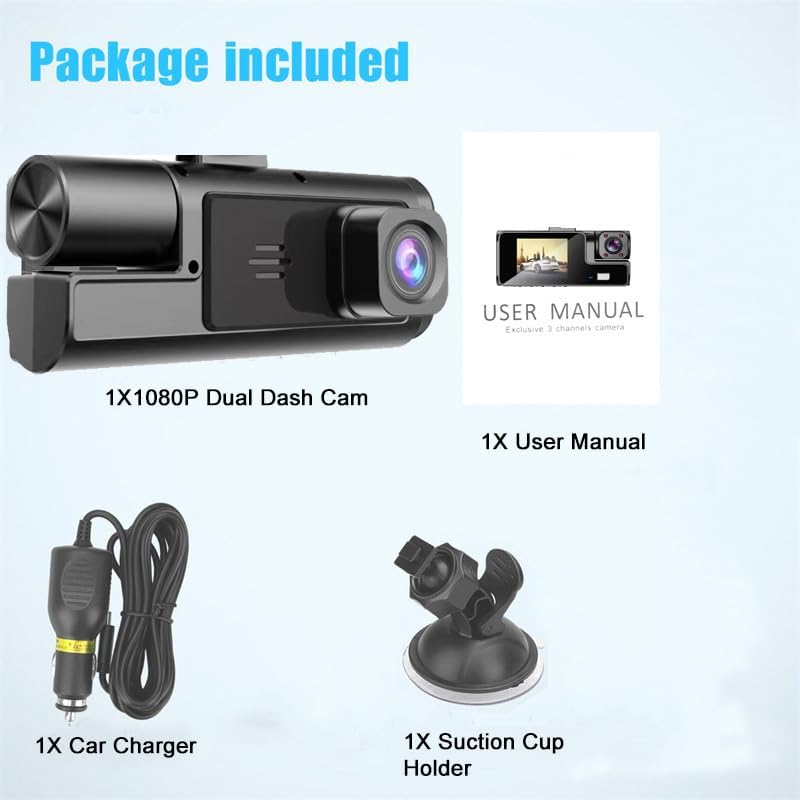
Contents of the Meiqils Dual Dash Cam package, including the dash camera, car charger, suction cup mount, and user manual.
Official video demonstrating the Meiqils 1080P Dual Dash Camera's features and included accessories.
Official video showcasing the Meiqils 1080P Dual Dash Camera and its components.
Installation Guide
Mounting the Dash Camera
Follow these steps to securely mount your dash camera:
- Clean the windshield surface thoroughly where you intend to mount the dash cam. Ensure it is free of dust and grease.
- Attach the suction cup holder to the dash cam by sliding it into the designated slot until it clicks into place.
- Press the suction cup firmly against the cleaned windshield and push the lever down to lock it in place.
Power Connection
Connect the dash camera to your vehicle's power source:
- Connect the car charger cable to the dash cam's power input port (USB-C).
- Plug the car charger into your vehicle's cigarette lighter socket.
- The dash cam will power on automatically when the vehicle's ignition is turned on.

Diagram illustrating the installation process of the Meiqils Dual Dash Camera, showing placement on the windshield and connection to the car's cigarette lighter.
Basic Operation
Power On/Off
The dash cam is designed for automatic operation. It will power on and begin recording when your vehicle's ignition is turned on and power off when the ignition is switched off.
Recording Modes
The camera primarily operates in continuous loop recording mode.
Loop Recording
The loop recording feature ensures continuous video capture. When the inserted memory card (not included) reaches its full capacity, the oldest video files will be automatically overwritten by new recordings. This prevents the recording from stopping due to a full card.

Visual representation of the loop recording function, showing older video segments being overwritten by new ones to ensure continuous recording.
Official video demonstrating the Meiqils 1080P Dual Dash Camera's recording capabilities and user interface.
Settings and Features
G-Sensor (Emergency Accident Lock)
The integrated G-Sensor detects sudden impacts or rapid deceleration. Upon detection, the current video segment is automatically locked and saved to a protected folder on the memory card. This prevents the file from being overwritten during loop recording, preserving critical evidence in case of an accident.

Image depicting the G-Sensor feature, showing a locked video icon over a scene of a minor car accident, indicating automatic file protection.
Night Vision
The dash camera is equipped with a night vision sensor to enhance video clarity in low-light conditions, ensuring recordings are visible even at night.

Comparison image showing the clarity of recordings during daytime and nighttime, highlighting the dash camera's night vision capabilities.
170° Wide Angle View
The 170-degree wide-angle lens captures a broad field of view, minimizing blind spots and providing comprehensive coverage of the road ahead and the vehicle's interior.

Diagram illustrating the 170° wide-angle field of view provided by the dash camera, showing a broader perspective of the road.
Menu Navigation
To access and adjust settings, press the "M" Button. This button allows you to navigate through various options such as video resolution, G-Sensor sensitivity, loop recording duration, and more.

Close-up image of the dash camera's buttons, specifically highlighting the 'M' (Menu) button and its function for accessing settings.
Official video demonstrating the Meiqils 1080P Dual Dash Camera's front and inside recording capabilities.
Official video highlighting the Meiqils 1080P Dual Dash Camera's clear video and night vision features.
Maintenance
Proper maintenance ensures the longevity and optimal performance of your dash camera:
- Check Mount Security: Regularly inspect the suction cup mount to ensure it is securely attached to the windshield. Re-attach if necessary.
- Clean Lenses: Use a soft, dry, lint-free cloth to gently clean the front and interior camera lenses. Avoid abrasive materials or chemical cleaners that could scratch the lens.
- Memory Card Management: Periodically format the memory card (not included) within the dash camera's settings. This helps prevent data corruption and maintains optimal recording performance. Back up any important files before formatting.
- Temperature Exposure: Avoid leaving the dash cam in direct sunlight or extreme temperatures for extended periods, as this can affect battery life and component integrity.
Troubleshooting
If you encounter any issues with your Meiqils 1080P Dual Dash Camera, refer to the following common problems and solutions:
| Issue | Solution |
|---|---|
| Dash cam does not power on. | Ensure the car charger is securely plugged into both the dash cam and the car's cigarette lighter. Verify that the vehicle's ignition is on. |
| Video quality is blurry or unclear. | Clean the camera lenses with a soft cloth. Ensure any protective film has been removed from the lenses. |
| Loop recording is not working, or the memory card is full. | Format the memory card (ensure important files are backed up). Ensure a compatible memory card (Class 10 or higher, up to 32GB recommended) is inserted. Check loop recording settings in the menu. |
| Videos are not being saved after an impact. | Verify the G-Sensor sensitivity settings in the menu. Ensure the memory card has sufficient space for locked files. |
Product Specifications
- Product Dimensions: 5.91 x 4.33 x 2.95 inches
- Item Weight: 8.1 ounces
- Model Name: 1080P Dual Dash Cam Front and Inside
- Batteries: 1 Lithium Polymer battery required (included)
- Connectivity Technology: USB
- Special Features: 1080P, Dual Dash Cam Front and Inside, G-Sensor, Loop Recording, Night Vision, Motion Detection, 170° Wide Angle, 2’’ IPS Screen
- Color: Black
- Manufacturer: MeiqiLS
- Video Capture Resolution: 1080p
- Mounting Type: Windshield Mount
- Field Of View: 170 Degrees
Warranty and Support
For detailed warranty information, technical assistance, or customer support, please refer to the contact information provided in the original packaging or visit the official Meiqils website. Please retain your proof of purchase for warranty claims.