
1. Introduction
Thank you for choosing the REVOTRA 2-Slice Toaster. This manual provides important information for the safe and efficient use of your new appliance. Please read these instructions thoroughly before first use and keep them for future reference.
Important Safety Instructions
- Read all instructions.
- Do not touch hot surfaces. Use handles or knobs.
- To protect against electrical shock, do not immerse cord, plugs, or toaster in water or other liquid.
- Close supervision is necessary when any appliance is used by or near children.
- Unplug from outlet when not in use and before cleaning. Allow to cool before putting on or taking off parts.
- Do not operate any appliance with a damaged cord or plug, or after the appliance malfunctions or has been damaged in any manner.
- Do not use outdoors.
- Do not let cord hang over edge of table or counter, or touch hot surfaces.
- Do not place on or near a hot gas or electric burner, or in a heated oven.
- Do not use appliance for other than intended use.
- Oversize foods, metal foil packages, or utensils must not be inserted in a toaster as they may involve a risk of fire or electric shock.
- A fire may occur if toasters are covered or touching flammable material, including curtains, draperies, walls, and the like, when in operation.
- Do not attempt to dislodge food when toaster is plugged in.
- Always attach plug to appliance first, then plug cord into the wall outlet. To disconnect, turn any control to “off,” then remove plug from wall outlet.
2. Product Overview
The REVOTRA 2-Slice Toaster is designed for efficient and consistent toasting with modern features for your convenience.
Key Features:
- 6 Shade Settings: From light golden to dark and crispy, customize your toast to your preference.
- Extra Wide Slots: 1.5-inch slots accommodate thick bagels, artisan breads, and frozen waffles.
- Easy-to-Use Controls with LED Display: Clearly labeled buttons for Defrost, Reheat, and Cancel functions, plus a bright LED countdown timer.
- Removable Crumb Tray: Simplifies cleaning and keeps your kitchen tidy.
- Stainless Steel Interior: Ensures safe, consistent toasting and resists heat distortion for long-lasting performance.
Product Components:

Figure 2.1: REVOTRA 2-Slice Toaster with toast and jam.
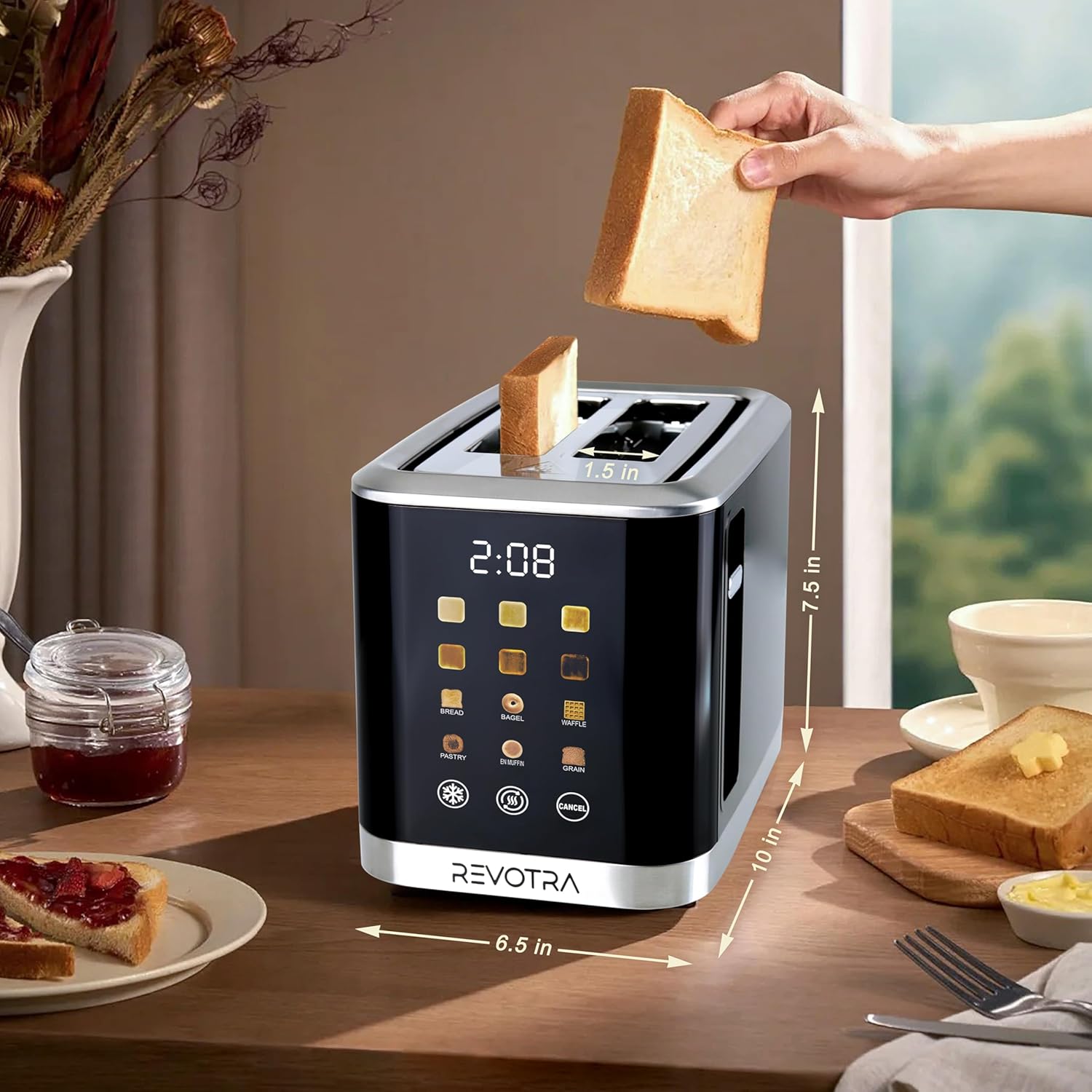
Figure 2.2: Toaster dimensions and slot width.
3. Setup
- Unpack: Carefully remove the toaster and all packaging materials.
- Placement: Place the toaster on a stable, flat, heat-resistant surface, away from flammable materials like curtains. Ensure there is adequate ventilation around the toaster.
- First Use: Before toasting food, operate the toaster empty on the highest shade setting (6) once or twice to burn off any manufacturing residues. A slight odor or smoke may be present; this is normal. Ensure the area is well-ventilated.
- Connect Power: Plug the power cord into a standard electrical outlet.
4. Operating Instructions
Follow these steps to operate your REVOTRA toaster:
- Insert Food: Place slices of bread, bagels, or waffles into the toasting slots. The extra-wide slots accommodate various thicknesses.
- Select Shade Level: Use the shade selection buttons on the LED display to choose your desired browning level from 1 (lightest) to 6 (darkest).
- Select Food Type (Optional): The toaster features specific settings for Bread, Bagel, Waffle, Pastry, English Muffin, and Grain. Select the appropriate icon for optimized toasting.
- Lower Lever: Push the toast lever down until it locks into place. The toaster will begin the toasting cycle, and the LED display will show a countdown timer.
- Retrieve Food: Once the toasting cycle is complete, the food will automatically pop up. Carefully remove the toasted items.
Special Functions:
- Defrost Function: Press the Defrost button (snowflake icon) to toast frozen items. This setting adds extra time to the toasting cycle to thaw and then toast the food.
- Reheat Function: Press the Reheat button (SSS icon) to warm up previously toasted items without further browning.
- Cancel Function: Press the Cancel button to stop the toasting cycle at any time.

Figure 4.1: Step-by-step guide for using the toaster.

Figure 4.2: Overview of 6 bread modes and 6 browning levels.
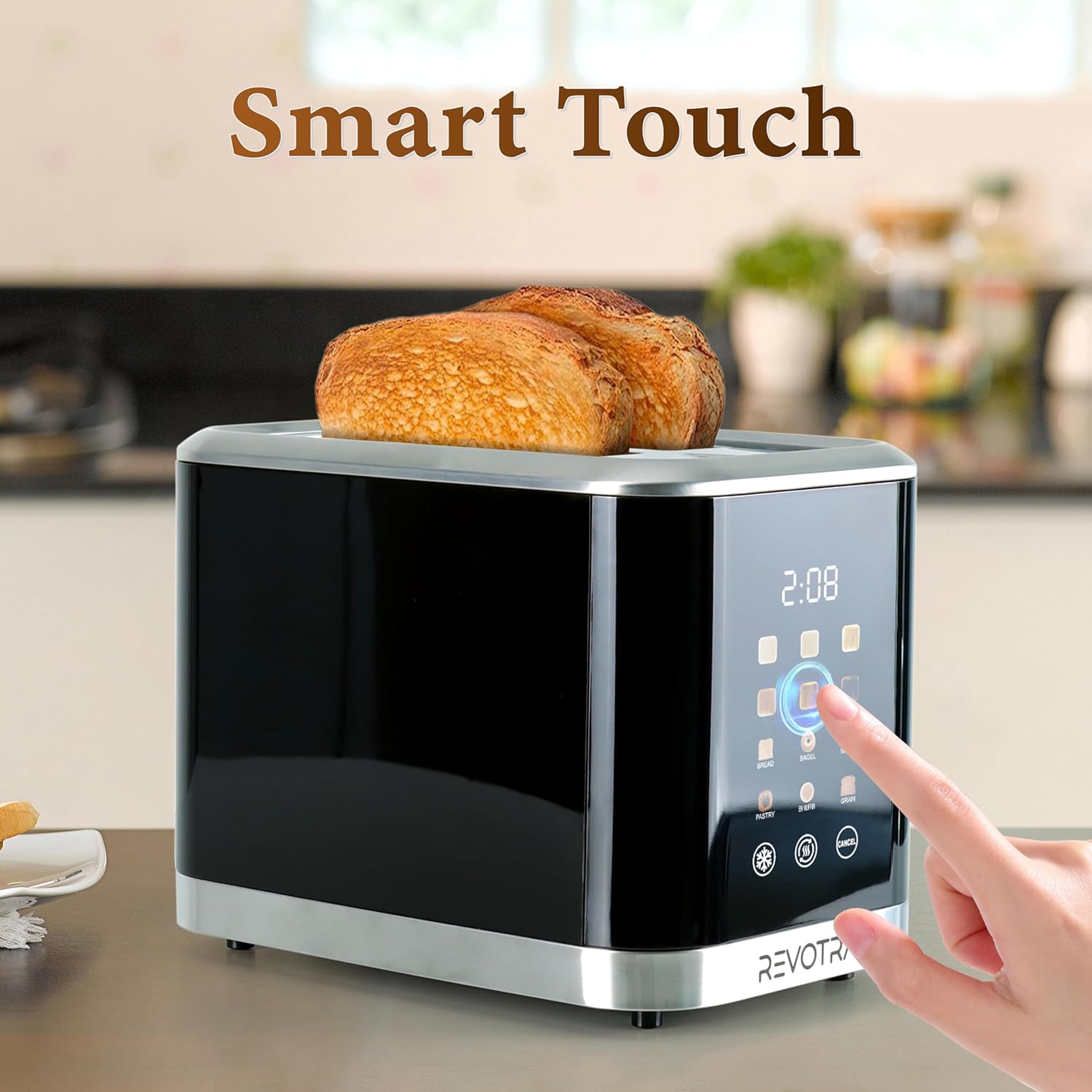
Figure 4.3: Smart touch LED display in operation.
5. Maintenance and Cleaning
Regular cleaning ensures optimal performance and extends the life of your toaster.
Cleaning the Crumb Tray:
- Unplug: Always unplug the toaster from the power outlet and allow it to cool completely before cleaning.
- Remove Tray: Slide out the removable crumb tray located at the bottom of the toaster.
- Discard Crumbs: Empty the crumbs into a waste bin.
- Clean Tray: Wipe the tray with a damp cloth. Do not use abrasive cleaners or immerse the tray in water.
- Reinsert Tray: Ensure the crumb tray is completely dry before sliding it back into the toaster.
Cleaning the Exterior:
- Wipe the exterior of the toaster with a soft, damp cloth.
- Do not use abrasive cleaners, scouring pads, or harsh chemicals, as these can damage the finish.
- Ensure the toaster is completely dry before plugging it back in.
Cord Storage:
The toaster features integrated cord storage on the bottom to keep your countertop tidy when not in use.

Figure 5.1: Removable crumb tray and cord storage feature.
6. Troubleshooting
If you encounter issues with your toaster, please refer to the following common problems and solutions:
| Problem | Possible Cause | Solution |
|---|---|---|
| Toaster does not turn on. | Not plugged in; power outlet not working; circuit breaker tripped. | Ensure toaster is securely plugged in. Test outlet with another appliance. Check your home's circuit breaker. |
| Food is not toasting evenly. | Uneven food thickness; crumb buildup. | Ensure food is evenly sliced. Clean the crumb tray regularly. |
| Food is stuck in the toaster. | Oversized food item. | Unplug the toaster. Carefully remove the food using non-metallic tongs. Do not use metal objects. |
| Smoke coming from toaster. | Food stuck; crumb buildup; first use residue. | Press the Cancel button. Unplug and allow to cool. Remove any stuck food or clean crumb tray. If it's the first use, this is normal. |
7. Specifications
- Brand: REVOTRA
- Model Number: MK-S-TOASTER01
- Product Dimensions (D x W x H): 15.1" x 6.02" x 7.36"
- Wattage: 800 watts
- Slot Count: 2
- Shade Settings: 6
- Display Type: LED
- Special Features: Built-In Timer, Defrost, Reheat, Cancel functions, Extra-Wide Slots, Removable Crumb Tray, Cord Storage
- Interior Material: Stainless Steel

Figure 7.1: Even heat distribution system for consistent toasting.
8. Warranty and Support
REVOTRA products are manufactured with quality and performance in mind. For specific warranty details, please refer to the warranty card included with your purchase or contact REVOTRA customer support.
Customer Support:
Should you have any questions, require assistance, or need support regarding your REVOTRA toaster, our dedicated team is available to help. Please reach out to us through the contact information provided on our official website or the product packaging.