
1. Product Overview
The Meiqils 1080P Dual Dash Camera is designed to provide comprehensive video surveillance for your vehicle, recording both the road ahead and the vehicle's interior simultaneously. Equipped with a 170° wide-angle lens, G-sensor for emergency locking, loop recording, and night vision capabilities, this dash cam ensures critical moments are captured for your safety and peace of mind.
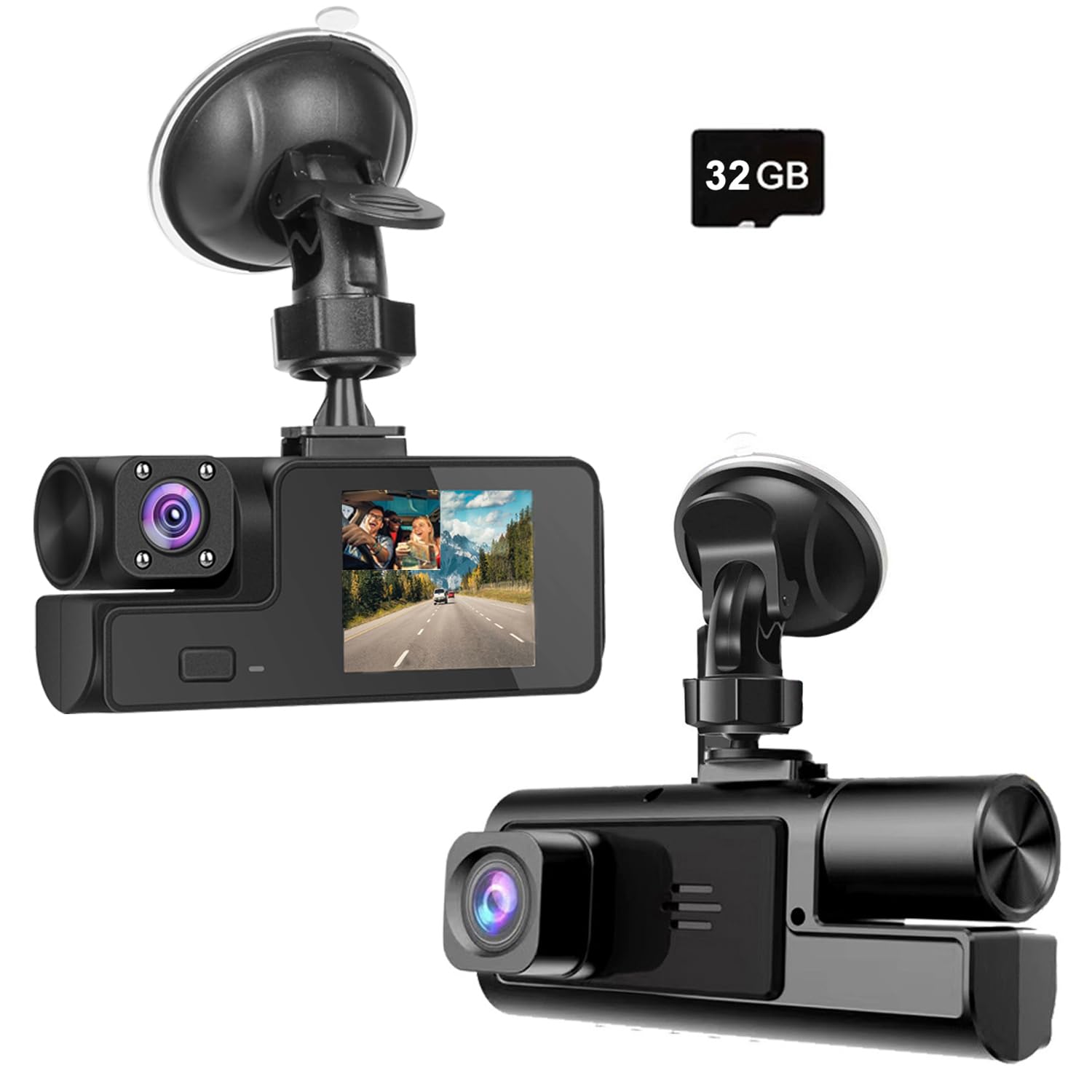
Figure 1: Meiqils 1080P Dual Dash Camera with included 32GB card.
2. What's in the Box
Please check the package contents upon receipt to ensure all items are present:
- 1x 1080P Dual Dash Cam
- 1x User Manual
- 1x Car Charger (Charging Cable)
- 1x Suction Cup Holder
- 1x 32GB Memory TF Card (if purchased with card variant)

Figure 2: Included components in the Meiqils Dual Dash Camera package.
Video 1: Unboxing and overview of the Meiqils 1080P Dual Dash Camera. This video demonstrates the contents of the package and provides a brief look at the camera's features.
3. Installation Guide
Follow these steps for proper installation of your dash camera:
- Clean Windshield: Ensure the area on your windshield where the suction cup will be placed is clean and dry for a secure attachment.
- Attach Suction Cup: Securely attach the suction cup holder to the windshield.
- Mount Dash Cam: Slide the dash cam onto the suction cup holder until it clicks into place. Adjust the camera angle to ensure a clear view of the road and interior.
- Connect Power: Plug the power cable into the dash cam's power port and then into your car's cigarette lighter socket. The dash cam will power on automatically when the car starts.

Figure 3: Diagram illustrating the recommended cable routing for the dash camera power cable.

Figure 4: Visual guide for connecting the dash cam to car power and understanding the 'M' (Menu) button functionality.
4. Basic Operation
Once installed and powered, the dash cam will typically begin recording automatically. Here are some basic operational instructions:
- Power On/Off: The camera powers on automatically when the car starts and powers off when the car is turned off. You can manually power it on/off by pressing and holding the power button.
- Recording: Recording usually starts automatically. A red indicator light or on-screen icon will confirm recording is active.
- Accessing Menu: Press the 'M' button (Menu button) to access settings. Use the up/down buttons to navigate and the 'OK' button to select.
- Playback: In the menu, select 'Playback' to view recorded videos.
5. Key Features
5.1. 1080P Dual Recording
The dash camera records in 1080P resolution, capturing clear video from both the front and inside of your vehicle simultaneously. This dual recording capability provides comprehensive coverage for various driving situations.

Figure 5: Illustration of simultaneous 1080P recording from both front and interior cameras.
5.2. Loop Recording
When the memory card is full, the loop recording feature automatically overwrites the oldest unlocked video files with new recordings. This ensures continuous recording without manual management of storage space.

Figure 6: Diagram explaining how loop recording automatically manages storage by overwriting older files.
5.3. G-Sensor (Emergency Accident Lock)
The built-in G-sensor detects sudden impacts or collisions. Upon detection, it automatically locks the current video segment, preventing it from being overwritten by loop recording. This preserves crucial evidence in the event of an accident.

Figure 7: Visual representation of the G-Sensor detecting an impact and locking video footage.
5.4. Night Vision
The dash camera is equipped with a night vision sensor that enhances video clarity in low-light conditions, ensuring recordings are clear even during nighttime driving.

Figure 8: Comparison showing the clarity of video recordings during daytime and nighttime conditions.
Video 2: Short clip demonstrating the dash cam's video quality during day and night driving conditions.
Video 3: Driving footage captured by the dash camera, showcasing its recording capabilities.
Video 4: A brief demonstration of the dash cam's clear video recording and night vision features.
5.5. 170° Wide Angle
The camera features a 170° wide-angle lens, providing a broad field of view to capture more of the road and surroundings, minimizing blind spots.
6. Product Specifications
| Feature | Specification |
|---|---|
| Product Dimensions | 5.91 x 4.33 x 2.95 inches |
| Item Weight | 8.8 ounces |
| Item Model Number | Dual Dash Camera Front and Inside |
| Batteries | 1 Lithium Polymer batteries required (included) |
| Connectivity Technology | USB |
| Special Features | 1080P, Dual Front and Inside Dash Cam, G-Sensor, Loop Recording, Night Vision, Motion Detection, 170° Wide Angle, 2’’ IPS Screen |
| Video Capture Resolution | 1080p |
| Mounting Type | Windshield Mount |
| Field Of View | 170 Degrees |
7. Troubleshooting
If you encounter issues with your Meiqils Dual Dash Camera, please refer to the following common problems and solutions:
- Camera Not Powering On:
- Ensure the car charger is securely plugged into both the dash cam and the car's cigarette lighter socket.
- Verify that the car's cigarette lighter socket is receiving power. Test with another device if possible.
- Check the power cable for any visible damage. - SD Card Full / Not Recording:
- Ensure a compatible Micro SD card (Class 10 or higher, up to 32GB recommended) is inserted correctly.
- Format the SD card regularly (monthly is recommended) through the camera's menu to maintain optimal performance.
- Verify that loop recording is enabled in the settings. - Mounting Issues (Suction Cup Not Holding):
- Thoroughly clean the windshield surface and the suction cup with a damp cloth and let it dry completely before reattaching.
- Ensure the suction cup lever is fully engaged to create a strong vacuum seal.
- Avoid mounting on textured or uneven surfaces. - Poor Video Quality:
- Ensure the camera lenses (front and interior) are clean and free from smudges or dust.
- Check that the protective film has been removed from the lenses.
- Verify that the recording resolution is set to 1080P in the camera settings. - Camera Stops Working in Cold Weather:
- Lithium Polymer batteries can be sensitive to extreme temperatures. If operating in very cold conditions, allow the car interior to warm up slightly before expecting full functionality.
8. Warranty and Support
This product comes with a standard manufacturer's warranty. For specific warranty details, please refer to the documentation included in your package or contact Meiqils customer support directly. If you require further assistance or have questions not covered in this manual, please reach out to the seller or manufacturer's support channels.