
Introduction
This manual provides comprehensive instructions for the assembly, operation, and maintenance of your Dardoo F1 Racing Simulator Cockpit. Please read this manual thoroughly before assembly and use to ensure proper function and safety. This cockpit is designed to provide a stable and adjustable platform for an immersive racing simulation experience, compatible with a wide range of steering wheels, pedals, and shifters (not included).

Figure 1: Fully assembled Dardoo F1 Racing Simulator Cockpit. Note that electronic components such as steering wheel, pedals, and shifter are not included.
Package Contents
The Dardoo F1 Racing Simulator Cockpit is shipped in two separate packages. Please verify all components are present before beginning assembly.
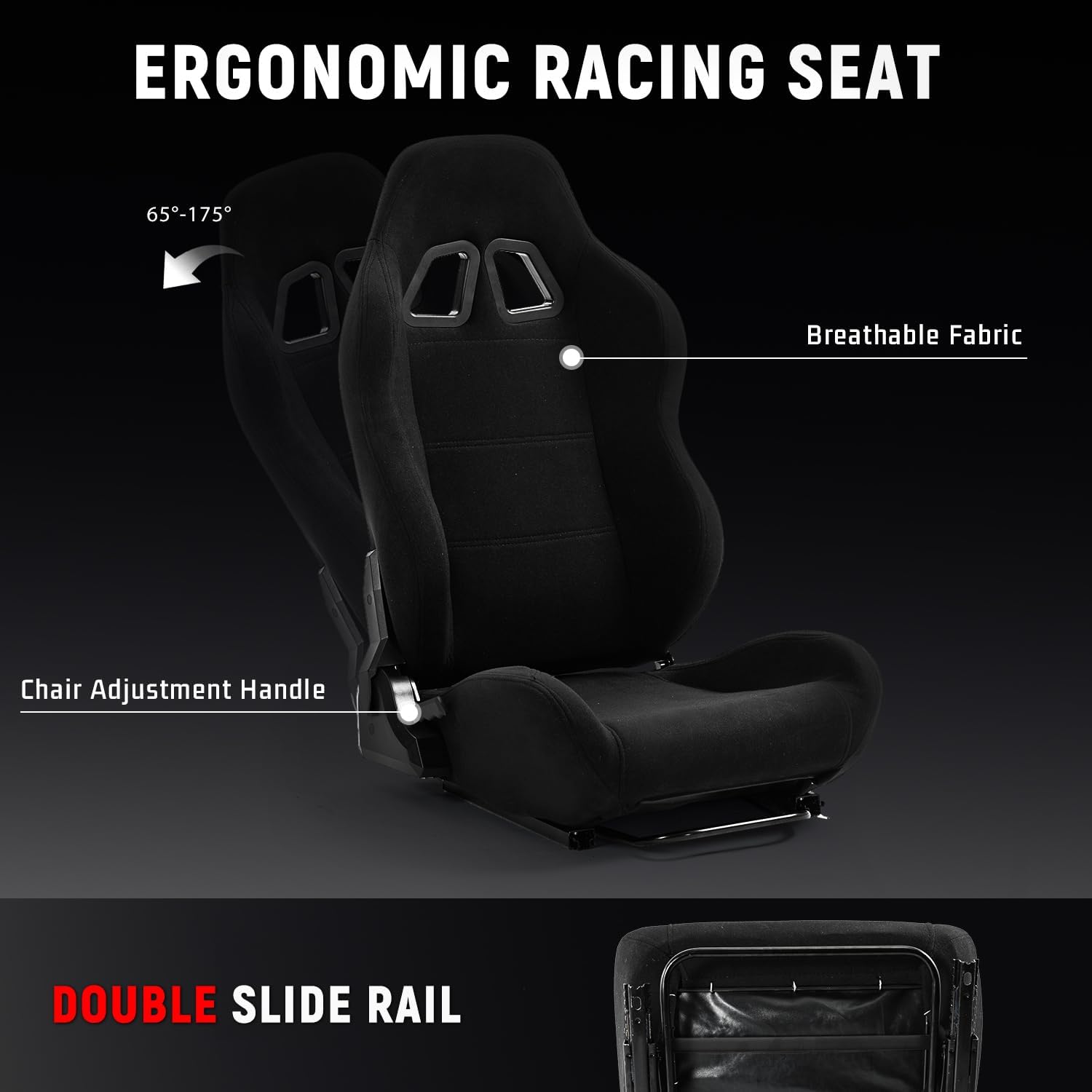
Figure 2: The cockpit components are distributed across two packages: Box A contains the Racing Seat, and Box B contains the Racing Cockpit Stand.
- Box A: Racing Seat
- Box B: Racing Cockpit Stand (Aluminum Profiles, Brackets, Hardware)
- Note: Steering wheel, pedals, and shifter are not included and must be purchased separately.
Setup and Assembly
Assembly requires careful attention to detail. It is recommended to have a second person assist with certain steps. Ensure you have adequate space for assembly.
1. Frame Assembly
Begin by assembling the main 30x60mm aluminum profile frame. Follow the included hardware instructions to secure all beams and uprights. The robust aluminum alloy ensures stability during use.
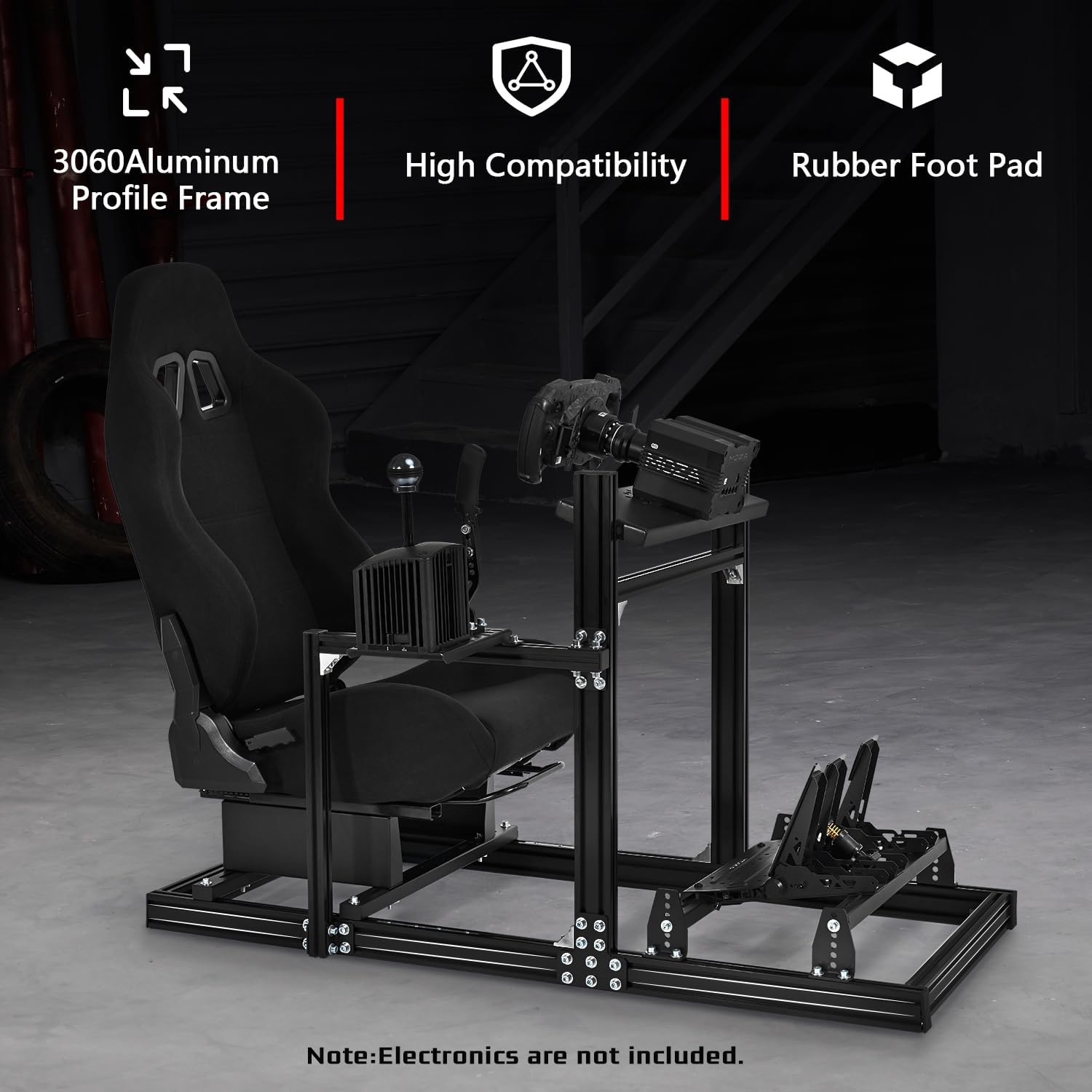
Figure 3: The cockpit features a durable 3060 aluminum profile frame for enhanced stability. Rubber foot pads are included to protect your floor and prevent slippage.
2. Seat Installation
Install the ergonomic racing seat onto the frame. The seat features a double slide rail system for easy forward and backward adjustment. The backrest can be reclined between 65 and 175 degrees to suit various driving preferences.
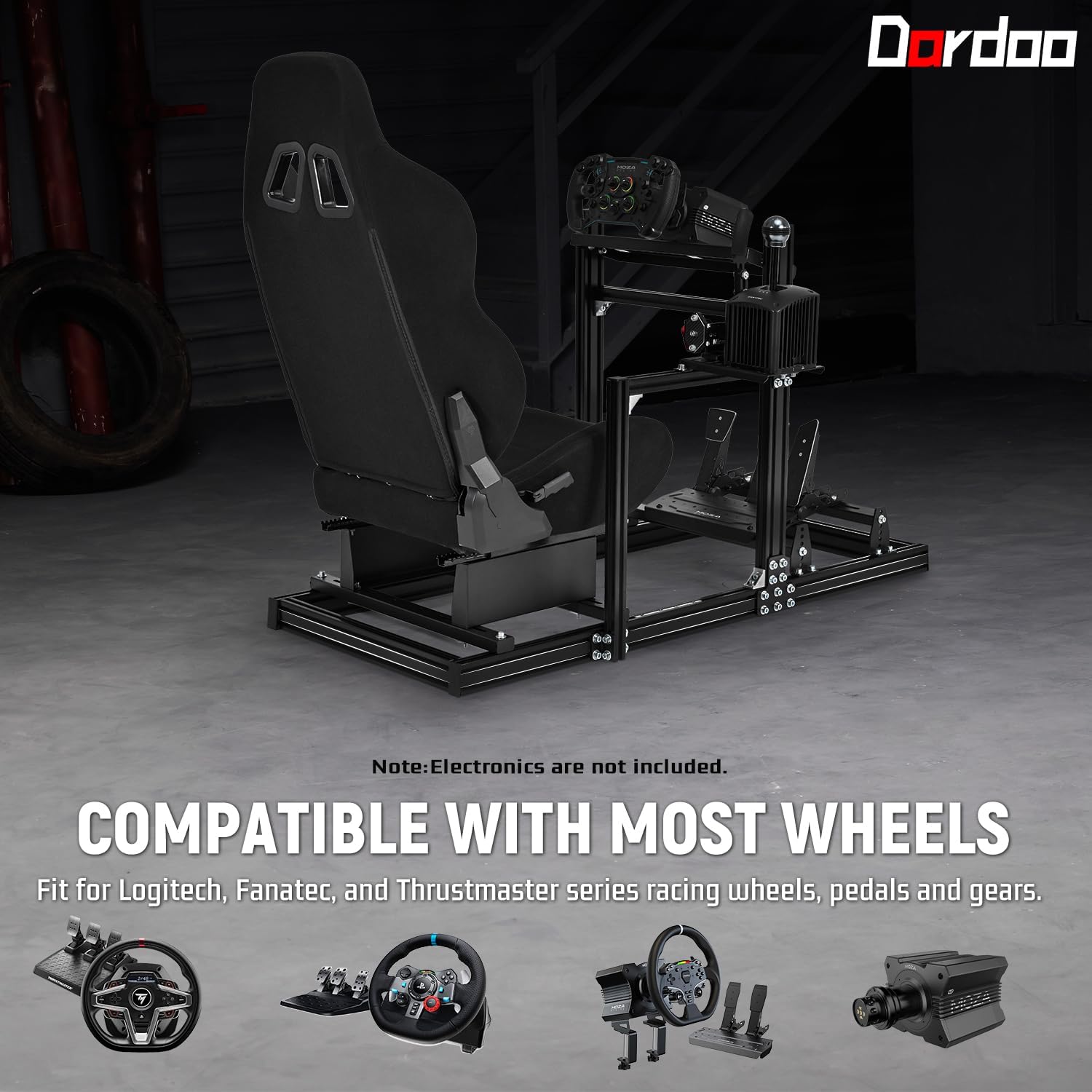
Figure 4: The ergonomic racing seat offers a wide range of backrest adjustment (65-175 degrees) and features a double slide rail for precise positioning.
3. Platform Adjustments
The cockpit offers multiple adjustment points for optimal user comfort and compatibility with various peripherals.
- Adjustable Steering Wheel Platform: Adjust the height and angle of the steering wheel platform for comfortable reach and visibility.
- Adjustable Shift Lever Platform: This platform can be mounted on either the left or right side, depending on your preference.
- Adjustable Foot Pedal Platform: The pedal platform allows for various tilt settings to accommodate different driving styles and pedal sets.
- Adjustable Rear Seat Stand Width: The width of the rear seat stand can be adjusted from 22cm to 48cm.
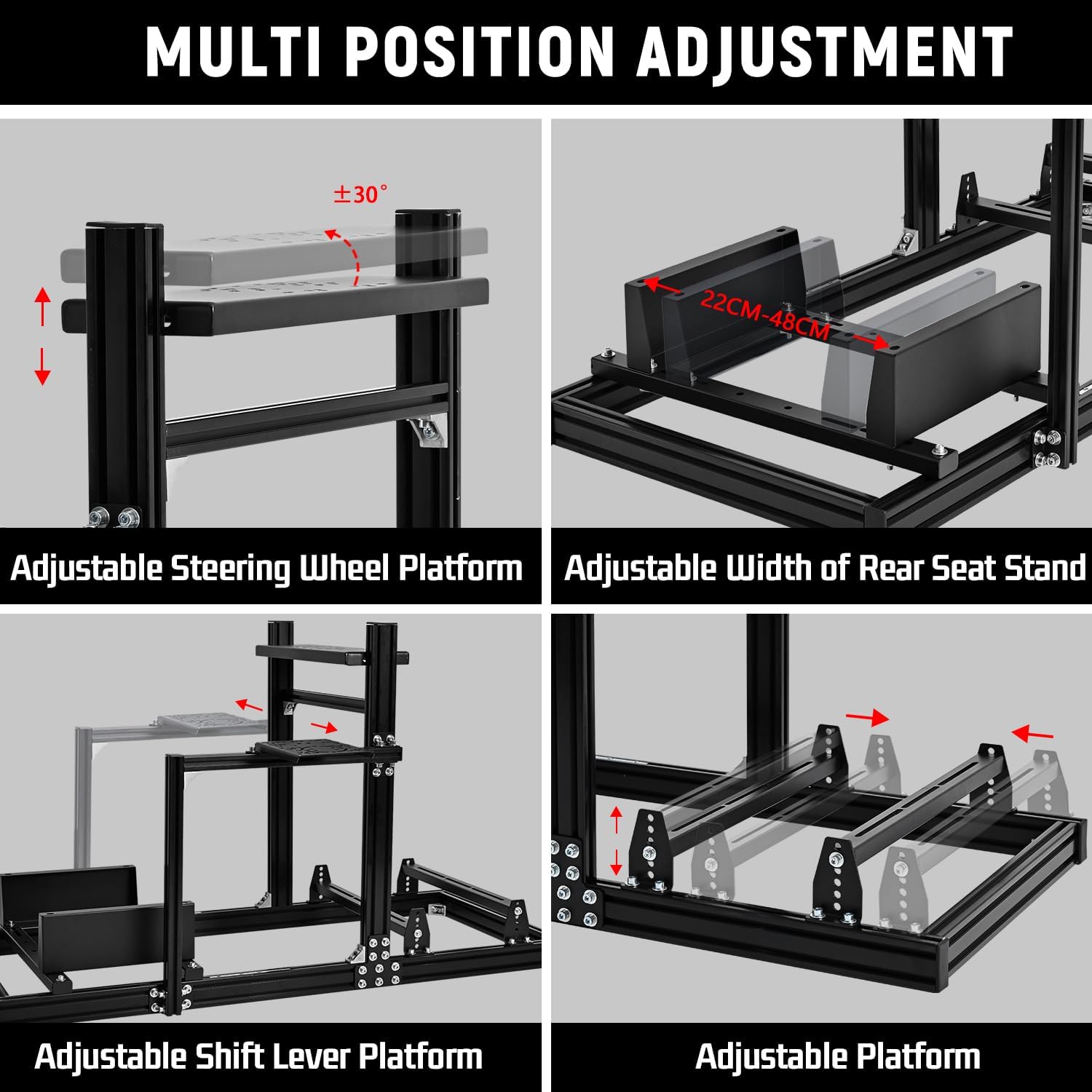
Figure 5: Detailed view of the multi-position adjustment capabilities, including steering wheel platform angle (±30°), adjustable width of the rear seat stand (22cm-48cm), adjustable shift lever platform, and adjustable pedal platform.
Operating the Cockpit
Once assembled, the Dardoo F1 Racing Simulator Cockpit provides a stable and customizable base for your racing peripherals. While the cockpit itself does not require power, ensure your connected steering wheel, pedals, and shifter are properly installed and powered according to their respective manufacturer's instructions.
Compatibility
The cockpit is designed for wide compatibility with major racing peripheral brands, including Logitech, Thrustmaster, and Fanatec. It supports direct drive motors with a torque of up to 20N.m.

Figure 6: The cockpit is compatible with a wide range of racing wheels, pedals, and gear shifters from brands such as Logitech (G29, G920, G923), Fanatec, and Thrustmaster series.
User Dimensions
The cockpit is suitable for users with a height between 1.4 meters (4.6 feet) and 2.2 meters (6.3 feet). The seat area has a maximum weight capacity of 400 lbs (approximately 181 kg).

Figure 7: Cockpit dimensions are approximately 53 inches (length) x 22.8 inches (width) x 43.5 inches (height). It accommodates users from 4.6ft to 6.3ft in height and up to 450 pounds in weight for the frame.
Maintenance
To ensure the longevity and optimal performance of your Dardoo F1 Racing Simulator Cockpit, follow these maintenance guidelines:
- Cleaning: Wipe down aluminum profiles and seat fabric with a damp cloth. Avoid abrasive cleaners or solvents.
- Fasteners: Periodically check all bolts and screws to ensure they are tight. Vibrations during use can sometimes loosen fasteners.
- Moving Parts: Ensure the seat rails and adjustment mechanisms operate smoothly. Lubrication is generally not required for the aluminum profiles.
- Storage: If storing the cockpit for an extended period, ensure it is in a dry environment to prevent any potential corrosion, although the aluminum is highly resistant.
Troubleshooting
This section addresses common issues you might encounter with your racing simulator cockpit.
| Problem | Possible Cause | Solution |
|---|---|---|
| Cockpit feels unstable or wobbly. | Loose fasteners or incorrect assembly. | Check all bolts and screws, especially those connecting the main frame profiles and uprights. Ensure they are tightened securely. Refer to the assembly instructions. |
| Seat adjustment is stiff or difficult. | Debris in the slide rails or misaligned rails. | Inspect the double slide rails for any obstructions. Clean the rails if necessary. Ensure the seat is properly aligned on the rails. |
| Peripherals (wheel, pedals, shifter) do not fit. | Incorrect mounting or compatibility issue. | Verify the mounting holes on your peripherals align with the cockpit's platforms. Refer to the "Compatibility" section. Ensure you are using the correct hardware for mounting. |
| Missing parts upon delivery. | Shipping error or oversight during packaging. | Refer to the "Package Contents" section and contact Dardoo customer support with your purchase details and a list of missing items. |
Specifications
| Brand | Dardoo |
| Model | F1 Racing Simulator Cockpit |
| Color | Racing Cockpit with Black Seats |
| Product Dimensions (L x W x H) | 134.62 x 57.91 x 110.49 cm (approx. 53 x 22.8 x 43.5 inches) |
| Item Weight | 38 Kilograms (approx. 83.8 lbs) |
| Frame Material | 30x60mm High-Strength Aluminum Alloy |
| Seat Recline Angle | 65 - 175 degrees |
| Compatible User Height | 1.4 m - 2.2 m (4.6 ft - 6.3 ft) |
| Max Seat Weight Capacity | 400 lbs (approx. 181 kg) |
| Compatible Devices | Logitech, Thrustmaster, Fanatec racing wheels, pedals, shifters (up to 20N.m direct drive motors) |
Warranty and Support
For warranty information and customer support, please refer to the documentation included with your purchase or visit the official Dardoo website. Please have your purchase receipt and product ASIN (B0F99PRF5N) ready when contacting support.
Online Resources:
- Official Dardoo Website: www.dardoo.com (Note: This is a placeholder URL, please refer to actual product documentation for correct website.)
- Product Page (Amazon.de): amazon.de/dp/B0F99PRF5N

