
1. Introduction
Thank you for choosing the UREVO S1 Under Desk Treadmill. This manual provides essential information for the safe and effective use, setup, operation, and maintenance of your new walking pad. Please read this manual thoroughly before first use and retain it for future reference.
2. Important Safety Instructions
WARNING: To reduce the risk of burns, fire, electric shock, or injury to persons, read the following important precautions and information before operating the treadmill.
- Always place the treadmill on a flat, stable surface.
- Keep children and pets away from the treadmill during operation.
- Ensure the power cord is not pinched or damaged. Use only the provided power adapter.
- Do not operate the treadmill if it has been damaged or submerged in water.
- Wear appropriate athletic footwear.
- Do not step on or off the treadmill while the belt is moving.
- Use the remote control to adjust speed gradually.
- In case of emergency, press the stop button on the remote or power off the unit.
- Maximum user weight: 242 lbs (110 kg).
3. Product Overview
The UREVO S1 Under Desk Treadmill is designed for convenient walking and light jogging in home or office environments. Its compact design and quiet operation make it ideal for integrating physical activity into your daily routine.
Key Features:
- 6-Point Knee Protection & Quiet Cushioning: Features a 6-point shock absorbing system with 5-layer anti-slip belts and 6 silicone absorbers to reduce impact and noise.
- Powerful & Ultra-Quiet 2.5HP Motor: Engineered for reliable performance with noise levels under 45dB.
- Versatile Walking/Jogging (0.6-4 mph): Easily adjust speed to match fitness goals.
- Compact & Lightweight Body Design: Weighs 35.3 lbs (16 kg) with built-in transport wheels for easy movement and storage.
- Convenient LED Display & Remote Control: Tracks real-time workout progress (time, distance, calories, speed) and allows easy setting adjustments.

Figure 3.1: UREVO S1 Under Desk Treadmill, compact and ready for use.
4. Components
The UREVO S1 Under Desk Treadmill package includes the following items:
- UREVO S1 Walking Treadmill
- Remote Control
- Hex Tool
- User Manual (this document)
- Lubricant (for maintenance)

Figure 4.1: Included accessories: remote control, hex tool, lubricant, and user manual.
5. Setup
- Unpack: Carefully remove the treadmill and all accessories from the packaging.
- Placement: Place the treadmill on a firm, level surface, ensuring adequate space around the unit for safe operation.
- Power Connection: Plug the power cord into the treadmill and then into a grounded electrical outlet.
- Initial Check: Ensure the safety key (if applicable, though not explicitly mentioned for this model, it's a common treadmill feature) is in place.
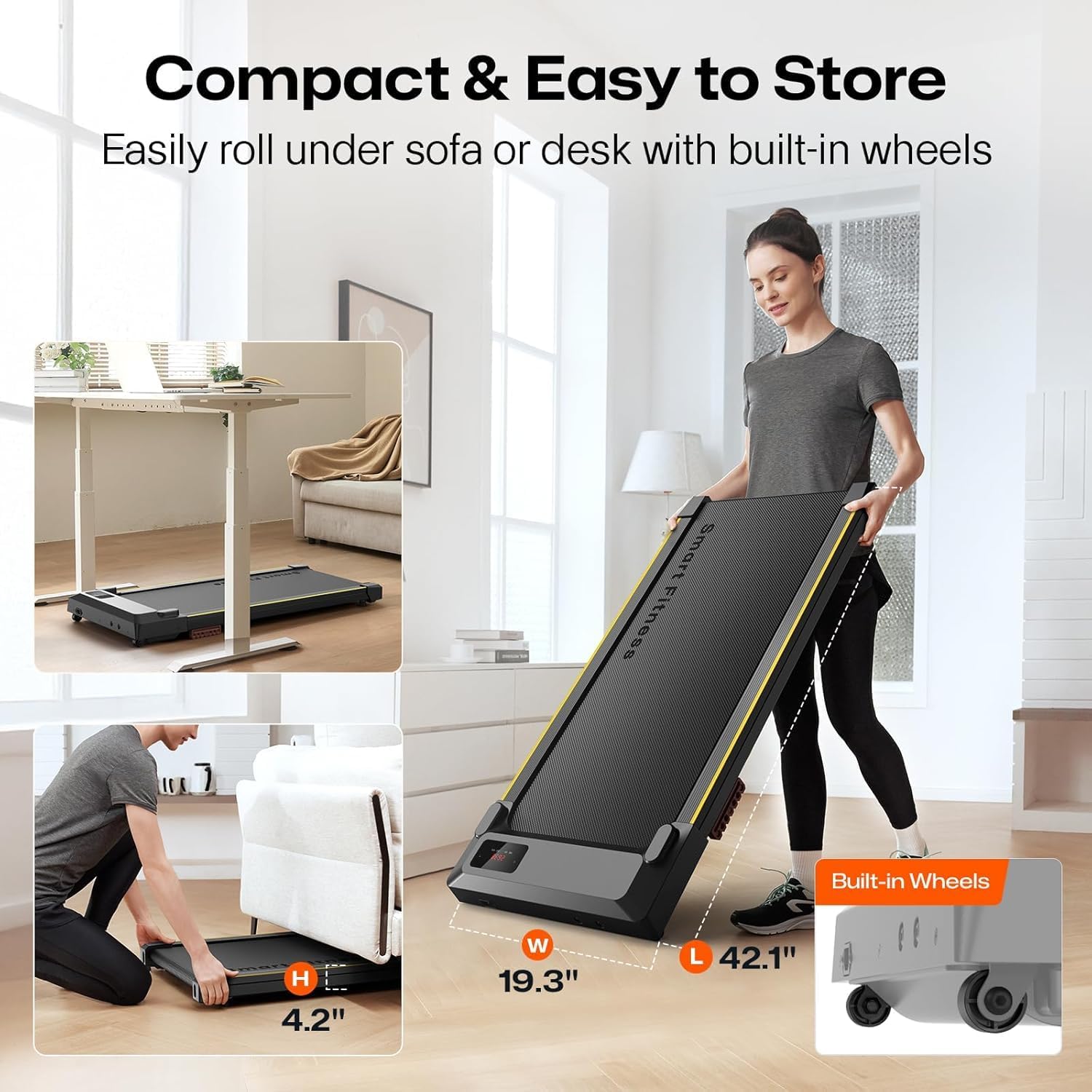
Figure 5.1: The UREVO S1 treadmill features built-in wheels for easy movement and compact storage under furniture.
6. Operating Instructions
6.1 Powering On/Off
- Power On: Locate the power switch on the treadmill (usually near the power cord) and flip it to the 'ON' position. The LED display will illuminate.
- Power Off: To completely power off the treadmill, flip the power switch to the 'OFF' position.
6.2 Using the Remote Control
The remote control allows you to start, stop, adjust speed, and change modes. Ensure the remote is pointed towards the treadmill's display for optimal response.
- Start/Pause: Press the Play/Pause button (▶/‖) to start or pause the treadmill. The treadmill will count down from 3 before starting.
- Speed Adjustment: Use the '+' button to increase speed and the '-' button to decrease speed. Speed ranges from 0.6 to 4 mph.
- Mode: Press the 'MODE' button to cycle through different display metrics (Time, Distance, Calories, Speed).
- Mute: Press the 'MUTE' button to silence any beeping sounds from the treadmill.

Figure 6.1: The LED display shows real-time workout data, controlled by the included remote.
6.3 LED Display
The integrated LED display provides real-time feedback on your workout:
- TIME: Duration of your workout.
- DIST.: Distance covered in miles.
- SPEED: Current walking/jogging speed in mph.
- KCAL: Estimated calories burned.
6.4 Manual Incline Adjustment
The UREVO S1 features a manual incline adjustment to increase workout intensity. To adjust the incline:
- Ensure the treadmill is powered off and unplugged.
- Locate the adjustable feet at the rear of the treadmill.
- Manually adjust the height of these feet to achieve the desired incline level. Ensure both feet are set to the same level for stability.
- Plug in and power on the treadmill to resume your workout.
Video 6.1: Demonstration of the UREVO S1 walking pad in use, highlighting its quiet operation and compact design.
Video 6.2: A brief overview of the UREVO S1 walking pad's features and usage in a home office setting.
7. Maintenance
Regular maintenance ensures the longevity and optimal performance of your UREVO S1 treadmill.
- Cleaning: Wipe down the treadmill with a damp cloth after each use. Avoid harsh chemicals.
- Belt Lubrication: Lubricate the running belt every 3 months or after 50 hours of use, whichever comes first. Use the provided lubricant or a 100% silicone treadmill lubricant. Refer to the detailed instructions in the separate lubrication guide (if provided) or general treadmill lubrication procedures.
- Belt Adjustment: Periodically check the running belt for proper tension and alignment. Adjust if necessary according to the instructions in the full manual.
8. Troubleshooting
If you encounter any issues with your UREVO S1 treadmill, please refer to the following common problems and solutions:
| Problem | Possible Cause | Solution |
|---|---|---|
| Treadmill does not power on. | Power cord not properly connected; power switch off; circuit breaker tripped. | Check power connections; ensure power switch is ON; reset circuit breaker. |
| Running belt stops or slips. | Belt too loose; insufficient lubrication; motor overload. | Adjust belt tension; lubricate the belt; reduce user weight or speed. |
| Unusual noise during operation. | Loose components; belt friction; motor issue. | Check and tighten all screws; lubricate belt; contact customer support if noise persists. |
| Remote control not responding. | Dead batteries; remote not pointed correctly; interference. | Replace batteries; ensure direct line of sight to display; remove obstructions. |
If the problem persists after attempting these solutions, please contact UREVO customer support.
9. Specifications
- Brand: UREVO
- Model Name: URTM025 (S1)
- Color: BLACK S1
- Product Dimensions: 46.8"D x 19.3"W x 4.8"H
- Item Weight: 37.5 Pounds (17 kg)
- Material: Alloy Steel
- Maximum Speed: 4 Miles per Hour
- Maximum Horsepower: 2 HP
- Maximum Weight Recommendation: 242 Pounds (110 kg)
- Display Type: LED
- Power Source: Corded Electric
- Metrics Measured: Distance, Speed, Time, Calories
10. Warranty and Support
The UREVO S1 Under Desk Treadmill comes with a 1-year warranty from the date of purchase, covering manufacturing defects. Please retain your proof of purchase for warranty claims.
For technical support, troubleshooting assistance, or warranty inquiries, please visit the official UREVO store or contact their customer service department.


