1. Product Overview
The Milwaukee M18 Bluetooth Jobsite Radio is designed for durability and high-quality audio performance in demanding work environments. It features dual 3.5-inch woofers and two high-range tweeters for balanced sound. Bluetooth 5.0 connectivity allows for wireless audio streaming up to 120 feet. The radio includes AM/FM capabilities with 18 programmable presets and customizable equalizer settings for bass and treble.
Power is supplied by any Milwaukee M18 battery or the included AC adapter, offering up to 13 hours of runtime at maximum volume with an M18 XC5.0 battery. Its robust design provides water, dust, and impact resistance. A USB-C 3.0A port is integrated for charging personal devices.
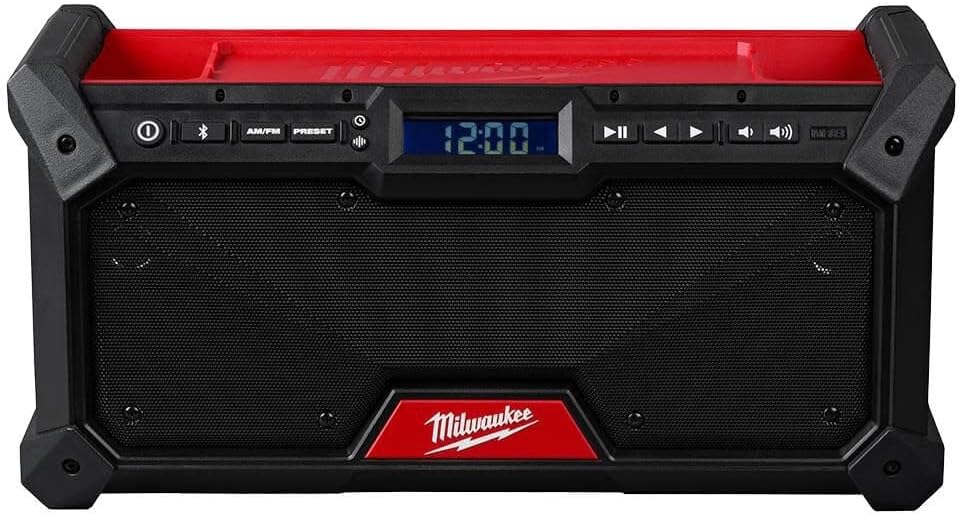
Front view of the Milwaukee M18 Bluetooth Jobsite Radio, showcasing the dual speakers, central digital display, and control panel for power, Bluetooth, AM/FM, presets, playback, and volume adjustments.
2. Safety Instructions
To ensure safe operation and prevent damage, please observe the following safety guidelines:
- Read all instructions thoroughly before operating the radio.
- Use only Milwaukee M18 batteries and chargers specified for this product.
- Do not expose the radio to rain or wet conditions.
- Do not disassemble the radio. Refer all servicing to qualified service personnel.
- Ensure proper ventilation around the radio. Do not block any ventilation openings.
- Keep the radio away from heat sources such as radiators, heat registers, stoves, or other apparatus that produce heat.
- Clean only with a dry cloth.
3. Setup
3.1 Power Source Connection
- Using an M18 Battery: Open the battery compartment cover and insert a charged Milwaukee M18 battery until it clicks into place. Close the cover securely.
- Using the AC Adapter: Connect the provided AC adapter to the radio's power input port and then plug the adapter into a standard electrical outlet.
3.2 Antenna Adjustment
For optimal AM/FM radio reception, extend the flexible antenna fully and adjust its position as needed.
4. Operating Instructions
4.1 Power On/Off
Press the Power button (marked with a circle and vertical line) located on the control panel to turn the radio on or off.
4.2 Mode Selection (AM/FM/Bluetooth)
Press the AM/FM button to cycle between AM and FM radio bands. Press the Bluetooth button (marked with the Bluetooth symbol) to activate Bluetooth mode.
4.3 Bluetooth Pairing
- Press the Bluetooth button. The Bluetooth indicator on the display will flash, indicating pairing mode.
- On your mobile device, enable Bluetooth and search for available devices. Select "Milwaukee Radio" from the list.
- Once successfully paired, the Bluetooth indicator on the radio's display will glow solid.
4.4 Radio Tuning and Presets
- Tuning: In AM or FM mode, use the Tune Up (right arrow) and Tune Down (left arrow) buttons to manually adjust the frequency.
- Saving Presets: Tune to the desired station. Press and hold the Preset button until the preset number flashes on the display. Use the Tune Up/Down buttons to select a preset number (1-18). Press the Preset button again to save the station.
- Recalling Presets: Briefly press the Preset button and then use the Tune Up/Down buttons to cycle through and select a saved preset station.
4.5 Volume Control
Adjust the audio output level using the Volume Up (speaker icon with two waves) and Volume Down (speaker icon with one wave) buttons.
4.6 Equalizer Settings
Press the EQ button (if available, or refer to the display menu) to access and adjust bass and treble levels to your preference.
4.7 USB-C Device Charging
Connect a compatible personal electronic device to the USB-C 3.0A port on the radio to charge it. The radio must be powered on for charging functionality.
5. Maintenance
5.1 Cleaning
Wipe the radio's exterior with a soft, damp cloth. Do not use abrasive cleaners, solvents, or harsh chemicals, as these can damage the finish or internal components.
5.2 Storage
When not in use, store the radio in a dry, protected area away from extreme temperatures. If storing for extended periods, remove the M18 battery.
6. Troubleshooting
- No Power: Ensure the M18 battery is charged and properly inserted, or that the AC adapter is securely connected to both the radio and a working power outlet.
- No Sound: Check the volume level. Ensure the correct audio source (AM, FM, or Bluetooth) is selected.
- Poor Radio Reception: Fully extend and adjust the antenna. Try repositioning the radio to a different location to improve signal strength.
- Bluetooth Connection Issues: Confirm the radio is in Bluetooth pairing mode (flashing indicator). Ensure Bluetooth is enabled on your device and it is within the 120 ft range. Try unpairing and re-pairing the device.
7. Specifications
| Feature | Detail |
|---|---|
| Brand | Milwaukee |
| Model Number | 2952-20 |
| Product Dimensions | 14"L x 6"W x 6"H |
| Connectivity Technology | Bluetooth 5.0 |
| Power Source | M18 Battery or AC Adapter |
| Radio Bands Supported | AM/FM |
| Special Features | Dust Resistant, Portable, Built-In AM Antenna, USB-C 3.0A Charging |
| Max Runtime | Up to 13 hours (with M18 XC5.0 battery at max volume) |
8. Warranty and Support
For detailed warranty information, product registration, or technical support, please refer to the official Milwaukee website or contact Milwaukee customer service directly. Keep your purchase receipt for warranty claims.


