
FEETMOR FH03
FEETMOR FH03 Heated Mittens User Manual
Model: FH03
1. Introduction
Thank you for choosing FEETMOR FH03 Heated Mittens. These electric rechargeable dual-heated mittens are designed to provide warmth and comfort in cold conditions, making them ideal for activities such as skiing, snowboarding, camping, hiking, and general winter use. They are also beneficial for individuals experiencing conditions like arthritis or Raynaud's phenomenon. Please read this manual thoroughly before use to ensure proper operation and maintenance.
2. Package Contents
Verify that all items listed below are included in your package:
- 1 Pair of FEETMOR Heated Mittens
- 1 Pair of 7.4V 3000mAh Li-Polymer Batteries
- 1 Type-C Charger (20W PD adapter)
- 1 User Manual
- 1 Pair of Ski Support Strips (wrist protectors)
- 1 Gift Box Bag

Image: Contents of the FEETMOR FH03 Heated Mittens package.
3. Product Features
- Enhanced Heating Coverage: Features heating elements fully covering the palm, back, and fingertips for even warmth. Dual buttons allow individual or combined heating control for palms and back.
- Upgraded Battery System: Equipped with USB-C 7.4V 22.2Wh Li-Polymer batteries and a 20W PD adapter for faster heating, longer life, and stable performance.
- Touchscreen Compatibility: Touchscreen-compatible fingertips allow device use without removing mittens.
- Thoughtful Design: Includes an extra-wide cuff for easy wear, an adjustable windproof wrist strap, and a heat-trapping soft lining. Free wrist protectors are included for added safety.
- Durable Materials: Constructed from Polyester (93%) and Elastane (7%) for lightweight comfort and durability.
- All-Weather Performance: Designed for various outdoor activities in cold conditions.

Image: Heating levels and coverage area.

Image: Touchscreen functionality.

Image: Material layers for warmth and comfort.
4. Setup Instructions
4.1 Charging the Batteries
- Locate the two 7.4V 3000mAh Li-Polymer batteries and the Type-C charger.
- Connect the batteries to the Type-C charger. The charger is a 20W PD adapter.
- Plug the charger into a standard wall outlet.
- Allow the batteries to fully charge before first use. The indicator light on the batteries will change from red to green when fully charged.
4.2 Installing Batteries in Mittens
- Open the zippered pocket located on the cuff of each mitten.
- Connect the battery cable inside the pocket to the fully charged battery.
- Carefully place the battery into the pocket and zip it closed. Ensure the cable is not pinched.
Video: This video demonstrates the process of installing batteries into the heated mittens and adjusting heat settings. It shows how to connect the battery, place it in the cuff pocket, and cycle through the temperature levels.
5. Operating Instructions
5.1 Powering On/Off
- To power on, press and hold the power button on the back of the mitten for approximately 2 seconds until the indicator lights illuminate.
- To power off, press and hold the power button again for approximately 2 seconds until the indicator lights turn off.
5.2 Adjusting Heat Levels
The mittens feature six heat settings, controlled by dual buttons for independent palm and back heating. The indicator lights will show the current heat level:
- Press the power button briefly to cycle through the heat settings (High, Medium, Low).
- Each press will change the heat level, indicated by the number of illuminated lights.
- The dual buttons allow you to adjust the palm and back heating zones separately or together.
5.3 Using Touchscreen Functionality
The fingertips of the mittens are designed to be touchscreen compatible. This allows you to operate most touchscreen devices without removing your mittens, maintaining warmth and connectivity.
6. Maintenance and Care
6.1 Cleaning
- Always remove batteries before cleaning.
- The mittens are Hand Wash Only. Do not machine wash, tumble dry, or dry clean.
- Use a mild detergent and cold water. Gently scrub soiled areas.
- Rinse thoroughly and air dry completely before reinserting batteries or storing.
6.2 Storage
- Ensure mittens are completely dry before storing.
- Store batteries in a cool, dry place, away from direct sunlight and extreme temperatures.
- It is recommended to charge the batteries every 3-6 months during off-season storage to maintain battery health.
7. Troubleshooting
7.1 Mittens Not Heating
- Check Battery Connection: Ensure batteries are securely connected inside the cuff pockets.
- Check Battery Charge: Verify that the batteries are fully charged. Recharge if necessary.
- Power On Correctly: Confirm you are pressing and holding the power button for 2 seconds to activate.
7.2 Uneven Heating
- Adjust Settings: Use the dual buttons to ensure both palm and back heating elements are set to the desired level.
- Inspect for Damage: Check for any visible damage to the heating elements or wiring. Discontinue use if damage is found.
7.3 Battery Not Charging
- Verify Charger Connection: Ensure the Type-C charger is properly connected to both the battery and the power outlet.
- Check Power Outlet: Test the power outlet with another device to ensure it is functional.
- Inspect Charger/Cable: Look for any damage to the charging cable or adapter.
If issues persist after attempting these troubleshooting steps, please contact FEETMOR customer support.
8. Specifications
| Specification | Detail |
|---|---|
| Model Number | FH03 |
| Material | Polyester (93%), Elastane (7%) |
| Battery Type | 7.4V 3000mAh Li-Polymer (22.2Wh) |
| Charger | Type-C 20W PD Adapter |
| Color | Black |
| Special Features | Adjustable Strap, Flexible, Touch Screen Support, Windproof |
| Sport Compatibility | Hunting, Ice Skating, Skiing, Snowboarding |
| Product Care | Hand Wash Only |
| Item Weight | 1.06 kg (approximate, including batteries) |
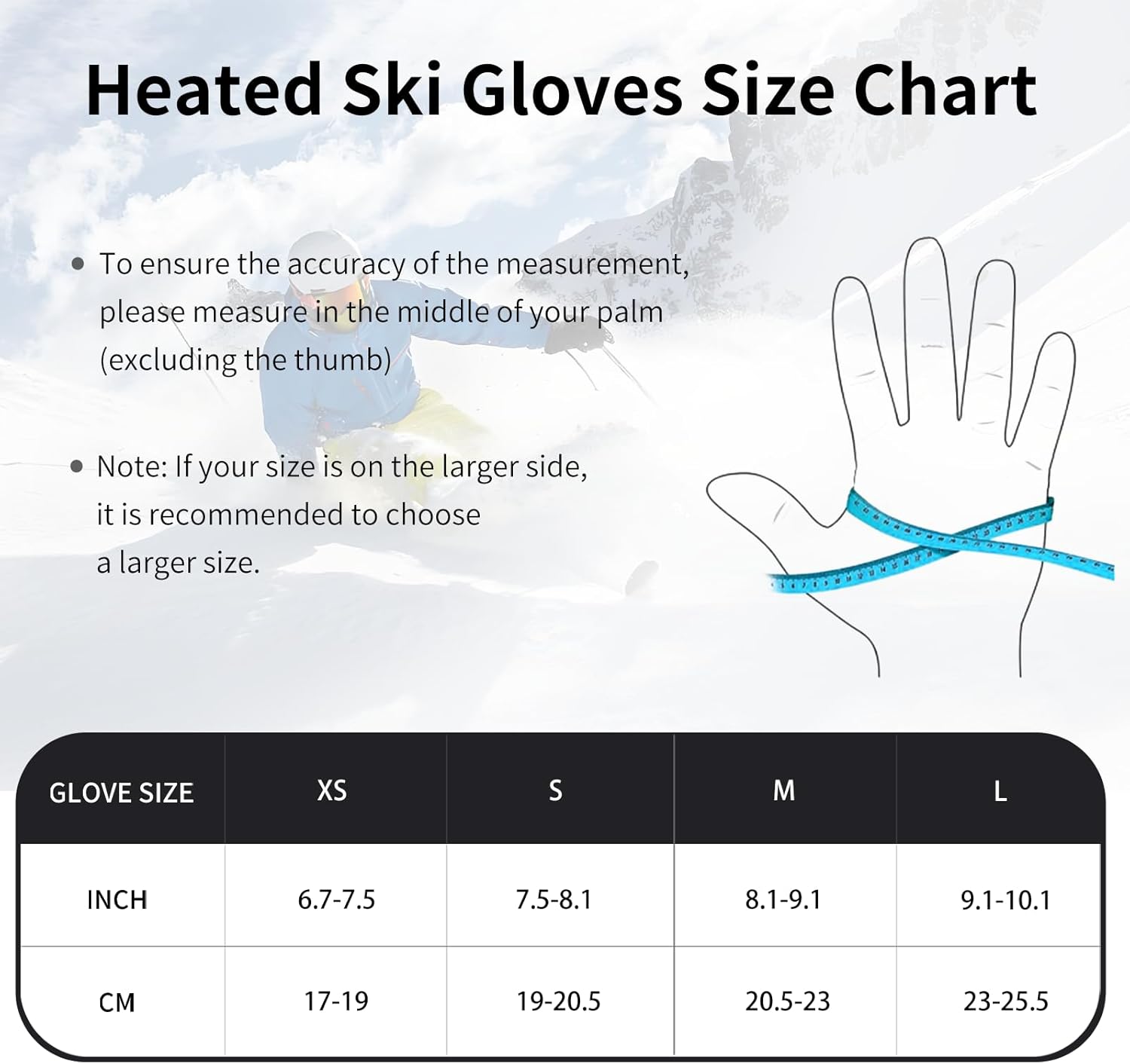
Image: Size chart for FEETMOR Heated Mittens.
9. Warranty and Support
FEETMOR products are designed for quality and performance. For specific warranty information, please refer to the documentation included with your purchase or visit the official FEETMOR website. If you encounter any issues or require assistance, please contact FEETMOR customer support at the contact information provided in your product packaging or on the brand's official channels.
Ask a question about this manual
Ask about setup, troubleshooting, compatibility, parts, safety, or missing instructions. Manuals+ will review the question and use this page’s manual context to help answer it.