
1. Safety Information
Please read all instructions carefully before installation and operation. Retain this manual for future reference.
- Ensure the range hood is properly grounded.
- Disconnect power before servicing or cleaning.
- Installation must comply with all local codes and standards.
- Do not operate the range hood without filters in place.
- This appliance is intended for household use only.
2. Package Contents
Verify that all components are present before beginning installation:
- TAZPI 30 Inch Under Cabinet Range Hood Unit
- Baffle Filters (Pre-installed)
- Mounting Hardware
- User Manual
- Telecontrol (Remote Control)
3. Setup and Installation
This range hood is designed for under-cabinet mounting and can be configured for ducted or ductless (recirculating) operation. Consult a qualified installer for electrical and ducting work.
3.1 Dimensions and Clearance
Ensure adequate space and clearance above your cooking surface. Refer to the diagram below for detailed measurements.

Image: Range Hood Dimensions. This diagram illustrates the overall dimensions of the range hood, including its length, width, height, and the diameter of the duct outlet.
3.2 Mounting
The unit is designed for under-cabinet installation. Secure the range hood to the underside of the cabinet using the provided mounting hardware. Ensure the mounting surface is structurally sound to support the weight of the unit (approximately 45.6 pounds).
3.3 Ducting Options
- Ducted Installation: Connect the 6-inch round duct outlet to an external ventilation system. This method exhausts cooking fumes outside the home.
- Ductless (Recirculating) Installation: For ductless operation, charcoal filters (sold separately) are required to filter air before recirculating it back into the kitchen. Ensure the top vent is not obstructed.
3.4 Electrical Connection
The range hood operates on 120V/60Hz (standard US electrical supply) and uses a 3-prong plug. Some specifications may list 220V; please verify your local electrical requirements and ensure compatibility. A dedicated circuit is recommended.
4. Operating Instructions
The TAZPI range hood features both touch control and gesture sensing for convenient operation.

Image: Gesture Control Interface. This image highlights the gesture sensing area on the control panel, allowing for hands-free operation.
4.1 Control Panel Overview
The control panel is located on the front of the unit and includes touch buttons for various functions. Gesture sensing allows for control without direct contact.
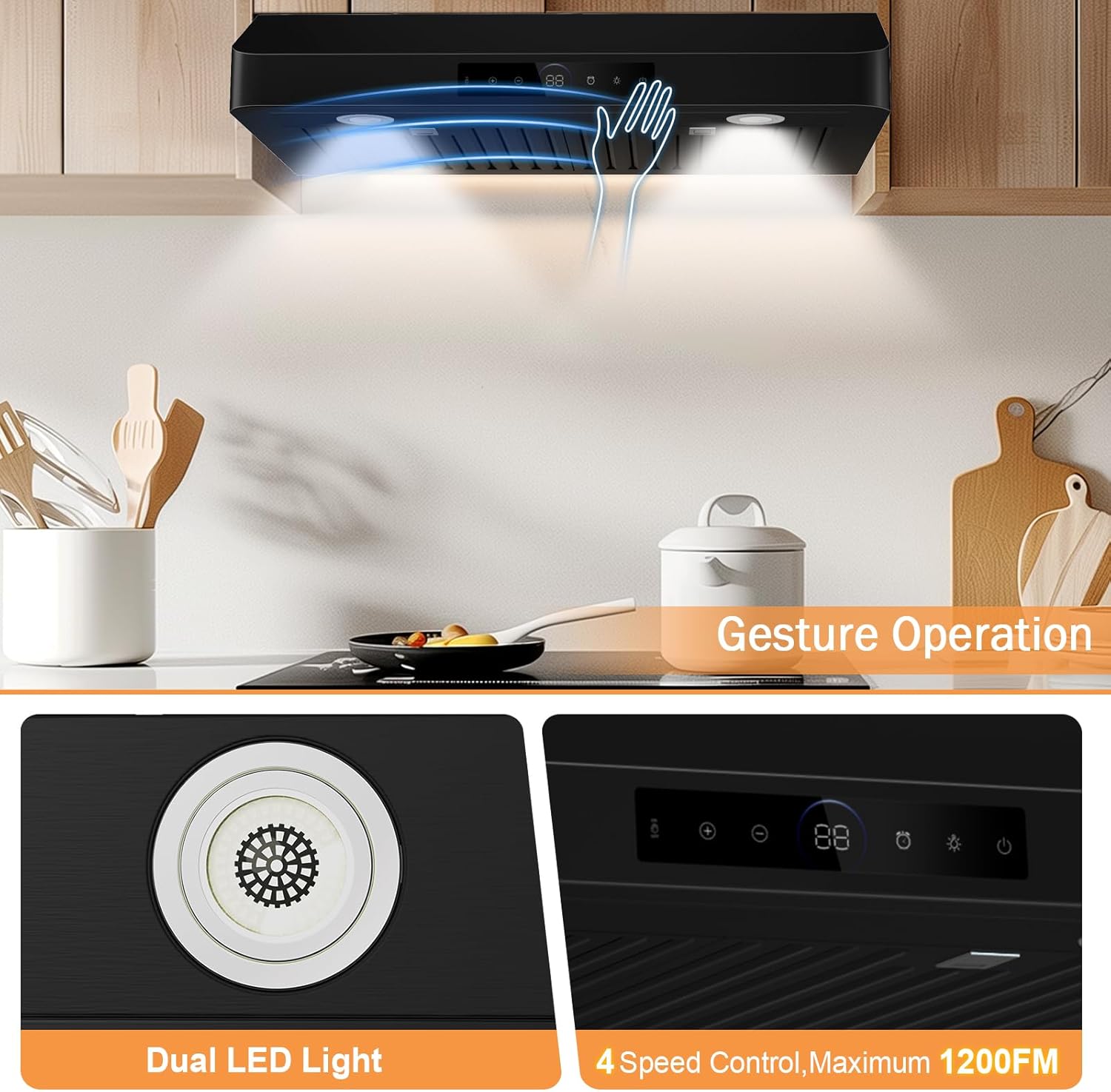
Image: Control Panel and LED Lights. A detailed view of the touch control interface, dual LED lights, and the gesture sensing zone.
4.2 Power On/Off
- Touch Control: Press the power icon on the touchscreen.
- Gesture Control: Wave your hand across the gesture sensing area to turn the unit on or off. The system recognizes intentional movements within 15-30cm to prevent accidental activation.
4.3 Fan Speed Adjustment
The range hood offers 4 fan speeds to accommodate different cooking needs.
- Touch Control: Use the '+' and '-' buttons on the touchscreen to cycle through the 4 speed settings (400 CFM, 600 CFM, 900 CFM, 1200 CFM).
- Gesture Control: Specific hand gestures can also adjust fan speed. Refer to the quick start guide for gesture patterns.
4.4 LED Lighting
Activate the dual LED lights for improved visibility over your cooking surface.
- Touch Control: Press the light bulb icon on the touchscreen to turn the lights on or off.
- The high-CRI LEDs provide accurate color rendition of food.
4.5 Timer and Auto Purge
- Shutdown Timer: Set a timer for 1-15 minutes for automatic shutdown after cooking.
- Auto Purge: Activate the 3-minute post-cooking purge function to clear residual smoke and odors from the kitchen.
5. Maintenance
Regular maintenance ensures optimal performance and longevity of your range hood.
5.1 Cleaning the Exterior
Wipe the stainless steel exterior with a soft cloth and a non-abrasive stainless steel cleaner. Avoid harsh chemicals or abrasive pads that can scratch the surface.
5.2 Filter Cleaning and Replacement
The range hood is equipped with 340 stainless steel baffle filters, designed to capture grease effectively.

Image: Dishwasher-Safe Filters. This image demonstrates the ease of removing and cleaning the baffle filters in a dishwasher.
- Removal: Gently pull down the release latches on the filters to remove them.
- Cleaning: The filters are dishwasher-safe. Alternatively, wash them by hand with hot, soapy water. Allow them to dry completely before reinstallation.
- Frequency: Clean filters regularly, depending on cooking frequency and type.
- Charcoal Filters (for Ductless operation): If using in recirculating mode, charcoal filters will need periodic replacement. Follow the manufacturer's guidelines for replacement frequency.
5.3 LED Light Replacement
The LED lights have a long lifespan. If replacement is necessary, contact customer support for compatible parts and instructions.
6. Troubleshooting
This section addresses common issues you might encounter with your range hood.
| Problem | Possible Cause | Solution |
|---|---|---|
| Fan does not turn on | No power supply; circuit breaker tripped; loose wiring. | Check power connection; reset circuit breaker; ensure all connections are secure. |
| Low suction power | Clogged filters; improper ducting; motor issue. | Clean or replace filters; check ductwork for obstructions or leaks; ensure proper duct size. For ductless models, ensure charcoal filters are not saturated. |
| Excessive noise | Loose parts; motor imbalance; duct obstruction. | Check for loose screws or components; inspect fan blades for debris; verify ductwork is clear and properly installed. |
| LED lights not working or flickering | Loose connection; faulty LED module. | Check light connections; if flickering persists, contact customer support for a replacement LED module. |
| Grease accumulation on cabinets above hood | Ineffective ventilation; leaky exhaust baffle. | Ensure filters are clean; verify ducting is sealed properly and free of leaks. For ductless models, ensure charcoal filters are installed and replaced regularly. |
7. Specifications
Detailed technical specifications for the TAZPI 30 Inch Under Cabinet Range Hood, Model 15S-E30BK.
| Feature | Specification |
|---|---|
| Model Number | 15S-E30BK |
| Dimensions (L x W x H) | 29.68 x 7.86 x 20.83 inches |
| Mounting Type | Under Cabinet Mount |
| Material | Stainless Steel |
| Airflow Displacement | Maximum 1200 CFM (Boost Mode), Standard Operating 900 CFM (Dual Motors), Adjustable Speeds: 400, 600, 900, 1200 CFM |
| Number of Speeds | 4 |
| Noise Level | 55 dB (Max) |
| Controls Type | Touch, Gesture Sensing |
| Lighting | Dual LED Lights (2 x 3W, Ra92 CRI) |
| Filter Type | 340 Stainless Steel Baffle Filters (Dishwasher-Safe) |
| Ventilation Type | Ducted (Ductless option with charcoal filters) |
| Voltage | 120V/60Hz (Standard US), 220V (as listed in some specifications - verify local requirements) |
| Power Consumption | 230W (Motor) |
| Item Weight | 45.6 Pounds |
8. Warranty and Support
For warranty information, please refer to the documentation included with your purchase or contact TAZPI customer service directly. Warranty terms typically cover manufacturing defects for a specified period.
8.1 Customer Support
If you have questions, require technical assistance, or need to order replacement parts, please contact TAZPI customer support. You can typically find contact information on the manufacturer's website or through your retailer.
When contacting support, please have your model number (15S-E30BK) and purchase date available.


