
1. Introduction
This manual provides essential information for the safe and efficient operation of your ACMER Ascarva 4S CNC Router Machine. This professional CNC router is designed for ultra-high precision carving and cutting on various materials including wood, planar surfaces, acrylic, and MDF. It features a robust aluminum alloy construction, a 70W spindle, and a 400mm x 400mm x 95mm working area. The machine is equipped with intelligent controls and user-friendly features to enhance your crafting experience.

Figure 1: The ACMER Ascarva 4S CNC Router Machine in operation, carving an intricate eagle design into a wooden board. The machine features an orange and silver frame with a spotlight illuminating the work area.
2. Setup
The ACMER Ascarva 4S CNC Router Machine features a pre-assembled design and orderly cable management to reduce installation time by 50%. Follow these steps for initial setup:
- Unpacking: Carefully remove all components from the packaging. Verify all parts are present according to the packing list.
- Placement: Place the machine on a stable, level surface in a well-ventilated area.
- Power Connection: Connect the power cord to the machine and a suitable power outlet.
- USB Connection (Optional): For PC control, connect the machine to your computer using the provided USB cable.
- Software Installation: Install the necessary control software (e.g., Candle, USGS, Base) compatible with Windows, Mac, or Linux operating systems.
- Bit Installation: Securely install the appropriate CNC bit into the spindle collet.
- Material Securing: Use clamps or other appropriate methods to firmly secure your material to the workbed.

Figure 2: The ACMER Ascarva 4S CNC Router Machine positioned on a wooden workbench, ready for operation. Various tools and materials are visible in the background, indicating a typical workshop environment.
Setup Demonstration Video
Video 1: This video demonstrates the initial setup and first cutting operation of a similar CNC machine (AnoleX 4030-Evo Ultra 2). It covers connecting the USB cable, powering on the machine, installing the CNC bit, jogging the bit to the working origin, and initiating an engraving task. While the model differs, the general setup principles are applicable.
3. Operating Instructions
The Ascarva 4S offers high-speed performance and precise control for various carving and cutting tasks.
- Spindle Power: 70W (upgradable to 500W).
- Spindle Speed: 8000 RPM.
- Maximum Carving Speed: 1000mm/min.
- Maximum Movement Speed: 5000mm/min.
- Acceleration: 100mm/s².
- Control Interface: 3.5-inch touch screen with intuitive multilingual interface (EN/ES/FR/DE, etc.) and manual Z-axis height knob.
- Expandability: Compatible with 5W/10W laser modules (expandable).
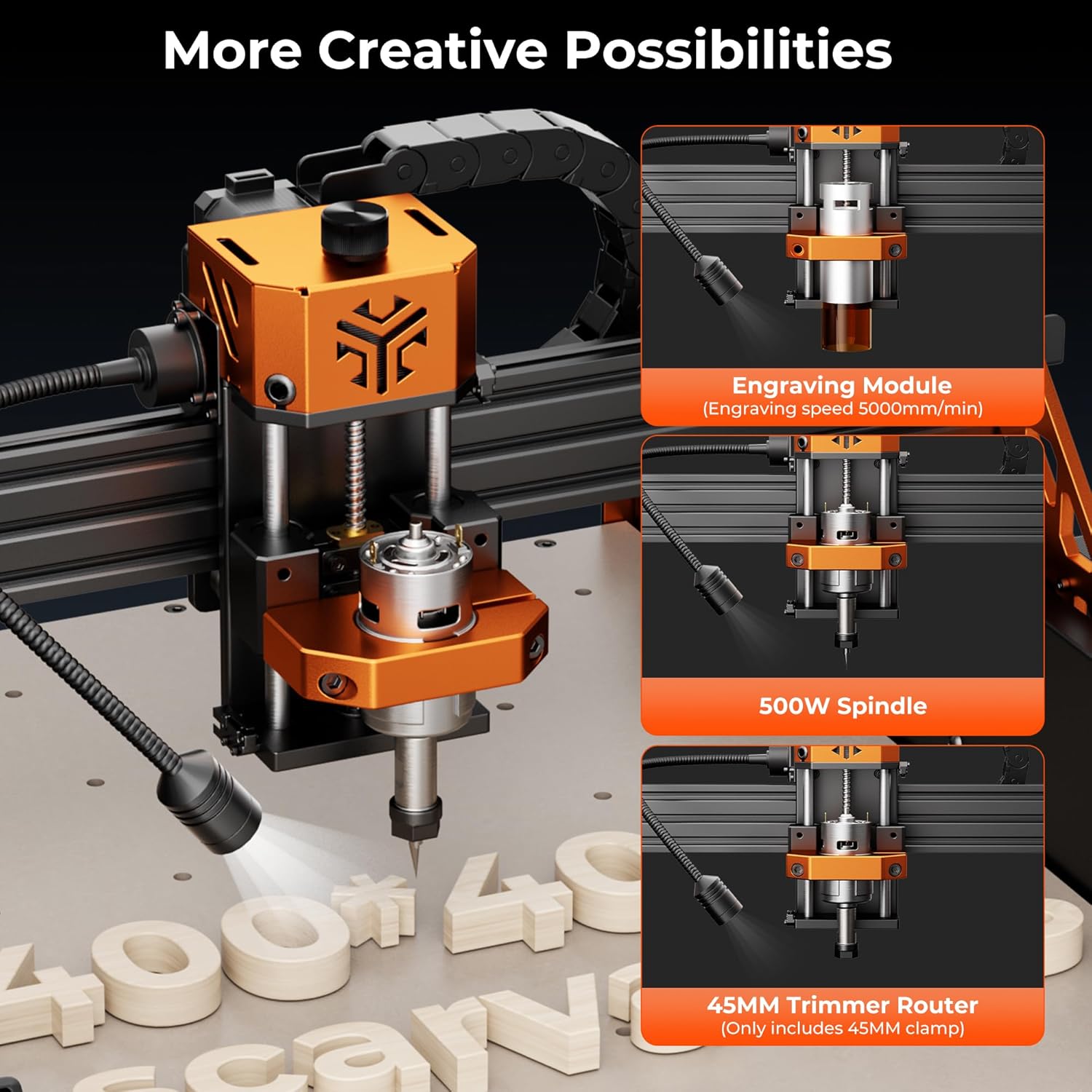
Figure 3: A detailed view of the CNC machine's spindle head, illustrating its versatility with interchangeable modules for engraving, a more powerful 500W spindle, and a 45mm trimmer router.

Figure 4: The 3.5-inch touch screen control panel provides clear and intuitive control over the machine's operations. An adjustable spotlight is also shown, designed to illuminate the carving area for better visibility.
Operation Demonstration Videos
Video 2: This video provides an introduction to the FoxAlien Masuter 3S, showcasing its capabilities in cutting various materials like aluminum, copper, wood, and acrylic, as well as laser engraving. While a different model, it illustrates the general operational versatility of CNC router machines.
Video 3: This video demonstrates cutting tests performed with a trimmer router and laser on a Masuter Pro machine. It shows the machine's performance on materials such as Aluminum 6061, Bakelite, Acrylic, Solid Wood, Resin Board, Plywood, Nylon, and POM, highlighting the diverse applications.
4. Maintenance
Proper maintenance ensures the longevity and optimal performance of your ACMER Ascarva 4S CNC Router Machine.
- Dust Protection: The Y-axis dust cover and Z-axis motor protective cover are designed to extend the lifespan of the machine by preventing dust and debris accumulation. Regularly inspect and clean these covers.
- Modular Design: The machine's modular design facilitates easy assembly, repair, and replacement of parts. Refer to the detailed assembly instructions for specific component handling.
- Continuous Operation: The machine is built for continuous heavy tasks, but regular checks for wear and tear are recommended, especially after extended use.

Figure 5: This image illustrates the effectiveness of the advanced dust baffle design. The top machine, equipped with baffles, shows a clean work area, while the bottom machine without baffles accumulates significant dust and debris during operation.
5. Troubleshooting
If you encounter any issues with your ACMER Ascarva 4S CNC Router Machine, please refer to the following general advice:
- Connection Issues: Ensure all cables (power, USB) are securely connected. For PC control, verify that the correct drivers are installed and the software recognizes the machine.
- Movement Problems: Check for any obstructions on the linear rails or ball screws. Ensure stepper motors are receiving power and are properly connected.
- Cutting/Carving Quality: Verify that the correct bit is installed, it is sharp, and the material is securely clamped. Adjust cutting parameters (speed, depth) in your software as needed.
- Software Errors: Consult the software's documentation or online resources for specific error messages.
For persistent issues or complex problems, please contact ACMER customer service for assistance.
6. Specifications
| Feature | Specification |
|---|---|
| Manufacturer | ACMER |
| Part Number | 4S |
| Product Dimensions | 39.88 x 39.88 x 9.4 cm |
| Item Model Number | Ascarva 4 S |
| Material | Aluminum |
| Power Source | AC |
| Voltage | 24 Volts (AC) |
| Included Components | CNC Router Machine |
| Item Weight | 18 kg |
| Maximum Rotational Speed | 8000 RPM |
| Base Type | Plunge |
7. Warranty and Support
ACMER is committed to providing high-quality products and comprehensive customer service. As the manufacturer, we offer dedicated pre-sales and after-sales support to all our customers.
If your CNC engraving machine experiences any issues during use, please do not hesitate to contact our ACMER customer service team. We are here to assist you with troubleshooting, repairs, and any questions regarding machine parts or upgrades.
For specific inquiries regarding the newly upgraded automatic tool alignment function, please proactively contact our customer service team. We can provide a free replacement of the original module with the upgraded tool module to enhance your machine's functionality.
