
1. Introduction
Thank you for choosing the MEIKEE 100W LED Flood Light with Motion Sensor. This product is designed to provide efficient and reliable outdoor lighting with advanced motion detection and customizable settings. Please read this manual thoroughly before installation and operation to ensure proper use and safety.
2. Safety Instructions
WARNING: To avoid electric shock, always disconnect power at the circuit breaker before installation or servicing.
- Ensure the power supply is turned off before commencing any electrical work.
- Installation should be performed by a qualified electrician if you are not familiar with electrical wiring.
- This product is designed for outdoor use only.
- Ensure the fixture is properly grounded according to local electrical codes.
- Do not look directly into the LED light source when illuminated, as it may cause eye damage.
- Keep the product away from flammable materials.
3. Package Contents
Verify that all components are present before installation:
- 100W Motion Sensor Flood Light
- Remote Control (2 AAA batteries included)
- Screw Pack (mounting screws, wire nuts)
4. Product Features
- Ultra Bright Illumination: 9600 lumens, 6500K Daylight White.
- Adjustable Heads: Three independently adjustable LED heads for a wide 270° lighting angle.
- PIR Motion Sensor: 180° detection angle, up to 12 meters (39 feet) range.
- 4 Working Modes: 24-Hour Detection, Night-Only Detection, Continuous Light, and Timer + Detection.
- Customizable Settings: Adjustable brightness (10%-100%), detection range (6m/9m/12m), and lighting duration (45s to 10min).
- Remote Control: Convenient adjustment of settings from a distance.
- Durable & Weather-Resistant: IP66 waterproof aluminum housing and IP65 waterproof sensor head for outdoor reliability.
- Efficient Heat Dissipation: Designed for prolonged lifespan.

Image: Key features of the MEIKEE flood light, including adjustable heads, PIR motion sensor, heat dissipation, and high-brightness LEDs.
5. Installation Guide
Follow these steps for a safe and proper installation:
- Prepare for Installation:
- Turn off power at the circuit breaker before starting.
- Ensure the mounting surface is stable and can support the fixture's weight.
- Recommended installation height: 6-8 meters (approximately 20-26 feet) for optimal motion sensor performance.
- Mount the Fixture:
- Attach the mounting bracket to the wall or junction box using the provided screws.
- Feed the electrical wires through the gasket and mounting plate.
- Wire Connections:
- Connect the live wire (usually black) from the fixture to the live wire from the power supply.
- Connect the neutral wire (usually white) from the fixture to the neutral wire from the power supply.
- Connect the ground wire (usually green or bare copper) from the fixture to the ground wire from the power supply.
- Secure all connections with wire nuts.
- Secure the Fixture:
- Attach the flood light fixture to the mounting bracket, ensuring a tight and secure fit.
- Adjust the angle of the light heads and the motion sensor to cover the desired area.
- Restore Power:
- Once installation is complete, turn the power back on at the circuit breaker.
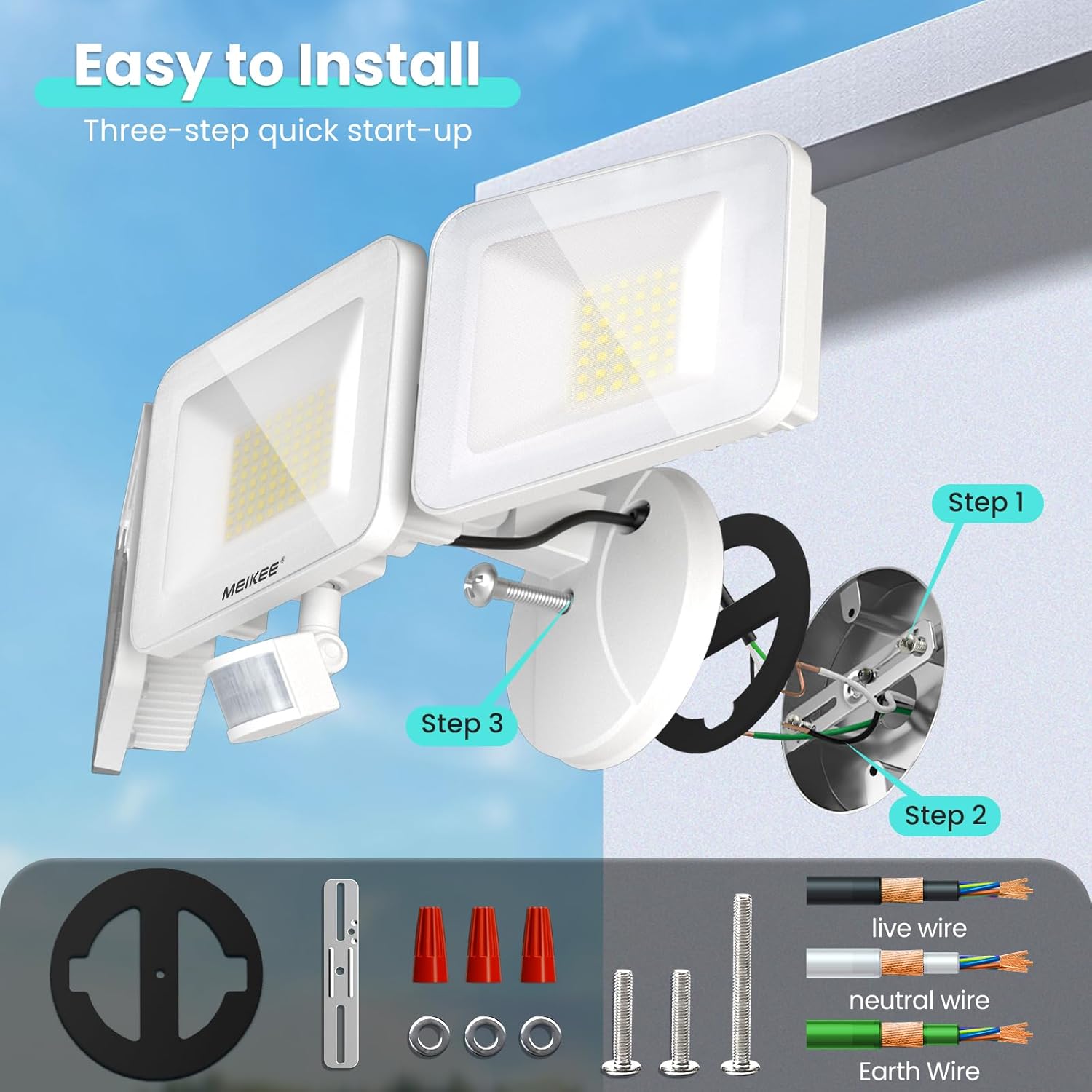
Image: Visual guide for the three-step installation process, illustrating mounting and wiring.
6. Operating Instructions
The MEIKEE flood light offers various settings adjustable via the included remote control or directly on the sensor head.
6.1. Working Modes
Select from four distinct operating modes:
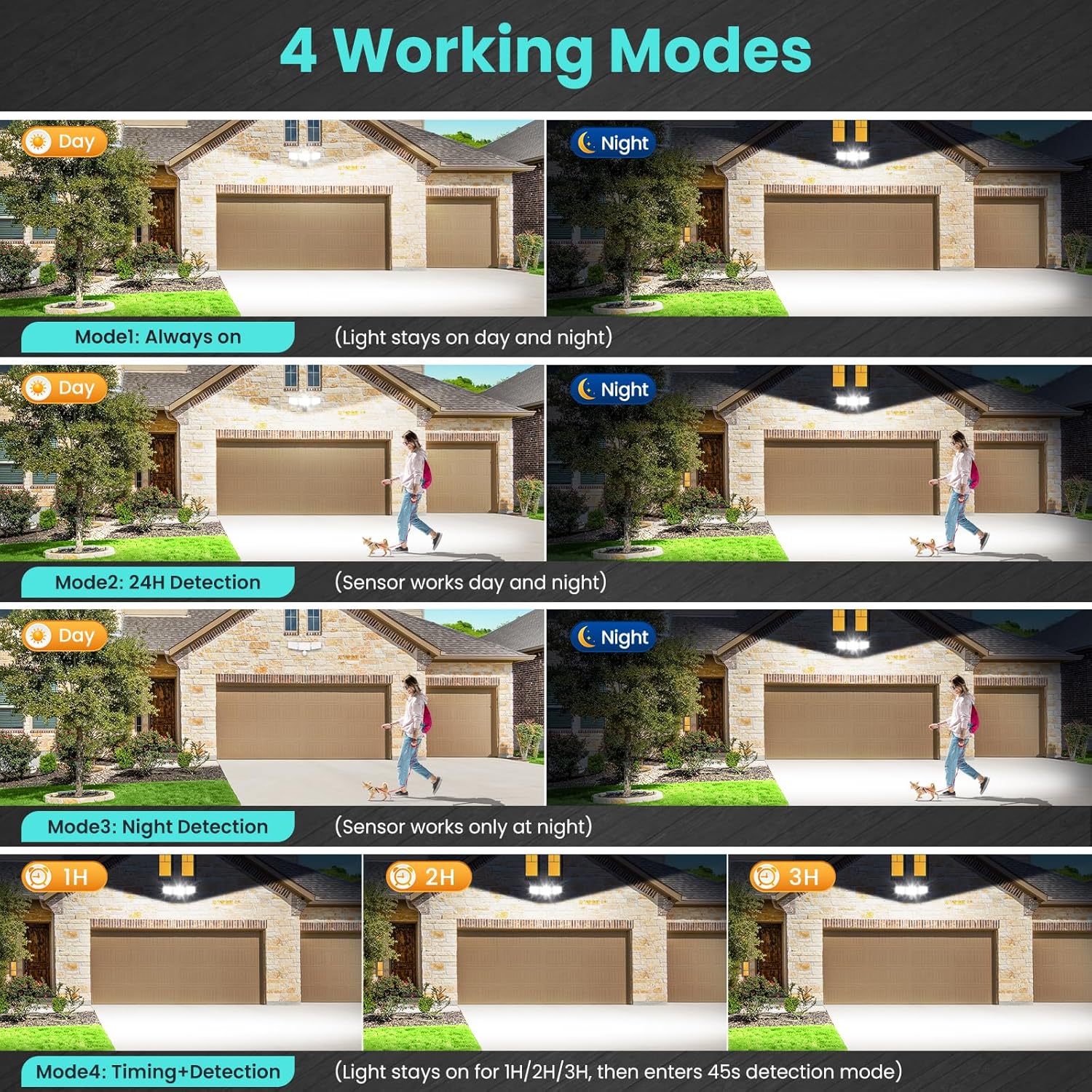
Image: Overview of the four available working modes for the flood light.
- Mode 1: Always On (Constant Light Mode)
The light stays on continuously, day and night, regardless of motion. Activate by pressing the 'ON/OFF' button on the remote. - Mode 2: 24-Hour Detection
The sensor works day and night. The light will turn on when motion is detected and turn off after the set duration if no further motion is detected. Activate by pressing the 'DAY' button on the remote. - Mode 3: Night-Only Detection
The sensor works only at night. The light will turn on when motion is detected in low light conditions and turn off after the set duration if no further motion is detected. Activate by pressing the 'MOON' button on the remote. - Mode 4: Timing + Detection Mode
The light stays on for a set period (1, 2, or 3 hours) and then switches to 45-second night sensing mode automatically. Select 1H, 2H, or 3H on the remote.
6.2. Adjustable Settings
Customize the light's performance to your specific needs:

Image: Visual representation of adjustable sensing distance, brightness, and lighting duration settings.
- Brightness: Adjust from 10% to 100% using the brightness control buttons on the remote.
- Detection Range: Set the motion sensor's sensitivity to 6m (20ft), 9m (30ft), or 12m (39ft) using the corresponding buttons on the remote.
- Lighting Duration: Choose how long the light stays on after motion is detected: 45 seconds, 90 seconds, 120 seconds, 5 minutes, or 10 minutes. Select the desired time on the remote.
- 5-Second Test Feature: Allows for quick testing of sensor functionality during setup.
7. Remote Control Functions
The 15-key remote control provides convenient access to all settings. Ensure the remote has fresh AAA batteries and is pointed towards the sensor head for optimal communication.

Image: Remote control layout and indication of both remote and sensor head control options.
- ON/OFF: Toggles Constant Light Mode.
- 45S/90S/120S/5MIN/10MIN: Sets lighting duration.
- 6M/9M/12M: Adjusts detection distance.
- Brightness Buttons (Sun icons): Adjusts brightness levels (10% to 100%).
- TIMER (1H/2H/3H): Activates Timing + Detection Mode.
- DAY: Activates 24-Hour Detection Mode.
- MOON: Activates Night-Only Detection Mode.
8. Maintenance
Regular maintenance ensures optimal performance and longevity of your flood light:
- Cleaning: Periodically wipe the light heads and sensor lens with a soft, damp cloth to remove dust and debris. Do not use abrasive cleaners.
- Inspection: Annually check all electrical connections and mounting hardware for tightness and signs of wear or damage.
- Sensor Area: Keep the area around the motion sensor clear of obstructions (e.g., tree branches, tall plants) that could interfere with detection.
9. Troubleshooting
If you encounter issues, refer to the following common problems and solutions:
| Problem | Possible Cause | Solution |
|---|---|---|
| Light does not turn on. | No power; incorrect wiring; sensor settings. | Check circuit breaker; verify wiring connections; adjust sensor mode/sensitivity. |
| Light stays on continuously. | Constant Light Mode activated; sensor malfunction. | Ensure Constant Light Mode is off; check sensor for obstructions. |
| Motion sensor not detecting. | Incorrect sensitivity/range settings; obstructions; improper installation height. | Adjust detection range and sensitivity; clear obstructions; verify installation height. |
| Remote control not working. | Dead batteries; no line of sight; remote too far. | Replace AAA batteries; ensure direct line of sight to sensor; operate within range. |
| Light flickers or dims unexpectedly. | Unstable power supply; loose wiring. | Consult an electrician to check power supply; inspect and tighten wiring connections. |
10. Technical Specifications
| Specification | Value |
|---|---|
| Model Name | TSFA0100 |
| Wattage | 100 Watts |
| Brightness | 9600 Lumens |
| Color Temperature | 6500 Kelvin (Daylight White) |
| Voltage | 120 Volts |
| Material | Aluminum |
| Water Resistance Level | IP66 (Housing), IP65 (Sensor Head) |
| Motion Sensor Angle | 180° |
| Motion Sensor Range | Up to 12m (39ft) |
| Product Dimensions | 9"L x 6.89"W x 7.13"H |
| Item Weight | 3.17 pounds |
| Power Source | AC |
| Control Method | Remote |
| Included Components | Flood light, Remote Control, Screw Pack |
11. Warranty and Support
This MEIKEE product comes with a Limited Warranty. For specific warranty details and duration, please refer to the product packaging or contact MEIKEE customer support.
If you require further assistance, have questions, or need to report an issue, please contact MEIKEE customer support through the retailer's platform or the official MEIKEE website. Please have your model number (TSFA0100) and purchase information ready.


