
1. Introduction
Thank you for choosing the TIGERKING SPARK5922-W Large Fireproof Digital Safe. This safe is designed to provide secure storage for your valuables, documents, and other important items. Featuring a robust construction, digital lock, and fire-resistant properties, it offers enhanced protection against theft and fire. Please read this manual carefully before installation and operation to ensure proper use and maximum security.
2. Safety Information
- Keep the emergency keys in a secure location away from the safe and out of reach of children. Do not store them inside the safe.
- Ensure the safe is placed on a level, stable surface.
- This safe is heavy (approximately 306 lbs / 139 kg). Exercise extreme caution and use appropriate lifting equipment or assistance during transportation and installation to prevent injury.
- Do not attempt to open the safe by force.
- Regularly check the battery level of the digital lock to ensure continuous operation.
3. Package Contents
Verify that all components are present in the package:
- 1 × TIGERKING SPARK5922-W Safe
- 1 × Instruction Manual
- 2 × Back Up Keys (Emergency Keys)
- 3 × Spoke Handles
- 4 × Expansion Bolts for floor fixing
4. Product Overview
The TIGERKING SPARK5922-W safe combines advanced security features with practical design for optimal protection and organization.
Key Features:
- UL 72 Standard Fireproof: Withstands temperatures up to 1200°F for 40 minutes.
- Heavy-Duty Construction: 13-gauge steel body, 9-gauge steel door, and 16mm fire-resistant board.
- Advanced Locking System: Electronic combination lock with 6 x 1-inch solid steel bolts (3 live, 3 dead).
- Dual Entry Methods: Digital password or emergency key.
- Anti-Theft Alarm: Activates on violent vibrations or three incorrect entries.
- Interior Features: Built-in UL-certified power outlet, LED lighting, DIY jewelry drawer, 3 adjustable shelves, drawer hidden compartment, and a false bottom.
- Customizable Storage: All shelves and drawers are removable.
- Plush Interior Lining: Goose-down lining protects valuables from scratches.
- Floor Fixable: Pre-drilled holes for secure floor mounting.
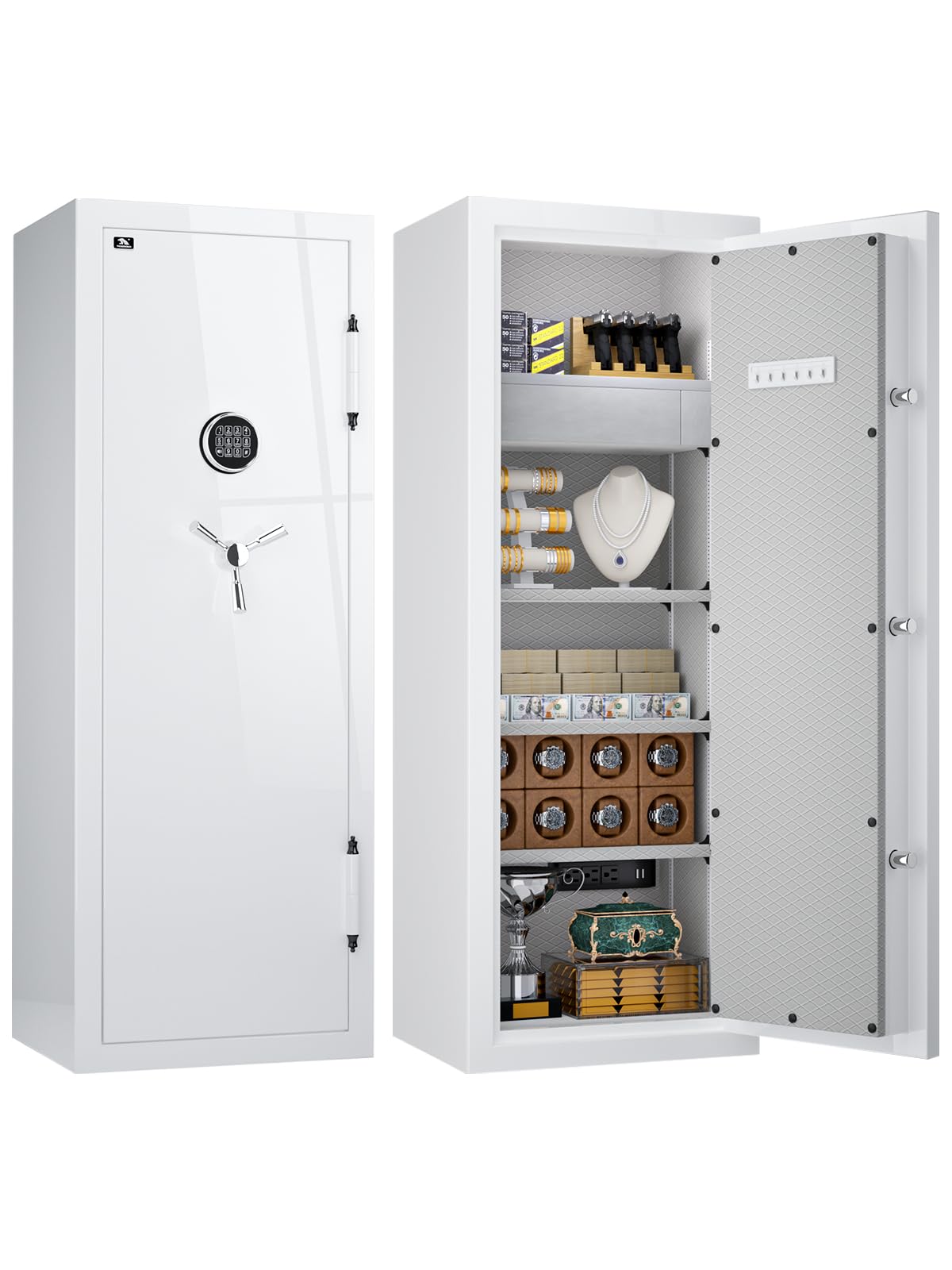
Image 1: Front view of the TIGERKING SPARK5922-W safe.
Image 2: Overview of the safe's electronic panel and features like silent mode, alarm, LED light, electrical outlet, and floor fixing capability.
Image 3: Detailed view of the safe's interior, highlighting hanging hooks, luxurious velvet lining, high-quality metal handle, sensor LED light, and UL-certified electrical outlet.
Image 4: Illustration of the safe's interior storage options, including a built-in DIY jewelry tray, drawer hidden compartment, removable shelves, and a bottom hidden compartment.
5. Setup
5.1 Unpacking and Placement
- Carefully remove the safe from its packaging. Due to its weight, it is recommended to have multiple people or use a dolly for moving.
- Place the safe in its desired location, ensuring it is on a flat, stable surface.
5.2 Battery Installation
The electronic lock requires batteries for operation. Open the battery compartment, typically located on the back of the digital keypad, and insert the required batteries (usually AA or AAA, not included). Ensure correct polarity.
5.3 Floor Fixing (Optional)
For enhanced security, the safe can be bolted to the floor. The safe has four pre-drilled screw holes on the bottom.
- Position the safe in its final location.
- Mark the drilling points through the holes on the floor.
- Move the safe and drill pilot holes into the floor using an appropriate drill bit.
- Reposition the safe over the drilled holes.
- Insert the provided expansion bolts through the safe's bottom holes and into the floor.
- Tighten the bolts securely to anchor the safe to the floor.
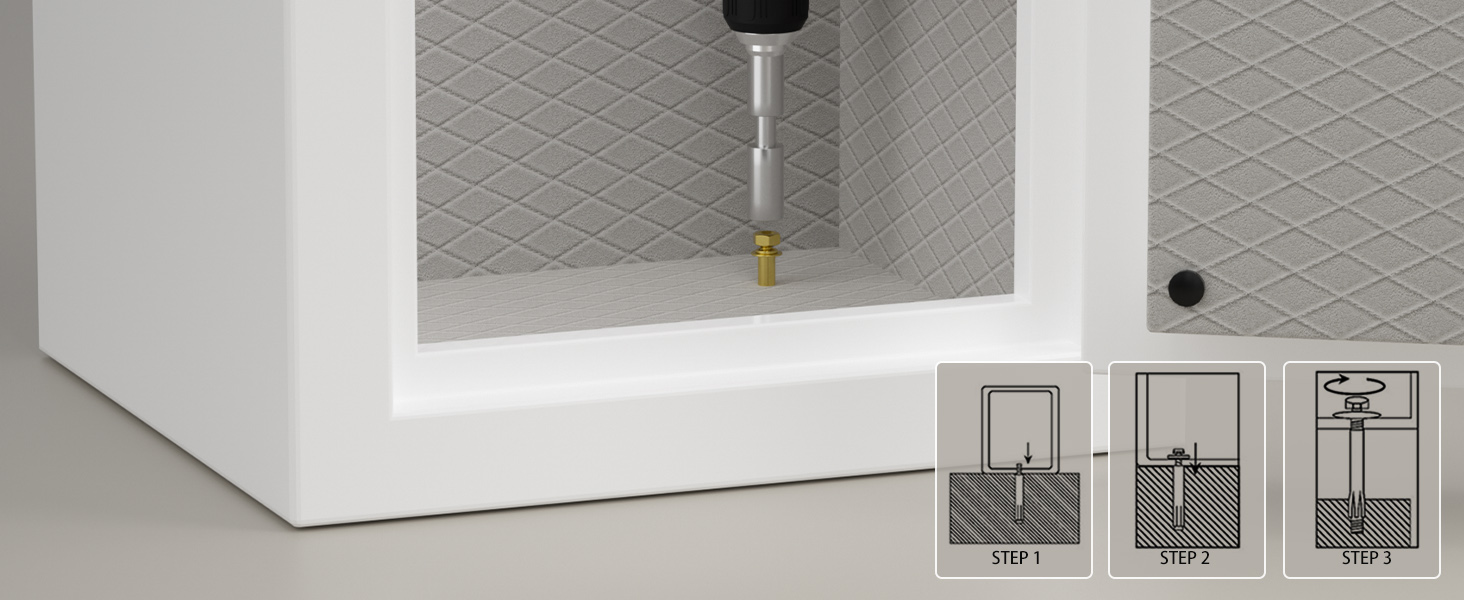
Image 5: Visual guide for securing the safe to the floor using expansion bolts.
6. Operating Instructions
6.1 Initial Opening
Upon first use, you will need to open the safe using the emergency key.
- Locate the emergency keyhole, usually hidden behind the digital keypad cover or a small plate.
- Insert the emergency key and turn it.
- Simultaneously turn the handle to open the safe door.
6.2 Setting Your Digital Password
Once the safe is open, you can set your personal digital password.
- With the door open, locate the reset button on the inside of the door or near the battery compartment.
- Press the reset button. The keypad will beep, and an indicator light will illuminate.
- Enter your desired 3-8 digit code on the keypad, then press '#' or 'ENTER' to confirm.
- Test the new code with the door open before closing it.
6.3 Opening the Safe with Digital Password
- Enter your programmed digital password on the keypad.
- Press '#' or 'ENTER'. The indicator light will turn green.
- Within 5 seconds, turn the handle clockwise to open the safe door.
6.4 Using Emergency Key (Alternative Entry)
If you forget your password or the batteries are depleted, use the emergency key:
- Remove the keypad cover to expose the emergency keyhole.
- Insert the emergency key and turn it.
- Turn the safe handle to open the door.
Image 6: Illustration of the two entry methods: digital password with handle, and emergency key with handle.
6.5 Closing and Locking the Safe
- Close the safe door firmly.
- Turn the handle counter-clockwise until the bolts are fully extended and the door is secured.
6.6 Alarm System
The safe is equipped with an anti-theft alarm system that activates under two conditions:
- Violent Vibrations: If the safe detects significant impact or movement.
- Three Incorrect Entries: If an incorrect password is entered three consecutive times.
To silence the alarm, enter the correct password or use the emergency key.
7. Maintenance
- Cleaning: Wipe the exterior with a soft, damp cloth. Avoid abrasive cleaners or solvents.
- Battery Replacement: Replace batteries annually or when the low battery indicator appears. Always replace all batteries at the same time.
- Door Hinges: Periodically check door hinges for smooth operation. Do not lubricate unless necessary and only with recommended lubricants.
8. Troubleshooting
- Safe will not open with password:
- Ensure batteries are fresh and correctly installed.
- Verify you are entering the correct password.
- Try using the emergency key to open the safe.
- Keypad is unresponsive:
- Replace batteries.
- Check for any debris obstructing the buttons.
- Alarm sounds unexpectedly:
- Check if the safe was subjected to any impact or vibration.
- Ensure no one attempted to open the safe with incorrect codes.
- Enter the correct password to disarm the alarm.
- Door does not close properly:
- Ensure no items are obstructing the door or locking bolts.
- Check if the safe is on a level surface.
9. Specifications
| Brand | TIGERKING |
| Model Number | SPARK5922-W |
| Exterior Dimensions (H x W x D) | 59" x 21.65" x 17.72" |
| Interior Dimensions (H x W x D) | 55.51" x 19.68" x 12.2" |
| Capacity | 13.12 Cubic Feet (Exterior) / 7.72 Cubic Feet (Interior) |
| Item Weight | 306 lbs (139 kg) |
| Material | Carbon Steel |
| Lock Type | Electronic Combination Lock |
| Fireproof Standard | UL 72 (40 minutes up to 1200°F) |
| Mounting Type | Floor Mount |
| Special Features | Alarm System, Anti-Theft, Combination Lock, Fireproof, Removable Shelf, Internal Power Outlet, LED Lighting |
Image 7: Detailed product dimensions for the TIGERKING safe.
Image 8: Diagram illustrating the fireproof construction layers, including 13-gauge steel, 16mm heat-resistant fire board, and premium velvet protection, meeting UL 72 standard.
10. Warranty and Support
TIGERKING is committed to product quality and customer satisfaction. This product includes a limited 1-year customer service warranty.
For any questions, technical support, or warranty claims, please contact TIGERKING customer service. Refer to the contact information provided with your purchase or visit the official TIGERKING website.


