
Introduction
Thank you for choosing the A-iPower SUA2600i Quiet Inverter Generator. This generator is designed to provide reliable, clean power for various applications, including camping, tailgating, RV use, and home backup. Its lightweight design, quiet operation, and advanced safety features make it an excellent choice for powering sensitive electronics and essential appliances.
Please read this manual thoroughly before operating the generator to ensure safe and efficient use. Keep this manual for future reference.
Product Features
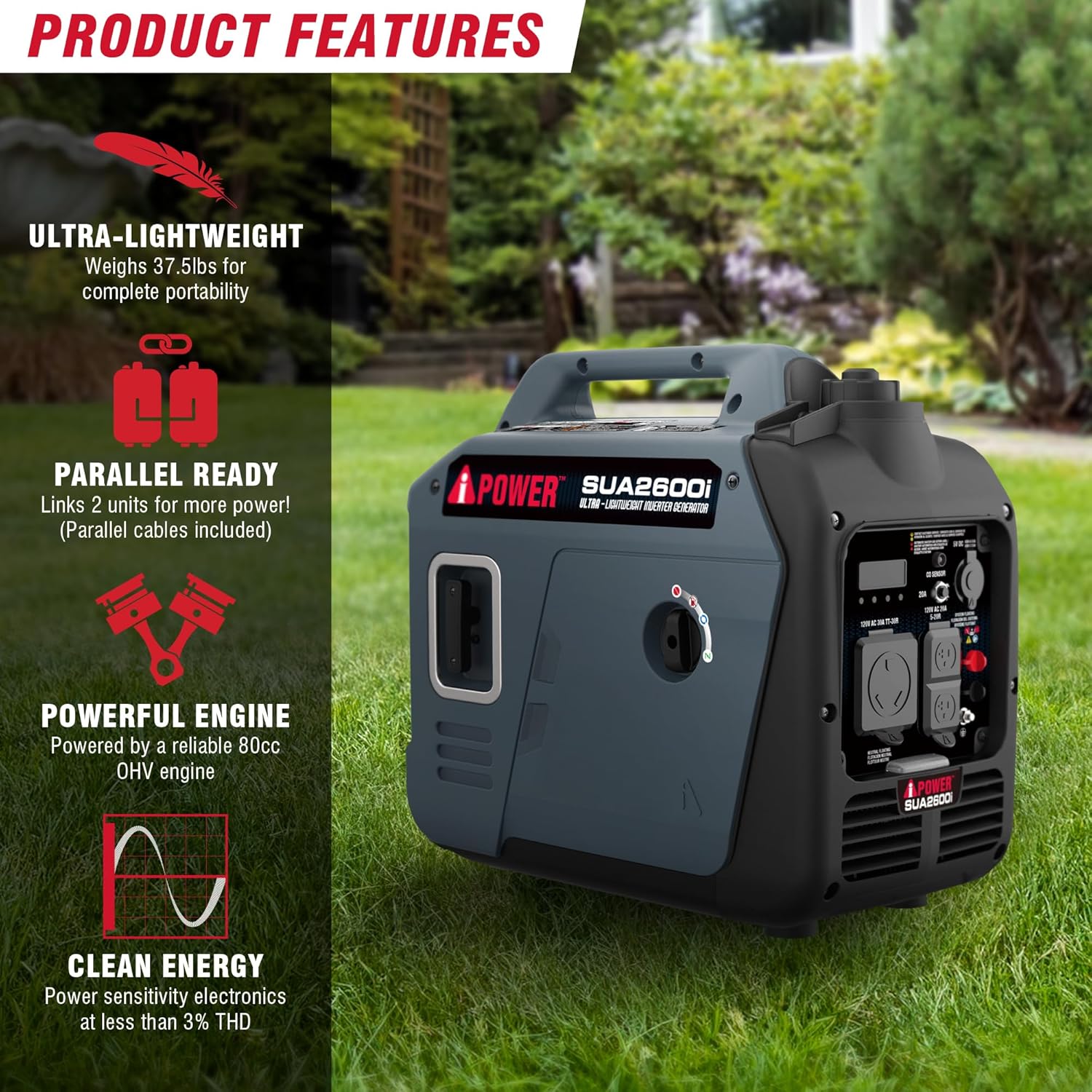
- Powerful and Versatile: Delivers 2,600 starting watts and 2,000 running watts, suitable for powering mini-fridges, coffee makers, fans, phone chargers, and string lights. Ideal for outdoor setups or small RV needs.
- Ultra-Lightweight and Portable: Weighing just 38 pounds, this generator is easy to carry and store in vehicles, RV compartments, or garages, ensuring portability without compromising performance.
- Extended Runtime: A 0.9-gallon fuel tank provides up to 9 hours of runtime at 25% load, perfect for extended use. Features low idle technology to conserve fuel and reduce noise.
- Quiet and Clean Power: Inverter technology ensures less than 3% Total Harmonic Distortion (THD), making it safe for sensitive electronics like laptops, tablets, and CPAP machines. Operates at a quiet 62 dBA, comparable to a normal conversation.
- Built-in Safety and Expandability: Equipped with a CO sensor for automatic shutdown, low oil protection, and a digital data center for real-time monitoring. Parallel-ready ports allow connection of a second generator for increased power.
What's in the Box
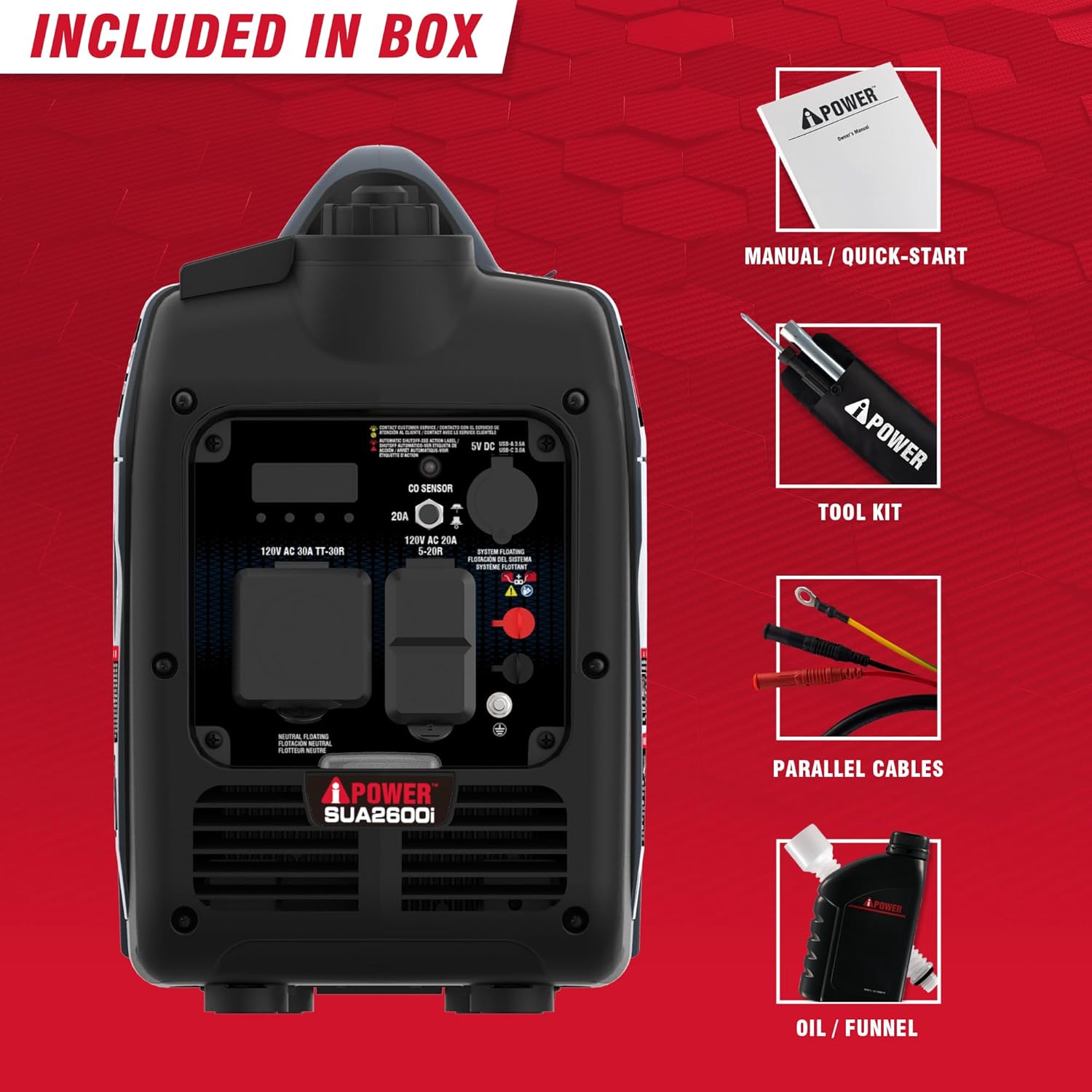
Upon unpacking, ensure all items listed below are present and undamaged:
- A-iPower SUA2600i Inverter Generator Unit
- Owner's Manual
- Quick Start Guide
- Tool Kit
- Parallel Cables (for connecting two units)
- Oil / Funnel
Safety Information
Your safety is paramount. Always follow these guidelines to prevent injury or damage:
- Carbon Monoxide Hazard: Generators produce carbon monoxide (CO), an odorless, colorless, and poisonous gas. NEVER operate the generator indoors or in partially enclosed areas. Always use it outdoors in a well-ventilated area, far from windows, doors, and vents.
- CO Sensor: This generator is equipped with a built-in CO sensor that automatically shuts down the engine if dangerous levels of carbon monoxide are detected. Do not disable or tamper with this safety feature.
- Fire Hazard: Gasoline is highly flammable. Refuel in a well-ventilated area with the engine off and cool. Do not smoke or allow open flames near the generator.
- Electrical Shock Hazard: Do not operate the generator in wet conditions. Ensure all connections are dry and secure. Use only grounded extension cords.
- Hot Surfaces: The generator's engine and muffler become very hot during operation and remain hot for some time after shutdown. Avoid touching these surfaces.
- Children and Pets: Keep children and pets away from the generator at all times.
Setup
- Unpacking: Carefully remove the generator and all accessories from the packaging. Inspect for any shipping damage.
- Add Engine Oil: The generator is shipped without engine oil. Place the generator on a level surface. Remove the oil fill cap/dipstick. Using the provided funnel, add the recommended amount and type of engine oil (refer to the Specifications section for details). Do not overfill. Securely replace the oil fill cap/dipstick.
- Add Fuel: Ensure the generator is off and cool. Use fresh, unleaded gasoline with an octane rating of 87 or higher. Slowly pour gasoline into the fuel tank, being careful not to overfill. Leave a small air gap at the top to allow for fuel expansion. Securely replace the fuel cap.
- Positioning: Place the generator outdoors in a well-ventilated area, at least 20 feet away from any buildings, windows, or vents. Ensure the exhaust is directed away from people and structures.
Operating Instructions
Starting the Generator
- Ensure the generator is on a level surface and all electrical loads are disconnected.
- Turn the fuel valve to the "ON" position.
- Move the choke lever to the "CHOKE" position (if the engine is cold).
- Pull the recoil starter handle firmly and smoothly until the engine starts.
- Once the engine starts, slowly move the choke lever to the "RUN" position.
- Allow the engine to warm up for a few minutes before connecting electrical devices.
Connecting Electrical Devices
- Plug your devices into the appropriate outlets on the control panel.
- Do not overload the generator. Ensure the total wattage of connected devices does not exceed the generator's running wattage.
- For sensitive electronics, the inverter technology provides clean power, minimizing the risk of damage.


ECO Mode
The ECO mode switch, when activated, allows the engine speed to automatically adjust to the load, improving fuel efficiency and reducing noise levels. For maximum power output, turn ECO mode off.
Parallel Operation
This generator is parallel-ready. To connect two SUA2600i units for increased power, use the provided parallel cables and follow the instructions in the Quick Start Guide or a dedicated parallel kit manual. Ensure both generators are off before connecting.
Stopping the Generator
- Disconnect all electrical loads from the generator.
- Allow the engine to run for a few minutes without load to cool down.
- Turn the engine switch to the "OFF" position.
- Turn the fuel valve to the "OFF" position.
Maintenance
Regular maintenance ensures optimal performance and extends the life of your generator. Always perform maintenance with the engine off and cool.
- Check Engine Oil: Check oil level before each use. Change oil after the first 20 hours of operation, then every 100 hours or annually.
- Clean Air Filter: Inspect the air filter every 50 hours or more frequently in dusty conditions. Clean or replace as needed.
- Inspect Spark Plug: Check the spark plug every 100 hours. Clean or replace if fouled or damaged.
- Fuel System: If storing the generator for more than 30 days, drain the fuel tank and carburetor or use a fuel stabilizer to prevent fuel degradation.
- General Cleaning: Keep the generator clean and free of debris. Use a damp cloth to wipe down exterior surfaces.
Troubleshooting
| Problem | Possible Cause | Solution |
|---|---|---|
| Engine will not start | No fuel, low oil, choke not set, spark plug issue, fuel valve off. | Add fuel, add oil, adjust choke, check/replace spark plug, turn fuel valve on. |
| No power output | Overload, circuit breaker tripped, ECO mode on with high load. | Reduce load, reset circuit breaker, turn off ECO mode for high loads. |
| Engine stops unexpectedly | Low oil shutdown, CO sensor activation, out of fuel, overheating. | Check oil level, move to well-ventilated area, refuel, allow to cool. |
| Engine runs rough | Stale fuel, dirty air filter, fouled spark plug. | Use fresh fuel, clean/replace air filter, clean/replace spark plug. |
If problems persist after attempting these solutions, please contact A-iPower customer support.
Specifications
| Feature | Detail |
|---|---|
| Brand | A-iPower |
| Model Number | SUA2600i |
| Starting Wattage | 2600 Watts |
| Running Wattage | 2000 Watts |
| Fuel Type | Gasoline |
| Engine Displacement | 80 Cubic Centimeters |
| Runtime (at 25% load) | Up to 9 hours |
| Noise Level | 62 dBA |
| Total Power Outlets | 4 (120V AC 30A TT-30R, 120V AC 20A 5-20R, USB-A, USB-C) |
| Item Weight | 38.7 Pounds |
| Item Dimensions (L x W x H) | 19.9" x 10.7" x 18.5" |
| Special Features | Automatic Idle Control, CO Sensor, Extra-Long Run Time, Fuel Efficient, Super Quiet |

Official Product Video
This video provides an overview of the A-iPower SUA2600i 2600-Watt Inverter Generator, highlighting its features and benefits. It demonstrates the generator's compact size, control panel, and quiet operation.
Warranty and Support
The A-iPower SUA2600i Inverter Generator comes with a 3 Year Limited Manufacturer's Warranty. For warranty claims, technical assistance, or to purchase replacement parts, please contact A-iPower customer support.
Refer to the official A-iPower website or the contact information provided in your Quick Start Guide for the most up-to-date support details.


