
Marshall Kilburn III
Marshall Kilburn III Bluetooth Speaker User Manual
Model: Kilburn III
Introduction
The Marshall Kilburn III is a premium portable Bluetooth speaker designed to deliver exceptional audio quality with a classic aesthetic. It features 360° True Stereophonic sound, robust dust and water resistance, and an extended battery life, making it suitable for various environments. This manual provides detailed instructions for setting up, operating, maintaining, and troubleshooting your Kilburn III speaker.
What's in the Box
- Marshall Kilburn III Speaker
- USB-C to USB-C charging cable
- Quick Start Guide
- Legal and Safety Information
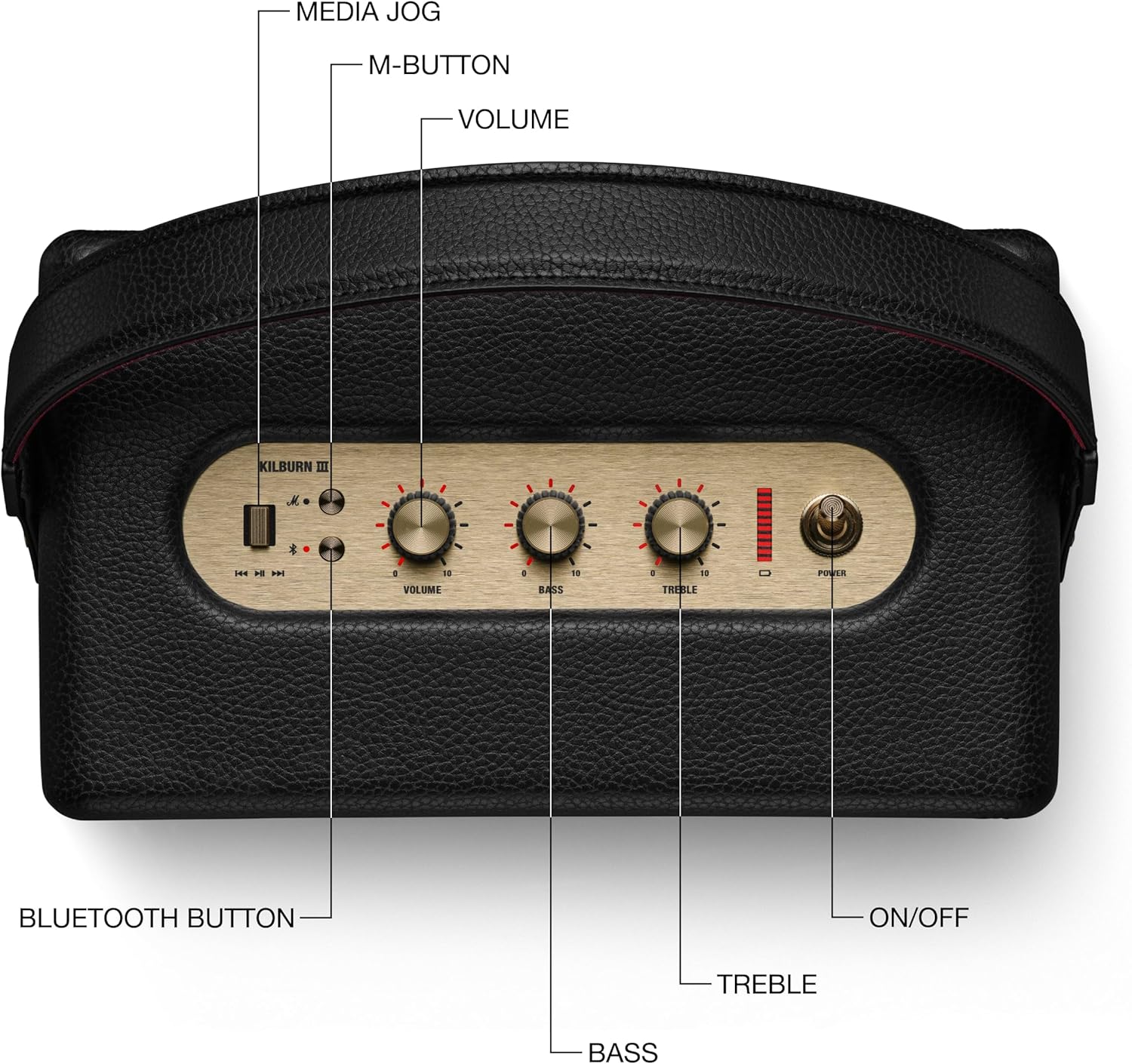
Figure 1: Included components with the Marshall Kilburn III speaker.
Product Overview
The Kilburn III features intuitive controls and a durable design. Familiarize yourself with the main components and controls:

Figure 2: Top panel controls of the Kilburn III speaker.
- Volume Knob: Adjusts the overall sound output level.
- Bass Knob: Controls the low-frequency audio output.
- Treble Knob: Controls the high-frequency audio output.
- Power Switch: Toggles the speaker on/off.
- Bluetooth Button: Initiates Bluetooth pairing mode.
- M-Button: Allows switching between custom EQ modes (configurable via the Marshall app).
- Battery Indicator: LED bar indicating remaining battery life.

Figure 3: Rear panel connections of the Kilburn III speaker.
- USB-C Power Input/Output: Used for charging the speaker and for using the speaker as a power bank to charge other devices.
- AUX 3.5mm Input: For connecting audio devices via a 3.5mm audio cable.
Setup
Charging the Speaker
Before first use, fully charge the Kilburn III speaker. Use the included USB-C to USB-C charging cable.
- Connect one end of the USB-C cable to the USB-C port on the rear of the speaker.
- Connect the other end of the USB-C cable to a compatible USB power adapter (not included) or a USB-C power source.
- The battery indicator LEDs on the top panel will illuminate to show charging progress. All LEDs will be solid when fully charged.

Figure 4: Charging the Kilburn III speaker via USB-C.
Bluetooth Pairing
To connect your audio device to the Kilburn III via Bluetooth:
- Pull the power switch towards the front until the speaker turns on.
- Push and hold the Bluetooth button on the top panel until the LED turns to a slow pulse, indicating pairing mode.
- On your audio device (smartphone, tablet, laptop), open the Bluetooth settings.
- Select "Kilburn III" from the list of available devices.
- Once connected, the Bluetooth LED on the speaker will turn solid.

Figure 5: Marshall Kilburn III ready for Bluetooth pairing.
Operating Instructions
Basic Playback
- Ensure the speaker is powered on and connected via Bluetooth or AUX.
- Start playing audio from your connected device.
- Adjust the Volume knob on the speaker to your desired listening level.

Figure 6: Adjusting the volume on the Kilburn III.
Adjusting Sound
Customize your audio experience using the dedicated Bass and Treble knobs:
- Turn the Bass knob clockwise to increase bass, or counter-clockwise to decrease it.
- Turn the Treble knob clockwise to increase treble, or counter-clockwise to decrease it.
Using the M-Button (Custom Modes)
The M-button allows you to cycle through pre-set or custom equalizer modes. To configure these modes, you may need to use the official Marshall app (if available for this model).
- Press the M-button to switch between available sound modes.
Charging External Devices (Power Bank Function)
The Kilburn III can act as a power bank to charge your mobile devices:
- Connect your device's USB-C charging cable to the USB-C port on the rear of the Kilburn III.
- The speaker will begin charging your device. Note that using this feature will reduce the speaker's playtime.
Maintenance
To ensure the longevity and optimal performance of your Marshall Kilburn III speaker, follow these maintenance guidelines:
- Cleaning: Use a soft, dry cloth to wipe the speaker's surfaces. Do not use abrasive cleaners, alcohol, or chemical solvents.
- Water and Dust Resistance: The speaker is IP54 rated, meaning it is resistant to dust and water splashes from any direction. However, it is not waterproof and should not be submerged in water. Ensure all ports are dry before charging.
- Storage: Store the speaker in a cool, dry place away from direct sunlight and extreme temperatures.
- Battery Care: For optimal battery life, avoid fully discharging the battery frequently. Charge the speaker regularly, even if not in use for extended periods.
Troubleshooting
If you encounter issues with your Kilburn III, try the following solutions:
| Problem | Possible Solution |
|---|---|
| Speaker does not turn on. | Ensure the battery is charged. Connect the speaker to a power source using the USB-C cable. |
| Cannot pair via Bluetooth. |
|
| No sound or low volume. |
|
| Sound distortion. |
|
| Battery drains quickly. |
|
Specifications
| Feature | Detail |
|---|---|
| Model Name | Kilburn III |
| Speaker Type | Portable Speaker |
| Color | Black & Brass |
| Product Dimensions | 10.75"D x 5.91"W x 6.65"H |
| Item Weight | 6.17 Pounds |
| Battery Life | 50 Hours |
| Charging Time | 3 Hours |
| Wireless Communication Technology | Bluetooth |
| Bluetooth Range | 33 Feet |
| Water Resistance Level | Water Resistant (IP54 rated) |
| Speaker Maximum Output Power | 36 Watts |
| Audio Output Mode | Stereo |
| Control Method | Touch (Knobs) |
| Power Source | Battery Powered |
Warranty and Support
The Marshall Kilburn III comes with a Limited Warranty. For detailed warranty information, please refer to the "Legal and Safety Information" document included in your product packaging.
For further assistance, technical support, or to purchase replacement parts, please visit the official Marshall website or contact their customer service. You can also refer to the User Manual (PDF) for additional details.
Related documentsKilburn III


Ask a question about this manual
Ask about setup, troubleshooting, compatibility, parts, safety, or missing instructions. Manuals+ will review the question and use this page’s manual context to help answer it.