
Introduction
This manual provides instructions for the Loakdsa replacement remote control, designed for use with various Yamaha Natural Sound AV Receivers. This remote offers direct functionality without the need for programming, serving as a convenient replacement for your original unit.
Product Overview

Figure 1: Front view of the remote control. This image displays the layout of all control buttons, including power, input selectors, volume, and navigation.
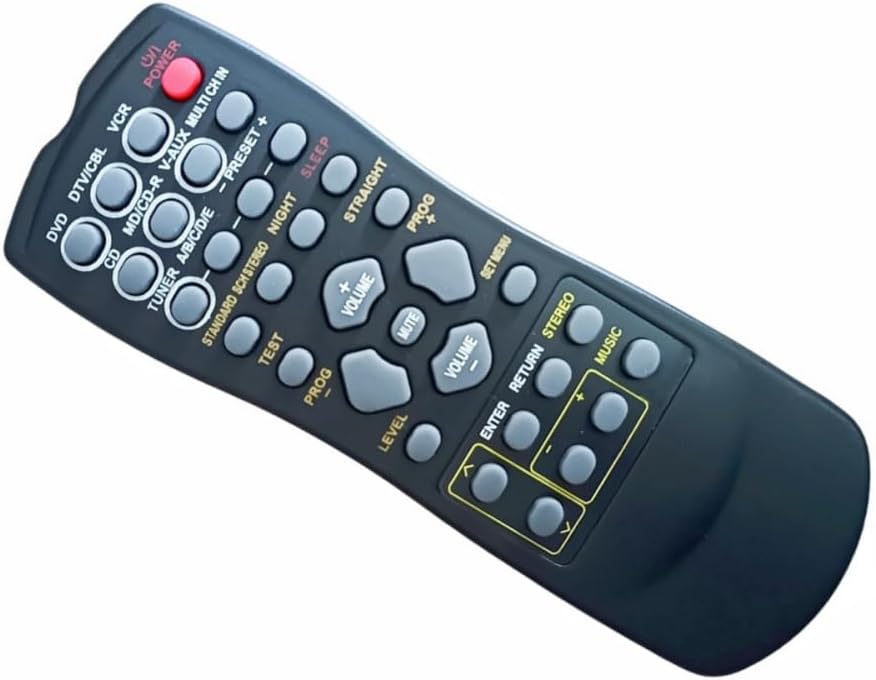
Figure 2: Angled view of the remote control. This perspective highlights the ergonomic design and button placement.

Figure 3: Back view of the remote control. This image shows the battery compartment cover.
Setup
- Battery Installation: Locate the battery compartment on the back of the remote control (refer to Figure 3). Slide the cover open.
- Insert two new AAA batteries, ensuring the positive (+) and negative (-) terminals align correctly with the markings inside the compartment.
- Close the battery compartment cover securely.
- Initial Use: No programming or setup is required. The remote is ready for use immediately after battery installation.
Operating Instructions
Point the remote control directly towards the infrared receiver window of your Yamaha AV Receiver. Ensure there are no obstructions between the remote and the receiver.
- Power On/Off: Press the POWER button to turn your AV Receiver on or off.
- Input Selection: Use the input selector buttons (e.g., DVD, DTV/CBL, VCR, CD, TUNER) to switch between different audio/video sources connected to your receiver.
- Volume Control: Press the VOLUME + button to increase the volume and VOLUME - to decrease it.
- Mute: Press the MUTE button to temporarily silence the audio. Press it again to restore sound.
- Navigation: Use the directional arrow buttons (up, down, left, right) and ENTER for menu navigation on your receiver, if supported.
- Preset Functions: Buttons like PRESET + and PRESET - are typically used for tuning radio stations.
- Sound Modes: Buttons such as STANDARD, SCH STEREO, NIGHT, STRAIGHT, and MUSIC control various sound modes and enhancements.
- Sleep Timer: The SLEEP button may activate a sleep timer function on your receiver.
Maintenance
- Battery Replacement: Replace batteries when the remote's performance diminishes or it stops responding. Always use new AAA batteries.
- Storage: If the remote control will not be used for an extended period, remove the batteries to prevent leakage and potential damage.
- Cleaning: Wipe the remote with a soft, dry cloth. Avoid using liquid cleaners or abrasive materials.
Troubleshooting
| Problem | Possible Cause | Solution |
|---|---|---|
| Remote not responding. | Dead or incorrectly inserted batteries. | Replace with new AAA batteries, ensuring correct polarity. |
| Remote not responding. | Obstruction between remote and receiver. | Ensure a clear line of sight to the AV receiver's infrared sensor. |
| Remote not responding. | Remote is out of range. | Move closer to the AV receiver (within 10 feet). |
| Some buttons do not work. | Function not supported by your specific Yamaha AV Receiver model. | Refer to your Yamaha AV Receiver's original manual for supported functions. |
Specifications
- Brand: Loakdsa
- Compatible Devices: Yamaha Natural Sound AV Receivers (models RX-385RDS, RX-395RDS, RX-396RDS, RX-496RDS, RX-596RDS, RX-385, RX-395, RX-396, RX-495, RX-496, RX-595, RX-596)
- Connectivity Technology: Infrared (IR)
- Special Feature: No Programming Required
- Maximum Number of Supported Devices: 1
- Maximum Range: Approximately 10 feet (3 meters)
- Power Source: 2 x AAA Batteries (not included)
- Color: Black
Customer Support
For any questions or concerns regarding your Loakdsa replacement remote control, please contact our customer support. We aim to respond to inquiries within 24 hours.
Please refer to your purchase documentation or the seller's contact information for specific support channels.