
1. Introduction
The TECKNET WiFi Water Leak Detector is designed to provide early warning of water leaks and drips in your home or office. This smart sensor connects directly to your 2.4GHz WiFi network, sending instant notifications to your smartphone via the Tuya Smart App and activating a local 120dB audible alarm. Its advanced 6-point sensing technology helps protect your property from potential water damage.
2. Safety Information
- Do not expose the device to extreme temperatures or direct sunlight.
- Keep the device away from strong magnetic fields.
- Use only specified AAA batteries. Do not mix old and new batteries, or different types of batteries.
- Dispose of batteries according to local regulations.
- Do not attempt to disassemble or repair the device yourself. Contact customer support for assistance.
- Ensure the device is placed on a flat, stable surface where water leaks are most likely to occur.
3. Package Contents
- 1 x TECKNET WiFi Water Leak Detector (Model TK-WA161)
- 2 x AAA Batteries
- 1 x User Manual (this document)
4. Product Overview
The TECKNET WiFi Water Leak Detector features a compact design with advanced sensing capabilities. It includes:
- 6-Point Precision Detection: Equipped with 2 top and 4 bottom probes for comprehensive water detection.
- 120dB Adjustable Siren: A loud local alarm with adjustable volume levels.
- WiFi Connectivity: Direct connection to 2.4GHz home WiFi, no hub required.
- App Notifications: Instant alerts to your smartphone via the Tuya Smart App.
- Long Battery Life: Up to 2 years on 2 AAA batteries with low battery alerts.
- IP67 Certified: Designed to withstand water exposure without damage.

Image: The TECKNET Water Leak Detector positioned to detect both dripping and leaking water, highlighting its dual detection capabilities.

Image: The TECKNET Water Leak Detector shown submerged in water, illustrating its IP67 water resistance rating, ensuring no damage after water exposure.
5. Setup Instructions
5.1. Battery Installation
- Locate the battery compartment on the back of the device.
- Use a small tool (like a flathead screwdriver or the provided tool if any) to gently pry open the battery cover.
- Insert the two AAA batteries, ensuring correct polarity (+/-).
- Close the battery cover securely until it clicks into place.

Image: A visual guide demonstrating the four steps for battery installation: inserting a tool to open, rotating to unlock, inserting AAA batteries, and closing the cover.
5.2. App Download and Device Pairing
- Download the "Tuya Smart" app from the Apple App Store or Google Play Store.
- Register or log in to your Tuya Smart account.
- Ensure your smartphone is connected to a 2.4GHz WiFi network. The device does not support 5GHz WiFi.
- Open the app and tap the "+" icon to add a device.
- Select "Security & Video Surveillance" then "Water Leak Sensor (Wi-Fi)".
- Follow the in-app instructions for Bluetooth-assisted pairing. This typically involves pressing and holding the "TEST" button on the device until the indicator light flashes, then confirming in the app.
- Once successfully paired, you can name the device and assign it to a specific room in the app.
5.3. Placement
Place the water leak detector in areas prone to water leaks or flooding. Common locations include:
- Under kitchen and bathroom sinks
- Behind washing machines and dishwashers
- Near water heaters and sump pumps
- In basements, utility rooms, and crawl spaces
- Near air conditioning units or refrigerators with water lines
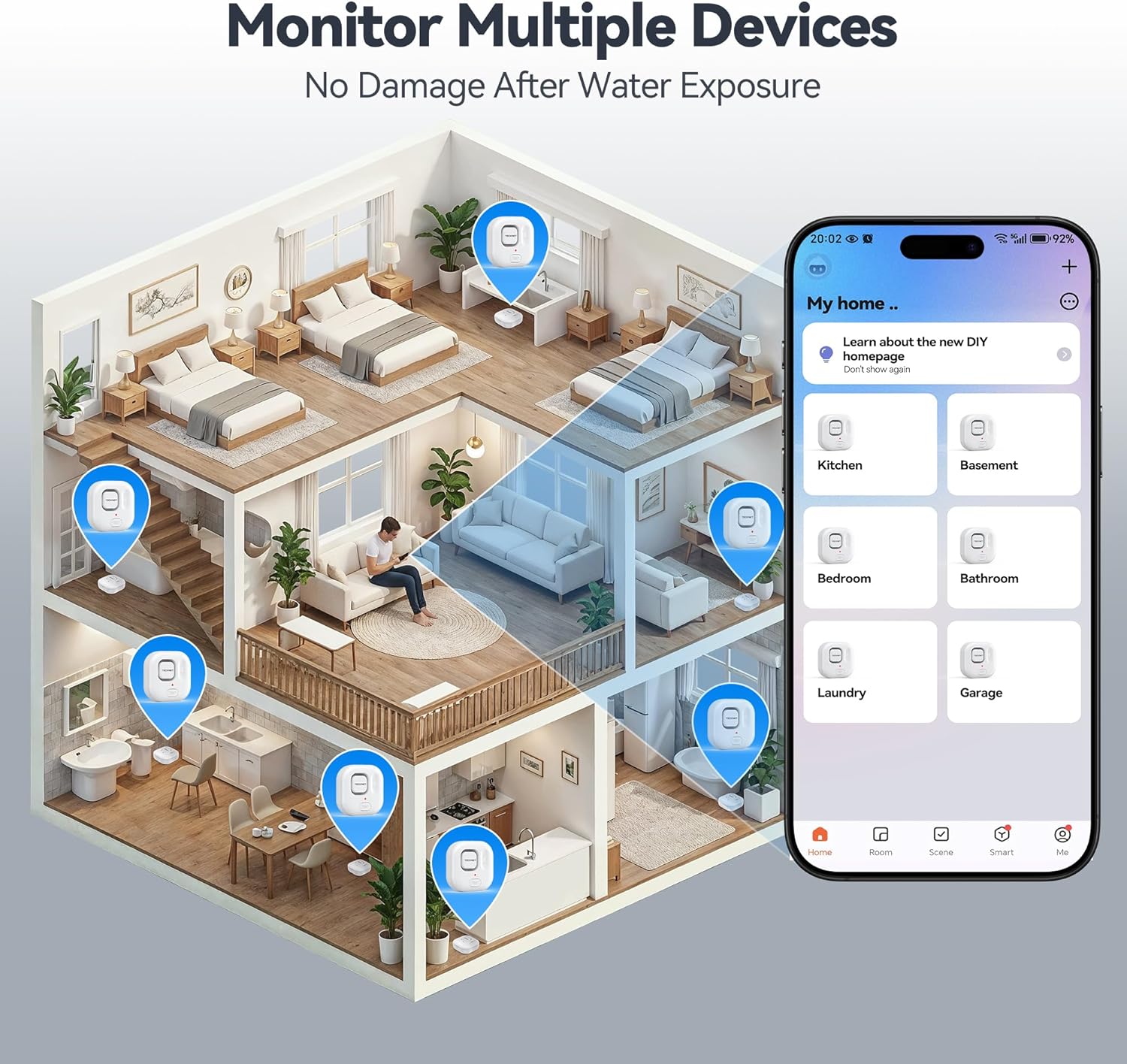
Image: An illustration depicting various locations within a house where TECKNET Water Leak Detectors can be strategically placed, such as kitchens, bathrooms, and basements, alongside the corresponding mobile app interface for monitoring.
6. Operating Instructions
6.1. Leak Detection and Alerts
When the sensor detects water, it will immediately:
- Trigger the built-in 120dB audible alarm.
- Send an instant push notification to your smartphone via the Tuya Smart App.
To silence the alarm, you can press the "TEST" button on the device or disable it through the Tuya Smart App.
6.2. Adjusting Alarm Volume
The alarm volume can be adjusted to 0dB (silent), 40dB, 80dB, or 120dB. This can be done either through the Tuya Smart App settings for the device or by repeatedly pressing the "TEST" button on the device to cycle through the volume levels.
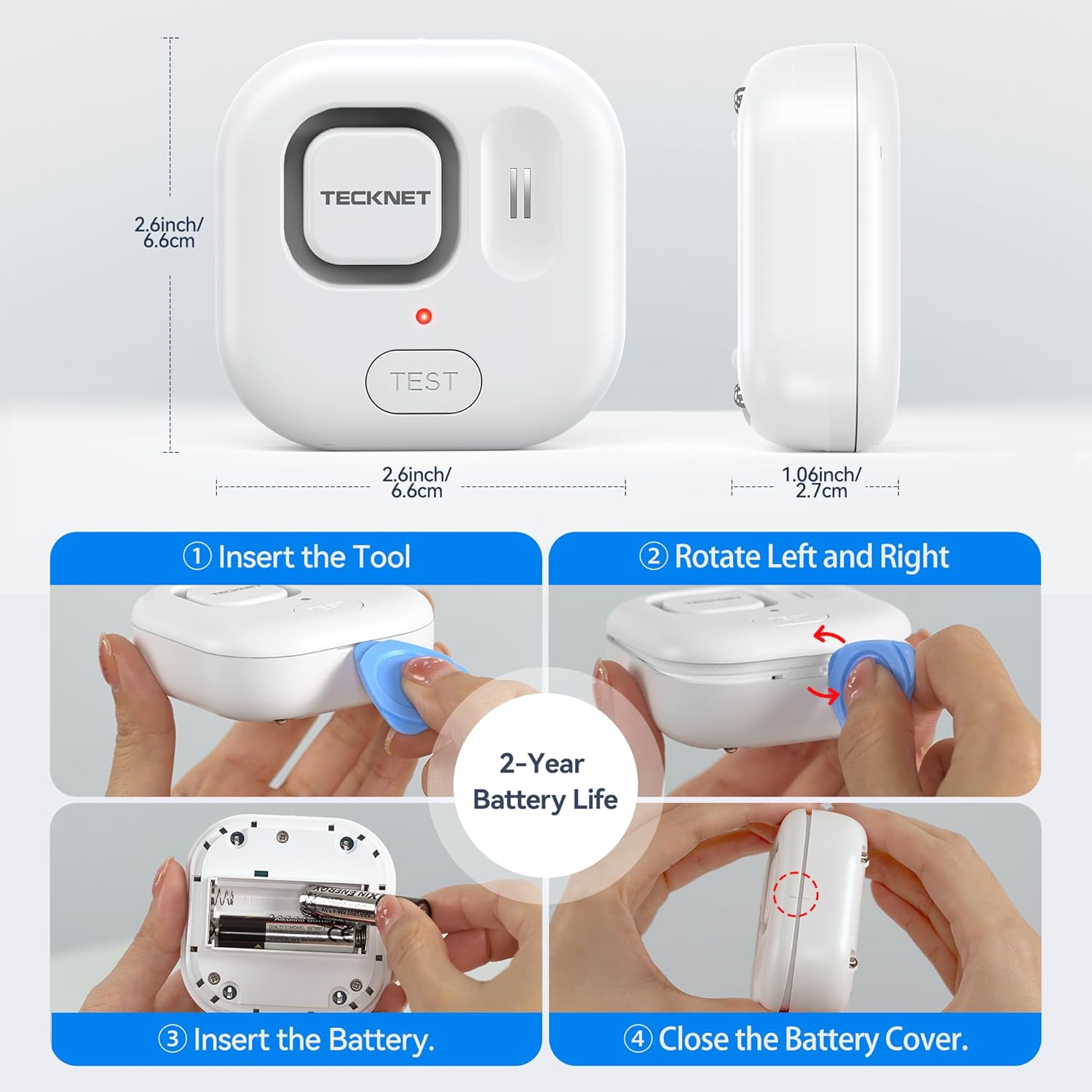
Image: A visual representation of the four adjustable alarm volume settings (0dB, 40dB, 80dB, 120dB) and how they might sound across different floors of a house.
6.3. Testing the Device
It is recommended to test the device periodically to ensure proper functionality. To test:
- Place the sensor on a damp cloth or a small amount of water, ensuring the bottom probes make contact.
- The alarm should sound, and you should receive a notification on your smartphone.
- Dry the sensor thoroughly after testing.
7. Maintenance
7.1. Battery Replacement
The device is powered by two AAA batteries, offering up to 2 years of battery life. The Tuya Smart App will send a notification when the battery level is low. Replace batteries as described in Section 5.1.
7.2. Cleaning
Wipe the device with a soft, dry cloth. Do not use abrasive cleaners or immerse the device in water (beyond its intended function for leak detection) as this may damage internal components.
8. Troubleshooting
- Device not connecting to WiFi:
- Ensure your WiFi network is 2.4GHz. The device does not support 5GHz networks.
- Check if your WiFi password is correct.
- Move the device closer to your WiFi router.
- Restart your router and try pairing again.
- No app notifications:
- Check your phone's notification settings for the Tuya Smart App.
- Ensure the device is connected to WiFi and has sufficient battery.
- Verify your phone has an active internet connection.
- Alarm not sounding:
- Check battery level and replace if low.
- Ensure the alarm volume is not set to 0dB in the app or via the "TEST" button.
- Test the device with water to confirm sensor functionality.
- False alarms:
- Ensure the sensor probes are clean and dry.
- Relocate the device if it's in an area with high humidity or condensation that might trigger it.
9. Specifications
| Model Number | TK-WA161 |
| Connectivity | WiFi (2.4GHz only), Bluetooth (for setup) |
| App Compatibility | Tuya Smart (Android & iOS) |
| Alarm Volume | 120dB (adjustable: 0dB, 40dB, 80dB, 120dB) |
| Sensors | 6 probes (2 top, 4 bottom) |
| Power Source | 2 x AAA batteries |
| Battery Life | Up to 2 years |
| Dimensions | 1 x 1 x 1 cm (approx. 2.6 x 2.6 x 1.06 inches); 109 g |
| Ingress Protection | IP67 Certified |
| Included Components | WiFi Water Alarm, 2 AAA Batteries |
10. Warranty and Support
TECKNET provides a 36-month warranty for this product upon registration. If you encounter any issues or have questions regarding your TECKNET WiFi Water Leak Detector, please contact our professional customer service team. Refer to the TECKNET official website or your purchase documentation for contact details.
