
Introduction
The Xech Prism X-017 is a versatile 3-in-1 desktop device designed to enhance your workspace or bedside. It integrates a rechargeable study lamp, a Bluetooth-enabled digital alarm clock with dual alarms, and a convenient pen stand. This manual provides detailed instructions for setting up, operating, maintaining, and troubleshooting your Xech Prism.
What's in the Box
- Xech Prism X-017 Unit
- Power Cable (USB-C)
- User Manual (this document)
Product Overview
The Xech Prism combines essential desk functions into one compact unit. It features a flexible lamp arm, a digital display for time and alarms, and a built-in compartment for stationery.
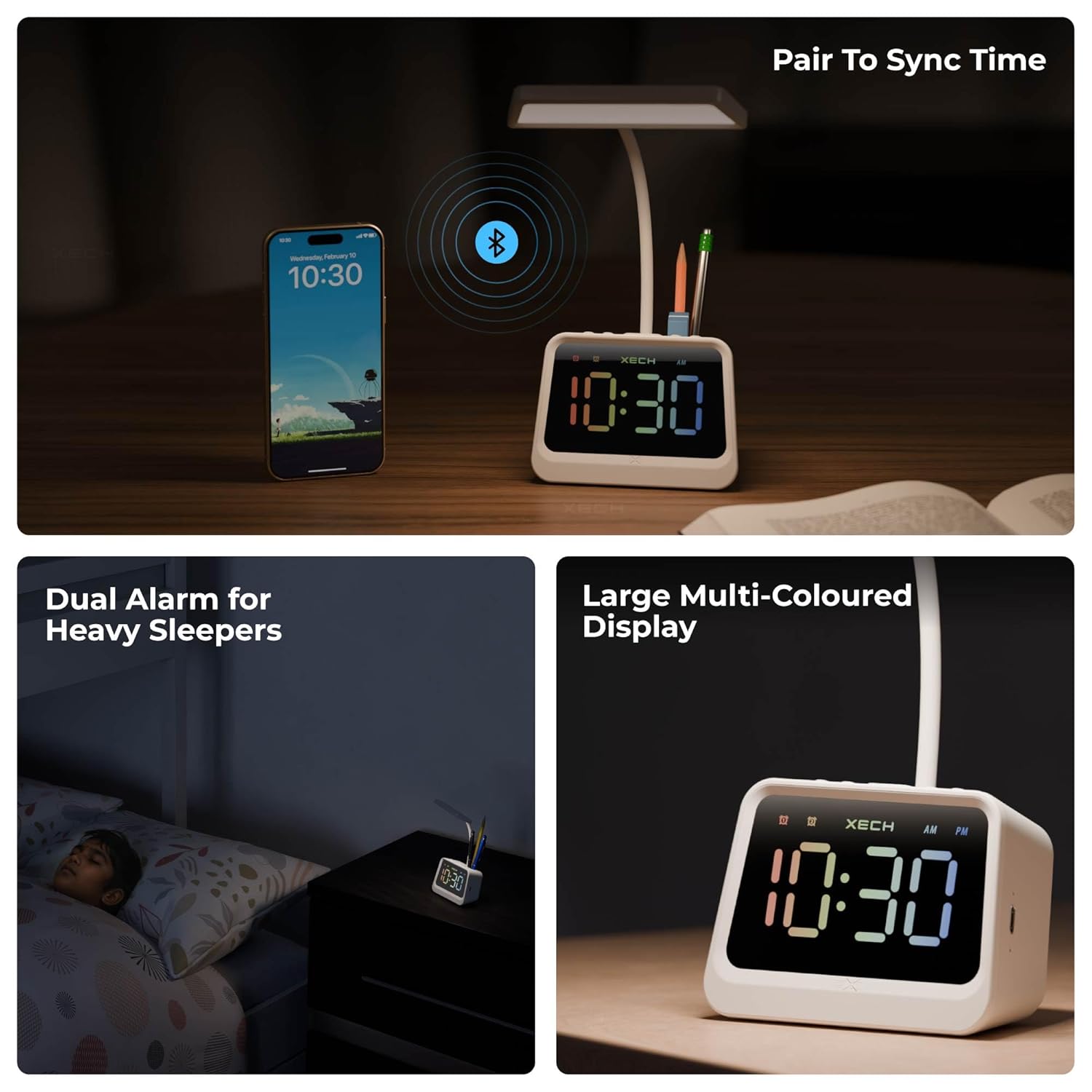
Image: The Xech Prism unit highlighting its three main functions: digital clock, table lamp, and pen stand.

Image: Demonstrating Bluetooth time synchronization with a smartphone, the dual alarm function, and the large multi-colored digital display.
Setup
- Initial Charging: Before first use, connect the provided USB-C power cable to the charging port on the back of the Xech Prism and plug the other end into a compatible USB power adapter (not included). Allow the device to charge fully. The charging indicator light will change when charging is complete. The device can also be used while plugged in.
- Placement: Place the Xech Prism on a stable, flat surface such as a desk, study table, or bedside table. Ensure it is away from direct sunlight or heat sources.
- Bluetooth Time Synchronization:
- Turn on the Xech Prism.
- Enable Bluetooth on your smartphone or tablet.
- Search for "Prism" in the list of available Bluetooth devices and select it to pair.
- Once connected, the clock will automatically synchronize its time with your paired device, ensuring accurate time display without manual adjustment.

Image: The Xech Prism connected for USB-C charging, illustrating that it can be used while plugged in, and its automatic brightness adjustment for night viewing.
Operating Instructions
Lamp Operation
- Power On/Off: Press the power button located on the base of the unit to turn the lamp on or off.
- Adjusting Brightness (Stepless Dimming): While the lamp is on, press and hold the power button to continuously adjust the brightness level. Release the button when the desired brightness is reached.
- Changing Light Tones: Short press the light mode button (usually indicated by a sun icon) to cycle through different color temperatures: warm light (3500K), natural white light (5000K), and cool white light (6000K).
- Flexible Neck: The lamp features a flexible goose neck, allowing you to adjust the light angle and direction as needed for optimal illumination.

Image: Illustration of the three available light color tones, the flexible neck for adjustment, and the stepless dimming feature of the lamp.

Image: The Xech Prism functioning as a multifunctional lamp with an integrated pen stand, highlighting its large lamp head for broader light coverage.
Digital Alarm Clock Operation
- Auto Time Sync: As described in the Setup section, the clock automatically synchronizes its time when paired with a Bluetooth device.
- Setting Dual Alarms: Use the dedicated alarm buttons on the base of the unit to set up to two independent alarms. Refer to the on-screen prompts or the quick start guide for specific button sequences to set alarm times and activate/deactivate them.
- Large Multi-Colored Display: The clock features a clear, large LED display with multi-colored digits for easy readability at any time of day or night.
Pen Stand Functionality
The integrated pen stand provides a convenient storage solution for pens, pencils, markers, or other small stationery items, helping to keep your desk organized.
Maintenance
- Cleaning: Use a soft, dry cloth to clean the exterior of the device. Do not use liquid cleaners or abrasive materials, as they may damage the surface or electronic components.
- Charging: To prolong battery life, avoid completely draining the battery frequently. Charge the device when the battery indicator is low.
- Storage: When not in use for extended periods, store the Xech Prism in a cool, dry place.
Troubleshooting
| Problem | Possible Cause | Solution |
|---|---|---|
| Device does not turn on. | Low battery or power cable not connected properly. | Ensure the device is fully charged or connected to a power source using the provided USB-C cable. Check the power adapter and outlet. |
| Bluetooth time sync fails. | Bluetooth is off on the phone, device is out of range, or pairing issue. | Ensure Bluetooth is enabled on your smartphone and the Xech Prism is within range. Try unpairing and re-pairing the device. Restart both devices if necessary. |
| Lamp light is too dim or not changing color. | Brightness setting is low or incorrect button pressed. | Press and hold the power button to adjust brightness. Short press the light mode button to cycle through color tones. |
| Alarm does not sound. | Alarm is not set or is deactivated. | Verify that the alarm time is correctly set and the alarm is activated (indicated by an alarm icon on the display). |
Specifications
| Feature | Detail |
|---|---|
| Model Number | X-017 |
| Brand | Xech |
| Product Dimensions | 5.6D x 11W x 32H Centimeters |
| Item Weight | 240 Grams |
| Base Material | Acrylonitrile Butadiene Styrene |
| Lamp Type | Desk Lamp |
| Shade Colour | White |
| Light Source Type | LED |
| Power Source | Battery Powered (Rechargeable via USB-C) |
| Controller Type | Push Button |
| Special Features | Alarm Clock, Colour Changing, Dimmable, Rechargeable |
| Voltage | 3 Volts |
| Cordless | Yes |
| Water Resistance Level | Not Water Resistant |
| Recommended Uses | Reading, Decoration |
| Room Type | Bedroom, Living Room, Office, Study Room |
Official Product Videos
Xech Prism Features Overview
Video: A comprehensive overview of the Xech Prism's key features, including its digital clock, lamp, and pen stand functionalities, along with demonstrations of light adjustments and Bluetooth time sync.
Meet Prism by Xech
Video: An introductory video showcasing the Xech Prism in various settings, highlighting its design and ease of use as a versatile desk companion, including its large multicolour display, flexible goose neck, 3 light tones, adjustable dimming, auto sync time, dual alarm, pen stand, and in-line controls.
Warranty and Support
For warranty information and customer support, please refer to the official Xech website or contact their customer service directly. Keep your purchase receipt for warranty claims.
Manufacturer: XECH Technologies Pvt Ltd
Importer Contact Information: XECH Technologies Pvt Ltd, MIDC, Andheri East, Mumbai
