
BSIDE DC AC Clamp Meter
BSIDE DC AC Clamp Meter User Manual
Model: DC AC Clamp Meter
Introduction
Thank you for choosing the BSIDE DC AC Clamp Meter. This open-jaw 600A smart TRMS color LCD rechargeable digital multimeter is designed for precise and safe electrical measurements. It combines the functions of a clamp meter and a multimeter, allowing for versatile use in various applications, including automotive maintenance and electrician work. This manual provides detailed instructions for the safe and effective operation, maintenance, and troubleshooting of your device.
Safety Information
Always adhere to safety precautions when using electrical testing equipment. Failure to do so may result in injury or damage to the meter or equipment under test.
- Do not exceed the maximum input values specified for each measurement range.
- Ensure the test leads are properly connected and in good condition before use.
- Do not use the meter if it appears damaged or is not operating correctly.
- Exercise extreme caution when working with live circuits.
- Always disconnect power to the circuit before making resistance, capacitance, or diode measurements.
- Keep hands and fingers away from the open jaw when measuring current.
Product Overview
The BSIDE DC AC Clamp Meter features an open-jaw design for easy measurement in tight spaces. Its 2.8-inch color display enhances readability, even in challenging lighting conditions. The device is designed for single-hand operation with an all-button interface.

Figure 1: Overview of the BSIDE DC AC Clamp Meter and its accessories.
Key Features:
- Open Jaw Design: Facilitates current measurement in confined areas like inverters or intensive lines.
- 600A DC AC Amp Measurement: Capable of measuring both DC and AC currents up to 600A.
- Smart Mode: Automatically identifies and measures AC/DC voltage, resistance, and continuity with optimal resolution.
- All Button Design: Enables quick and convenient function switching for single-hand operation.
- Color Display: A 2.8-inch color screen provides clear and easy-to-read measurements.
- Multi-Line Display: Shows up to 5 test results simultaneously, including voltage, frequency, and MAX/MIN/AVG values.
- Professional Voltage Detector (V-Alert): Integrated non-contact voltage testing with selectable low/high sensitivity modes.
- Rechargeable Battery: Equipped with a built-in rechargeable Li-ion battery and charging cable.
- Flashlight: Integrated LED flashlight for illumination in dark work environments.
Setup
Charging the Battery:
The meter comes with a built-in rechargeable 3.7V 1200mA Li-ion battery. Before first use, or when the low battery indicator appears, charge the device using the provided charging cable.
- Connect the small end of the charging cable to the charging port on the meter.
- Connect the USB end of the charging cable to a standard USB power adapter (not included) or a computer USB port.
- The battery indicator on the display will show charging status. Charge until the indicator shows a full charge.

Figure 2: Charging the rechargeable Li-ion battery.
Connecting Test Leads:
For measurements requiring test leads (voltage, resistance, capacitance, diode, continuity), connect them as follows:
- Insert the red test lead into the INPUT terminal.
- Insert the black test lead into the COM terminal.
Operating Instructions
The BSIDE Clamp Meter features an intuitive all-button design. Press the power button (⏻) to turn the device on or off. Use the function buttons to select the desired measurement mode.
1. Smart Mode (Auto):
When powered on, the meter defaults to Smart Mode (AUTO). In this mode, the meter automatically identifies and measures AC/DC voltage, resistance, and continuity, providing the best resolution.
- Connect test leads to the circuit. The meter will automatically display the measurement type and value.
2. AC/DC Current Measurement (Clamp Jaw):
Use the open jaw to measure AC or DC current up to 600A without breaking the circuit.
- Press the A~ button to select AC current measurement or A− button for DC current measurement.
- Open the clamp jaw by pressing the lever.
- Enclose a single conductor (not a cable with multiple conductors) within the jaw.
- Release the lever to close the jaw securely around the conductor.
- Read the current value on the display.

Figure 3: Measuring AC current in an automotive application.

Figure 4: Measuring AC current in an electrician maintenance scenario.
3. AC/DC Voltage Measurement:
To measure voltage, ensure the test leads are connected correctly.
- Press the V~ button for AC voltage or V− button for DC voltage.
- Connect the test leads in parallel to the circuit or component you wish to measure.
- Read the voltage value on the display.

Figure 5: Measuring DC voltage on a battery.
4. Resistance Measurement:
Always ensure the circuit is de-energized before measuring resistance.
- Press the Ω button to select resistance measurement.
- Connect the test leads across the component.
- Read the resistance value on the display.
5. Capacitance, Diode, Duty Cycle, Frequency, Continuity, V-Alert, Live Check:
These functions are accessible via dedicated buttons or by cycling through modes using the function buttons.
- Capacitance: Press the µF button. Connect leads across the capacitor (ensure it's discharged).
- Diode: Press the →|− button. Connect leads across the diode. Measures diodes within 3.0V.
- Duty Cycle: Press the % button. Connect leads to the signal source.
- Frequency: Press the Hz button. Connect leads to the signal source.
- Continuity: Press the 🔊 button. A beeper sounds if resistance is less than 50Ω.
- V-Alert (Non-Contact Voltage Detection): This function allows for voltage detection without direct contact.

Figure 6: V-Alert function in use near circuit breakers.
- Live Wire Check: Use this function to identify live wires.
6. Flashlight:
The meter includes a built-in flashlight for illuminating dark work areas.
- Press the flashlight button (💡) to turn the flashlight on or off.

Figure 7: Bright LED flashlight for improved visibility.
Maintenance
Cleaning:
Wipe the meter's casing with a damp cloth and mild detergent. Do not use abrasives or solvents. Ensure the meter is off and disconnected from any power source before cleaning.
Storage:
When not in use, store the meter in its carrying case in a cool, dry place, away from direct sunlight and extreme temperatures. If storing for extended periods, ensure the battery is partially charged to prolong its lifespan.
Battery Care:
The built-in Li-ion battery should be charged regularly, even if the meter is not frequently used, to maintain battery health. Avoid fully discharging the battery for prolonged periods.
Troubleshooting
If you encounter issues with your BSIDE Clamp Meter, refer to the following common problems and solutions:
| Problem | Possible Cause | Solution |
|---|---|---|
| Meter does not power on. | Battery is fully discharged. | Charge the battery using the provided USB cable. |
| Inaccurate readings. | Incorrect measurement mode selected; Test leads not properly connected; External interference. | Ensure correct mode is selected. Check lead connections. Move away from strong electromagnetic fields. |
| Continuity beeper does not sound. | Resistance is above 50Ω; Continuity mode not selected. | Verify resistance is below 50Ω. Select continuity mode. |
| Display shows "OL" (Overload). | Input value exceeds the selected range. | Switch to a higher range if available, or ensure the measurement is within the meter's capabilities. |
Specifications
| Parameter | Value |
|---|---|
| Display | 6000 counts, 2.8 inch color display |
| DC Current | 1-600A (0.1A ±(2.5%+5)) |
| AC Current | 1-600A (40-999 Hz) (0.1A ±(2.5%+5)) |
| DC Voltage | 60mV/600mV (0.01mV/0.1mV ±(1%+3)); 6V/60V (0.001V/0.01V ±(0.8%+3)); 600V/610V (0.1V/1V ±(1%+5)) |
| AC Voltage | 60mV/600mV (0.01mV/0.1mV ±(1.2%+3)); 6V/60V (0.001V/0.01V ±(1%+3)); 600V/610V (0.1V/1V ±(1.2%+5)) |
| Resistance | 0.1Ω-60MΩ (various ranges and accuracies) |
| Capacitance | 0.01µF-60mF (various ranges and accuracies) |
| Frequency | 1Hz-9.999MHz (various ranges and accuracies, 900mVrms-20Vrms) |
| Duty Cycle | 10%-95% (0.1% ±3%) |
| Diode Test | Measures diodes within 3.0V |
| Continuity | Beeper sounds when resistance < 50Ω |
| V-Alert | Low or high sensitivity mode |
| Live Wire Check | Yes |
| Power | Rechargeable 3.7V 1200mA battery (built-in) |
| Dimensions | 222.4 x 43.6 x 30 mm (8.74 x 1.69 x 1.18 inches) |
| Weight | 146.5 g (5.15 ounces) |
Package Contents
The following items are included in your package:
- 1 x DC AC Clamp Meter
- 1 x Test Leads (Red and Black)
- 1 x Charging Cable (USB)
- 1 x Carrying Case
- 1 x Battery (built-in)
- 1 x User Manual (this document)
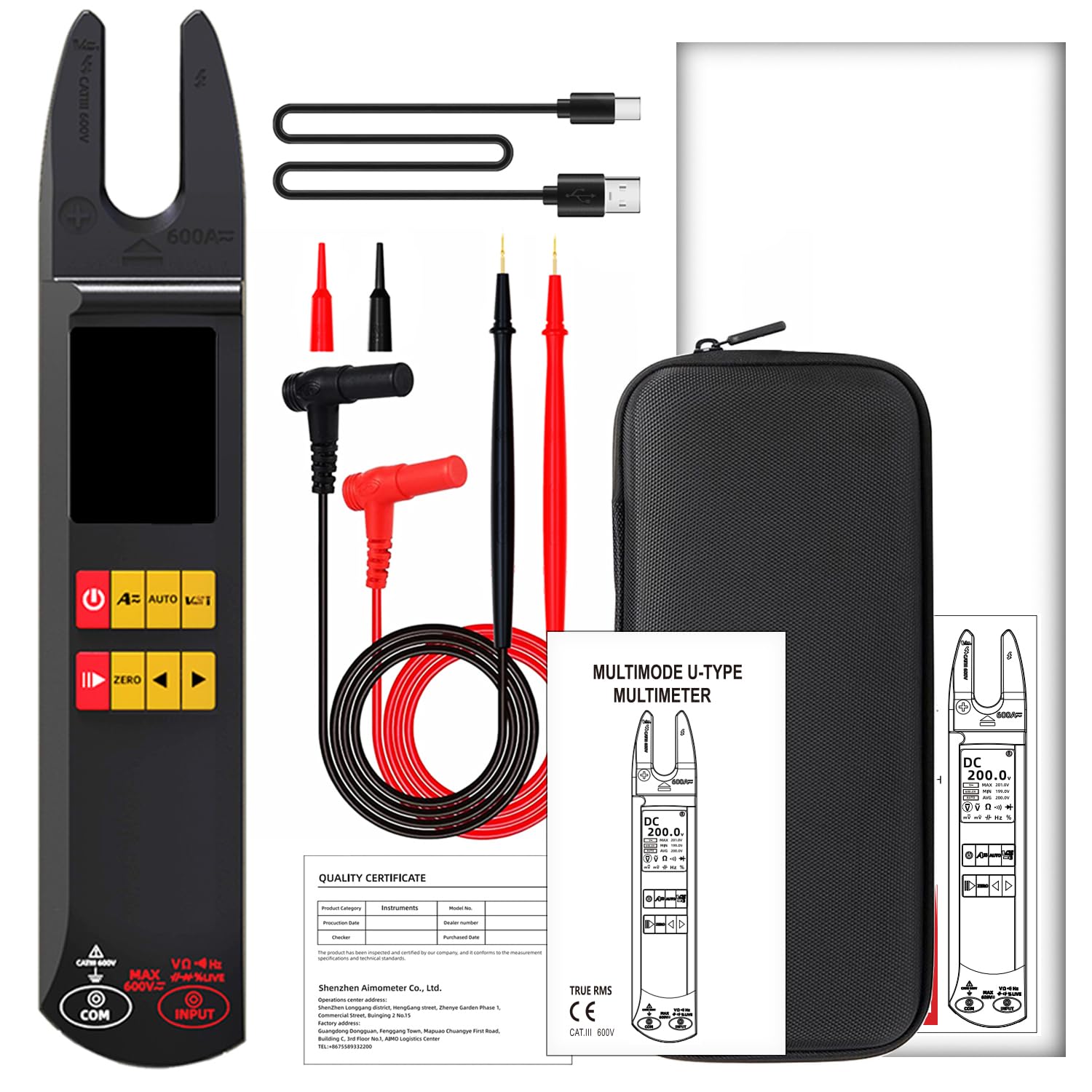
Figure 8: Contents included in the product package.
Warranty and Support
BSIDE products are manufactured to high-quality standards. For warranty information or technical support, please contact the manufacturer or your point of purchase. Keep your purchase receipt as proof of purchase for warranty claims.
Manufacturer: BSIDE
For further assistance, please visit the official BSIDE website or contact their customer service.
Related documentsDC AC Clamp Meter


Ask a question about this manual
Ask about setup, troubleshooting, compatibility, parts, safety, or missing instructions. Manuals+ will review the question and use this page’s manual context to help answer it.