
SwitchBot W4900000
SwitchBot Indoor Outdoor Thermometer User Manual
Model: W4900000 | Brand: SwitchBot
Product Overview
The SwitchBot Meter Pro is a versatile 5-in-1 wireless thermometer and hygrometer designed to monitor temperature and humidity both indoors and outdoors. It features a large 3.6-inch LCD screen for easy readability and integrates seamlessly with the SwitchBot ecosystem for enhanced smart home capabilities.

Image: The main SwitchBot Meter Pro unit, its accompanying outdoor sensor, and a smartphone displaying the SwitchBot app interface with temperature and humidity readings.
Key features include:
- Wireless 5-in-1 Meter Pro: Displays temperature, humidity, time, date, and comfort level on a 3.6-inch screen.
- Multi-Point Monitoring: Supports monitoring for up to two outdoor sensors (one included) to view indoor and outdoor temperature differences.
- Smart Alerts: Provides sound alarms, app notifications, and screen alerts for preset temperature or humidity thresholds.
- Compact & Aesthetic Design: Features a sleek design with wall mounting holes and an adjustable stand.
- Part of SwitchBot Ecosystem: Integrates with SwitchBot Hub for voice commands via Alexa or Google Assistant and remote control.
Setup Guide
1. Unboxing and Components
Your package should contain the following items:
- Meter Pro unit (Indoor Display) x 1
- Outdoor Meter (Outdoor Sensor) x 1
- AAA Batteries (included)
2. Battery Installation
The Meter Pro and Outdoor Meter require AAA batteries for operation. Locate the battery compartment on the back of each device, insert the included AAA batteries, ensuring correct polarity, and close the compartment securely.

Image: Close-up view of the battery compartment on the back of the SwitchBot Meter Pro, showing where to insert AAA batteries.
3. Device Placement
The Meter Pro offers flexible placement options:
- Tabletop Stand: Utilize the adjustable stand on the back of the unit to place it on any flat surface, such as a desk, shelf, or nightstand.
- Wall Mount: The unit includes wall mounting holes for secure attachment to a wall.
For the Outdoor Meter, place it in a location that provides accurate outdoor readings, ideally protected from direct sunlight and heavy precipitation. It comes with a strap for hanging.
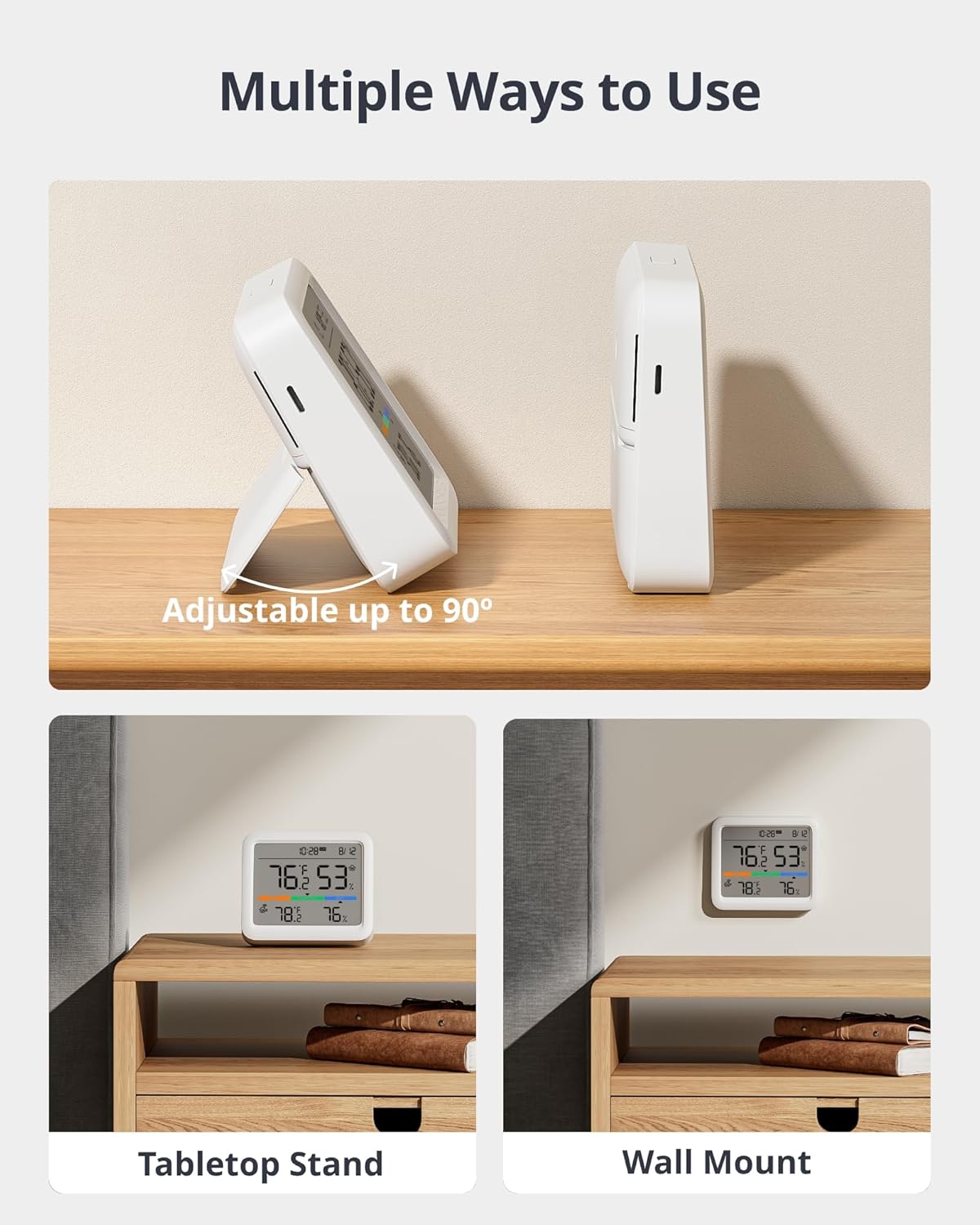
Image: Two examples of Meter Pro placement: one on a tabletop using its adjustable stand, and another mounted flush against a wall.
4. App Pairing and Connectivity
To unlock the full potential of your SwitchBot Meter Pro, download the SwitchBot App from your device's app store. Follow the in-app instructions to add your Meter Pro and Outdoor Meter. The devices connect via Bluetooth, and for extended features like weather forecasts, voice commands, and remote control, pairing with a SwitchBot Hub is required.

Image: A smartphone screen displaying the SwitchBot app, showing temperature and humidity readings for the Meter Pro.
Operating Instructions
1. Understanding the Display
The 3.6-inch LCD screen of the Meter Pro provides real-time environmental data:
- Temperature & Humidity: Primary readings for both indoor (Meter Pro) and outdoor (Outdoor Meter) environments.
- Time & Date: Current time and date for convenience.
- Comfort Level: Indicated by color-coded zones (Dry, Comfort, Wet) to quickly assess environmental comfort.
- Weather Forecast: (Requires SwitchBot Hub) Displays weather icons.

Image: A detailed view of the Meter Pro's LCD screen, highlighting the display of time, date, indoor temperature and humidity, outdoor temperature and humidity, and comfort level indicators.
2. Multi-Point Monitoring
The Meter Pro can connect to up to two outdoor sensors, allowing you to monitor conditions in different areas, such as a living room, yard, or greenhouse. This enables easy comparison of temperature and humidity differences between indoor and outdoor environments.
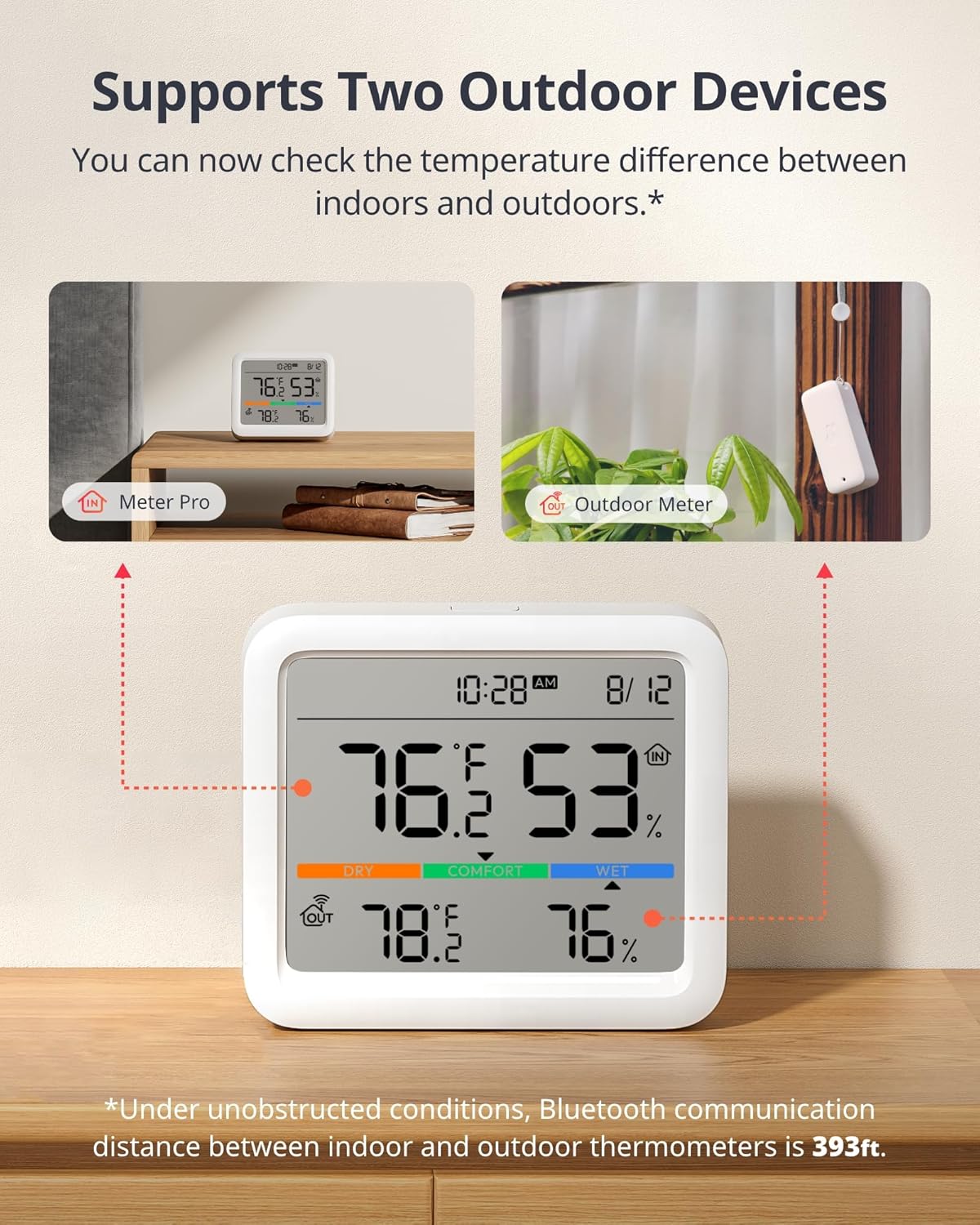
Image: An illustration demonstrating the Meter Pro's capability to connect and display data from both an indoor Meter Pro unit and an outdoor Meter sensor, showing temperature and humidity readings for both.
3. Smart Alerts
Configure smart alerts through the SwitchBot App to receive notifications if temperature or humidity levels exceed your preset values. Alerts can be delivered via sound alarms, app notifications, or displayed directly on the Meter Pro screen. This feature helps maintain optimal conditions in your home or office.

Image: Visual representations of the three types of smart alerts: app notifications on a phone, data display on the Meter Pro screen, and an icon indicating sound alerts.
4. Data Storage and Export
The Meter Pro stores up to 68 days of local data. You can view historical temperature and humidity trends within the SwitchBot App. The app also allows you to export this data for further analysis, providing insights into environmental changes over time.

Image: A smartphone displaying data summary from the Meter Pro, with a laptop in the background showing exported data in a spreadsheet format.
5. Voice Command Compatibility & Ecosystem Integration
When paired with a SwitchBot Hub, the Meter Pro can be controlled using voice commands via popular smart assistants like Amazon Alexa or Google Assistant. This integration allows you to check temperature and humidity verbally or automate other smart home devices based on environmental conditions.

Image: A woman interacting with a smart speaker, illustrating the Meter Pro's compatibility with various voice command platforms like Alexa, Google Home, Siri Shortcuts, IFTTT, and SmartThings.
Maintenance
1. Battery Life and Alerts
The Meter Pro and Outdoor Meter are designed for long battery life, typically lasting up to 12 months under average use. The device will provide a low battery alert on its screen and through the app when replacement is needed.
2. Cleaning
To clean the device, gently wipe the surface with a soft, dry cloth. Avoid using abrasive cleaners or solvents, as these may damage the display or casing. Ensure the outdoor sensor remains free of debris for accurate readings.
Troubleshooting
- No Display/Power: Check if batteries are inserted correctly and have sufficient charge. Replace batteries if necessary.
- Inaccurate Readings: Ensure the sensors are placed in appropriate locations, away from direct heat sources, vents, or extreme cold. The Meter Pro has a temperature accuracy of 0.4 °C. Calibration options may be available in the app.
- Connectivity Issues: Ensure Bluetooth is enabled on your smartphone and the devices are within range. For remote access and advanced features, verify your SwitchBot Hub is online and properly configured.
- Weather Forecast Not Displaying: This feature requires a SwitchBot Hub and an active internet connection. Ensure the Hub is online and the Meter Pro is bound via the SwitchBot App.
- Alerts Not Received: Check app notification settings on your smartphone and within the SwitchBot App. Ensure the Meter Pro is connected to the app and/or Hub.
Specifications
| Feature | Detail |
|---|---|
| Product Dimensions | 0.79 x 3.62 x 3.11 inches; 11.29 ounces |
| Item Model Number | W4900000 |
| Batteries | 1 AAA batteries required (included) |
| Manufacturer | SwitchBot |
| Color | White |
| Upper Temperature Rating | 122 Degrees Fahrenheit |
| Temperature Accuracy | 0.4 °C |
Warranty and Support
For warranty information, technical support, or any inquiries regarding your SwitchBot Meter Pro, please visit the official SwitchBot website or contact their customer service directly. Keep your purchase receipt for warranty claims.
You can find more information and support resources at the SwitchBot Store on Amazon.
Related documentsW4900000


Ask a question about this manual
Ask about setup, troubleshooting, compatibility, parts, safety, or missing instructions. Manuals+ will review the question and use this page’s manual context to help answer it.