
1. Introduction
Thank you for choosing the EUREKA ERGONOMIC Gaming Desk ERK-R1S-V3. This manual provides essential information for the proper assembly, operation, and maintenance of your new gaming desk. Please read these instructions carefully before beginning assembly and retain them for future reference.
The ERK-R1S-V3 gaming desk features a sleek carbon fiber texture surface, integrated RGB lighting, and a robust R-shape design. It includes convenient accessories such as a cup holder, headphone hook, and controller holder to enhance your gaming experience.
2. Product Specifications
- Model Number: ERK-R1S-V3
- Dimensions (D x W x H): 24.19" x 44.5" x 30.5" (61.44 cm x 113.03 cm x 77.47 cm)
- Item Weight: 45.2 lbs (20.5 kg)
- Maximum Weight Load: 160 lbs (72.5 kg)
- Color: Black
- Top Material Type: Wood with Laminated Carbon Fiber Finish
- Base Material: Aluminum / Metal
- Special Features: RGB LED Lighting, Cup Holder, Headphone Hook, Controller Holder, Adjustable Leveling Feet, Anti-corrosion & Anti-scratch Desktop

This image illustrates the overall dimensions of the gaming desk: 44.8 inches wide, 24.28 inches deep, and 30.87 inches high. It also indicates a maximum weight load capacity of 160 lbs.
3. Setup and Assembly
Assembly of the EUREKA ERGONOMIC Gaming Desk is required. Please ensure you have all components and necessary tools before beginning. While assembly is designed to be straightforward, some tools may not be included.
3.1 Unpacking and Component Check
- Carefully unpack all contents from the packaging.
- Refer to the included parts list (if provided in packaging) to verify all components are present and undamaged.
- Keep packaging materials until assembly is complete in case of missing parts or return needs.
3.2 Assembly Steps
Follow the step-by-step instructions provided in the separate assembly guide included with your product. Key structural components include the R-frame legs and the desktop. Ensure all screws are tightened securely but do not overtighten.
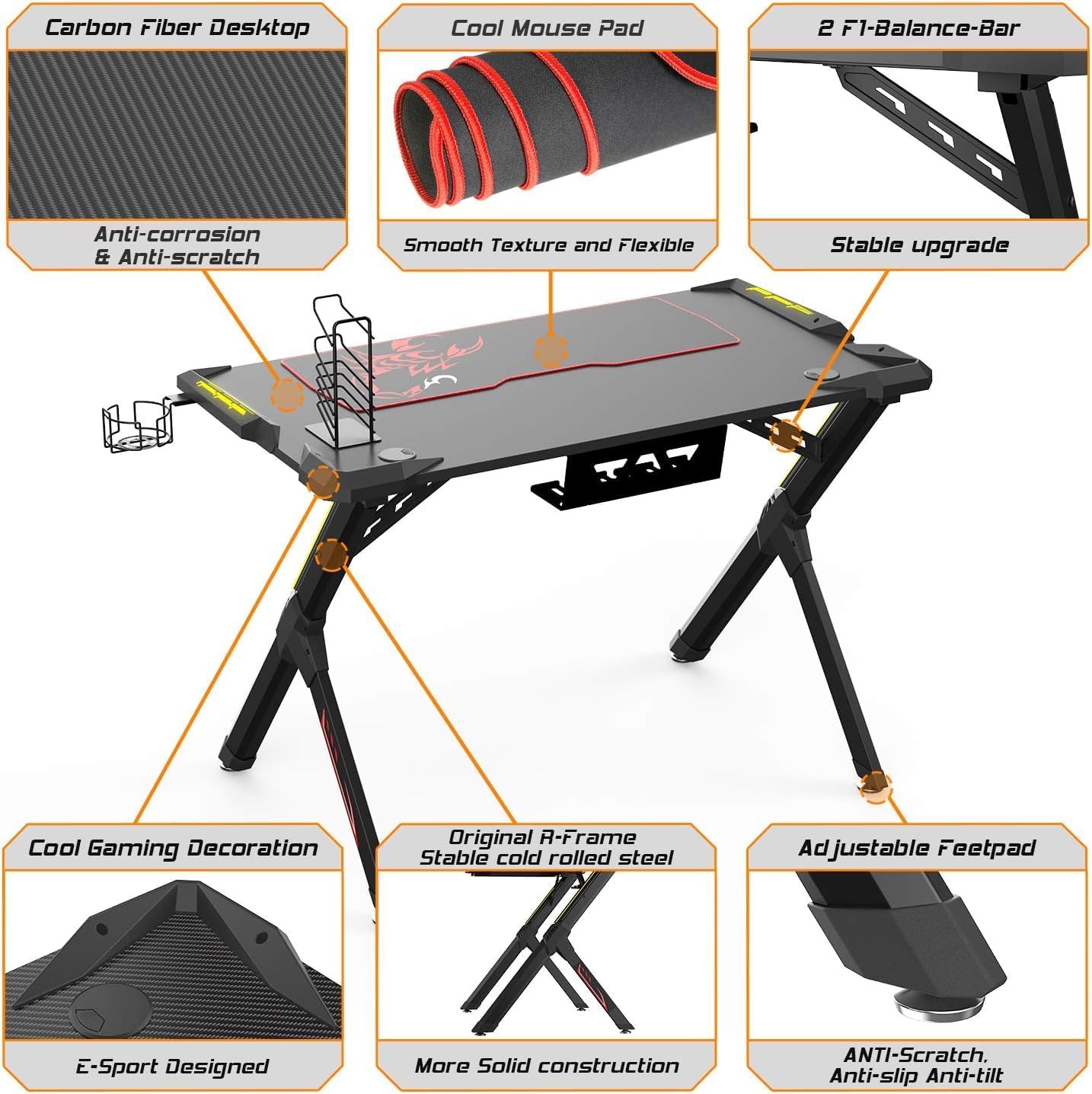
This diagram highlights key features and components of the desk, including the carbon fiber desktop with anti-corrosion and anti-scratch properties, the cool mouse pad, two F1-Balance-Bars for stability, the original R-frame made of stable cold rolled steel, and adjustable anti-scratch, anti-slip, anti-tilt footpads. It also shows the E-Sport designed elements and cool gaming decoration.
3.3 Attaching Accessories
The desk comes with a gear hook, cup holder, and controller holder. These can be attached to the designated points on the desk frame according to your preference. The headphone holder is reversible for flexible placement.

This image displays the integrated accessories: a handle rack for controllers, a reversible headphone holder, and a cup holder for beverages. These accessories are designed for convenience during gaming sessions.
3.4 Leveling the Desk
The desk is equipped with four adjustable leveling feet. After assembly, place the desk in its desired location. If the desk wobbles, adjust the leveling feet by rotating them until the desk is stable and level on the floor. This reduces friction and noise.
4. Operating Instructions
4.1 RGB LED Lighting
The EUREKA ERGONOMIC Gaming Desk features integrated RGB LED lighting. To activate the lighting, plug the USB cable from the desk into an available USB port on your gaming PC, laptop, or a compatible USB power adapter.
- Control: Use the controllable lighting button located on the desk's edge to cycle through different lighting modes and colors.
- Lighting Modes: The desk supports two lighting control models: Monochrome Light Show (static colors) and Gradient Light Show (dynamic color transitions).
- Colors: The LED lighting glows with 6 distinct colors.

This image shows the desk's integrated RGB LED lighting, which offers 6 color options and two lighting control models: Monochrome Light Show and Gradient Light Show. The controllable lighting button is visible on the desk's edge.
5. Maintenance
Proper maintenance will ensure the longevity and appearance of your gaming desk.
- Cleaning the Desktop: The carbon fiber textured desktop is designed to be anti-scratch and anti-corrosion. Wipe the surface with a soft, damp cloth. Avoid abrasive cleaners or harsh chemicals that could damage the finish.
- Frame Cleaning: Clean the metal frame with a soft, dry cloth. If necessary, a slightly damp cloth can be used, followed by immediate drying.
- Cable Management: Regularly check and organize cables to prevent damage and maintain a tidy setup.
- Fastener Check: Periodically check all screws and fasteners to ensure they remain tight. Retighten if necessary to maintain desk stability.
6. Troubleshooting
- Desk Wobbles: Ensure all assembly screws are securely tightened. Adjust the four leveling feet at the bottom of the desk legs until the desk is stable on an even surface.
- RGB Lighting Not Working: Verify that the USB cable for the RGB lighting is securely plugged into a functional USB port on your computer or a power adapter. Check if the lighting control button is responsive.
- Missing Parts: If you find any parts missing during assembly, please contact EUREKA ERGONOMIC customer support immediately.
7. Warranty and Support
7.1 Warranty Information
This EUREKA ERGONOMIC Gaming Desk is covered by a Limited Warranty. The specific terms and duration of the warranty may vary. Please refer to the warranty card included with your product or contact EUREKA ERGONOMIC customer support for detailed information regarding coverage, limitations, and how to make a claim.
7.2 Customer Support
For technical assistance, missing parts, or warranty inquiries, please contact EUREKA ERGONOMIC customer support. You can typically find contact information on the manufacturer's official website or through the retailer where you purchased the product.
Manufacturer: Eureka Ergonomics
Online Store: Visit the EUREKA ERGONOMIC Store on Amazon


